
DNS Resolution through Proxies: Prevent and Fix DNS Leaks


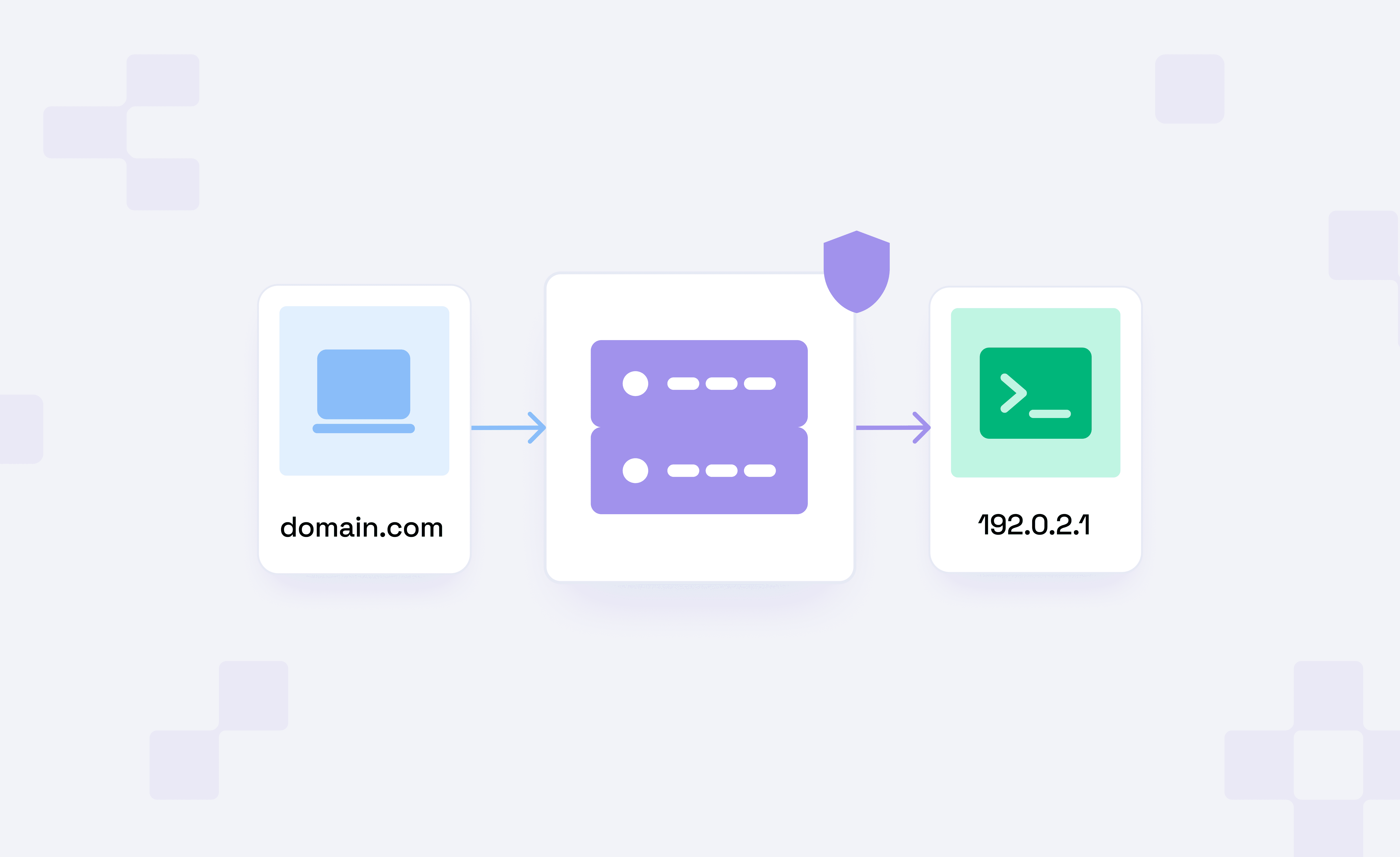
DNS resolution when proxying is a tricky subject, as there are multiple situations in which you might unknowingly leak DNS requests even when everything seems perfect on the surface. It could be your browser resolving DNS independently, misconfigured split routing, proxy-bypass behavior, or more.
In simple terms, DNS leaks occur when a server (which you didn’t configure) is handling DNS requests outside of the proxy path. In a proxy setup, one common indicator of a DNS leak is a mismatch between your proxy IP and the IP of your DNS servers, as shown in the following image.
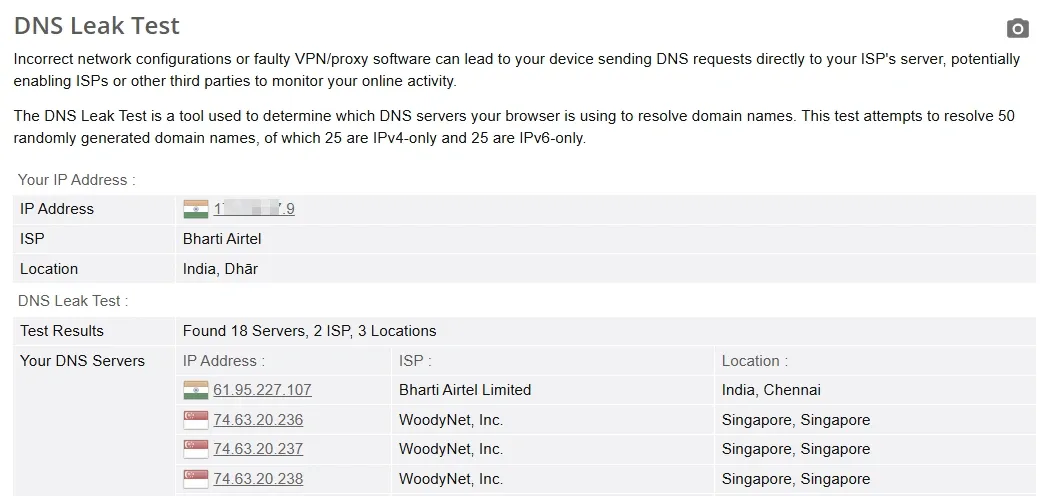
To address this, we have summarized DNS leaks and how to handle them in the context of proxying. In the end, you will be able to tell whether DNS leaks are related to your proxy setup and where to look for errors.
Why do Proxies Fail to Route DNS?
A properly configured HTTP proxy can handle DNS requests itself, instead of the client resolving them locally via the ISP’s DNS resolver.
In practice, however, application-level, system-level, or proxy misconfigurations can often force local DNS resolution, thereby negating the privacy cover you sought from using a proxy. The following sections briefly discuss such cases.
Where do DNS leaks happen?
There are multiple factors that can make your client or configuration a DNS leak hotspot. Take a look:
- Client-Side Misconfiguration: A misconfiguration in your client, browser, application, or script may resolve the request hostname before the traffic is sent through the proxy. When this happens, your local DNS resolver handles the lookup, which leaks your real DNS server and potentially your actual location.
- Using the Wrong Proxy Protocol: Some proxy protocols, particularly standard SOCKS5 implementations, are designed to perform DNS resolution on the client side before proxying the connection. This can expose your local DNS server even when the traffic itself is routed through the proxy. Using SOCKS5h or HTTP/HTTPS proxies ensures DNS resolution is performed remotely by the proxy server instead.
- Proxy Server Misconfiguration: Even if DNS resolution is correctly passed to the proxy server, the proxy itself may be improperly configured. If the proxy server uses a DNS resolver located in a different country or network than the proxy IP, it can create inconsistencies that reveal proxy usage or trigger fraud detection systems. For example, a proxy advertised as being in France but using DNS servers located in Egypt would appear suspicious because the DNS and IP geolocation do not match.
When DNS resolves on the client side
There are two ways in which DNS resolves. One happens locally on the client side, and the other occurs when the proxy handles DNS along with the traffic (discussed later).
While these methods might differ slightly in latency, there are critical privacy implications (such as ISP-led DNS snooping). However, we won’t stray from the primary subject here and will stick to explaining client-side resolution, including PAC lists and proxy bypass rules.
Direct resolution before proxy handoff
It’s the most common case of a DNS leak, where DNS resolution occurs before a proxy connection is established.
In such cases, the proxy server receives only the target IP (instead of a hostname) and does not handle DNS at all. This generally happens with SOCKS5 proxy setups. SOCKS5h, however, sends DNS requests to the proxy server for remote resolution. If you’re wondering, HTTP proxies get the full URL (including the hostname), allowing for remote DNS resolution.
Bypass lists and PAC logic
In addition to direct direction resolution before proxy handover, DNS resolution can occur locally when you apply proxy bypass rules to specific domains. This allows the client to resolve domains locally before proxying anything.
In the same way, PAC (proxy auto-configuration) scripts enable web browsers to select a proxy server for specific URLs. In this case, functions such as dnsResolve() and isResolvable() may initiate client-side DNS lookups before any proxy connection is initiated.
When DNS resolves on the proxy side
Proxy-side DNS resolution means the proxy server converts the hostname to an IP address. This setup allows you to keep DNS resolution within the proxy path and avoid sending DNS queries to the system resolver (such as an ISP). This is typical for HTTP proxying and SOCKS5h, indicating no DNS leak.
SOCKS remote DNS
According to RFC 1928, SOCKS5 can carry multiple destination address types, such as IP addresses or domain names (ATYP = 0x03). This allows a client to send a hostname (in place of the target IP) directly to the proxy, prompting DNS resolution at the proxy server. However, in practice, developers simply use socks5h:// to enable remote DNS resolution.
CONNECT-based hostname resolution
With HTTP proxies, you generally don’t need any special configuration for remote DNS resolution, as the client already sends the full URL to the proxy. Similarly with HTTPS, the CONNECT method specifies the target as host:port, allowing the proxy server to receive the hostname.
How proxy mode changes DNS behavior
Based on the proxy implementation, DNS requests may still be resolved locally, passed to the proxy server, or intercepted (and redirected) along the way.
Here are the core cases discussed in the following sections.
System proxy vs TUN/TAP mode
When you set a system proxy, it applies to the entire system. However, some applications may still bypass, especially if they are using non-HTTP traffic (such as QUIC). Here, an HTTP proxy can’t capture and tunnel all system activity.
In the same fashion, DNS traffic typically uses UDP/53, which many HTTP proxies don’t handle natively, forcing DNS resolution to fall back to the system resolver. Finally, an operating system resolves DNS via its default servers if the configured DNS path fails or times out.
On the other hand, TUN/TAP mode creates a virtual network layer, effectively capturing all outbound network traffic and routing it via the proxy setup. So, if the proxy can handle all traffic types (TCP, UDP, etc.), it will force even previously non-compliant applications, such as games, to resolve via the proxy server.
Browser-level DoH
Most modern browsers that support encrypting DNS requests have DoH turned on by default.
“Check if your browser has DoH turned on”.
Though this arrangement is better than ISP-managed DNS, the browser’s default DNS server might not be your first preference. Since browsers’ DoH can override proxy DNS resolution, you must configure it if you want the proxy or a 3rd-party server to resolve DNS requests for you.
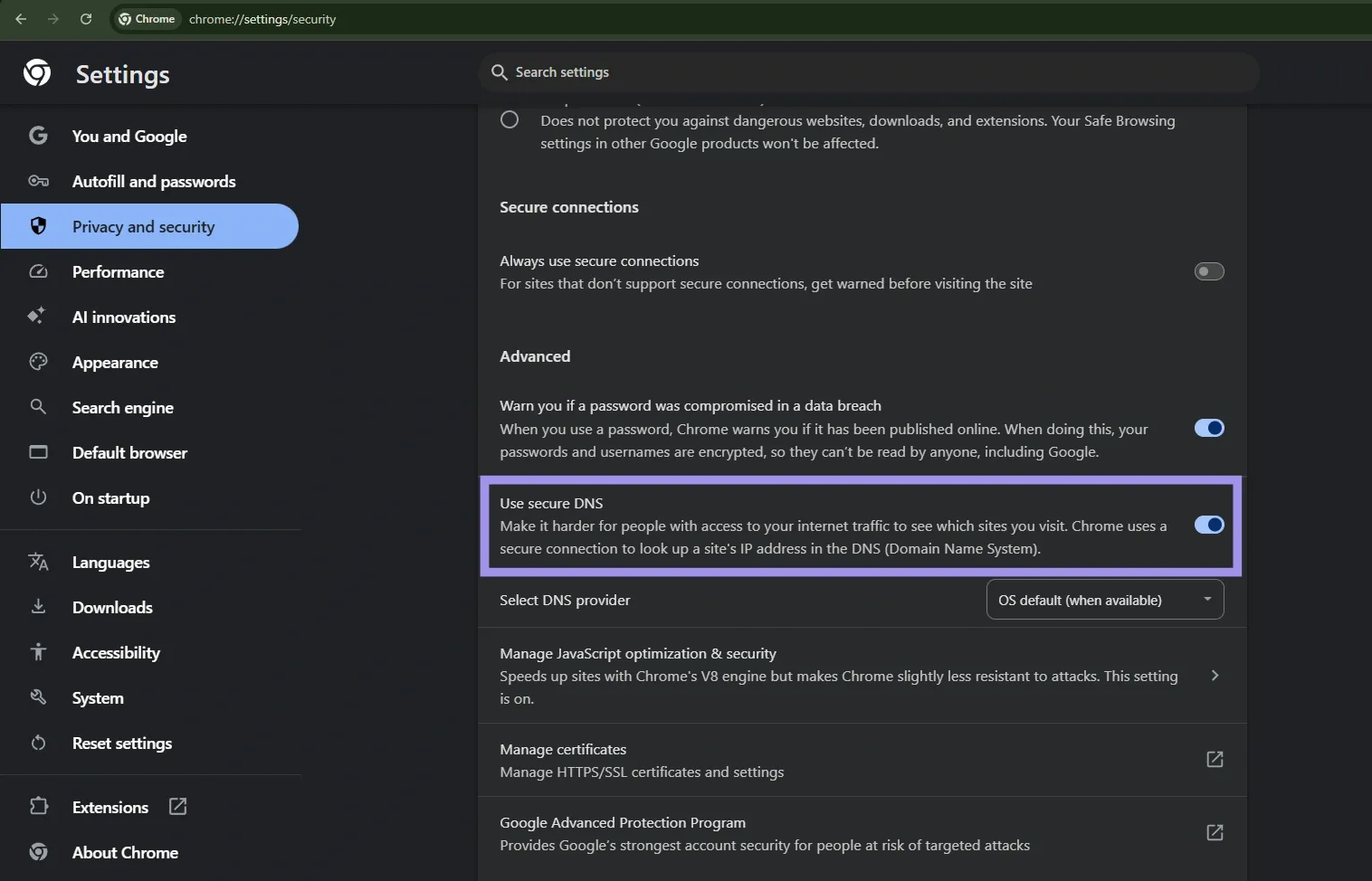
For instance, Chromium/Chrome has DoH settings under Settings > Privacy and security > Security > Use secure DNS. You need to set the “use secure DNS” toggle to OFF for the system proxy to handle DNS itself. Chromium also supports setting a custom DNS server (although this may also bypass proxy DNS resolution).
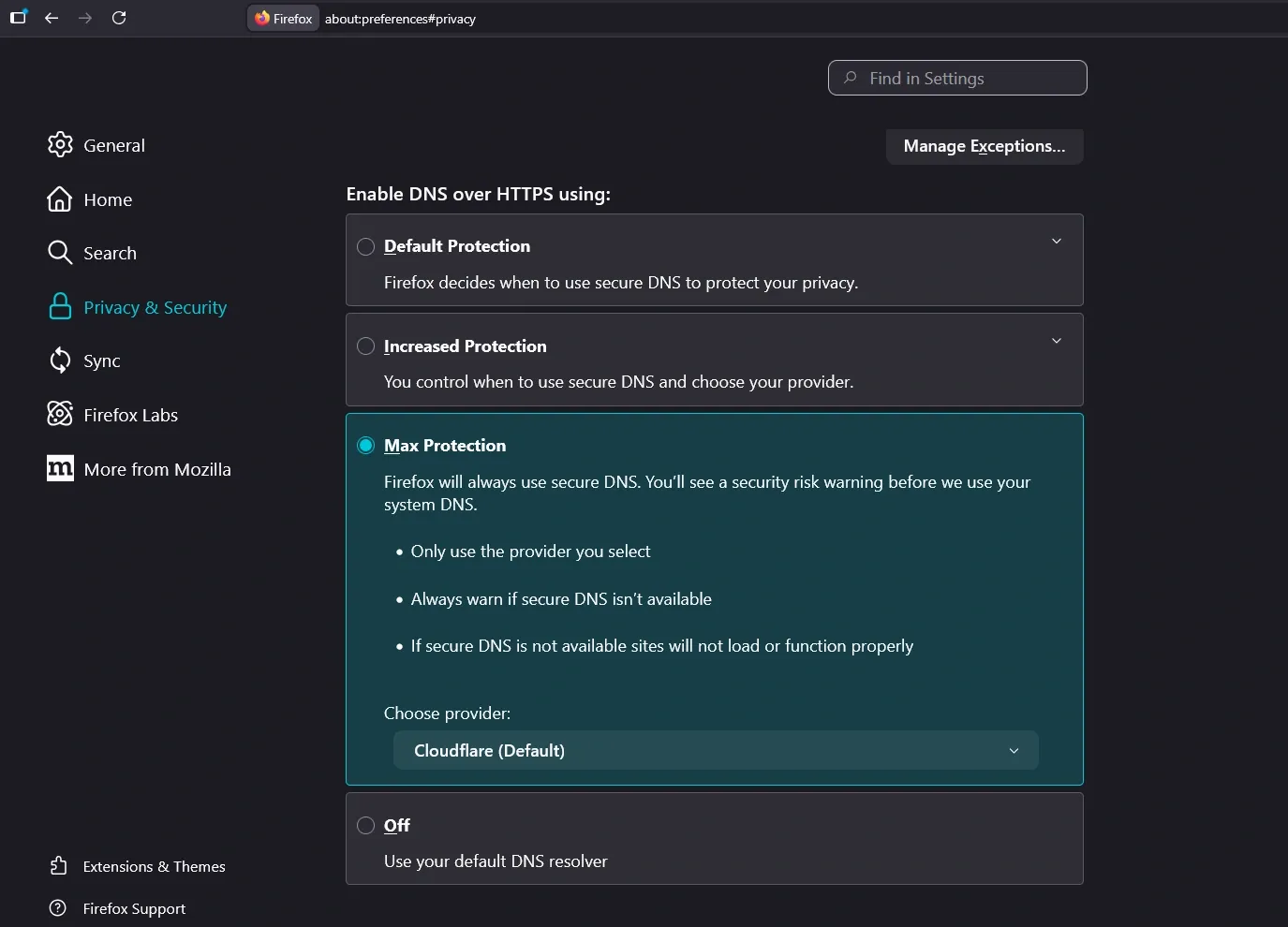
In the same way, Firefox allows you to turn DoH off (or use a custom DNS server) in its Settings > Privacy & Security > DNS over HTTPS section. Also note that Apple’s Safari doesn’t have dedicated DoH controls for itself, and instead it follows the system DNS resolver.
Transparent DNS Interception
Transparent DNS proxying is when your ISP silently intercepts DNS requests at the network level. Though this does not directly modify DNS requests, it allows DNS snooping and/or forced redirection (to specific DNS servers) without consent or any configuration changes on the user’s side.
And even with a configured proxy, DNS queries can simply bypass the intended proxy path and resolve at a 3rd-party DNS server ( which is often an ISP-controlled resolver).
For instance, if you’re visiting example.com over a proxy with a transparent DNS setup, your ISP can snoop on the domain lookup and possibly redirect it to its own servers. This becomes a privacy issue even if the final web traffic is proxied.
As a safeguard, you can use DoH or DoT to encrypt DNS traffic. This helps, as transparent DNS usually intercepts clear-text UDP/53 traffic and lets encrypted traffic pass as standard HTTPS requests.
How to Verify and Fix DNS-through-Proxy Issues
DNS-through-proxy issues (commonly known as DNS Leaks) occur when DNS requests resolve at your ISP or at a server different from what’s configured in your proxy setup.
We have summarized the following list as guidelines to fix and verify such DNS leaks.
- Browser and app checks: You can easily check a browser’s DNS path using online tools like DNSLeakTest. For individual apps, you need to verify whether they use the system proxy or have their own network settings configured. If yes, override them with your preferred DNS resolver.
- Resolver and exit-IP comparison: This is an extension to verifying DNS leaks via tools such as DNSLeakTest. So, in addition to testing DNS resolution, you can hit IP echo services such as ifconfig.me or ipinfo.io to get the traffic exit IP. Afterward, you can compare the exit IP (via tools such as Proxy Tester) with the DNS-resolved IP and check whether they match. If not, implement force remote resolution and recheck DNS and traffic rules to ensure they align (explained later).
- Packet-level verification: This is the gold standard to examine DNS traffic in real time. You can use tools such as Wireshark, an open-source packet inspection utility, to verify the DNS path by capturing traffic on UDP/TCP port 53. For better accuracy, we advise flushing the existing DNS cache before starting with packet analysis.
- Force remote resolution: A foolproof way to achieve this is to tunnel DNS traffic directly via the proxy. For SOCKS5, you can bind a UDP socket to the proxy, and for HTTP, simply “embed” DNS traffic with the HTTP traffic and let the proxy handle it. Alternatively, one can configure their network firewall to implement a blocking logic on Port 53 (TCP & UDP) to block traffic to any destination other than the intended DNS resolvers.
- Align DNS and traffic rules: If not configured well, routing DNS and standard traffic separately is practically asking for DNS leaks. One simple rule we recommend to every network developer is to unify traffic and DNS paths. You should pay special attention when split-routing specific apps via the tunnel, because in such cases, DNS is often handled by the hardcoded ISP resolver. As a countermeasure, either split DNS requests too, or force DNS resolution for all queries away from your ISP.
- Use encrypted upstream DNS carefully: Encrypted DNS mechanisms, such as DoT and DoH, are great for avoiding man-in-the-middle (MITM) attacks. However, encryption alone won’t cut it, and one should verify where DNS requests resolve. For instance, a web browser may have its own version of “secure” DNS resolution that may differ from your proxy configuration.
- DNS Misconfiguration: Lastly, it’s very important for the proxy provider to use a DNS server in the same or nearby country as the proxy server. If not, this might be flagged by web firewalls as a proxy user, leading to bans.
Use cases for different DNS-through-proxy setups
There are multiple use cases for DNS-through-proxy configurations. For more clarity, we have highlighted distinctions between DNS-through-proxy and DNS-on-proxy in every section.
In short, DNS-through-proxy is where a proxy is “proxying” DNS requests to remote resolvers. On the other hand, DNS-on-proxy indicates that the proxy itself handles DNS requests.
The choice of model dictates the privacy posture and operational efficacy as discussed subsequently.
Browsers and enterprise access
Whether you choose DNS-on-proxy or DNS-through-proxy depends on how much control or consistency you require across the network.
For enterprise setups, DNS-on-proxy is generally preferred for central policy enforcement, including for content filtering, activity logging, and malware prevention. On top of that, it allows you to implement split-DNS, where internal domains resolve through the corporate DNS infrastructure while public ones use external resolvers.
However, using a DNS-through-proxy is an optimal approach for minimizing DNS exposure risk and keeping DNS traffic and the proxy aligned. This ensures the DNS request follows the proxy path, rather than resolving directly on the local network or elsewhere.
Still, you can’t ignore modern browsers, which can simply ignore a proxy’s DNS policies and resolve independently, thanks to features such as DoH and connection optimization protocols like Happy Eyeballs.
As a result, it’s not just about implementing all-inclusive server-side DNS policies but also “true” enforcement that covers individual apps’ blind spots.
Geo-testing and localization
Geo-testing and localization let developers verify if their application behaves correctly across different geographies. The idea is to check if the location-based triggers work as intended, including geo-blocks and localized content.
Both of these strategies rely heavily on proxying and DNS resolution.
For instance, DNS-on-proxy reflects the same region for both DNS and normal web traffic. This allows developers to region-test their projects to verify that a website loads in accordance with their content localization policies. In the same way, you can check if your content delivery network (CDN) performs as expected by testing the app from different regions. It also applies to ad verification, something strongly governed by geo-sensitive content distribution.
In such cases, deploying DNS-through-proxy can introduce unnecessary conflicts if the DNS-resolved IP doesn’t match the proxy IP. This can trigger network firewalls to block the user entirely or flag them, limiting proxy use.
Automation and multi-region tooling
Web firewalls are often sensitive to automation workflows, such as web scraping, due to their high-volume, targeted activity patterns.
In such cases, deploying DNS-on-proxy can result in the operation being flagged or throttled due to a large number of similar-looking DNS lookups handled by select DNS servers. This is especially true if you’re not implementing a carefully engineered IP rotation strategy for DNS traffic as well.
As a countermeasure, DNS-through-proxy can offset some of these detection risks to some extent. Developers can use multiple remote DNS servers across regions to distribute DNS requests evenly, minimizing the risk of DNS-based detection and bans.
On the downside, one should account for additional network latency and increased dependency on remote DNS resolvers
