
How to Build a Zillow Listing Scraper in Python (Step-by-Step Guide)



TL;DR
Zillow's terms prohibit automated scraping without authorization, so this tutorial builds the part you can keep: a Python extraction pipeline practiced on sample listing HTML rather than live Zillow pages. You'll extract addresses, prices, and property details, separate monthly rent from sale prices, remove duplicates by zpid, and handle missing fields without crashing. The finished pipeline saves the results to a CSV and reads the file back to check every record. If you later get authorized access through Bridge or a licensed feed, you replace only the fetch layer, and the cleaning and validation carry over as they are.
Zillow listings contain property details such as asking prices, addresses, and square footage. Gathering this information manually across hundreds of properties can take hours, which is where a scraper can help. However, extracting those details isn't always straightforward. Some content loads through JavaScript and may not appear in a standard HTTP response. Zillow also restricts automated scraping without authorization.
In this guide, we'll be creating the Zillow listing scraper's extraction pipeline in Python. Due to these restrictions, we'll practice on saved sample HTML rather than live Zillow pages, extract property details, clean the data, and export it to a CSV file.
How Does a Zillow Scraper Work?
The house details on Zillow are structured on both the search results page and on each individual page. Search results list several homes in a specific neighborhood, typically with the homes' address, asking price, number of bedrooms, number of bathrooms, and square footage. Opening a property page gives you additional information, including listing history, home features, and property status.
A Zillow scraper turns this data into structured records (CSV files, JSON objects, etc.). Each record can include the property address, price, square footage, listing status, and a Zillow property ID (zpid). If a listing appears more than once or the property is updated, the property ID will be very useful.
This information can be difficult to extract. While some data is returned with the initial response, other data may be loaded via JavaScript afterward, and a normal HTTP request may return HTML with no listing details, even if you see them in the browser.
Zillow's TOU also prohibits automated scraping without authorization, even when listings are publicly visible. For our Python demo, we'll use saved sample HTML to show the extraction process without having to make live requests to Zillow.
How to Build a Zillow Scraper With Python
We'll develop our Zillow scraper using Python, BeautifulSoup, and pandas, using a saved HTML file of some sample property listings. This lets us view the page structure and run our extraction code without sending an automated request to Zillow's website.
We'll set up the project, extract the appropriate property data, handle missing data, and export it to a CSV file. We'll run each script and check its output before moving on.
Step 1: Set Up Python and Install the Libraries
The examples in this guide use PyCharm, but you can also use VS Code or another editor on Windows, macOS, or Linux. You'll need Python 3.11 or newer. Run python --version to check your version. If Python isn't installed, get it from the official Python website. On Windows, you can also install it through PowerShell using winget install Python.Python.3.14.
In PyCharm, create a new project named zillow-scraper. Select Project venv and choose your installed Python interpreter. PyCharm will automatically create a .venv folder for the project's dependencies.
If you're using VS Code or a terminal instead, create a folder named zillow-scraper, open it, and run python -m venv .venv to create the virtual environment yourself.
Next, open a terminal in your editor or project folder. PyCharm usually activates the virtual environment automatically. If yours isn't active, use the appropriate command:
macOS/Linux: source .venv/bin/activate
Windows (PowerShell): .\.venv\Scripts\Activate.ps1
Note: If PowerShell blocks the activation script, run Set-ExecutionPolicy -ExecutionPolicy RemoteSigned -Scope CurrentUser once, then run the activation command again.
Windows (Command Prompt): .venv\Scripts\activate.bat
With the environment active, install the required libraries:
python -m pip install requests beautifulsoup4 pandasRequests is used to send an HTTP request (not used in this tutorial, but you would need it to get authorized data), BeautifulSoup is used to parse the HTML, and pandas is used to organize the property information extracted from the HTML. To check if the libraries are properly installed, use:
python -c "import requests, bs4, pandas; print('Libraries: OK')"Now that the Python environment is set up, we can create the sample property listing data to examine its HTML structure before extracting any information.
Step 2: Identify the Property Information You Want to Extract
To extract listing data, you need to understand the structure of property listings. Zillow search results display multiple properties, and property pages display additional information, such as price history and property features.
We'll make a very small HTML page of fictional property listings. To create a new HTML file, right-click on your project folder in PyCharm, and then click New > HTML File and enter the name sample_listings.html. Replace its contents with the following:
<!DOCTYPE html>
<html lang="en">
<head>
  <meta charset="UTF-8">
  <title>Sample Property Listings</title>
</head>
<body>
<main id="search-results">
  <article class="property-card" data-zpid="990001" data-status="for_sale">
        <a class="property-link" href="https://example.org/listings/990001">Listing details</a>
        <p class="address">14 Cedar Lane, Sampletown</p>
        <p class="price">$745,000</p>
        <span class="beds">3 beds</span>
        <span class="baths">2 baths</span>
        <span class="area">1,880 sqft</span>
  </article>

  <article class="property-card" data-zpid="990002" data-status="for_rent">
        <a class="property-link" href="https://example.org/listings/990002">Listing details</a>
        <p class="address">88 Maple Avenue, Sampletown</p>
        <p class="price">$2,850/mo</p>
        <span class="beds">2 beds</span>
        <span class="baths">1 bath</span>
        <span class="area">920 sqft</span>
  </article>

  <article class="property-card" data-zpid="990003" data-status="sold">
        <a class="property-link" href="https://example.org/listings/990003">Listing details</a>
        <p class="address">202 Pine Street, Sampletown</p>
        <p class="price">$610,000</p>
    <span class="beds">4 beds</span>
        <span class="baths">2.5 baths</span>
        <span class="area">1,600 sqft</span>
  </article>

  <article class="property-card" data-zpid="990004" data-status="for_sale">
        <a class="property-link" href="https://example.org/listings/990004">Listing details</a>
        <p class="address">9 Elm Court, Sampletown</p>
        <p class="price">$420,000</p>
        <span class="beds">2 beds</span>
        <span class="baths">1 bath</span>
  </article>

  <article class="property-card" data-zpid="990001" data-status="for_sale">
        <a class="property-link" href="https://example.org/listings/990001">Listing details</a>
        <p class="address">14 Cedar Lane, Sampletown</p>
        <p class="price">$745,000</p>
        <span class="beds">3 beds</span>
        <span class="baths">2 baths</span>
        <span class="area">1,880 sqft</span>
  </article>
</main>
</body>
</html>
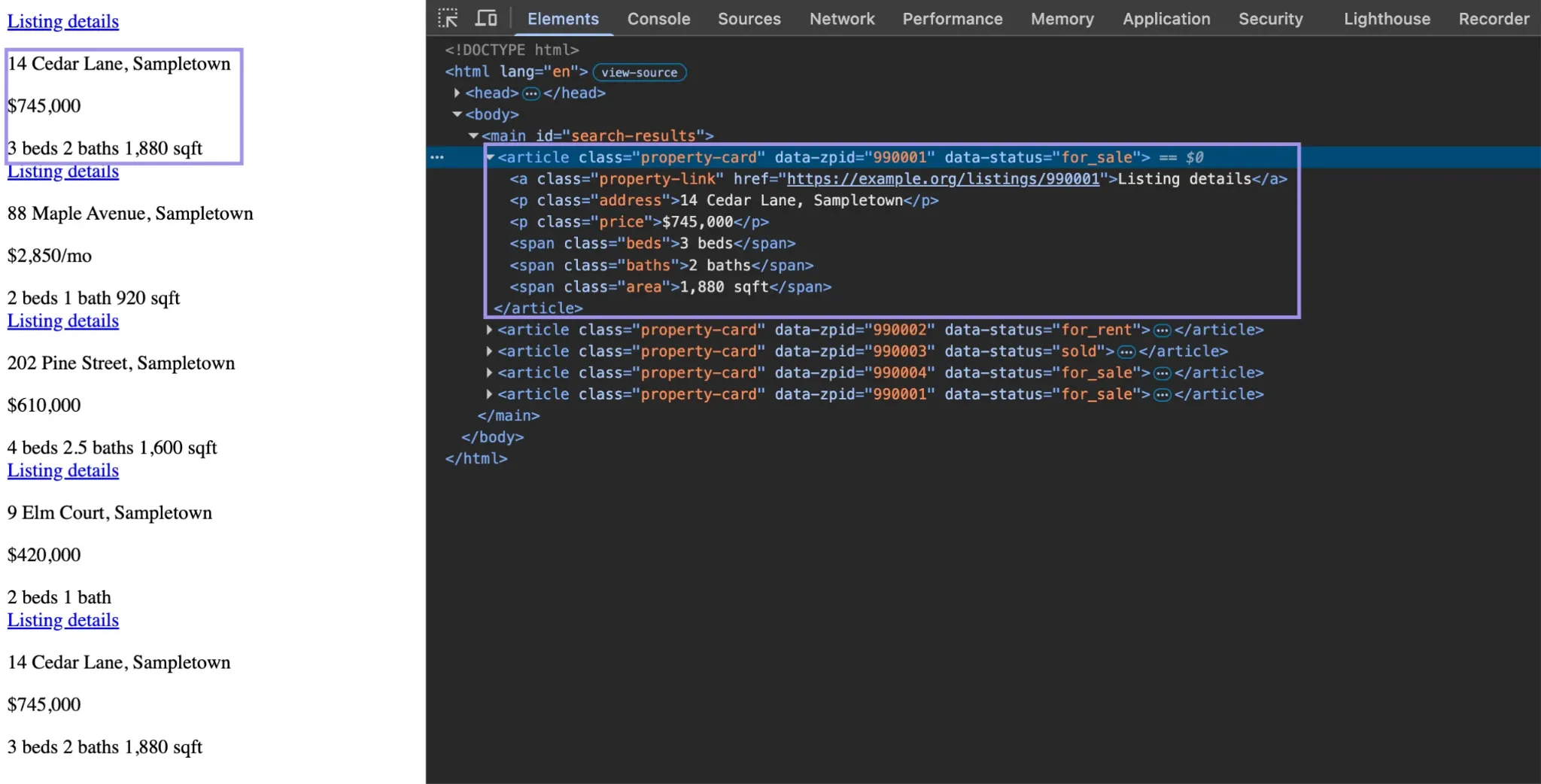
Save and view in a web browser. Right-click on the first property and press Inspect to check the HTML of the property in Developer Tools.
You'll notice that each property is contained within an <article> element that has the property-card class. Its address, price, bedrooms, bathrooms, and square footage each have their own class name, and the data-zpid and data-status attributes specify the property and listing status. The link's href attribute contains the property's URL.
These selectors are specific to our sample HTML. If you're working with another HTML source, inspect its structure and adjust the selectors accordingly.
We also have a duplicate listing and a listing that doesn't have square footage. We'll use both when cleaning and validating the extracted data.
Step 3: Load the Property Listing Data
With the example HTML file, we're going to load it into Python. We'll use BeautifulSoup to find the property cards in our sample HTML.
Open a new Python file called scraper.py in your project folder, next to sample_listings.html, in PyCharm. Add the following code:
from pathlib import Path
from bs4 import BeautifulSoup

html_path = Path(__file__).with_name("sample_listings.html")
html = html_path.read_text(encoding="utf-8")
soup = BeautifulSoup(html, "html.parser")

cards = soup.select("#search-results article.property-card")
print(f"Loaded file: {html_path.name}")
print(f"Listing cards found: {len(cards)}")
print(f"First property ID: {cards[0]['data-zpid'] if cards else 'None'}")Path(file).with_name() constructs the path to the sample_listings.html in the same folder as the script, read_text() reads the file, and BeautifulSoup parses the HTML. The select() method finds every property card matching our CSS selector.
Run the script:
python scraper.py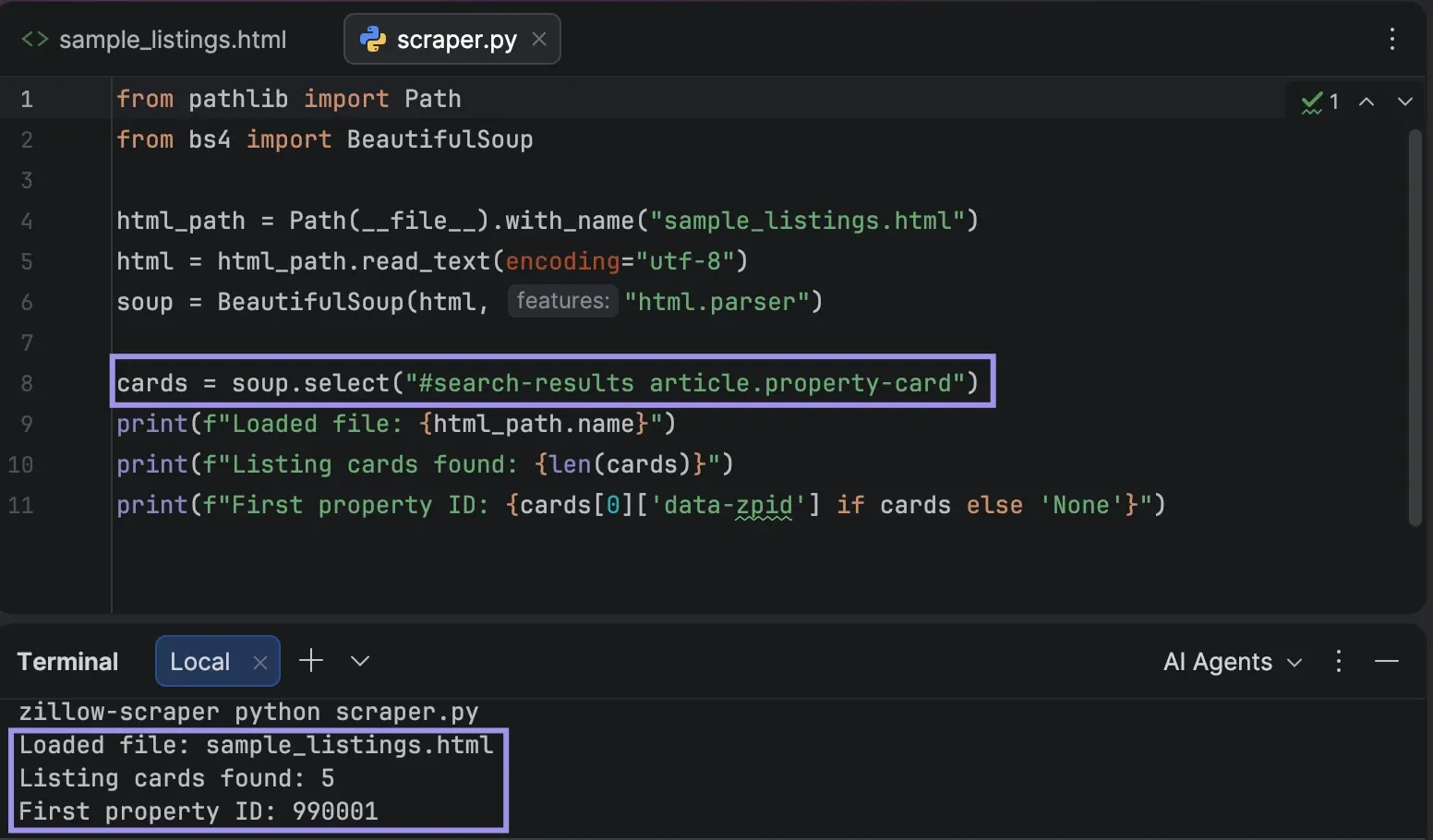
For an authorized live data source, Requests can retrieve HTML, but it can't execute JavaScript. Certain listings may also appear on multiple pages or load as you scroll down the page. These differences must be taken into consideration, and the retrieval logic updated.
In authorized scraping workflows, proxies can be used to route requests. Residential proxies are beneficial for location-based collection and rotating sessions since they are assigned to real home connections. ISP proxies maintain a consistent IP address for extended periods of time, whereas datacenter proxies are more suitable for tasks that are high-volume and cost-conscious. They're not a replacement for authorization or JavaScript execution.
Since this example uses a local HTML file, there's no need for a proxy. If you later work with an authorized data source, our 1 GB of free residential data lets you test location-based requests.
Step 4: Extract the Zillow Property Listings
Once the listing cards have been identified, we can extract the property details from them. We're going to use BeautifulSoup to read the HTML elements and will save each listing as a Python dictionary.
Create a new Python file in your project folder called extract_listings.py. Add the following code:
from pathlib import Path
from pprint import pprint
from bs4 import BeautifulSoup

def get_text(card, selector):
        element = card.select_one(selector)
        return element.get_text(strip=True) if element else None

def extract_listings(file_path):
        html = file_path.read_text(encoding="utf-8")
        soup = BeautifulSoup(html, "html.parser")
        listings = []

        for card in soup.select("#search-results article.property-card"):
            link = card.select_one("a.property-link")
            listings.append({
            "property_id": card.get("data-zpid"),
            "address": get_text(card, ".address"),
                "price": get_text(card, ".price"),
            "bedrooms": get_text(card, ".beds"),
            "bathrooms": get_text(card, ".baths"),
            "square_feet": get_text(card, ".area"),
            "status": card.get("data-status"),
            "url": link.get("href") if link else None,
            })

        return listings

if __name__ == "__main__":
        sample_file = Path(__file__).with_name("sample_listings.html")
        results = extract_listings(sample_file)
        print(f"Extracted records: {len(results)}")
        pprint(results[0], sort_dicts=False)
        print(f"Records without square footage: {sum(r['square_feet'] is None for r in results)}")
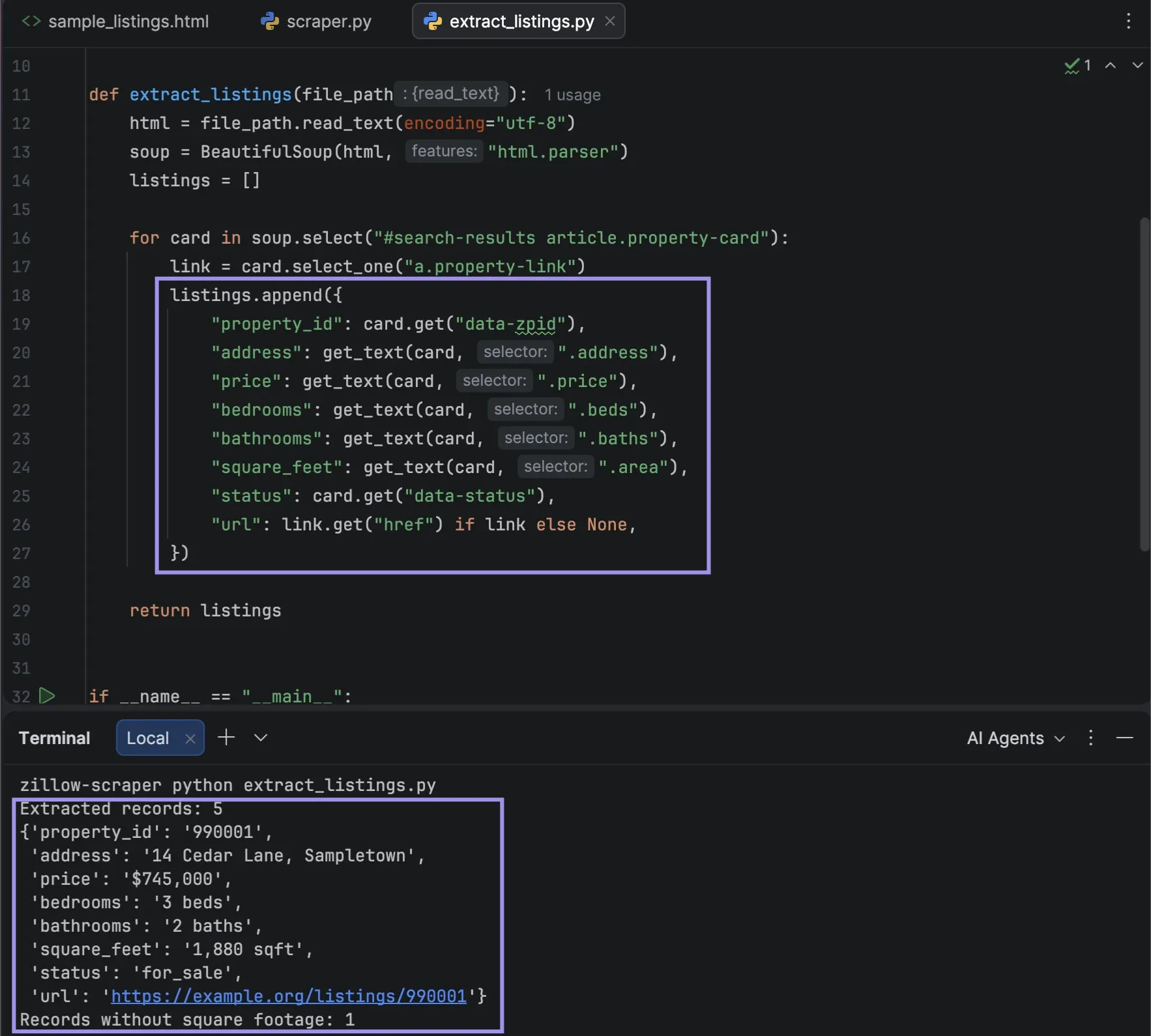
The extract_listings() function loops through each property card and gathers its details. A get_text() helper has also been added to return an element's text, or None if it isn't found, so a listing without square footage doesn't crash the script. The property ID and listing status are provided by HTML attributes; the property URL is provided by the href attribute of the link.
From PyCharm's terminal, run the file.
python extract_listings.pyAll five samples have been scraped, including the duplicate listing. The extracted values are still strings; hence, we need to fix their formats and eliminate duplicates in the next step.
Step 5: Handle Missing Values, Listing Statuses, and Duplicate Properties
There are five listings in our sample; however, one listing is repeated. It also contains a rental price, a sold property, and a listing without square footage. These records will be cleaned up so that properties can be compared without mixing monthly rent with sale prices or counting duplicates.
In your project folder, make a new Python file called clean_listings.py. We'll import the extract_listings() function from Step 4, so we don't have to change the previous script.
from pathlib import Path
import re
from extract_listings import extract_listings

def parse_number(text):
        match = re.search(r"\d[\d,]*(?:\.\d+)?", text or "")
        if not match:
            return None
        value = float(match.group().replace(",", ""))
        return int(value) if value.is_integer() else value

def clean_records(records):
        cleaned = []
        seen = set()

        for index, record in enumerate(records):
            if record["property_id"]:
                key = ("id", record["property_id"])
            elif record["url"]:
                key = ("url", record["url"])
            elif record["address"]:
                key = ("address", record["address"].strip().casefold(), record["status"])
            else:
                key = ("row", index)

            if key in seen:
                continue
            seen.add(key)

            price = record["price"]
            cleaned.append({
            "property_id": record["property_id"],
            "address": record["address"],
                "status": record["status"],
            "price_usd": parse_number(price),
            "price_basis": ("monthly" if "/mo" in price.lower() else "total") if price else None,
            "bedrooms": parse_number(record["bedrooms"]),
            "bathrooms": parse_number(record["bathrooms"]),
            "square_feet": parse_number(record["square_feet"]),
            "url": record["url"],
            })

        return cleaned

if __name__ == "__main__":
        sample = Path(__file__).with_name("sample_listings.html")
        raw = extract_listings(sample)
        cleaned = clean_records(raw)

        print(f"Raw records: {len(raw)}")
        print(f"Unique properties: {len(cleaned)}")
        for item in cleaned:
            print(f"{item['property_id']} | {item['status']} | "
              f"{item['price_usd']} ({item['price_basis']}) | "
                  f"area: {item['square_feet']}")
The parse_number() function will turn $745,000 and 1,880 sqft into numbers and return None if there are no numbers. However, it doesn't understand shorthand prices; $1.2M would be 1.2 and $850K would be 850, without any error, so you'd need additional parsing logic for those formats. We also preserve the listing status and price_basis to distinguish monthly rent from the total property price.
The script first looks at the property ID, and if that is not available, it looks at the URL or address of the listing to eliminate any duplicates. When the script falls back to the address, it also checks the listing status, so that the same address can be kept as separate sale and rental records. Because address-based matching is less reliable for multi-unit properties, unique IDs are preferable.
Also, the fact that a property is being priced differently doesn't mean it is a new listing. This example retains the first row for each property in a sample. If you want to know how prices actually changed, you would need to have dated snapshots instead of deleting the following observations.
Run the script:
python clean_listings.py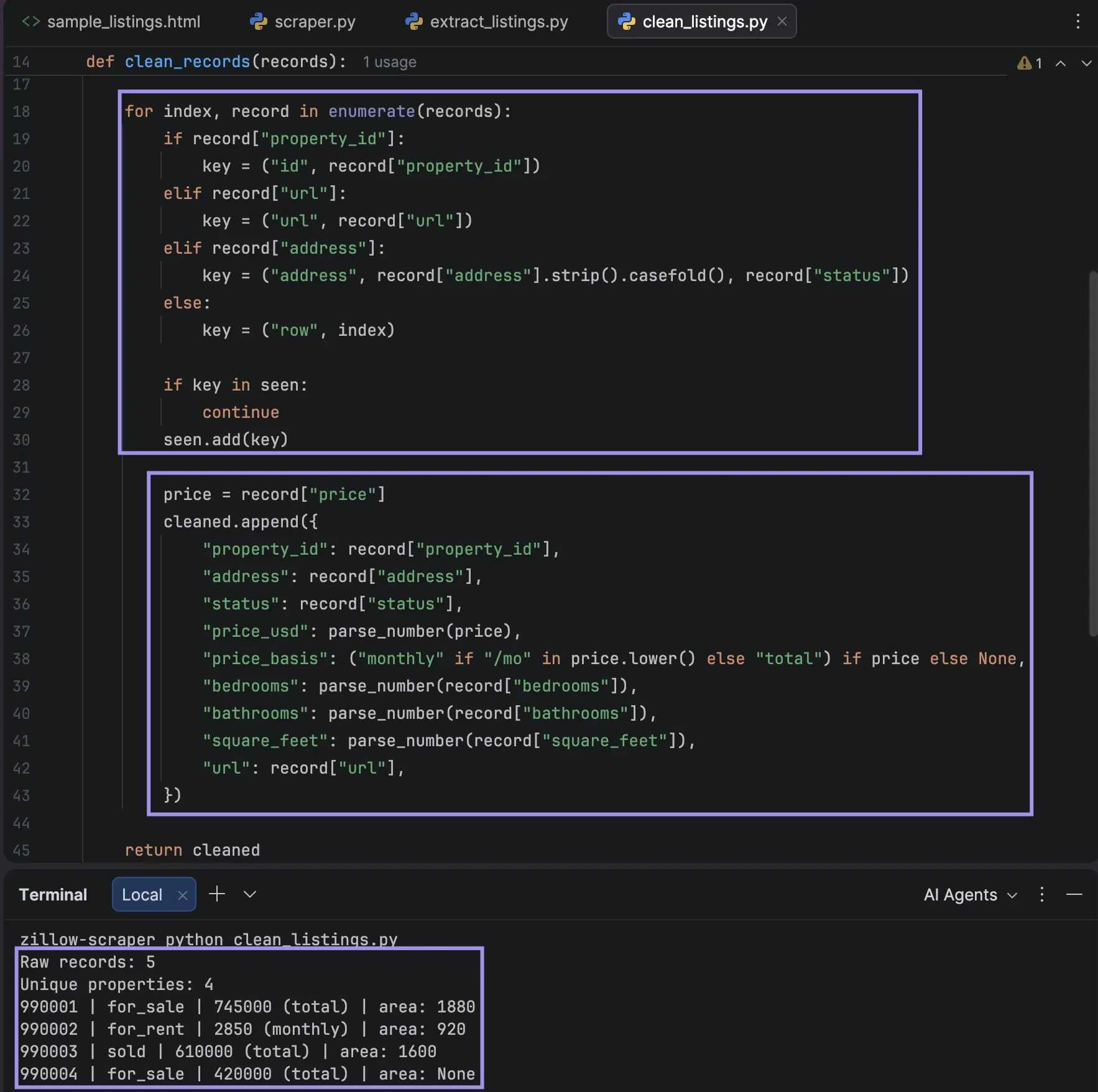
Step 6: Export the Listings to CSV and Verify the Results
We now have our property records cleaned up and ready to export. To save them, we'll use pandas and generate a CSV file, which you can open in Excel, Google Sheets, or any other tool for data analysis.
Then, create a new Python file in the project folder called export_listings.py. Ensure that extract_listings.py and clean_listings.py are in the same directory, and then add this code:
from pathlib import Path
import pandas as pd
from extract_listings import extract_listings
from clean_listings import clean_records

project_dir = Path(__file__).resolve().parent
raw_records = extract_listings(project_dir / "sample_listings.html")
cleaned_records = clean_records(raw_records)

csv_path = project_dir / "zillow_listings.csv"
pd.DataFrame(cleaned_records).to_csv(csv_path, index=False)

# Read the CSV back to confirm the saved data is correct.
saved = pd.read_csv(csv_path, dtype={"property_id": str})
by_id = saved.set_index("property_id")

assert len(raw_records) == 5, "The sample should contain five listings"
assert len(saved) == 4, "The CSV should contain four unique properties"
assert saved["property_id"].is_unique, "Duplicate property IDs found"
assert set(saved["property_id"]) == {"990001", "990002", "990003", "990004"}
assert by_id.loc["990001", "address"] == "14 Cedar Lane, Sampletown"
assert by_id.loc["990001", "price_usd"] == 745000
assert by_id.loc["990002", "price_usd"] == 2850
assert by_id.loc["990002", "price_basis"] == "monthly"
assert by_id.loc["990003", "status"] == "sold"
assert pd.isna(by_id.loc["990004", "square_feet"])

print(f"Listings found in HTML: {len(raw_records)}")
print(f"Unique rows in CSV: {len(saved)}")
print(f"CSV columns: {len(saved.columns)}")
print(f"First property: {by_id.loc['990001', 'address']}")
print(f"First price: ${by_id.loc['990001', 'price_usd']:,.0f}")
print(f"Rental price: ${by_id.loc['990002', 'price_usd']:,.0f}/month")
print(f"Missing square footage: {saved['square_feet'].isna().sum()}")
print("Validation: PASSED")
print(f"Saved file: {csv_path.name}")
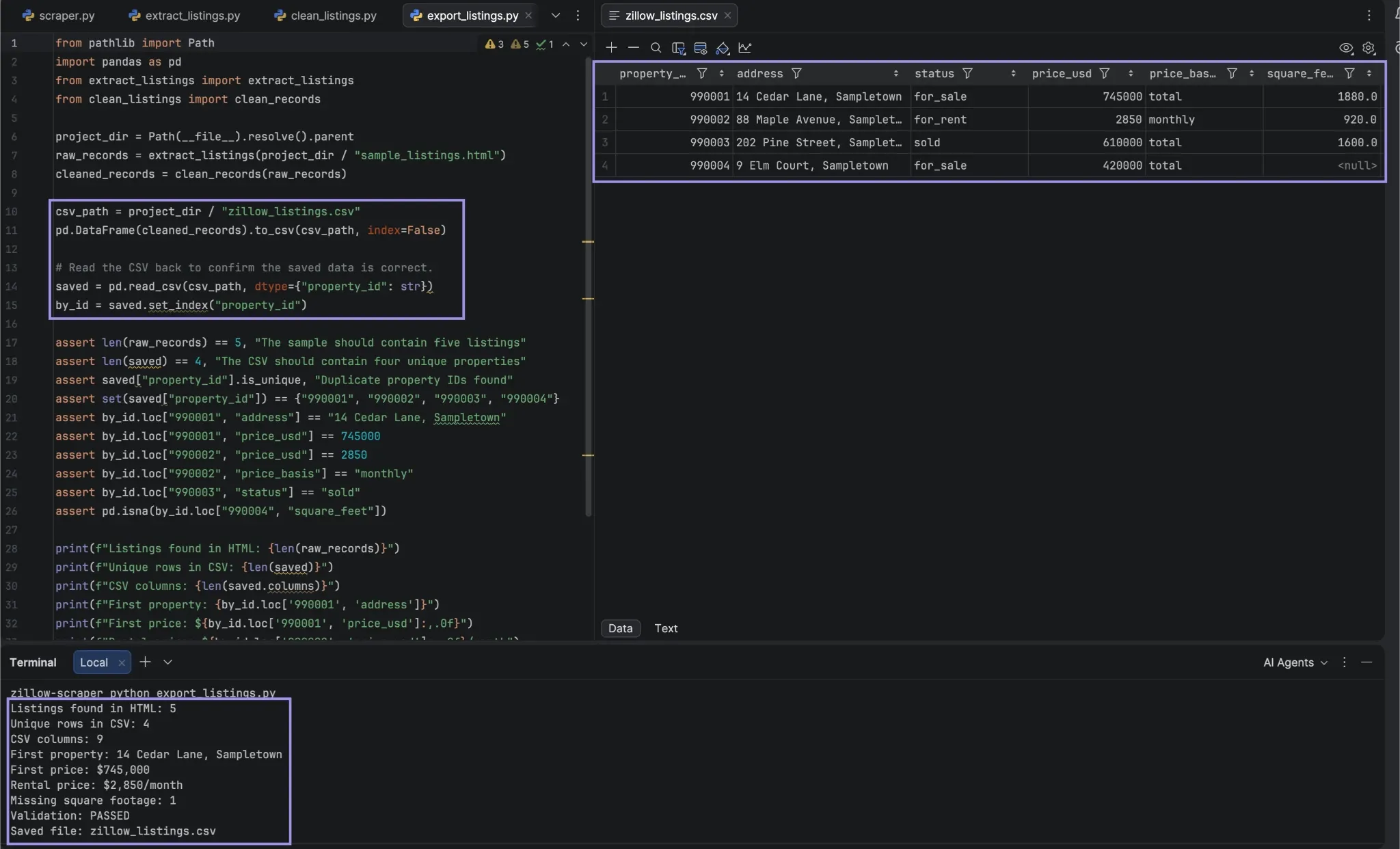
The script generates a pandas DataFrame and then exports it to a CSV file using the to_csv() function. Each row is an individual property, with the ID, address, status, price, price basis, bedrooms, bathrooms, square footage, and URL being the columns.
We've introduced assert checks to ensure that the record count is correct, there are no duplicate IDs, and there are no mismatched values. Running a script without errors doesn't guarantee that you have extracted everything correctly. Reading the CSV back verifies that our saved data is correct.
These checks are written for our sample listings, but you should use checks suited to your own data. If a check fails, review the extracted records, property IDs, and expected values before running the script again. Also, when run with the -O flag, Python ignores assert statements, so don't use them as the only way to validate production code.
Run the script:
python export_listings.pyThe generated zillow_listings.csv file contains four unique properties across nine columns. In the CSV preview, the rental property retains its monthly price basis, while one listing has a missing square-footage value. The terminal also confirms that five original records were reduced to four and displays Validation: PASSED.
If you are going to use price data over a period of time, you might want to add a collected_at column to track when each listing was collected. If you saved dated snapshots, you could compare price and status changes without mixing up older snapshots with current information.
How to Analyze the Extracted Zillow Listing Data
After you've exported the CSV, you can use it to do calculations that make property comparisons easier. Open the zillow_listings.csv file in Excel or Google Sheets, and create a price_per_sqft column. For a property listed for sale, calculate price per square foot as price_usd / square_feet. If you do not find any square footage or if the square footage is 0, leave the result empty so that it will not lead to incorrect calculations.
For our sample property, Cedar Lane, it is listed at $745,000 and has 1,880 square feet. This comes to about $396 per square foot. The Elm Court property, however, is not listed with square footage data, so we can't calculate the same for that property.
A slightly different approach is needed for properties being rented. Our sample Maple Avenue property rents for $2,850/month, and it has 920 sq ft, giving a rate of $3.10/sq ft/month. You can use this number to compare rents with other rents, but not with sale prices.
The sold Pine Street property can take the same calculation, which comes to about $381 per square foot. Keep asking prices and sold prices separate when comparing, though, since one is what a seller wants and the other is what a buyer paid.
These figures help compare property prices across locations and property sizes. Because our dataset contains only four fictional properties, the calculations demonstrate the method rather than actual housing market prices.
Why Your Zillow Scraper Returns Empty or Incorrect Results
A scraper may execute without any problems, but still return incomplete or wrong property data. If you suspect that the problem is in your code, try to determine if it is a problem with the HTML structure, missing listing fields, or your processing of the results.
The common issues you may have with our Python workflow are:
| Problem | Likely cause | How to fix it |
|---|---|---|
| No listings extracted | The CSS selector doesn't match the HTML structure | Check that #search-results article.property-card matches the listing elements. Update the selector if the structure differs |
| Missing property details | Some fields are absent from search results or individual records | Check the available HTML elements. Keep missing values as None rather than inserting incorrect data |
| Incorrect prices or statuses | Rental and sale prices use different formats, or the listing status is misread | Check data-status and preserve price_basis to distinguish monthly rent from sale prices |
| Duplicate properties | The same listing appears multiple times | Deduplicate using property_id, with the listing URL or address as a fallback |
| HTTP 200 but no listings | An authorized live request returns HTML without JavaScript-rendered content | Inspect the response HTML and confirm whether the expected listing elements are present |
| 403 errors or CAPTCHAs | The website restricts automated access | Check the site's access rules and your authorization. Use an approved data source instead of attempting to bypass restrictions |
clean_listings.py (for our sample) eliminates the duplicate property ID 990001 and preserves the missing square-footage value for property 990004. These are intentional test cases and do not indicate a failed extraction.
Alternatives to Scraping Zillow Directly
If you are looking to acquire real estate data but don't want to create a real estate scraper, then there are alternative methods for doing this. The right option depends on your research goals and the property details you need.
- Zillow Research datasets: Zillow Research offers downloadable CSV files of home values, rent costs, housing inventory, and other market data at various ZIP codes.
- Licensed data providers: Property-level data is available in real estate data services and from MLS integrations depending on their licensing agreement and coverage.
- Third-party scraping tools: Managed services extract data and provide structured data via APIs or downloadable files. But you still need to check their permissions and compliance with Zillow's terms.
Because Zillow Research's data isn't composed of individual property listing records, it's more appropriate for market analysis.
If you later get access to an authorized source such as Bridge or a licensed feed, the fetch layer is the only part of this tutorial you replace. Those sources return structured records rather than HTML, so there is nothing to parse with selectors. The cleaning, deduplication, and validation steps carry over as they are, because real feeds still contain duplicates, missing fields, and mixed price formats.
