Web scraping used to require advanced coding skills. Eventually, it became easier with tools such as Instant Data Scraper, which allows anyone to extract web data automatically straight from the browser. It works on a broad range of targets, including JavaScript-heavy websites (with some caveats that we have discussed later).
Overall, this guide gives a detailed overview of Instant Data Scraper, its setup, how it works, some good alternatives, and when to look elsewhere.
What is Instant Data Scraper?
Instant Data Scraper is a beginner-friendly scraping tool that comes as a browser extension currently available for Google Chrome and Microsoft Edge. It has a simple interface for a scraper and is a great utility for its target use case, which is mostly scraping basic websites with negligible anti-bot defenses.
We were skeptical about its automation capabilities at first and whether it could work unattended. However, for a completely free point-and-click scraping tool, Instant Data Scraper definitely punches above its weight.
That said, there were a few issues, including misaligned exports and scraping sessions stopping abruptly in some cases, which we have covered in later sections.
Note: Instant Data Scraper is no longer maintained by its original developer, Web Robots.
How to Use Instant Data Scraper
Run Your First Scrape
After you install Instant Data Scraper from the respective app stores based on your browser, Google Chrome or Microsoft Edge, the next step is to visit a website and review its terms of use to see which scraping bots are allowed and to what extent.
Generally, public data-hosting websites are the most scraping-tolerant. But for this illustration, we are taking an even simpler target: Bookstoscrape, which is basically a demo bookstore made for people learning to scrape.
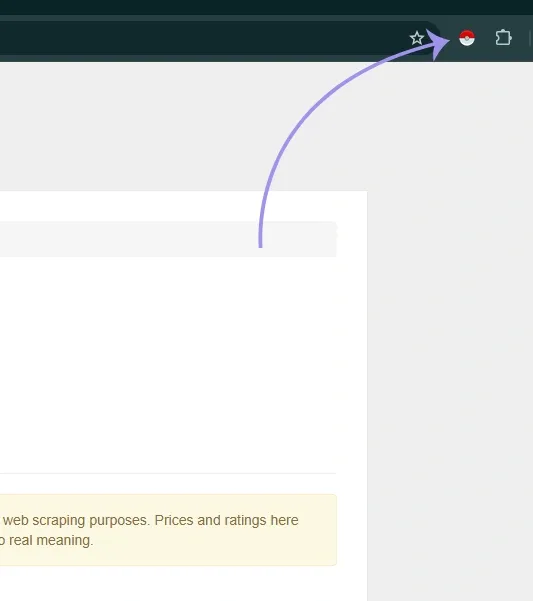
Once the target web page is open, all you have to do is click the Instant Data Scraper extension icon on the browser. It will open and scrape the active web page at once. Check the following image.
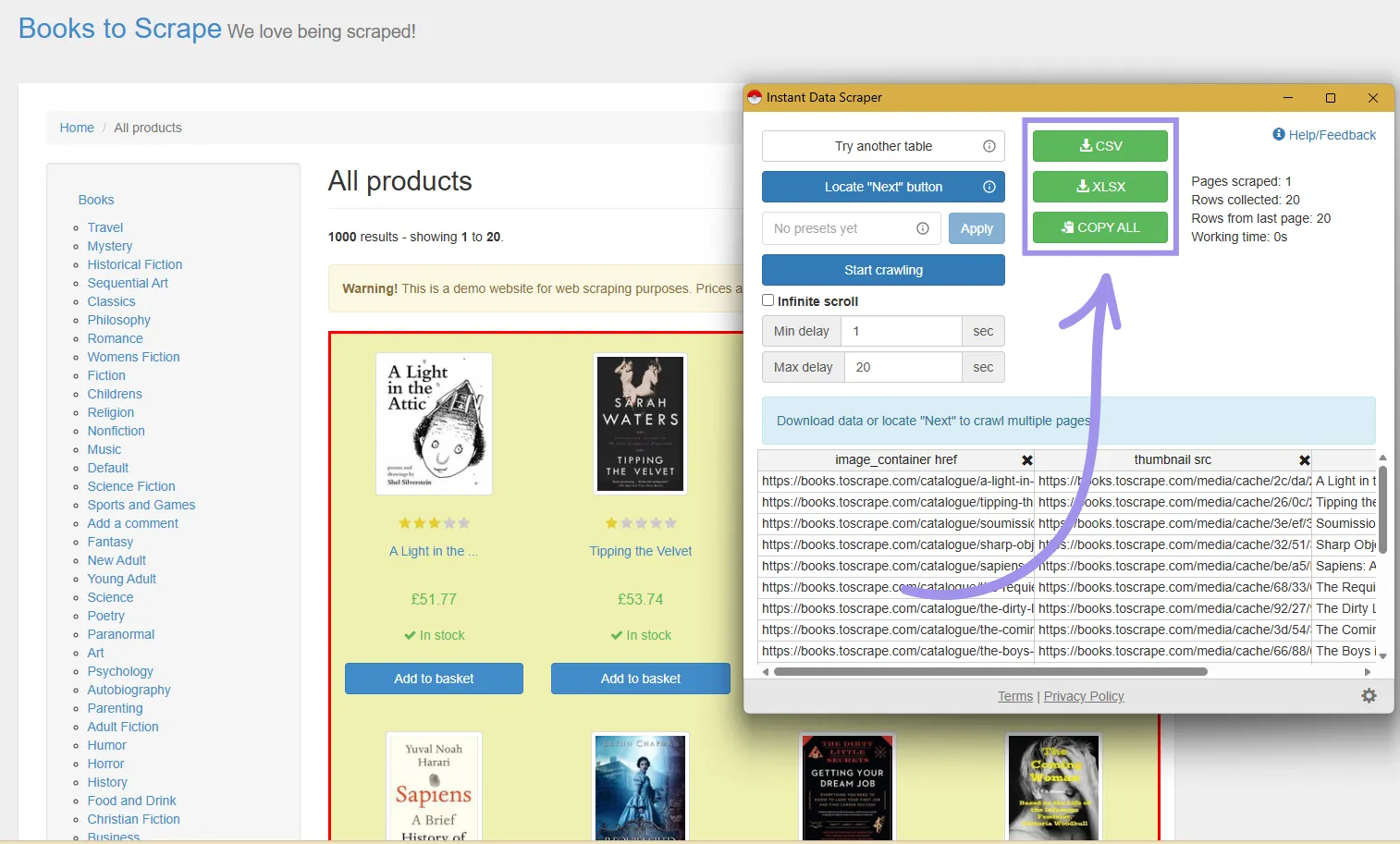
The interface is straightforward. You get the details about the pages analyzed, with the tabular view at the bottom indicating the exact data scraped. If you’re satisfied with the data, simply download it as a CSV or XLSX file. Alternatively, copy and paste it into a spreadsheet (such as Google Sheets or Microsoft Excel).
Another feature is using Presets, which remain hidden within the Settings gear icon on the bottom right.
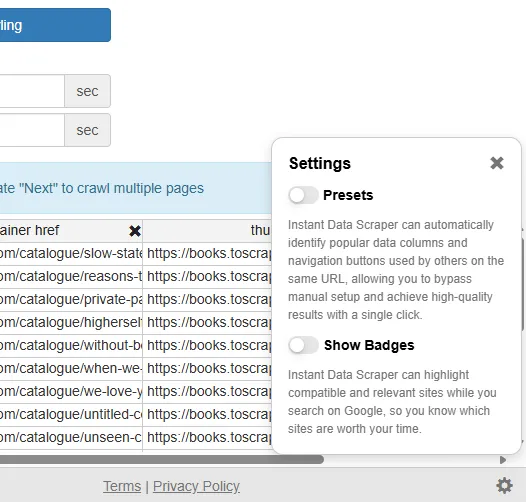
We recommend checking the usage terms before activating the presets, since they send visited URLs and search queries to Instant Data Scraper’s servers, which are then possibly shared with 3rd parties.
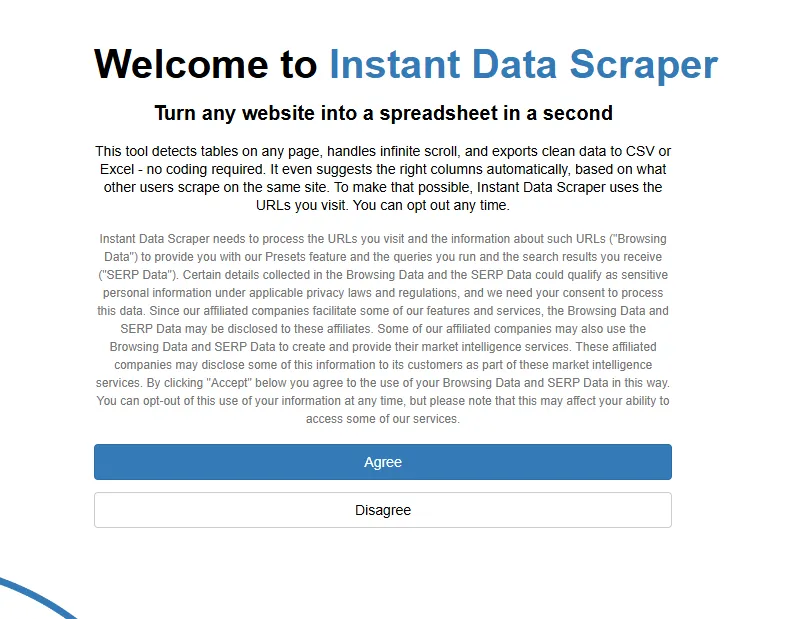
Ideally, you should proceed without the Presets, since they didn’t make much difference in our experience, and you can always select your preferred data using its Try another table feature (explained below).
Fix an Incorrect Detection
Based on the page structure, Instant Data Scraper can sometimes detect tables you would not want. In that case, you can click Try another table, and it will cycle through the other tables it detected on the page until you settle with the desired data.
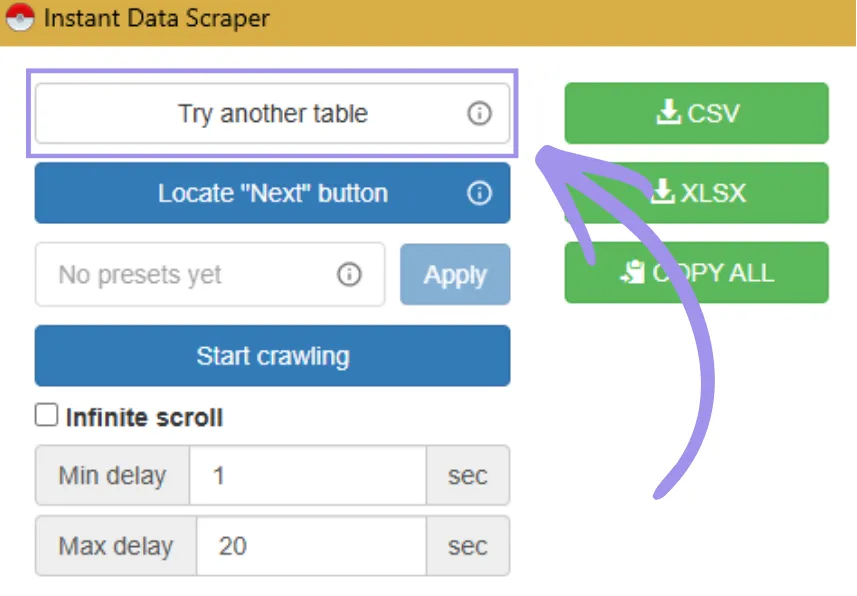
Once found, you can go ahead with downloading the data or setting a continuous crawl-and-scrape sequence (discussed in the following section).
Handle Pagination and Infinite Scroll
Instant Data Scraper can handle infinite scrolls and paginated views. You can use this feature with either the Infinite scroll or Locate “Next” Button, based on the target website’s structure.
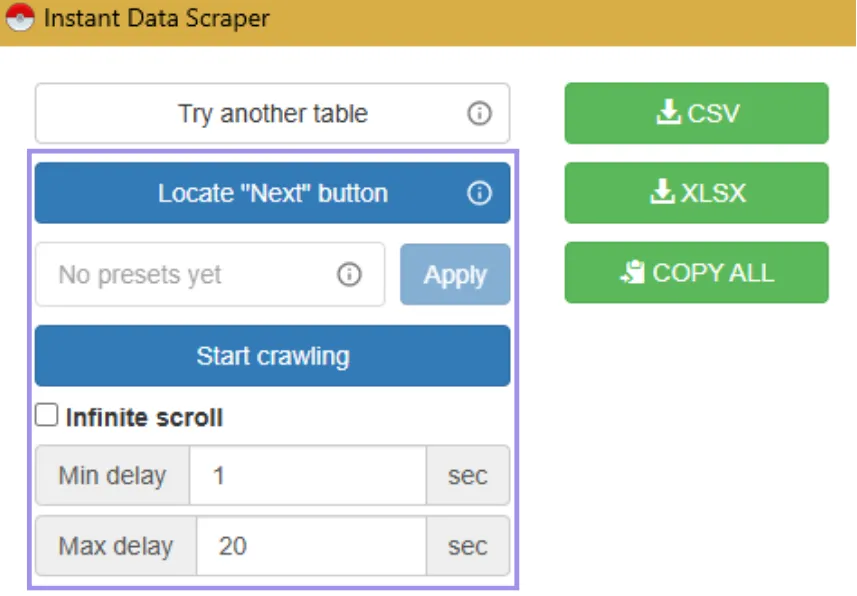
Infinite scroll is self-explanatory. For paginated data, one just has to click “Locate Next Button”, followed by clicking whatever button on that web page helps a user visit the following page. Instant Data Scraper learns from this simple trick and scrapes paginated data when clicked with Start crawling afterward.
Normally, you can leave Min delay and Max delay untouched. However, the tool prompts you to increase the preset values to let the content load before moving on if it fails to detect similar data on subsequent page loads.
Where Instant Data Scraper Falls Short
Though Instant Data Scraper is extremely straightforward, this simplicity also indicates limited functionality and some drawbacks, as explained below.
Unreliable Export Formatting
One thing we wish Instant Data Scraper’s developers would fix right away is the way it exports data. In our brief hands-on, while it performed okay at extracting collection pages with the image URL, product name, and price, the column names were hardly correct.
It seems to be using CSS classes instead of the logical category name. You can check the following image, where our Booktoscrape exported data with column names product_pod (~book title) and price_color (~book price).
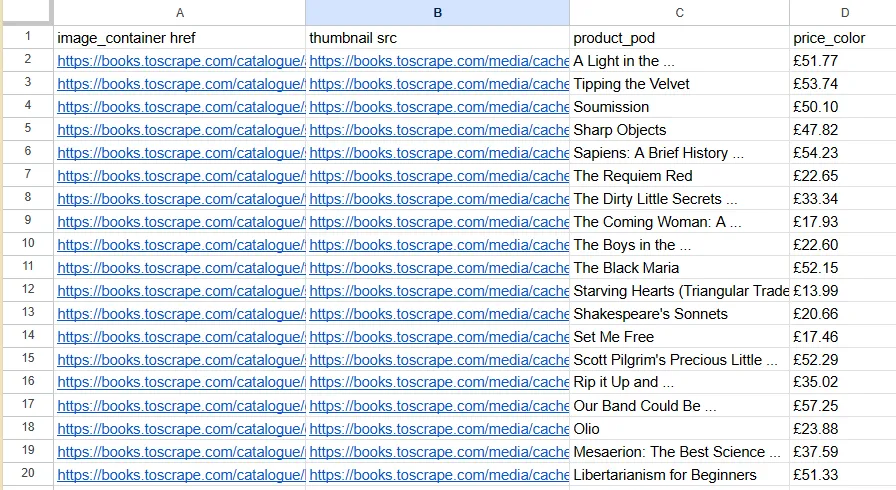
Although this looks minimal, it got worse when we tried to scrape individual book pages, such as the one below.

It was a simple enough page with only a handful of fields to extract. However, the export turned out to be a mess with six rows and fourteen columns. In addition to the widespread misalignment of the product information, multiple fields were just blank.
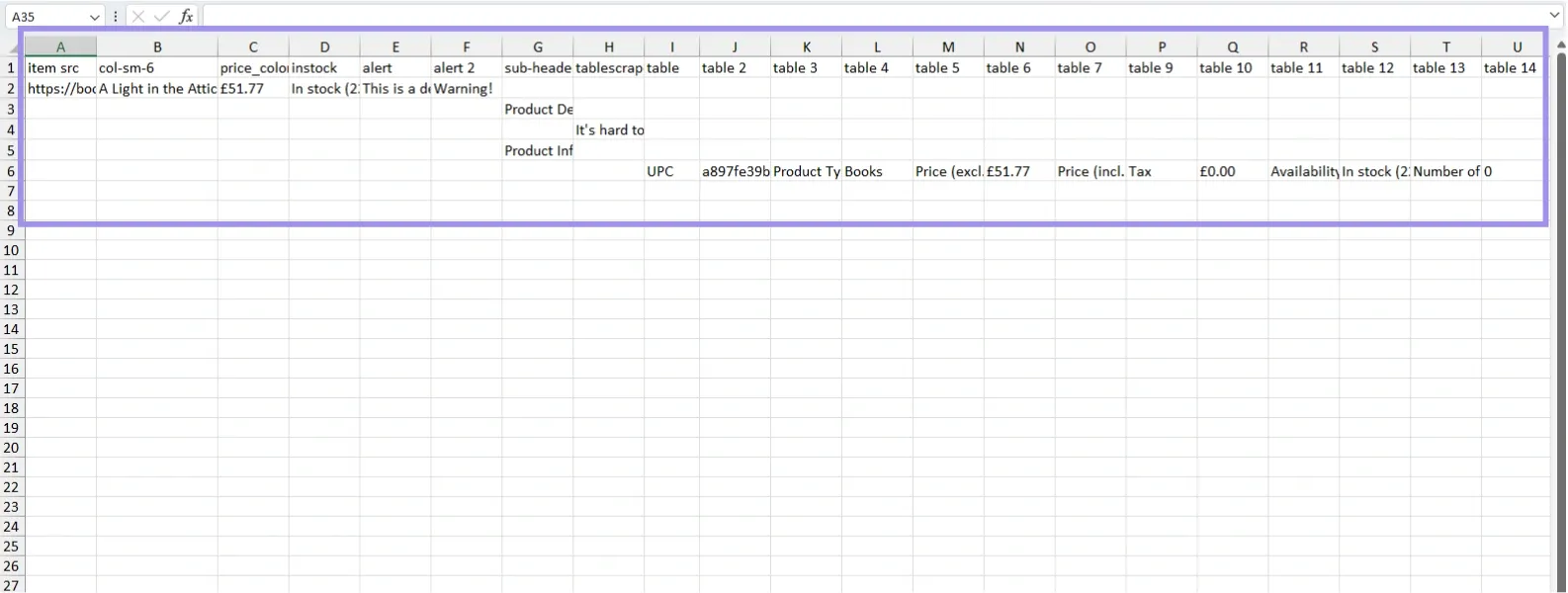
This can be troublesome for someone scraping even dozens of such pages, since it will require a lot of cleaning and manual cherry-picking to extract useful information from the data dump.
In the end, we recommend doing a pilot on the target website and checking if the output format is satisfactory upfront.
JavaScript-Rendered Pages
Modern websites don't load all their content during the initial page load. Instead, data fetching occur gradually in the background via AJAX (Asynchronous JavaScript and XML) requests.
Instant Data Scraper scrapes whatever content loads fully on the DOM (unless configured with delays). So you might miss data that’s lazy loading. However, that’s not an issue for one-off human-assisted scraping workflows, where you wait for the full page load or manually deal with click- or scroll-to-reveal content.
No Scheduling and Limited Automation
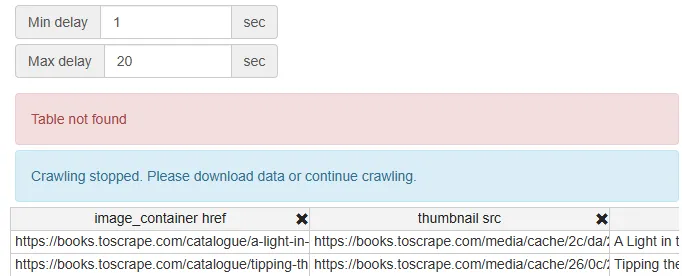
One of the most critical limitations of Instant Data Scraper is that you simply can’t schedule. Every scraping sequence must start manually, and ideally, you should oversee the entire process to help the tool get through.
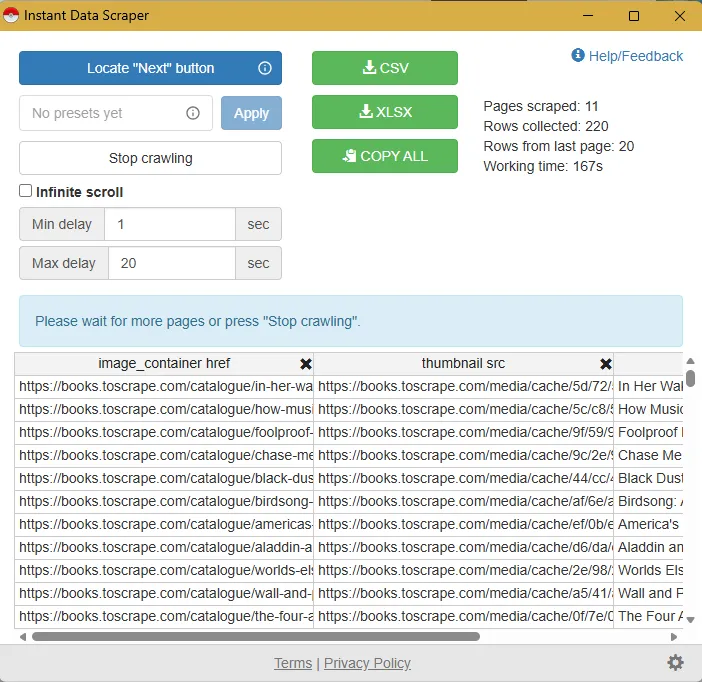
The following image indicates one such instance where the scraping stopped citing “Table not found.”
Still, what’s great is it scraped all 50 pages (the entire collection!) of BookstoScrape in the background (while being minimized) without costing us anything other than browser resources. You can check below that it went flawlessly, even with its presets disabled.
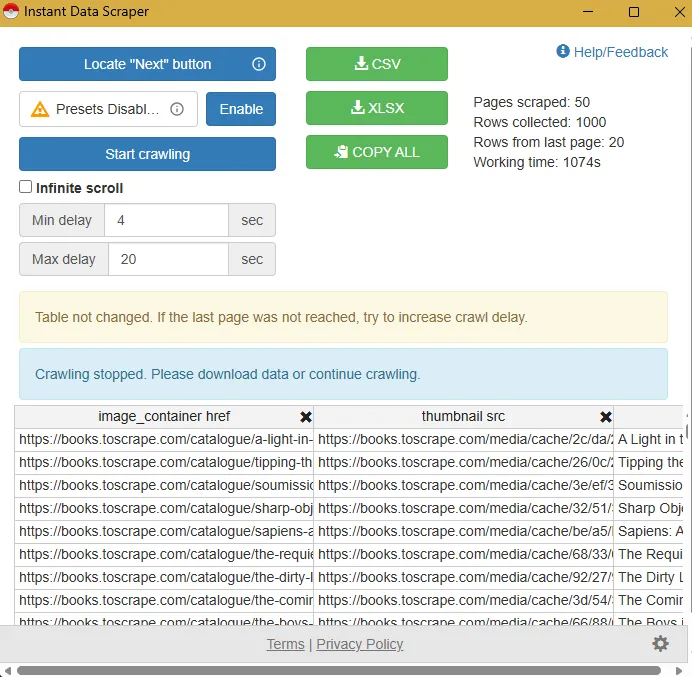
So when some critics accuse Instant Data Scraper of “zero” automation, we'd say it has limited automation capabilities. And we see no reason why a scraping beginner shouldn't give it a try, or why a marketer shouldn't use it regularly for elementary workflows.
Getting Blocked (at Scale)
Generally, tools such as Instant Data Scraper have little to do with scraping at scale. Sophisticated websites block bot activities within a few page views or sooner. But since it’s done inside your browser with a normal browsing fingerprint, Instant Data Scraper might provide some leeway before anti-bot alarms kick in.
However, once the target security systems identify bot activity coming from a normal user, it can result in your IP being blocked or rate-limited. The repercussions might extend beyond that, as present-day security systems are not limited to a single detection vector.
Therefore, you might have to deal with CAPTCHAs or limited access until you reset or substantially change the fingerprint that the site flags, which is rarely something a normal user can control. To avoid this, we suggest using anti-detect browser profiles with separate proxies per profile.
Geo-Restricted Content
Geo-restricted content depends on the target website. For instance, for an e-retailer, it can include location-based product prices and their types, availability, versions, and more. On the other hand, a streaming platform might be selective in giving access to its shows based on a user’s geography for copyright and other reasons.
This makes geo-fencing a classic Instant Data Scraper bottleneck, because it’s common for websites to serve content based on the user's location. The only way to overcome it is to subscribe to a proxy or a VPN if geo-targeting and IP rotation aren’t that important.
Beyond Instant Data Scraper
While tools like Instant Data Scraper are good for basic scraping, you should look elsewhere for a broader feature set discussed below.
- Scheduled runs: It has no options for custom timed, scheduled scraping runs on one or more targets.
- Large-scale scraping: Long scraping cycles can get stuck midway, asking for a constant manual oversight.
- JavaScript-heavy sites: Instant Data Scraper can become inconsistent in scraping and with its exports of JavaScript-heavy pages.
- Limited integrations: The data can’t automatically flow into a pipeline or BI tool for further analysis. Likewise, there are no integration options with other scraping-assistive tools, such as CAPTCHA solvers.
- Advanced scraping: Instant Data Scraper lacks native configurations for retry logic, alerts, authentication, token handling, etc., limiting it to small, manual scraping sessions.
- Team collaboration: In its current form, Instant Data Scraper is limited to a single person’s browser, with no way to collaborate or pick up someone’s work in their absence.
Alternatives to Instant Data Scraper
- WebScraper is a powerful alternative to Instant Data Scraper, which offers a very similar 100% free browser extension and a cloud version with built-in support scheduler, retry logic, API management, proxies, data retention, captcha bypass, and export integrations. The cloud version also offers a seven-day free trial.
- DataMiner is another browser extension that lets you scrape up to 500 pages for free. However, your account will be locked once you exceed that limit, and the only option to continue is to start a subscription. On the features front, you have scraping instructions, 1-click scraping, automated scraping, custom JavaScript, AJAX support, auto form filling, and more.
- MrScraper is an AI-powered solution with a free tier for its scraping browser. This browser is designed for scraping and advertised to handle CAPTCHAs and dynamic content on its own. You also get native support for proxies, fingerprint spoofing, custom user agents, automatic retries, IP rotation, and JavaScript rendering.
- Thunderbit is a freemium AI-driven scraping browser extension that also supports scraping PDFs, images, and documents. The best part about Thunderbit is that you can instruct it to extract specific data using natural language without naming the exact CSS selectors. Besides, it can scrape subpages, has pre-built scraping templates, and allows data export in preferred formats to Google Sheets, Airtable, or Notion.
- Listly’s USP is multi-tab scraping with one click and turning all that into a unified export. It can handle automatic navigation and multi-page extraction by URLs. Listly also supports scheduled scraping, automatic scrolling, and auto-saving the data, making it a great pick for unattended scraping workflows. A few more features include a free tier, automated keyboard and mouse actions, auto-login, proxy support, automatic error screenshots, and API-led data export.