There is no quick fix for TLS fingerprinting-based detection, and even a good proxy can do little. But there are a few other factors, with good proxy hygiene being a part of the solution.
We have discussed all of that in this beginner-friendly guide, including TLS fingerprinting, browsing signals, different client setups, JA3/JA4 signatures, proxying, and most importantly, the limits of fingerprint spoofing.
What is TLS fingerprinting?
As we normally open a real-life communication with a casual handshake, a client (such as a web browser) and a server (the target website) go through a similar ritual (known as the TLS handshake) before transferring encrypted data (~loading a web page). In simple terms, this is nothing more than the client and the server talking to each other about securing the communication medium to prevent external interference (such as Man-in-the-middle attacks).
This sort of safety net is provided by Transport Layer Security (TLS), a layer that secures application protocols such as HTTP. HTTP is the protocol that transfers web data from the server to the client. A padlock icon in the URL bar indicates that HTTP is coupled with TLS, making the connection secure (~HTTPS) from any middleman.
However, the weak link in web communication is the TLS handshake itself, since it is done in plain text and reveals information such as TLS version, cipher suites, extensions, and protocol preferences. So, in simple terms, TLS fingerprinting is a method for identifying a client based on the data exchanged during a TLS handshake.
JA3 and JA4
There are multiple fingerprinting methods that take the handshake data and convert it into a client identifier.
One of those methods is JA3, introduced by Salesforce in 2017, which analyzes the client's handshake data (~TLS ClientHello). It extracts five data points, including TLS version, cipher suites, extensions, elliptic curves, and elliptic curve point formats, and converts them into a 32-character fingerprint using the MD5 hashing algorithm.
However, web browsers began implementing anti-fingerprinting measures over time, including randomizing the order of TLS extensions in the ClientHello packet. This introduced inconsistencies in JA3-based fingerprinting.
Finally, JA4 (a part of the JA4+ suite) came as an update in late 2023, which also included additional data points such as SNI (Server Name Indication) and ALPN (Application-Layer Protocol Negotiation) values. This made the fingerprinting more randomization-resistant. Besides, JA4 also supports new-age transport protocols, including QUIC, whereas JA3 was designed for TLS handshakes over TCP connections.
Fingerprinting: Beyond the TLS handshake
Consider a client that connects over HTTP/2 and broadcasts unique identifiers, such as SETTINGS, WINDOW_UPDATE, PRIORITY, and HEADERS frames. This HTTP/2 fingerprint is commonly used (in addition to TLS fingerprint) by web security platforms, such as Cloudflare and Akamai, and allows a server to uniquely tag a client to throttle web automation (including cyberattacks).
For HTTP/3 fingerprinting, the challenges are unique because QUIC (which underpins HTTP/3) integrates TLS into the protocol and uses UDP rather than TCP (as seen with HTTP/2). For this new architecture, the most prominent fingerprinting vectors are transport (such as max_idle_timeout and max_udp_payload_size) and HTTP/3 SETTING frame parameters (QPACK_MAX_TABLE_CAPACITY, QPACK_BLOCKED_STREAMS, and MAX_FIELD_SECTION_SIZE). Still, it’s safe to say that HTTP/3 fingerprinting methods are still under development.
The key takeaway is that fingerprinting is evolving and now includes protocol analysis in addition to TLS handshake data and a few more things (discussed later). Therefore, passing the JA3 mark may not be enough in the present context.
Regardless, we have kept the following sections largely centered around TLS fingerprinting (and proxies) to control the scope of this discussion.
Why does the proxy fail to mask the TLS fingerprint?
Proxies are meant to hide the client’s actual IP address from the server. Commercial proxies handle this by opening a TCP connection for the client to the server and then directly allowing the client-server TLS handshake. This method is known as HTTP CONNECT tunneling.
The alternative, terminating TLS at the proxy and opening another connection to the server, is computationally expensive and difficult to implement for large-scale networks. In addition, doing so means the proxy can read a client’s web activity, undermining the confidentiality that HTTPS is designed to provide.
Still, such proxies exist, but their application area is generally load balancing, and WAF (web application firewall), unlike web automation that forward proxies are known for.
So, technically, the role of a forward proxy provider is limited to providing a clean IP with a good reputation. But the TLS handshake, the fingerprinting hotspot, is something a commercial proxy can’t do anything about.
Why clean proxies still get detected
Because IP masking, even with a good residential proxy, is not sufficient. Proxies operate at the network (IP) layer and have nothing to do with the client-side TLS markers.
The following list further explains specifically what can trigger detection systems.
- Stack Mismatch: Using a raw HTTP client (such as a Python request or curl) with a TLS stack unrelated to standard browsers, such as Google Chrome, can cause the client to be flagged for abnormal behavior.
- Identity inconsistency: Modern detection methods don’t stop at JA3/JA4 fingerprinting alone. They also analyze other signals, such as user agent, IP location/type, and JA3 hash. Contradictory signals add to the suspicion, inviting scrutiny and proxy bans.
- Unusual IP rotation: Frequent IP rotation that doesn’t match other session parameters, such as cookies and protocol settings, pins all rotated IPs to a single static TLS fingerprint, which is not a normal user workflow.
- Unreal activity patterns: Finally, proxies can be detected because of other detection vectors, including unusually high request volume and click/scroll behavior, which help differentiate between a real user and a series of automated web requests.
How do different client setups affect detection?
TLS fingerprinting depends on the client's TLS stack, and different configurations have their own detection risks. However, there are also ways to minimize them, as discussed subsequently.
Raw HTTP clients
Using an HTTP client in raw state (Python’s Requests, Node.js fetch, curl, Go’s net/http) can immediately trigger anti-bot systems. The TLS ClientHello sent by these scripts becomes inconsistent with the claimed User-Agent (for example, a Chrome User-Agent paired with a Python/OpenSSL fingerprint), indicating non-standard browsers or automation. Not only that, the HTTP window size and settings frames parameters sent by these raw clients differ from those of real browsers. As a countermeasure, you can plug libraries such as tls-client and curl-impersonate to minimize the risk of detection.
Headless browser automation
Headless browsers, such as Playwright and Puppeteer, are much better than raw HTTP clients at performing a standard TLS handshake. However, the detection risk for headless browser setup stems from other vectors, including fingerprint reuse or inconsistent IP rotation.
A normal browser builds up its surrounding data (cache, cookies, etc.) naturally based on day-to-day usage. However, a headless browser without a carefully managed browser context suffers from a static fingerprint, and automated request patterns don’t help either.
Finally, graphics and audio render differently in headless browsers from real browsers, since headless environments lack physical hardware (such as GPUs and monitors).
Therefore, even with a headless browser, you need a consistent browser fingerprint and good IP rotation since modern anti-bot systems aren’t limited to TLS fingerprinting alone.
Managed scraping browsers and APIs
Managed scraping browsers/APIs are the closest to normal browsing and work well if the service provider keeps the fingerprint clean and realistic.
With this setup, TLS fingerprinting is often less of an issue, and it generally works if additional browser context (ex., cache, cookies, persistent sessions, request pattern & volume, HTTP/2 signals) is managed according to the target’s security posture.
The only downside to this approach is that you are trusting a 3rd-party service without any visibility. And if mismanaged on their end, you’ll be left out with similar detection issues and without any control over debugging.
How to check if your TLS profile looks realistic
This section covers the basics of setting up a test environment, comparing the right signals, and interpreting the results.
Set up the right test environment
This is no rocket science, but you must set up your test environment exactly matching production variables, including client type, libraries, device, and everything else.
And though proxies play little role in TLS fingerprinting, we still recommend setting them upfront if you also plan to use them in production. (And as a matter of fact, residential proxies are best at giving you a real-user IP. So, plug them instead of datacenter proxies for highly sensitive targets.)
After matching your production environment, hit Browserleaks or BrowserScan from your scraping client.
Compare the right signals
So, you have set up the test and run a TLS fingerprint scan. Now what?
Based on the tool, you’ll get values for TLS version, cipher suite, key exchange, SETTINGS frame, WINDOW UPDATE frame, HEADERS frame, and more.
Before proceeding, we suggest running a similar test in a real browser while keeping everything else intact. This will give you a baseline for what to expect with each variable and help you compare the values.
Now, when you have both sets of values (test setup and real browser), you can verify a few key parameters, such as TLS extensions and their order, cipher suites, and ALPN value.
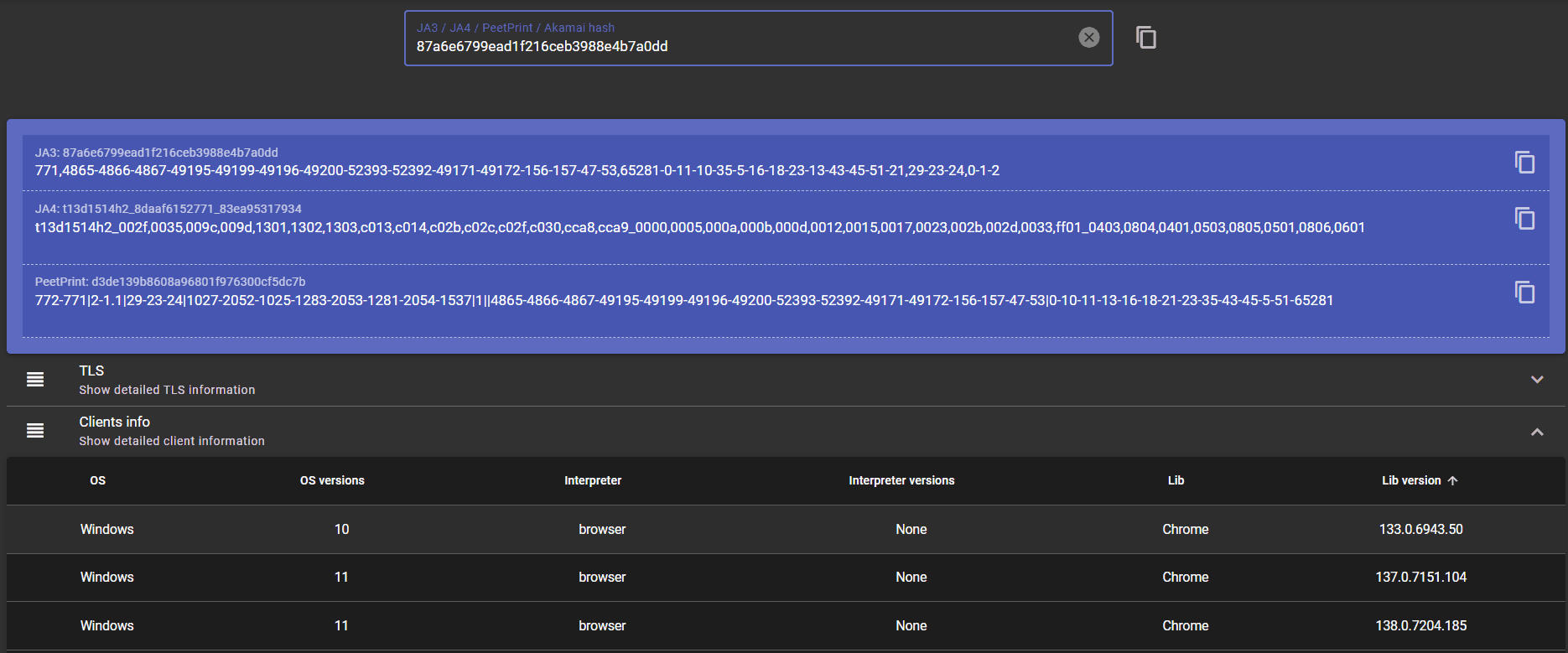
A more basic approach is to simply run the JA3/JA4 hash (from the test) through public databases, such as the JA3 zone, and look for markers resembling real users.
A more basic approach is to simply run the JA3/JA4 hash (from the test) through public databases, such as the JA3 zone, and look for markers resembling real users.
Check the following image. Here, you can see that it infers that the interaction is coming from a Chrome browser (which it was), indicating a realistic TLS fingerprint.
Avoid false conclusions
There are a few caveats to reading the signals, however. For instance, a good JA3/JA4 fingerprint isn’t an exclusive sign that you won’t get detected as anti-bot systems use many more markers (already explained) to tag a client profile for using automation.
In addition, checking once won’t suffice as a single software update (such as a new browser version) for real users, can render your “made-up” client profile obsolete. Consequently, periodic checks are a good way to validate whether your TLS fingerprint is realistic.
How to reduce TLS-based detection risk?
There are multiple steps that can help in managing a normal user-like TLS fingerprint. This includes selecting an appropriate browser, proxy use, managing browsing signals, and more.
Browser-realistic execution
If you can’t run a real browser yourself, the first step should be opting for a managed browser, followed by headless browsers. Both of these methods launch a real browser under the hood, so a realistic TLS stack is almost never an issue.
If you can’t use a real browser, deploying an HTTP client patched with TLS impersonation should be the last resort. Remember, sending a real browser-like header with a raw HTTP client is a strong detection signal to avoid at all costs.
Consistent request identity
As we stated earlier, modern detection systems are smart enough not to profile a client based on a single signal. This means one has to align all fingerprinting markers, including the TLS handshake, user agent, protocol settings, cookies, and other browser signals (language, operating system, etc.), to appear like a regular user.
For instance, a residential IP coupled with a Chrome-like user agent but without JavaScript execution can be a strong bot signal on many sites.
Identity-based rotation
IP rotation without changing the associated browser context can link multiple IPs with similar behavior to a single fingerprint, which is uncommon among real users.
For headless browsers, a simple rule is to keep a separate profile for each task and avoid excessive IP-based rotation, especially for highly sensitive targets. This will preserve browsing parameters, including cookies, session state, and local storage, as well as select IPs associated with a fingerprint. This looks normal, and even a ban would not affect multiple IPs and browser profiles at once.
However, it primarily depends on the website at hand. For instance, scraping a login-based website with a client that changes IPs excessively mid-session can alarm anti-bot measures. On the contrary, a public database might not enforce such stringent anti-scarping policies.
Proxy quality and session strategy
With everything else sorted, it’s equally important to choose a good proxy provider, since a burned IP can nullify all other efforts at fingerprint randomization/normalization.
You can use services such as IPQualityScore or IP-checker. The objective is to check the abuse history, blacklisting, and classification (residential or datacenter). Too many blacklist mentions or a low reputation score signal a subpar usage record that you should avoid, based on the target website.
If you’re unsure about a specific target, run the proxy IP (or a list of IPs) through our free proxy tester. This lets you check if the IPs work against that target from multiple locations, and you also get shareable results.
Finally, one must note that a good IP with a bad fingerprint or a realistic fingerprint with a burned IP can both invite scrutiny. Furthermore, session duration, browsing context, request volume, IP-rotation, and click/scroll behavior are all related, and you can’t settle for one while completely ignoring the others.
Continuous Validation
You can’t set up an environment with a good fingerprint, check once, and expect it to work for years to come. No. As detection algorithms evolve and vendors issue software updates, a fingerprint that works seamlessly today can encounter roadblocks in the future. Besides, automation and IP rotation take their own toll on a fingerprint in the form of CAPTCHA, rate limits, or outright blocks.
This makes continuous validation against a good baseline a key to staying ahead in the detection curve. Which means you should keep checking your setup against an ideal, matching user environment.