
Understanding HTTP Proxy: Headers, Auth, Cache, and Setup
Simply put, an HTTP Proxy server acts as an intermediary between a client and a target server when submitting an HTTP request. When an HTTP request is created, it is sent to the proxy server. The proxy server will then submit the HTTP request to the target server. Once the target server responds, the proxy server will send that response back to the client.
Depending on how the server is configured, the HTTP Proxy server may be able to send the HTTP request to the server without any modifications, may add or remove certain headers, and may require authentication, as well as apply certain filtering rules, and may even send a response from its cache instead of requesting the response from the origin server.
HTTP is a request and response protocol that is used over the Internet and is primarily used for transferring and sharing data. Most HTTP traffic runs over TCP, including HTTP/1.1 and HTTP/2, while HTTP/3 runs over QUIC over UDP. In practice, most traditional HTTP proxy setups are TCP-based and handle HTTPS destinations through the CONNECT method.
How does an HTTP proxy work?
The typical flow of an HTTP proxy request is as follows.
- The client will submit a request to the proxy.
- The proxy server will verify the client against any policies that may be in place, as well as any authentication methods that may exist.
- The proxy server may adjust any request routing and headers.
- The proxy server may submit a cached response to the client if it is enabled.
- The proxy server submits the request to the target server.
- The proxy server will receive a response from the target server.
- The proxy server will send that response to the client.
In general, that describes how an HTTP proxy server operates. Although it is simple in design, it is able to apply a wide variety of filtering, monitoring, and IP masking techniques based on how it is configured.
What can an HTTP proxy do?
An HTTP proxy can control requests, hide the client IP from the origin, impose access rules, control metadata, and sometimes respond with a previously cached response.
IP masking and location control
An HTTP proxy changes the network identity that the destination server sees. When your request goes through the proxy, the origin server sees the proxy’s IP address instead of your client IP.
If the proxy endpoint is located in a specific region (or country), you can control your location from the network.
Header-based filtering and routing
An HTTP proxy can make control decisions based on headers, method, and semantics of HTTP. These processes can be incorporated to control flow and determine the allowed, blocked, rerouted, or normalized requests.
In some instances, this constitutes policy enforcement, whilst in others, it is a means of redirecting traffic to different upstream systems or appending intermediary headers, such as Via or Forwarded. These changes to headers can be made, but they don’t have to be. Some proxies have very high traffic thresholds with minimal changes.
Caching and bandwidth savings
An HTTP proxy can also store cacheable responses and reuse them when later requests ask for the same resource under valid HTTP caching rules. When this operates optimally, it reduces repeated fetches, lowers bandwidth usage, and improves response times for commonly requested content.
Shared caches are explicitly part of the HTTP model, and proxy caches are one form of shared cache. This is why universities, enterprises, and other large organizations have historically used caching proxies to serve common files to many staff or students without pulling the same content from the origin every time.
Access control and policy enforcement
A proxy may also require authentication to relay traffic, limit which destinations may be accessed, log requests to provide traffic control for auditing, and cut off certain categories of traffic to enforce internal policies.
This also makes them effective for controlled browsing situations, workplace environments, school environments, and installations where outbound traffic must be restricted and controlled to pass through a single managed checkpoint.
Types of HTTP proxies
HTTP proxies can be classified in multiple dimensions. You may divide the proxies based on:
- Where they sit in the traffic path
- How visible they are to the client or server
- How access is allocated
- What kind of IP network sits behind them
The formal HTTP specs focus on intermediary behavior, while many commercial labels describe deployment style rather than a different protocol.
The most common practical division is as follows:
- Forward proxy – sits in front of the client and sends requests onward on the client's behalf. This is the standard model people usually mean when they talk about using proxies.
- Reverse proxy – sits in front of one or more origin servers and receives requests on the server side. It is commonly used for load balancing, TLS termination, caching, and routing traffic across backend services.
- Transparent proxy – intercepts traffic without requiring the client to explicitly configure a proxy in the usual way. It's commonly used in controlled networks for filtering, monitoring, or caching.
- Anonymous / elite proxy – common marketing labels, not formal HTTP protocol categories. These terms usually describe how much client identity the proxy exposes, not a distinct proxy mechanism defined by HTTP itself.
- Shared proxy – multiple customers use the same proxy pool or endpoint allocation.
- Dedicated proxy – the proxy resource is assigned to one customer.
| Type | What it means | Typical use |
|---|---|---|
| Forward proxy |
The client is configured to send requests to the proxy first | Browsing, automation, testing, outbound access control |
| Transparent proxy |
Traffic is intercepted by the network path | Enterprise filtering, school networks, and caching |
| Anonymous proxy | Vendor term for a proxy that aims to reduce client identity exposure | Privacy-focused browsing or basic masking |
| Elite proxy |
Vendor term for a proxy that aims to reveal even less proxy-related identity | Higher-stealth use cases |
| Shared proxy | Proxy capacity is used by more than one customer | Lower-cost general workloads |
| Dedicated proxy | Proxy resource is reserved for one customer | More predictable identity and session behavior |
One more distinction matters in real deployments: residential, datacenter, and ISP proxies. Those labels describe the source of IP addresses used. Residential proxies use IPs assigned by internet service providers to real residential devices. Datacenter proxies use server-hosted IP space. ISP proxies sit somewhere in between operationally - typically datacenter-hosted infrastructure using IP space associated with ISPs.
You'll also see providers describe session behavior as rotating or sticky. Rotating proxies change the exit IP on a schedule or per request. Sticky sessions keep the same IP for a period of time, so your requests look consistent to the destination. Again, that's not a different kind of HTTP proxy - it's a session handling choice layered on top of the proxy service.
How to set up an HTTP proxy?
Setting up an HTTP proxy generally comes down to four pieces of information: proxy host, port, protocol, and authentication type. After obtaining this information, you can integrate it into the client that will be routing traffic via the proxy, be it a browser, OS, CLI tool, or application runtime.
How to generate an HTTP proxy?
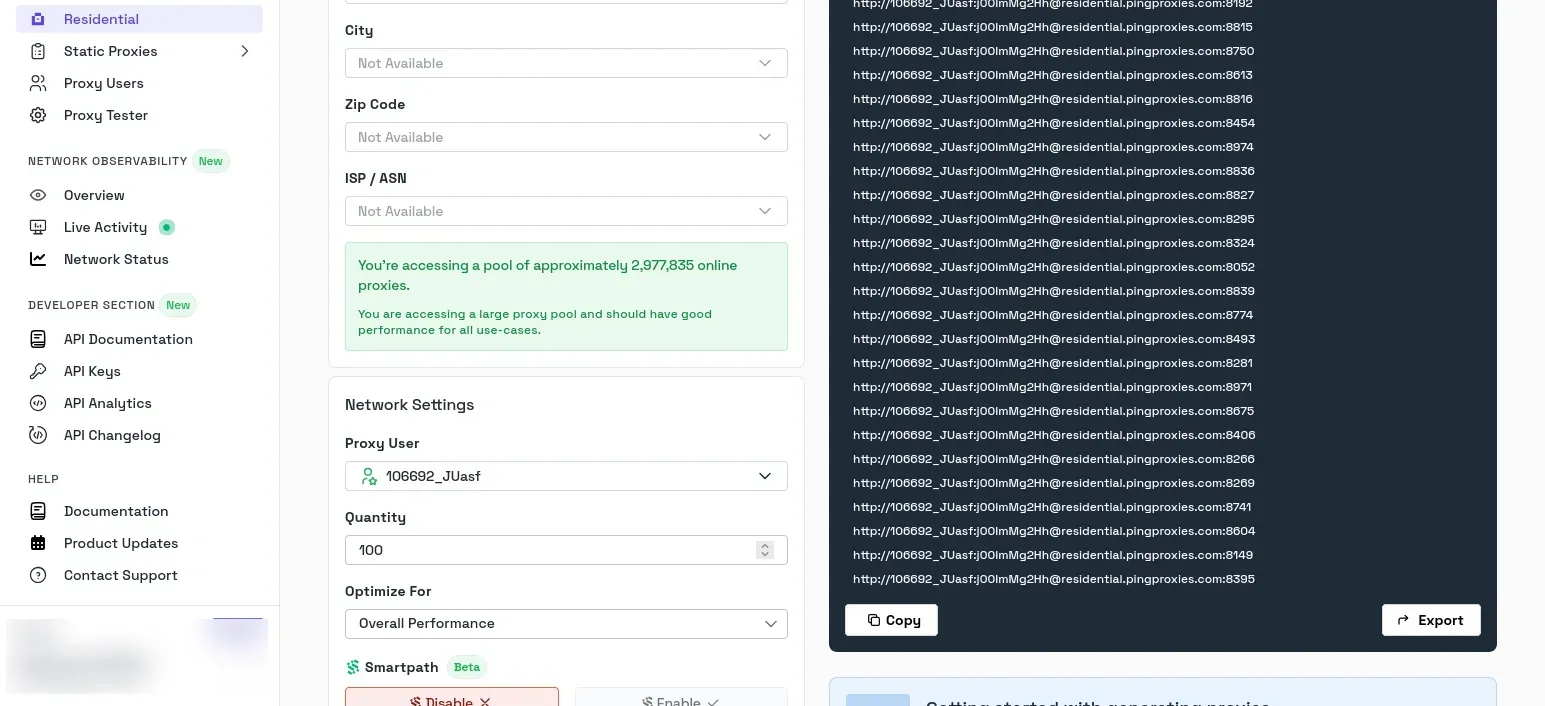
Now, let's take a look at how we can generate an HTTP proxy on our end through the Byteful dashboard.
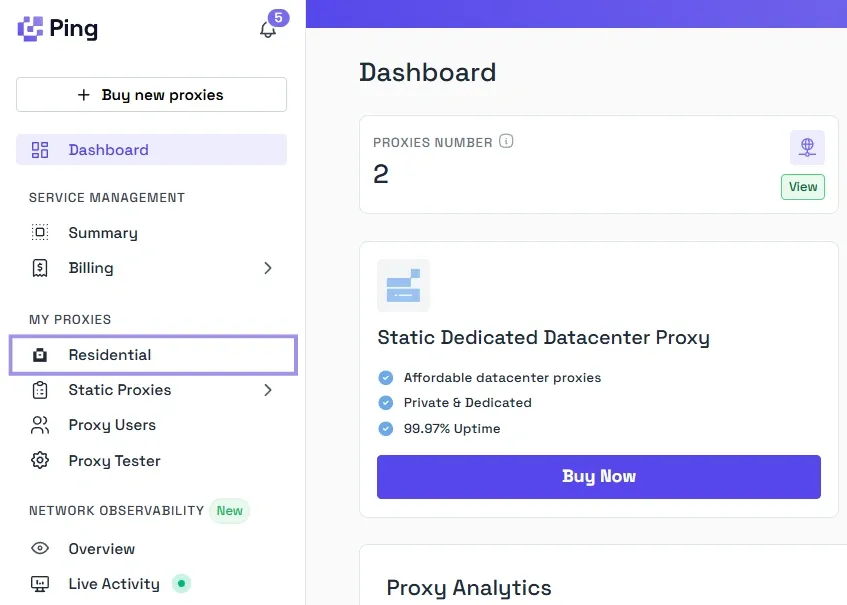
First, under the My Proxies menu on the left-hand sidebar, choose the network type you want. Say you pick Residential.
Here, pick the type (Sticky or Rotating), and select HTTP as the protocol. And choose the credentials format that includes the host, port, username, and password, because those are the values most tools expect when you configure a proxy manually.
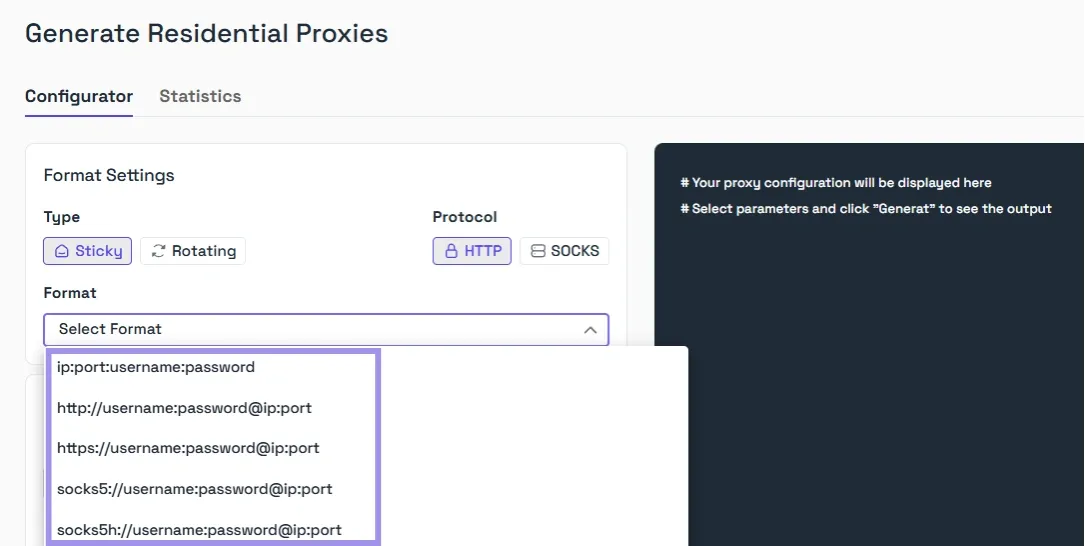
The exact screen labels can vary a bit by product and proxy type, but that is the core setup pattern.
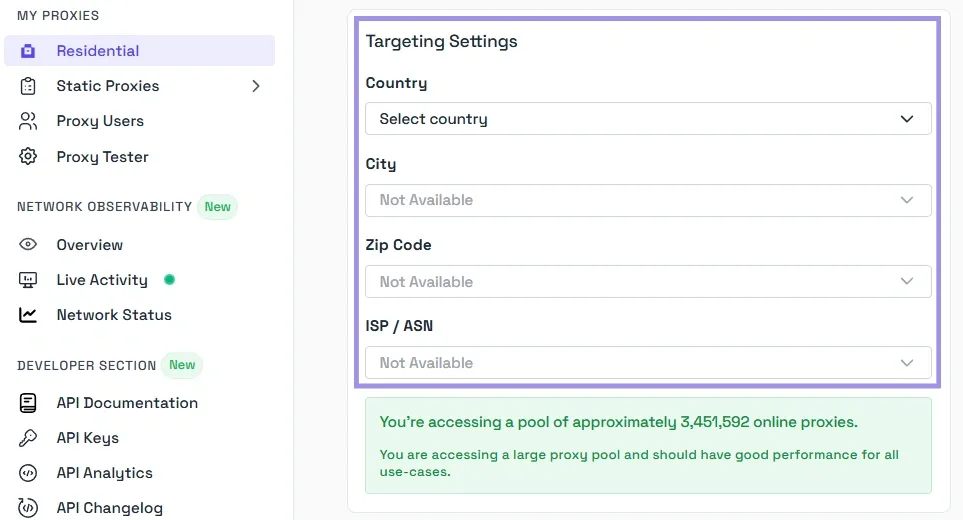
After that, choose the geo-location of your proxy.
Finally, just click Generate, and your pool of proxies will appear in the textbox on the right-hand side. You can choose to copy or export them in the TXT format.
Browser and OS setup basics
For browser or OS setup, you typically enter the proxy server address and port in the network settings, then authenticate when prompted.
On Windows, the manual path is Settings > Network & internet > Proxy, then enable manual proxy setup and enter the server and port.
Firefox exposes its own proxy settings separately under Settings > General > Network Settings, where you can choose manual proxy configuration or inherit the system proxy settings instead.
It's important to note that some browsers inherit the operating system proxy automatically, while others can keep their own per-browser configuration.
App and script configuration examples
In scripts and tools, the setup is usually more explicit. With curl, you can pass the proxy directly with -x or --proxy, which expects an HTTP proxy unless you specify otherwise.
curl -x http://HOST:PORT http://example.com
Authentication and allowlist checklist
Before you blame the proxy, check the boring parts. Make sure:
- You're using the correct host and port
- The selected protocol matches what the endpoint supports
- The username and password are current, or that your server IP is actually allowlisted if you're using IP-based auth
- The client is not silently bypassing the proxy for certain hosts through local network or exclusion rules
A good final test is to send a request to an IP-check endpoint or a simple test page and confirm that the visible outbound IP is the proxy, not your local connection. That tells you the request path is correct before you move on to the harder problems, such as session behavior, header leaks, or target-side blocking.
HTTP proxy headers explained
Certain HTTP headers impact the end-user experience. While some headers document the requests and responses as they traverse the various intermediary components of the system, others are formalized standards specifically used by proxies.
Via, Forwarded, and X-Forwarded-For
The Via header indicates that one or more proxies, or other intermediary components, have handled the request or response. A response with this header signifies that the response has traversed one or more HTTP components.
The Forwarded header is used to convey the details of the forwarding, including the original client, original host, and original protocol (i.e., HTTP or HTTPS). This header was designed to replace the various X-Forwarded-* headers with a single structured header.
The X-Forwarded-For header indicates the IP address of the originating client. It is commonly added by reverse proxies and load balancers so the backend servers behind them can still see the original client IP rather than just the proxy's IP. This header is very useful for applications that implement logging, rate-limiting, or other custom logic based on the use of trusted proxies. However, it may also create some security concerns, as the header may contain manipulated or fake IP addresses.
Proxy-Authenticate and Proxy-Authorization
Proxy-Authenticate and Proxy-Authorization are two headers that manage authentication for proxies. If a proxy requires authentication, it may respond with a 407 Proxy AuthenticationRequired response and use the Proxy-Authenticate header to specify the authentication scheme to the client.
For example, at Byteful, we return Proxy-Authenticate: Basic on failed responses.
The client is required to repeat the request, which is done using the Proxy-Authorization header, and this proxy authorization header includes the credentials for the proxy and not for the final destination website.
Headers sites use to detect proxy traffic
There isn't a single header that indicates a proxy is being used. Detection comes from identifying patterns. For example, sites may treat Via/Forwarded/X-Forwarded-For as signals of intermediaries, but they’re not definitive by themselves. Detection usually combines multiple signals (IP reputation, TLS/browser fingerprints, behavior patterns, and header consistency).
This is also the cause for proxy-placed headers becoming a problem if the headers are not placed appropriately. If a proxy inserts a forwarding header for no reason, it could expose intermediary proxies or original client information, which is meant to be hidden.
HTTP proxy cache explained
When an HTTP proxy cache is used, it stores responses and keeps them for future requests instead of refetching them from the origin server. This copy can be served to the client instead of refetching it from the origin server, which can increase response time and decrease bandwidth usage when requests for the same resource are made multiple times. This type of caching is also used to minimize the server's bandwidth usage and increase response time for frequently accessed resources.
The main controls come from headers such as Cache-Control, which tell the proxy whether a response can be stored, how long it stays fresh, and when it must be revalidated. So an HTTP proxy only caches content that the configuration and HTTP caching rules allow.
Common use cases for HTTP proxies
HTTP proxies are most useful when you need an intermediate layer between your client and the destination server. Here are a few of the most typical scenarios.
Browsing, filtering, and access control
One of the earliest use cases is managed web access. An HTTP proxy can be used in a school, workplace, lab, or other controlled environment to manage users' access to the web via user authentication, blocking access to certain sites, and implementing logging or policy checks to control access to the proxy.
Testing websites from different IPs
Another common use of HTTP proxies is to view a site via an IP address different from the user's own. This can be done to test geo-dependent functionality, verify content targeted to a specific geographic area, check the behavior of a rate limit on a specific network, or reproduce a problem that occurs only in certain locations.
Automation, web scraping, and monitoring
Web automation scripts, crawlers, uptime monitoring, and other automated activities are controlled through the use of proxies. This means that requests can be routed through a specific proxy server, and users can be authenticated at the proxy level. This allows for cleaner user code and centralized outbound network policy control at that proxy server.
In web data collection specifically, proxies are often used to separate the automation client from the IP address seen by the target, while monitoring systems use them to test endpoints from different network paths or through a controlled egress layer.
Risks and limitations of HTTP proxies
- Plain HTTP visibility and security tradeoffs - When sending plain HTTP traffic through a proxy, the request and response content are transmitted without the protective layer of TLS, meaning that any intermediary can read or modify the content while it is in transit. With HTTPS endpoints, an HTTP proxy typically employs the CONNECT method to create a tunnel, after which the site traffic is encrypted. In this setup, the proxy can still see some connection metadata, such as the destination host and port, and in many TLS setups, it may also see SNI. But it generally can’t read the HTTPS content unless it is performing TLS interception and the client trusts the proxy’s root certificate..
- Header leaks and misconfiguration - HTTP proxies may handle information in an unintended manner, such as when careless proxy handling of added header fields like Via, Forwarded, or X-Forwarded-For may cause the proxy to leak information about the user. Depending on the client and the environment, proxy bypass rules can be used to skip the proxy, revealing some or all of the true network path to the user. Also, minor misconfigurations, such as the wrong proxy type, incorrect authentication settings, or incomplete routing rules, can cause requests to fail, and traffic leaks can occur in ways that are difficult to notice and understand.
- Free and public proxy reliability issues - Free public proxies are often very unstable, slow, and are reused multiple times. Furthermore, they are poorly managed. Users have very little visibility into how they manage logs, authentication, up-time, or the integrity of the traffic. Despite how random and untrustworthy they are, they can still be used to soften the blow of a lack of reliability when consistency, security, and reliability are of little to zero concern.
