
How to Fix 429 “Too Many Requests” Errors in Web Scraping


Are you stuck with Error 429 Too Many Requests? On the surface, it looks like your scraper might have breached the limit set by the server. But there is more to it, and if you’re interested, this guide explains why 429 happens, how to overcome it, and how to avoid it in the future.
What does a 429 mean when you’re scraping?
The internet was never built for scrapers, but modern marketing ops and much else can't survive without them. The problem surfaces when a scraper becomes overly extractive without proper safeguards, prompting the target servers to rate-limit the associated IP address, session token, or API key. This results in a 429 Too Many Requests error on the scraper’s end.
A few reasons include an abnormally high volume of requests in a short timeframe and/or relentless retries without appropriate waiting. Furthermore, servers aren't obliged to return a Retry-After response header and can enforce a shadow ban if they detect abuse.
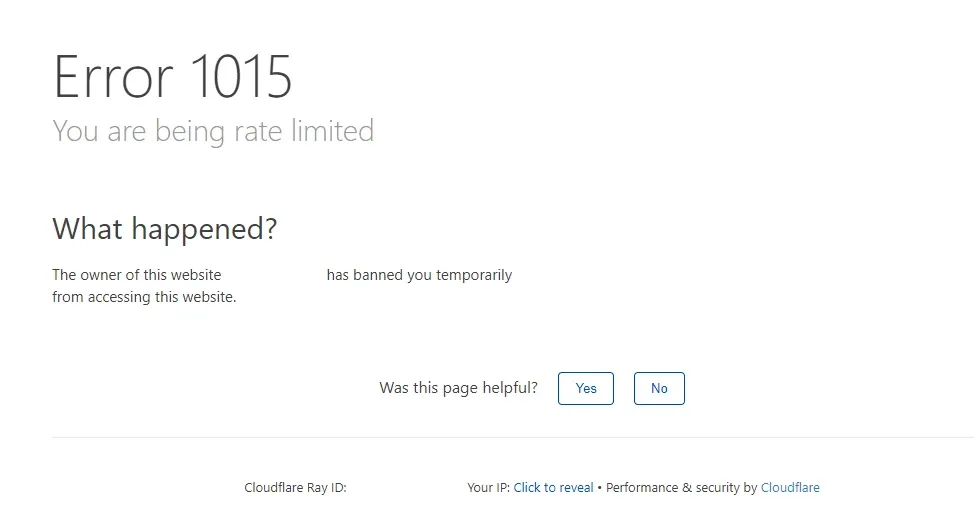
How the refusal actually looks depends on the target's security stack. Cloudflare's rate limiting, for instance, returns an HTTP 429 carrying its own error 1015 ('You are being rate limited') block page, while AWS WAF lets site admins block requests, count them without blocking, present CAPTCHAs or challenges, or serve any custom webmaster-defined response.
So, whether it's a plain 429 or a branded variant, the crux of the problem remains the same. Since 429 Too Many Requests is the most common form you'll encounter, we'll use it as the reference case going forward.
Recreating the Problem: Visualizing a 429 Error
For this demo, we configured a local server to allow 5 requests per minute and return a 429 after that. A short Python script then sent 8 requests to it in quick succession.
As expected, the first few requests returned 200 OK, each with an X-RateLimit-Remaining header that gradually reduced to zero. From the 6th request onwards, as you can see in the following screenshot, it started responding with 429 Too Many Requests, followed by a cooldown duration indicated by a Retry-After header set to 60 seconds.
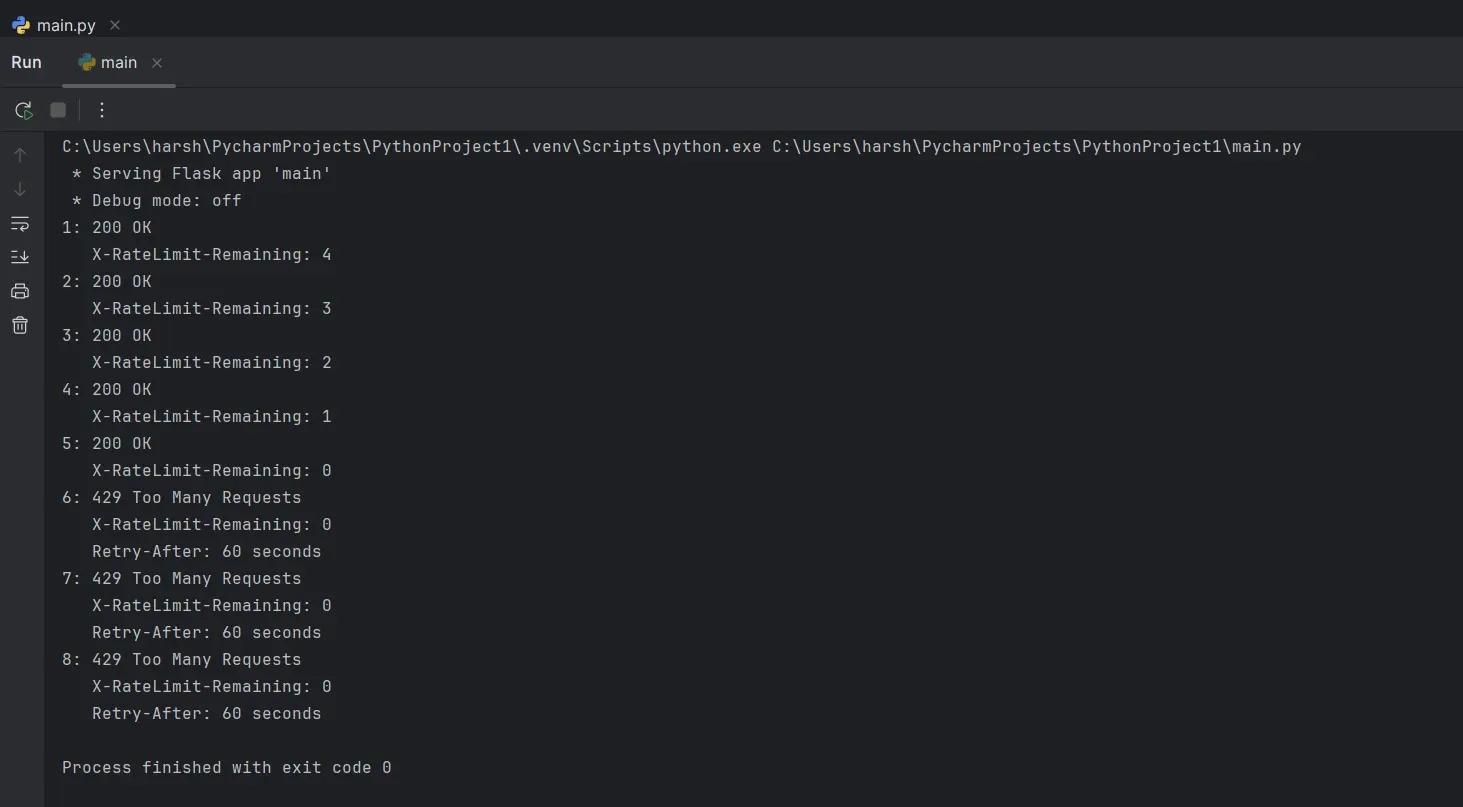
A real site rarely tells you this much. Cloudflare's error 1015 responses, for example, historically shipped with no Retry-After header at all; since March 2026, they include one (30 seconds by default, unless the site's rate limiting rule sets its own), but plenty of WAFs and origin servers still leave you to guess at the wait.
429 Too Many Requests Diagnosis: What is Triggering the Limit?
When you face a 429, there are a few steps you should take, starting with verifying it’s really a 429 and the root cause of the issue, as explained in the following sections.
Confirm it’s really a 429
A Retry-After header isn't exclusive to 429s. Servers also attach it to 503s and even redirects. And since it's ultimately up to the server how to respond, checking the status code or headers alone isn't enough in certain cases.
For instance, as already mentioned, AWS WAF lets site admins block requests, send custom response headers, count requests without blocking, present CAPTCHAs or challenges, and more.
That’s why it becomes important to confirm if you’re really facing a 429 or a rate-limiting temporary block, such as a 403, a 503, or a custom origin response. If the status code and headers don't settle it, look at the actual response body: Cloudflare's rate limit, for instance, identifies itself there with an error 1015 block page.
You can use the following snippet to print the response status code, headers, body, and text for context.
response = requests.get(url)

print("Status:", response.status_code)
print("Headers:", dict(response.headers))

print("\nBody preview:")
print(response.text[:500])
If the response is not what you normally expect from the web page, or is redirecting to another unrelated page, it may indicate you’ve breached the server’s rate limit for that duration.
Another signal is the presence of headers that can precede a 429, such as X-RateLimit-Limit, X-RateLimit-Remaining, and X-RateLimit-Reset, which suggest it’s best to slow down proactively. You can get these headers printed with the following code:
response = requests.get(url)

for header in [
    "Retry-After",
    "X-RateLimit-Limit",
    "X-RateLimit-Remaining",
    "X-RateLimit-Reset",
]:

   print(
        f"{header}: "
        f"{response.headers.get(header)}"
)
Identify what’s being limited: IP, session, or API key
To pinpoint the problem, whether it’s the IP, session, or the API key, we must change one parameter while keeping the other two constant.
For instance, change the IP by rotating to a different one, using a VPN, or switching to your cellular network for a moment without touching the session or the API key. If this enables access, it means the IP was rate-limited. Similarly, you can test for the session (by using incognito mode or a different browser altogether) and the API key.
But the current state of web defenses is far too intricate to work on a single parameter at a time. For example, Cloudflare introduced advanced rate limiting back in 2022, which allows enforcing rate limits using IP addresses, geolocation, cookies, ASNs, headers, or JA3 fingerprints, individually or in combination.
So now, anyone trying to identify a single responsible factor for 429 might not catch anything since it can be two or more variables tagged together.
Resolving the 429 Too Many Requests Error
Before we get down to resolving error 429, you must first immediately stop the current request burst, as it can cause the situation to escalate further. Next, there are two simple strategies to follow, as mentioned subsequently.
Honor Retry-After and back off
This is the first remedial measure if the server has indeed indicated a Retry-After duration or exact time for allowing access. (You should not overlook the warning, as it can lead to permanent blocks, which are much harder to manage.)
The following snippet reads the retry header and converts either format into a delay. If the response lacks the specific header, it returns None, allowing you to try other options.
from datetime import datetime, timezone
from email.utils import parsedate_to_datetime

def get_retry_delay(response):
    """Return Retry-After as seconds, or None if unavailable or invalid."""

    header = response.headers.get("Retry-After", "").strip()

    if not header:
        return None

    # Format: Retry-After: 120
    if header.isdigit():
        return int(header)

    # Format: Retry-After: Wed, 21 Oct 2026 07:28:00 GMT
    try:
        target = parsedate_to_datetime(header)

        if target.tzinfo is None:
            target = target.replace(tzinfo=timezone.utc)

        return max(
            (target - datetime.now(timezone.utc)).total_seconds(),
            0.0,
        )

    except (TypeError, ValueError):
        return None
This delay is fed straight into the scraper as follows, letting you retry once the server-mandated wait has been honored.
import time

delay = get_retry_delay(response)

if delay is not None:
print(f"Rate-limited. Retrying in {delay:.1f} seconds.")
time.sleep(delay)
But what to do if the response simply lacks a Retry-After header? The next section explains.
Retry with exponential backoff and jitter
Exponential backoff with jitter is your fallback when the target server doesn't suggest any cool-off period. The scraper has to devise its own waiting schedule, and it should err on the side of caution.
Exponential backoff indicates a waiting time that increases after every failed attempt, and jitter (random delay) helps if you have multiple rate-limited workers to prevent them from trying all at once, which can make matters worse. The following function includes them both.
import random
import time
import requests

from datetime import datetime, timezone
from email.utils import parsedate_to_datetime

def get_retry_delay(response):
    """Return Retry-After as seconds, or None if unavailable or invalid."""

    header = response.headers.get("Retry-After", "").strip()

    if not header:
        return None

    if header.isdigit():
        return int(header)

    try:
        target = parsedate_to_datetime(header)

        if target.tzinfo is None:
            target = target.replace(tzinfo=timezone.utc)

        return max(
            (target - datetime.now(timezone.utc)).total_seconds(),
            0.0,
        )

    except (TypeError, ValueError):
        return None

def get_with_backoff(url, max_retries=5):
    """Fetch a URL while handling temporary 429 errors."""

    for attempt in range(max_retries):
        response = requests.get(url, timeout=30)

        if response.status_code != 429:
            return response

        # Prefer the server's Retry-After instruction
        delay = get_retry_delay(response)

        # Otherwise, use exponential backoff with jitter
        if delay is None:
            delay = min(2 ** attempt, 60)
            delay += random.uniform(0, 1)

        print(
            f"429 received. Retrying in {delay:.2f} seconds "
            f"(attempt {attempt + 1}/{max_retries})"
        )

        time.sleep(delay)

    raise RuntimeError(
        "Request failed after maximum retries"
    )
You can see the above snippet caps the retry count. In the absence of this, the scraper would simply retry endlessly, which can prompt the target server to enforce severe, lasting measures.
How to Avoid Error 429
Prevention is better than cure fits perfectly here: manage scraping so you never encounter a 429 again, or encounter it as few times as possible. The following sections present three straightforward methods to avoid error 429.
Respect target server limits (or experiment!)
The best preventive measure is to go through the target’s documentation and check the allowable request rate per endpoint. Next, leave some headroom after accounting for all the simultaneous connections before scraping.
However, if the target hasn’t published any rate limits, the most foolproof approach is to run a small-scale test with all production variables. This will give you practical evidence as to what works with that target.
Once you have that number, you can plan scraping around it. We recommend setting rate limits yourself, both normally and in case a request fails. Also, add random delays to make requests look more natural.
Identity, session, and overall behavior management
Scraping sensitive targets is never easy, and the IP address remains the first chokepoint in most cases. To mitigate this, use rotating residential proxies.
Byteful offers a global proxy pool with per-request rotation and sticky sessions. This helps spread requests across multiple IPs, and geo-targeting helps ensure they're counted as a local user.
A proxy provides a separate network identity per request; however, device identity remains a flashpoint. To reiterate, modern internet security combines multiple detection vectors, including device fingerprint, network fingerprint, click-scroll behavior, and request rate/pattern.
Therefore, the next loophole to fix after proxies is device fingerprint. For multi-accounting, your best bet can be an anti-detect browser paired with a proxy. However, for scraping at scale, scraping APIs are the better choice.
But after everything, the core solution for scraping without getting a 429 is to try mimicking the ideal customer profile for any target. This includes how an actual user acts, loads webpages, paginates across pages, and more at that specific target.
Because a 429 error might also indicate that the target’s WAF is suspecting automation and tying all those abnormal requests to a single profile, which might be your scraper. Therefore, it finally comes down to maintaining multiple scraping profiles and fine-tuning the request rate, clicks, scrolling pattern, and everything else to look like a real, normal user.
Cache and cut redundant requests
Caching content is an intelligent move that slashes your data spend and skips overloading the target server with unnecessary requests (and thereby avoiding a possible 429). If you haven't implemented caching already, check if your scraper is fetching duplicate content or overlapping with other workers.
What you need is a persistent cache of successful responses that remains available between runs. Here’s a simple cache function:
from requests_cache import CachedSession

session = CachedSession(
    "scrape_cache",
    expire_after=3600
)

response = session.get(url)
This caches 200 OK responses by default. You can also send a stored ETag with If-None-Match for pages you need to check repeatedly for new content. In case the source has not changed, you will simply get 304 Not Modified. But the catch is, based on the target, they can still count these conditional requests against the primary rate limit.
Why Your 429 Fix Might Still Fail: The Missing Details
429s can be frustrating, and it becomes worse when you can’t debug your scraper out of denial of access. In such cases, the following pointers shed more light on what might be at play.
- Sliding windows: This represents a situation (similar to FIFO) where the server doesn’t reset all requests at a fixed time, but gradually refills the quota based on the immediate history. Sliding windows can sometimes be inferred from response headers. Watch X-RateLimit-Reset in particular: it is dynamic and shifts based on the exact timestamps of your past requests, rather than sticking to a rigid, fixed schedule.
- Shared proxies: Though proxies help, in an unlikely event that the users you are sharing the IPs with are hitting the same target, your requests might exhaust quicker than anticipated. This is something you can't control unless, of course, you subscribe to dedicated proxies.
- Escalated error: Neglecting 429s initially can escalate the situation into a hardened block, and if the server is configured to not communicate the actual problem back, you can be left wondering why your 429 remedies aren’t working.
