
Agentic Web Scraping: What It Is, How It Works, and Its Limits


TL;DR
Agentic web scraping means you describe the data you want in plain language, and an AI agent finds and extracts it. The agent reads the page, decides, acts, and repeats until it has a result or hits a set limit. Agentic scraping adapts when sites change. However, it is usually slower and costs more than a traditional scraper, and it can return wrong data without any error. Keep it for low-volume jobs, and use traditional scrapers for known sites and heavy extraction.
Agentic web scraping exists to make scraping convenient: you describe what you want, and an AI agent does the rest. For instance, it can auto-adjust to changing website structures and needs little to no coding on the operator's side. These traits make agentic web scraping perfect for certain use cases.
That said, it has its own downsides, and token cost is only one of them. So, this explainer covers agentic web scraping, how it works, its limits, and includes a hands-on demo for better understanding.
What is agentic web scraping?
Agentic web scraping is a prompt-and-scrape workflow. It is driven by an objective given in natural language and does everything else without needing additional human input. This means automated planning, navigation, interaction, data extraction, and verification without a script for every single step.
This differs from AI-assisted web scraping (often just called AI web scraping), where you list the target URLs, and AI handles parsing. Whereas traditional scraping is fully hand-coded and farthest from agentic web scraping.
Put simply, traditional scrapers suit high-volume, stable workflows against known targets. By contrast, AI fares better with changing layouts or cross-website data extraction. In those situations, writing a scraper for every website or patching it on every structure change makes little sense, especially at low volumes.
The following table shows the key differences between traditional and agentic scraping
| Aspect | Traditional scraping | Agentic scraping |
|---|---|---|
| Input | URLs and hand-written CSS/XPath selector | A goal in plain language |
| When a site changes | Breaks until patched | Adapts, but accuracy isn't guaranteed |
| Running cost | Servers and traffic | Server, traffic, and model tokens |
| Speed at scale | Fast | Generally slow, since every step waits for a model call |
| Output | Identical every run | Can vary between runs |
| Failure indicators | Errors or empty fields | Often none. Plausible-sounding wrong data |
| Suitability | Fixed-structure, high-volume work | Low-volume scraping with changing layouts or multi-site extraction. |
How does an agentic scraper work?
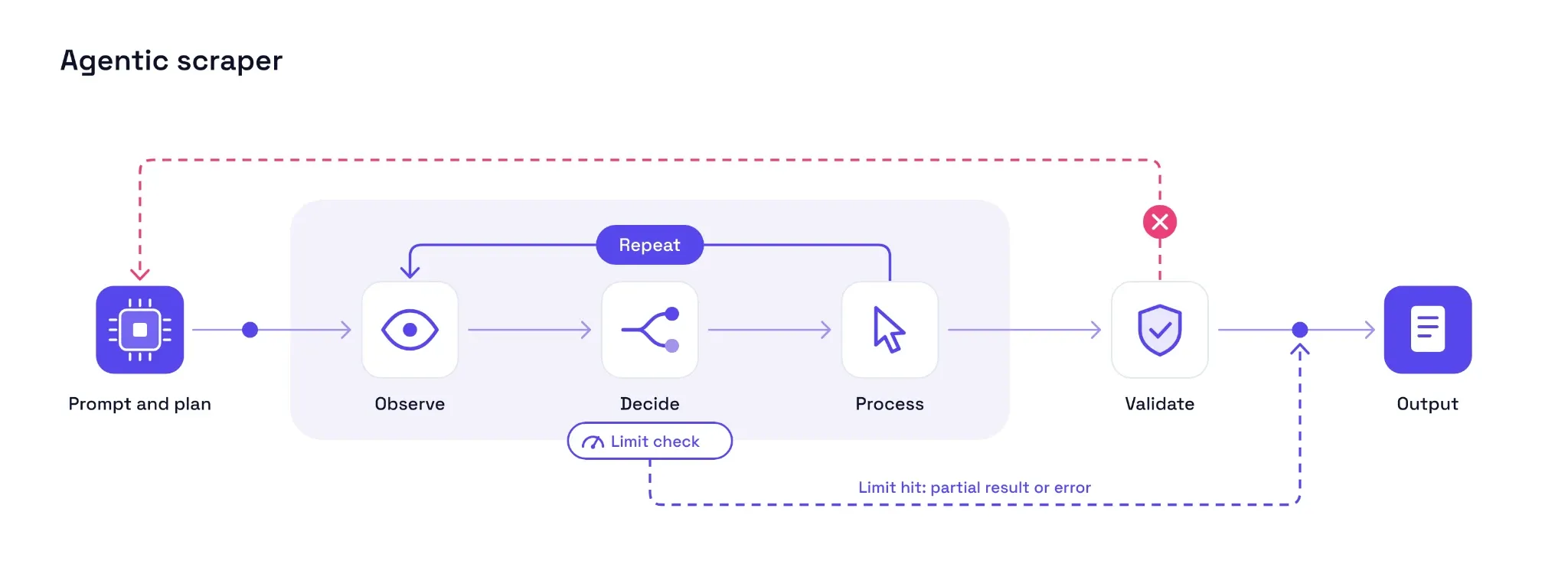
At the onset, an agentic scraper is simply an LLM+browser combo. The AI model understands the scraping objective and decides which site(s) to visit, plans and executes data extraction, self-verifies accuracy, and repeats until the objectives are met or resources are exhausted. Check the following steps explaining the details.
- Prompt and plan: You describe the scraping goals and output format in plain language to the LLM. The LLM takes it from there and, if you haven't named URLs in the objective, decides which pages to scrape.
- Observe: Ingesting raw HTML directly can be slow and costly. So, using some form of runtime content compression is pretty much the norm. For instance, Stagehand's snapshots condense the page into an accessibility tree that covers iframes and shadow DOM, and the agent can add a viewport screenshot when needed.
- Decide: The model thinks it over and decides the appropriate strategy. It can be single-step instructions or multiple steps glued into one call. The deciding factor can be accuracy or token efficiency, depending on the agentic framework.
- Process: Agents can use an automation framework such as Playwright or Puppeteer to handle browser actions (click, scroll, navigate, etc.). Alternatively, they can drive a Chromium-based browser directly with Chrome DevTools Protocol (CDP) commands.
- Read and repeat: The results go back to the model, and the chain (Observe, Decision, and Process) repeats until the agent delivers a result or hits a preset usage limit, such as maximum steps, timeout, or token spend.
- Validate and output: Data validation is a crucial step where many frameworks check the output against a schema you provide before sending it over. If not, the agent tries again.
To see this in action, we subscribed to Browser Use Cloud (1$ trial credit) and gave its agent a single goal on books.toscrape.com, a site made for scraping learners. Notice that we didn't pass the exact target URL. We left it to the LLM to navigate to the Travel category from the homepage.
from browser_use_sdk.v4 import BrowserUse

TASK = """Go to https://books.toscrape.com and open the Travel category.
Return the title and price of the first 5 books as a JSON list.
If you can't read a value, use null. Do NOT guess."""

with BrowserUse() as client:
    run = client.runs.create(TASK, max_cost_usd=0.25)
    ready = client.runs.wait_for_event(run.id, "browser.ready", interval=3)
    print("Watch live:", ready.data["live_view_url"])
    result = client.runs.wait_for_completion(run.id)
    print(result.status)
    print(result.result)
    print(f"Cost: ${result.total_cost_usd}")
The script printed a live-view link, where we watched the agent find and open the Travel category on its own:
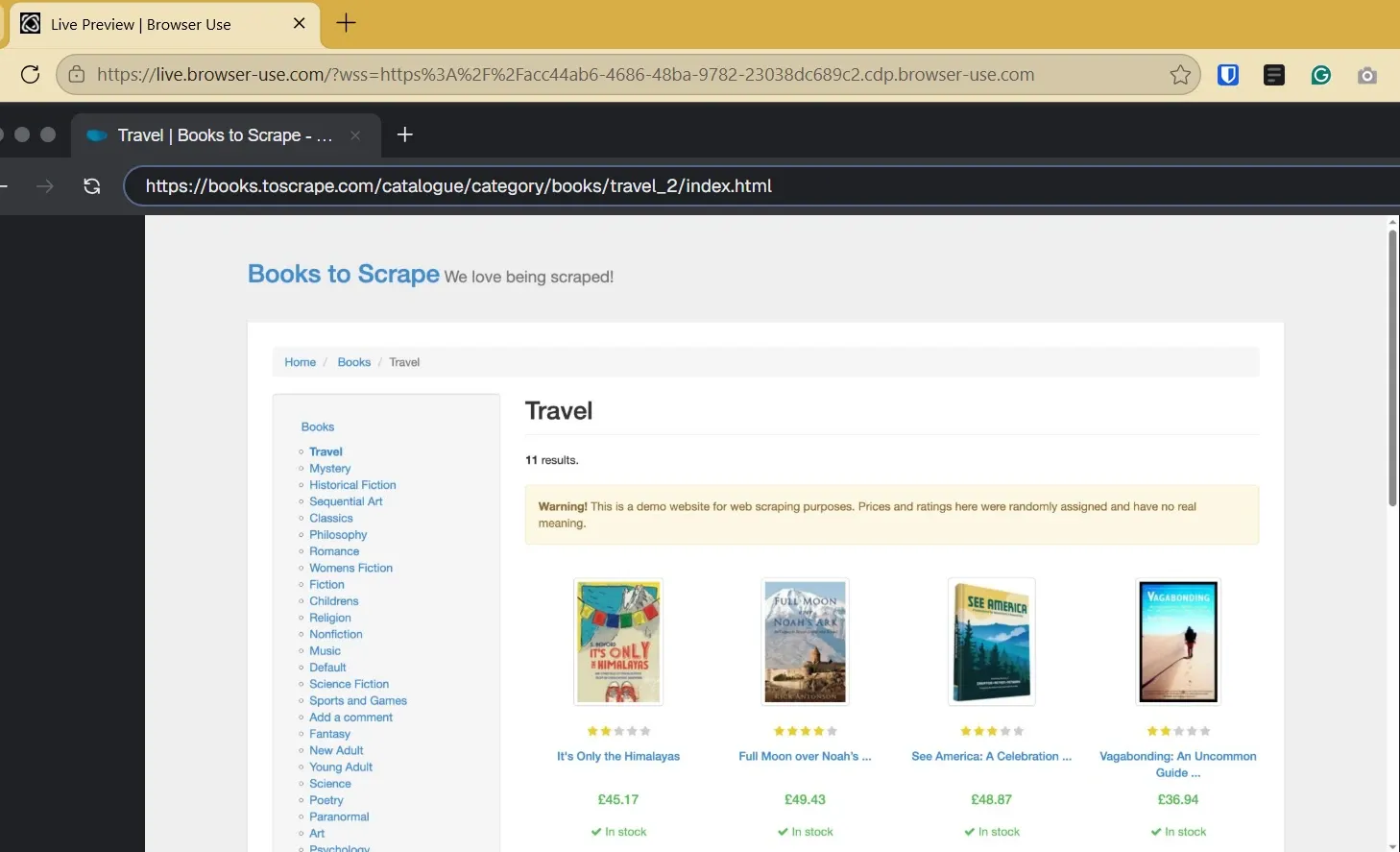
It then returned the following output:
[
{"title": "It's Only the Himalayas", "price": "£45.17"},
{"title": "Full Moon over Noah’s Ark: An Odyssey to Mount Ararat and Beyond", "price": "£49.43"},
{"title": "See America: A Celebration of Our National Parks & Treasured Sites", "price": "£48.87"},
{"title": "Vagabonding: An Uncommon Guide to the Art of Long-Term World Travel", "price": "£36.94"},
{"title": "Under the Tuscan Sun", "price": "£37.33"}
]
The run cost $0.002632, and all five titles and prices matched the Travel category page. That said, this is a practice target with no anti-bot protection.
Note: If you get a CERTIFICATE_VERIFY_FAILED error on Windows, run pip install truststore and add import truststore and truststore.inject_into_ssl() at the top of the script.
Agentic web scraping: Is it reliable?
It was mostly reliable across our tests. Beyond the demo on books.toscrape.com, we ran a few more, each with a $0.10 spend cap (the demo itself ran under the $0.25 cap in the script), and checked every output against the live pages. Here is the summary:
| Test | What we checked | Result | Cost |
|---|---|---|---|
| Demo | Five books from the Travel category | Correct | $0.002632 |
| Missing data | Asked for 15 books where only 11 exist | Correct, and it flagged that only 11 exist | $0.003080 |
| Lazy loading | 30 quotes on an infinite-scroll page | Correct, all 30 in order | $0.003515 |
| Anti-bot, run 1 | A Cloudflare practice challenge | Wrong: reported a block its own browser had passed after a few seconds | $0.002706 |
| Anti-bot, run 2 | Same, with a wait instruction | Correct | $0.002557 |
| Consistency | The demo task, run three times | Same data each time, but different JSON formatting and inconsistent spending | $0.002634 to $0.002674 |
The agent got seven of eight runs right. It didn't invent anything even without an explicit "Do Not Guess" instruction. It survived lazy loading when extracting 30 items, while scrolling on its own.
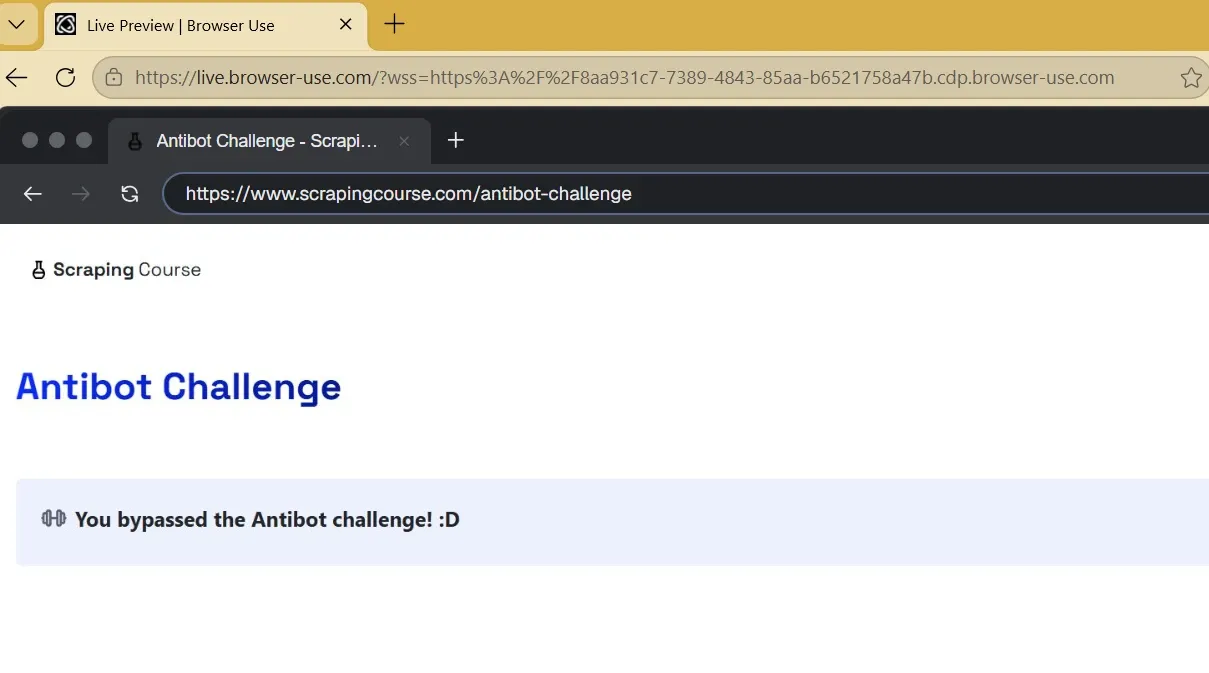
However, it reported being stuck on a Cloudflare anti-bot challenge when the live view confirmed it passed. To dig deeper, we reran the task with a 15-second wait in the prompt, and this time it correctly reported passing Cloudflare's prove-human block.
This shows that a major problem with agentic scraping is quiet failures. It lacks a scraping engineer's instincts, and problems can amplify if the operator cannot point out errors or if workflows are run entirely unattended.
Additionally, the agent also slightly messed up our consistency checks (three identical runs for the same task) with the same data but with different JSON formatting and cost.
Taken together, that is why we recommend conventional scraping for known websites and heavy data extraction, and agentic workflows for low-volume jobs.
What agentic scrapers need to run
Our illustration needed just an API key and a short script. So we signed up for BrowserUse, created an API key and set it as the BROWSER_USE_API_KEY environment variable, which the script picks up automatically. Everything else, including the AI model, agent runtime, cloud browser, spend limits, and live view, was handled by the platform. It even passed Cloudflare's anti-bot challenge without any configuration on our side.
However, in a self-hosted setup, you have to deal with most of these aspects yourself. In particular, you need to pay attention to the access layer, including stealth browsing, residential proxies, and CAPTCHA solving.
Still, no route covers everything, and you should consider a few things whether you self-host or use cloud agents.
- Task definition: It's best to clearly define the task and expected output fields. Put as many details as possible, as our anti-bot rerun showed that one detail can decide whether the answer is right.
- Sensible limits: Set usage caps on token spend, time, cost, or a combination of multiple parameters. In addition, keep the request rate low and within the target's limits.
- Verification: A validation step that checks the results, ideally against a second source, is essential in any LLM-led workflow. Also, try not to run agentic browsers completely on their own. Spot-check live views and recordings to catch errors and modify prompts accordingly.
- Legality: Similar to traditional scraping, the need to abide by local laws and the target's usage terms still applies.
