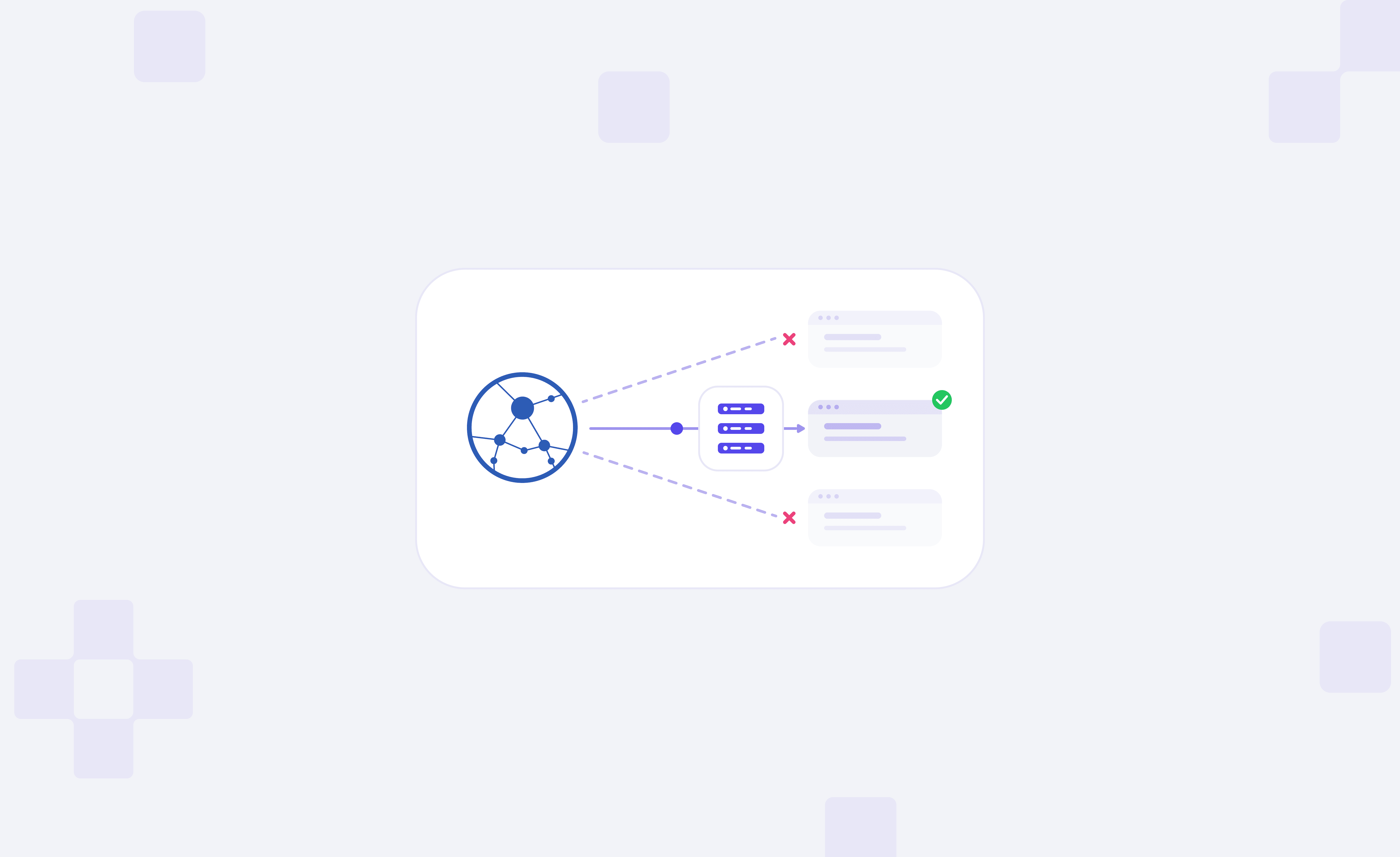
Asynchronous scraping with aiohttp lets you send multiple requests at once, but adding proxies introduces challenges with authentication, connection management, and IP rotation. Without proper configuration, you may encounter timeouts, failed requests, or unexpected IP addresses.
In this guide, you'll learn how to configure aiohttp proxies, send multiple requests simultaneously, rotate IPs, fix common issues, and verify that your proxy works.
How Proxy Connections Work in aiohttp
aiohttp uses Python's asyncio library to send multiple HTTP requests without waiting for each one to finish. If you set up a proxy, then the requests go through the proxy server before they go to the target website, and the target website sees the proxy's exit IP, rather than the direct IP.
A proxy can be specified for a single request, via the proxy parameter, or for a complete ClientSession, via the default proxy. If neither is set, aiohttp will make a direct connection to the destination by default. Depending on the situation, the appropriate method should be used:
| Configuration | How it works | Best for |
|---|---|---|
| Single proxy | Routes requests through one endpoint | Initial setup and consistent IP routing |
| Multiple proxy endpoints | Assigns different endpoints to individual requests | Distributing traffic across available proxies |
| Rotating gateway | Uses one gateway that manages exit IP selection | Workloads requiring provider-managed rotation |
Concurrency and IP rotation are separate. This does not imply 20 separate IP addresses are used when running 20 requests in parallel. All requests will generally use the same exit IP if they are using the same static proxy. For rotation, use different endpoints or configure a gateway to rotate IPs.
Set Up Your First aiohttp Proxy Connection
First, we'll create a single proxy connection and verify if it is going through the desired proxy exit IP. In this example, we're going to use PyCharm on macOS, but it can be followed in another Python development environment.
Step 1: Install aiohttp and Prepare Your Project
You need to have Python 3.10 or higher. Make a project called aiohttp-proxy-scraping and create a virtual environment to separate dependencies. PyCharm creates one automatically for new projects. If you're working in a plain terminal, run python -m venv .venv and activate it before installing packages.
Then install aiohttp, an async (asynchronous) HTTP client library we'll use to send requests via a proxy. It is compatible with the built-in asyncio library of Python, enabling requests to be executed concurrently without using a separate thread for every request.
In the terminal, type the command:
python -m pip install "aiohttp>=3.14,<4"Confirm the installation:
python -m pip show aiohttpThe second command shows you the version and information of the package that is installed. You don't need to install asyncio separately because it's included with Python.
Step 2: Choose a Proxy and Configure Your Credentials
You will need a proxy host, port, user, and password. There are different types of proxies, and the right one depends on the websites you want to access and whether you need a stable or rotating IP address.
- Datacenter proxies: These are based on IP addresses on datacenter infrastructure. They tend to have quick connections and are not as pricey as some other options, and can be used for high-volume requests to websites that do not have many IP-based restrictions. But websites can detect datacenter IP ranges and can limit their traffic.
- Residential proxies: These are based on the IP address of residential internet connections. They can be helpful in gathering public information from a variety of geographical areas. With rotating sessions, you can get different exit IPs across requests, and with a sticky session, you can get the same IP for a short time.
- ISP proxies (static residential): These are a mix of ISP-associated IPs with server-based infrastructure. They offer stable IPs and can be used in scenarios that require a fixed network address, like session-based data scraping. They generally prioritize stability over automatic rotation.
In this tutorial, we will use a Byteful rotating residential proxy to make the initial connection and later rotate the IP.
You can generate proxy credentials from our dashboard, where you set the residential proxy protocol, rotation, and location. If you don't have a proxy yet, new users can get 1 GB of free residential data, allowing you to test the setup before committing to a larger workload.
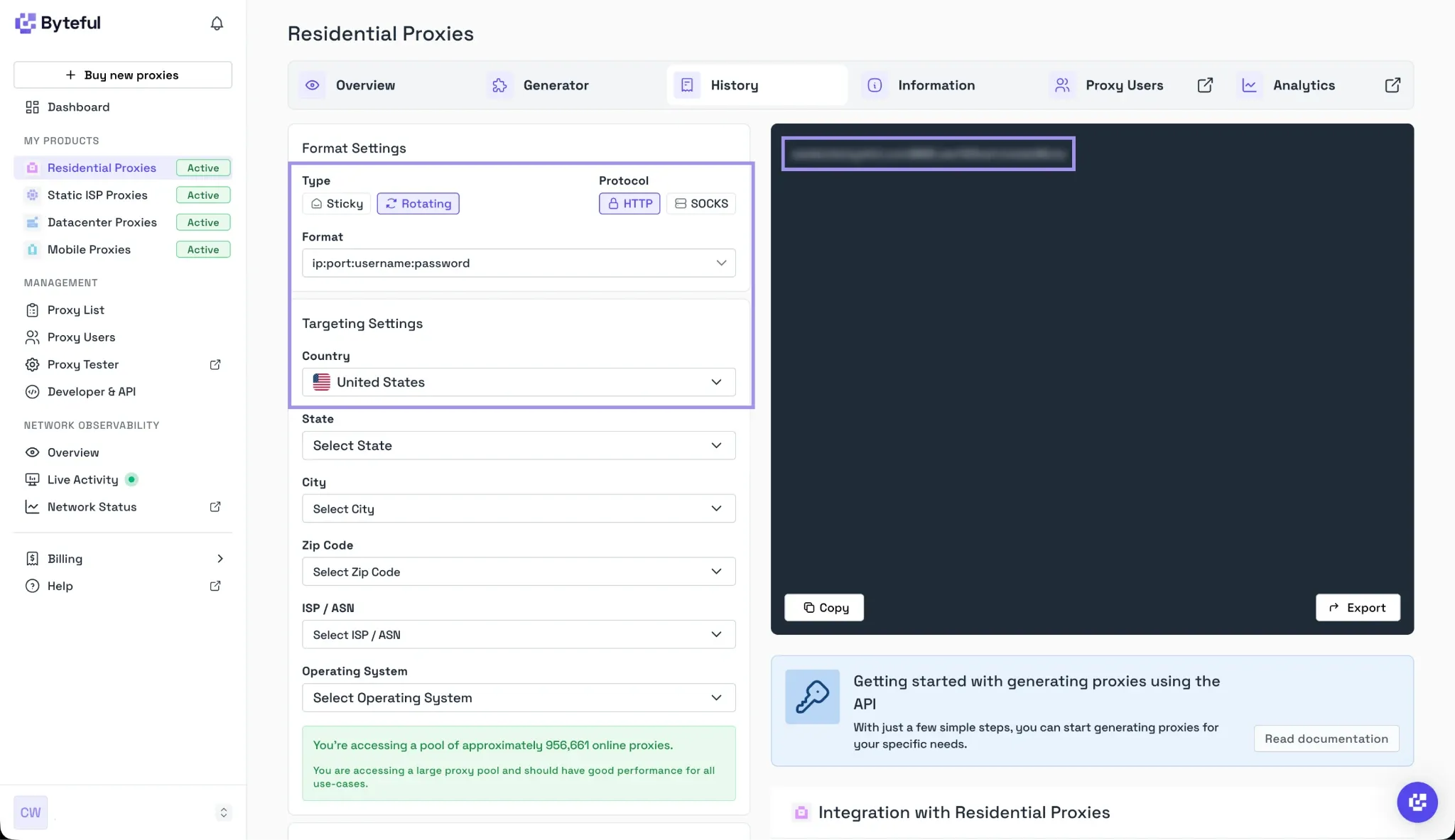
After receiving your credentials, create a .env file in the project folder:
BYTEFUL_PROXY_HOST=your-proxy-host
BYTEFUL_PROXY_PORT=your-proxy-port
BYTEFUL_PROXY_USER=your-username
BYTEFUL_PROXY_PASSWORD=your-password
Replace the placeholders with the actual values. Add .env to a .gitignore file so the credentials aren't accidentally committed to a repository.
Step 3: Configure an aiohttp Request Through the Proxy
Make a single_proxy.py file in Python. We'll use aiohttp.ClientSession to make a request to https://httpbin.org/ip, which is a test endpoint that returns the public IP address that the request came from.
The request needs three main components:
- Proxy URL: Combines the hostname and port to identify the proxy gateway
- Proxy authentication: Uses encode_basic_auth() to construct the Proxy-Authorization header
- Client session: Manages the HTTP connection and sends the request through the configured proxy
For example, the request itself uses the following structure:
async with session.get(
    "https://httpbin.org/ip",
    proxy=proxy_url,
    proxy_headers=proxy_headers,
) as response:
    response.raise_for_status()
    data = await response.json()
The proxy parameter sends the request to the gateway, and proxy_headers supplies authentication. The response returns a JSON object, which lets us examine the reported IP address.
We will use these elements as part of a full script in the next step.
Step 4: Run the Complete Script and Verify the Proxy
Put the following full code into single_proxy.py. It reads your proxy credentials from environment variables, generates a proxy-authenticated request, and prints the HTTP status and exit IP.
import asyncio
import os
import aiohttp


async def main():
    proxy_url = (
        f"http://{os.environ['BYTEFUL_PROXY_HOST']}:"
        f"{os.environ['BYTEFUL_PROXY_PORT']}"
    )
    proxy_headers = {
        "Proxy-Authorization": aiohttp.encode_basic_auth(
            os.environ["BYTEFUL_PROXY_USER"],
            os.environ["BYTEFUL_PROXY_PASSWORD"],
        )
    }
    timeout = aiohttp.ClientTimeout(total=30)
    async with aiohttp.ClientSession(timeout=timeout) as session:
        async with session.get(
            "https://httpbin.org/ip",
            proxy=proxy_url,
            proxy_headers=proxy_headers,
        ) as response:
            response.raise_for_status()
            data = await response.json()
            print("HTTP status:", response.status)
            print("Proxy exit IP:", data["origin"])


if __name__ == "__main__":
    asyncio.run(main())
The ClientTimeout(total=30) parameter sets the time limit for the request to 30 seconds, and response.raise_for_status() raises an exception if the HTTP response was not successful. Lastly, asyncio.run(main()) runs the asynchronous program.
To load the variables into your terminal on macOS or Linux, run the following before running the script:
set -a
source .env
set +a
python single_proxy.py
On Windows, set each variable in your terminal before running the script, or use the python-dotenv package to load the .env file.
If the connection succeeds, the terminal displays HTTP status 200 and the public IP returned by HTTPBin.
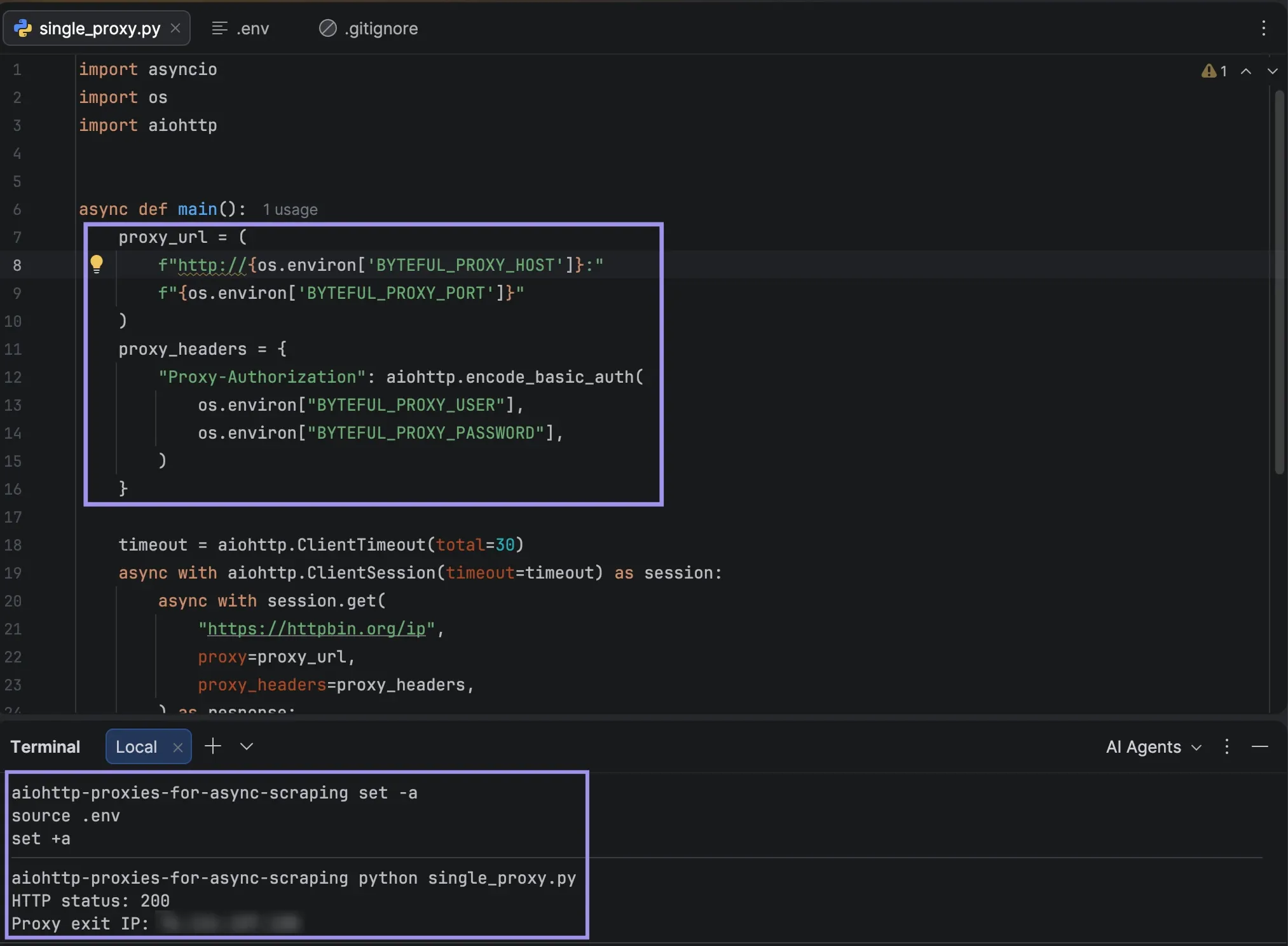
Check the return address against the direct public IP address. If the two match, the request did not go through the proxy. If you have set country-level targeting, run an IP geolocation lookup to verify that the reported country is the same as the country that you have set. When using a rotating residential proxy, the gateway's IP address will not necessarily be the same as the exit IP address, so check the actual exit IP address and not the gateway hostname.
Run Multiple Async Requests Through a Proxy
Now that the first proxy connection is confirmed, we can extend the setup to send multiple requests at once. aiohttp uses asynchronous tasks to handle responses without blocking the entire program, making it useful for scraping multiple pages.
Reuse ClientSession for Concurrent Requests
Using a new ClientSession for each request adds overhead since each ClientSession has its own connection pool. A single session enables effective management of connections across concurrent tasks.
Create async_requests.py and add the following code. It sends five requests through the configured proxy using asyncio.gather().
import asyncio
import os
import aiohttp


async def fetch_ip(session, request_id, proxy_url, proxy_headers):
    try:
        async with session.get(
            "https://httpbin.org/ip",
            proxy=proxy_url,
            proxy_headers=proxy_headers,
        ) as response:
            response.raise_for_status()
            data = await response.json()
            return request_id, response.status, data["origin"]
    except (aiohttp.ClientError, asyncio.TimeoutError) as error:
        return request_id, "Failed", type(error).__name__


async def main():
    proxy_url = (
        f"http://{os.environ['BYTEFUL_PROXY_HOST']}:"
        f"{os.environ['BYTEFUL_PROXY_PORT']}"
    )
    proxy_headers = {
        "Proxy-Authorization": aiohttp.encode_basic_auth(
            os.environ["BYTEFUL_PROXY_USER"],
            os.environ["BYTEFUL_PROXY_PASSWORD"],
        )
    }
    timeout = aiohttp.ClientTimeout(total=30)
    async with aiohttp.ClientSession(timeout=timeout) as session:
        tasks = [
            fetch_ip(session, i, proxy_url, proxy_headers)
            for i in range(1, 6)
        ]
        results = await asyncio.gather(*tasks)
        for request_id, status, result in results:
            print(
                f"Request {request_id}: "
                f"Status={status}, IP/Result={result}"
            )


if __name__ == "__main__":
    asyncio.run(main())
The fetch_ip() function processes each request; asyncio.gather() schedules all five and waits for them to be done. All requests are within the same session, and errors are returned individually instead of stopping the whole batch.
Check the Response and Exit IP for Each Request
These results can also be summarized to determine if each request was successful and if they had different exit IPs.
Add the following lines inside main(), immediately after the existing for loop, keeping them within the ClientSession block:
        successful = [
            result for _, status, result in results
            if status == 200
        ]
        failed = len(results) - len(successful)
        unique_ips = set(successful)
        print(f"\nSuccessful requests: {len(successful)}")
        print(f"Failed requests: {failed}")
        print(f"Unique exit IPs: {len(unique_ips)}")
The script now prints the status and IP for each request, followed by a summary of the successful requests, failures, and distinct IP addresses.
Export your environment variables and execute the new script in your terminal:
set -a
source .env
set +a
python async_requests.py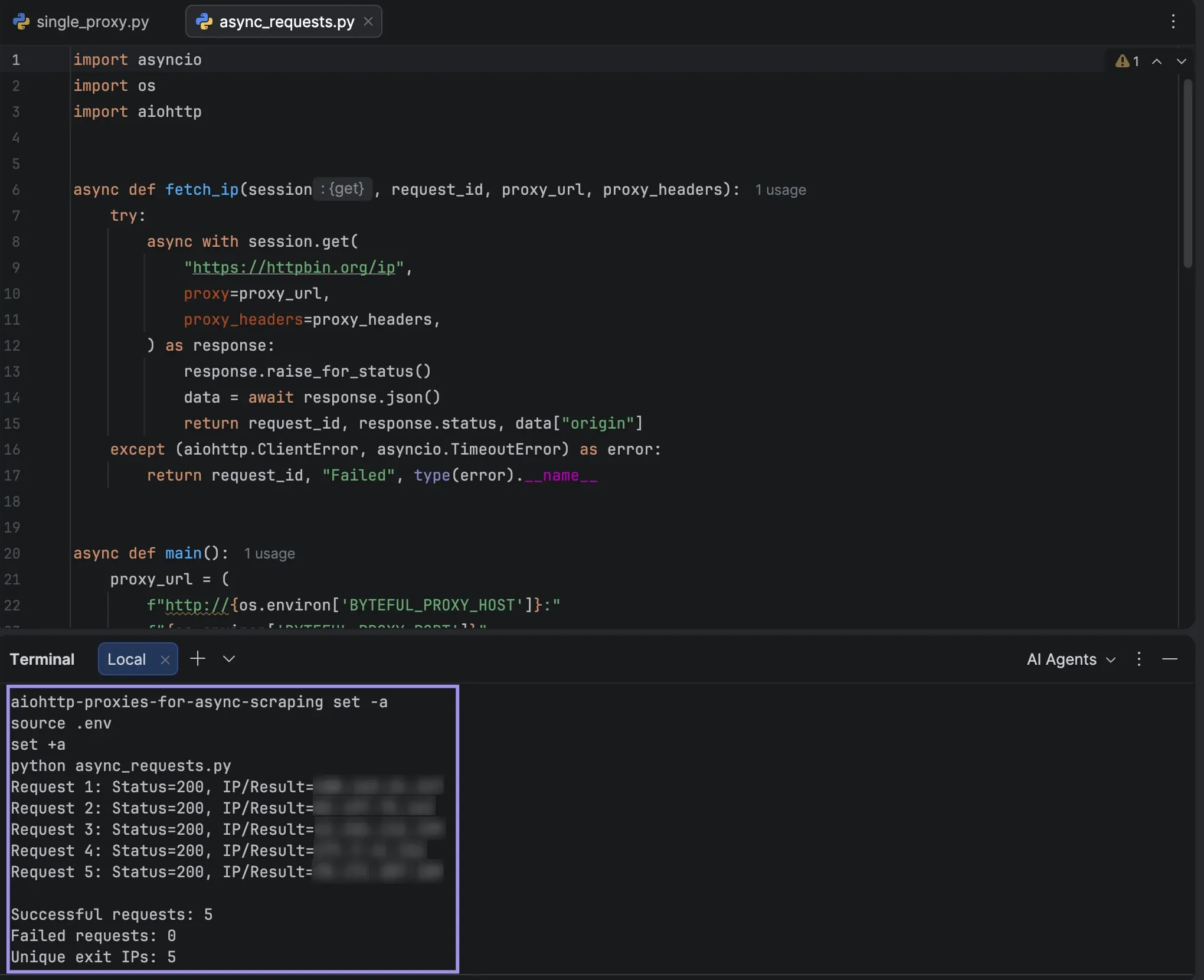
Requests are sent to the same proxy gateway, but the exit IP of each request is determined by the proxy's rotation settings, not by aiohttp. Static and sticky proxies will typically keep the same IP; a rotating residential gateway may use a different IP for each connection or request.
Scrape Multiple Pages Using aiohttp
Having confirmed that we can have concurrent requests, let's try the same thing with real web scraping. We will be scraping book titles from several category pages using Books to Scrape, a demo site for practicing scraping. When scraping other websites, please read their terms and review any access restrictions before doing so, and do not exceed their allowed number of requests.
In your terminal, install Beautiful Soup to parse the returned HTML:
python -m pip install beautifulsoup4Create scrape_books.py:
import asyncio
import os
import aiohttp
from bs4 import BeautifulSoup


BASE_URL = "https://books.toscrape.com/catalogue/category/books"


async def scrape_category(session, category, proxy, headers):
    url = f"{BASE_URL}/{category}/index.html"
    try:
        async with session.get(
            url, proxy=proxy, proxy_headers=headers
        ) as response:
            response.raise_for_status()
            html = await response.text()
    except (aiohttp.ClientError, asyncio.TimeoutError) as error:
        return category, type(error).__name__
    soup = BeautifulSoup(html, "html.parser")
    titles = [
        book["title"]
        for book in soup.select("article.product_pod h3 a")
    ]
    return category, titles


async def main():
    proxy = (
        f"http://{os.environ['BYTEFUL_PROXY_HOST']}:"
        f"{os.environ['BYTEFUL_PROXY_PORT']}"
    )
    headers = {
        "Proxy-Authorization": aiohttp.encode_basic_auth(
            os.environ["BYTEFUL_PROXY_USER"],
            os.environ["BYTEFUL_PROXY_PASSWORD"],
        )
    }
    categories = [
        "travel_2",
        "mystery_3",
        "historical-fiction_4",
    ]
    timeout = aiohttp.ClientTimeout(total=30)
    async with aiohttp.ClientSession(timeout=timeout) as session:
        results = await asyncio.gather(
            *[
                scrape_category(session, category, proxy, headers)
                for category in categories
            ]
        )
    for category, titles in results:
        if isinstance(titles, str):
            print(f"\n{category}: Failed ({titles})")
            continue
        print(f"\n{category}: {len(titles)} books")
        for title in titles[:3]:
            print(f"  {title}")


if __name__ == "__main__":
    asyncio.run(main())
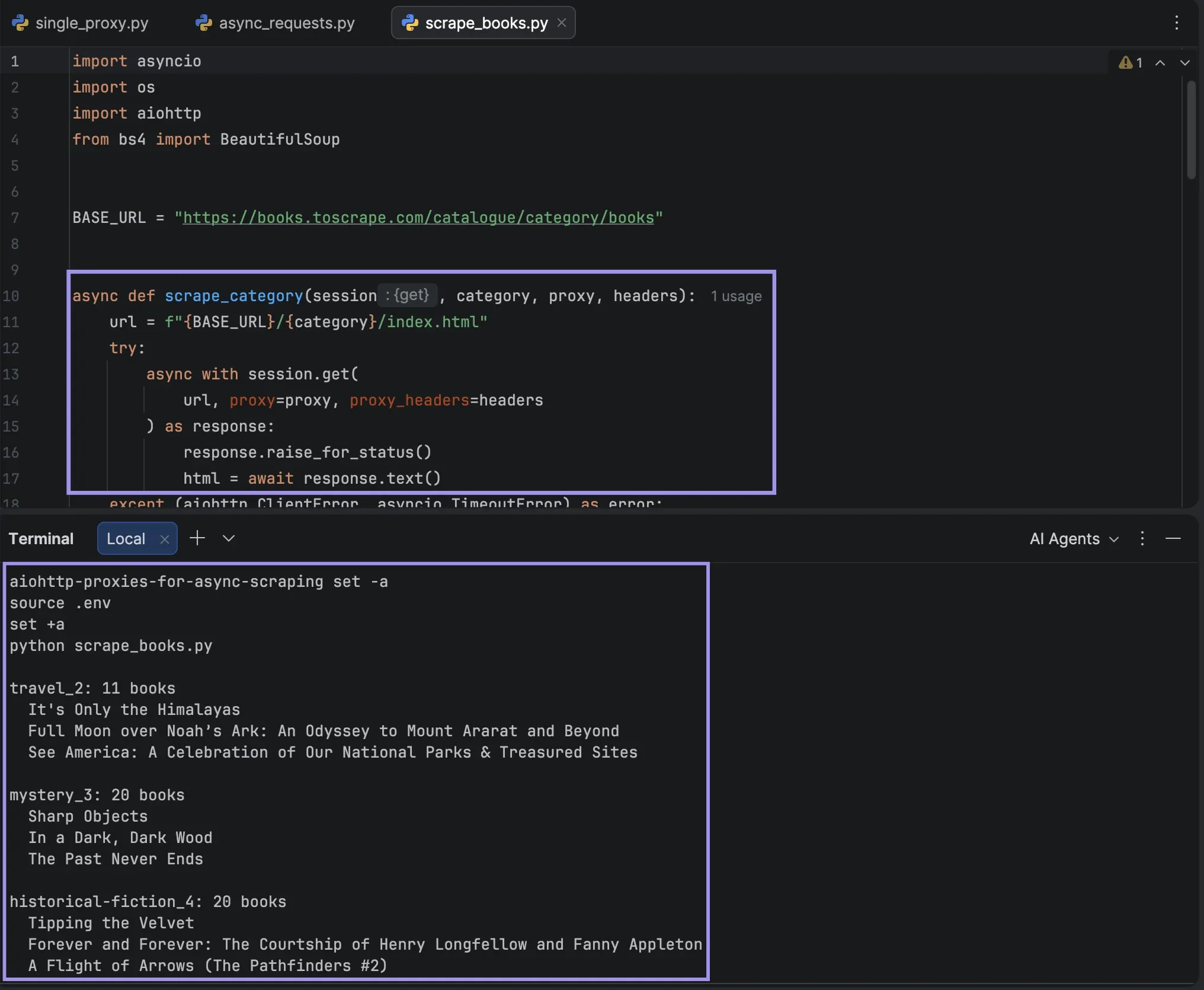
The script sends three requests to the three category pages at once, and with Beautiful Soup it gets the book titles out of the HTML. Only the first page of each category is requested, and up to 20 books are reported on each page, so larger categories, like Mystery (32 books), report 20 books.
All requests pass through the configured proxy, and asyncio.gather() returns the results in the same order as the categories list. In case of failure of a page or timeout, the script prints the name of the failed category, but continues to print the result for the other categories.
Load your .env variables, and then run the script python scrape_books.py in the terminal.
Rotate Proxies Without Breaking Your Async Scraper
Sending requests concurrently increases throughput, but does not dictate which IP address is used. You can either rotate proxy endpoints in Python, or the proxy provider can handle the exit IPs with a rotating gateway.
Method 1: Rotate Between Multiple Proxy Endpoints
Round-robin rotates through a list of pre-defined proxies. For instance, if there are three endpoints, the fourth request returns to the first. This allows you to spread requests out over the available proxies without having to use a separate session per proxy.
Add two more proxy configurations to your .env file in the same format as above: host, port, username, password.
BYTEFUL_PROXY_2_HOST=second-proxy-host
BYTEFUL_PROXY_2_PORT=second-proxy-port
BYTEFUL_PROXY_2_USER=second-username
BYTEFUL_PROXY_2_PASSWORD=second-password
BYTEFUL_PROXY_3_HOST=third-proxy-host
BYTEFUL_PROXY_3_PORT=third-proxy-port
BYTEFUL_PROXY_3_USER=third-username
BYTEFUL_PROXY_3_PASSWORD=third-password
Create rotate_proxies.py with the following code:
import asyncio
import itertools
import os
import aiohttp


def get_proxy(number):
    prefix = (
        "BYTEFUL_PROXY"
        if number == 1
        else f"BYTEFUL_PROXY_{number}"
    )
    url = (
        f"http://{os.environ[f'{prefix}_HOST']}:"
        f"{os.environ[f'{prefix}_PORT']}"
    )
    headers = {
        "Proxy-Authorization": aiohttp.encode_basic_auth(
            os.environ[f"{prefix}_USER"],
            os.environ[f"{prefix}_PASSWORD"],
        )
    }
    return url, headers


async def fetch(session, number, proxy_number, proxy):
    url, headers = proxy
    try:
        async with session.get(
            "https://httpbin.org/ip",
            proxy=url,
            proxy_headers=headers,
        ) as response:
            response.raise_for_status()
            data = await response.json()
            return number, proxy_number, data["origin"]
    except (aiohttp.ClientError, asyncio.TimeoutError) as error:
        return number, proxy_number, type(error).__name__


async def main():
    proxies = [get_proxy(i) for i in range(1, 4)]
    rotation = itertools.cycle(enumerate(proxies, start=1))
    timeout = aiohttp.ClientTimeout(total=30)
    async with aiohttp.ClientSession(timeout=timeout) as session:
        tasks = []
        for number in range(1, 7):
            proxy_number, proxy = next(rotation)
            tasks.append(
                fetch(session, number, proxy_number, proxy)
            )
        results = await asyncio.gather(*tasks)
        for number, proxy_number, result in results:
            print(
                f"Request {number} | "
                f"Proxy {proxy_number} | "
                f"IP/Result: {result}"
            )


if __name__ == "__main__":
    asyncio.run(main())
In this case, itertools.cycle() cycles through the proxies, one for each request. asyncio.gather() runs the six requests concurrently, with requests distributed across the three endpoints.
Update the .env file and execute the script in your terminal:
set -a
source .env
set +a
python rotate_proxies.py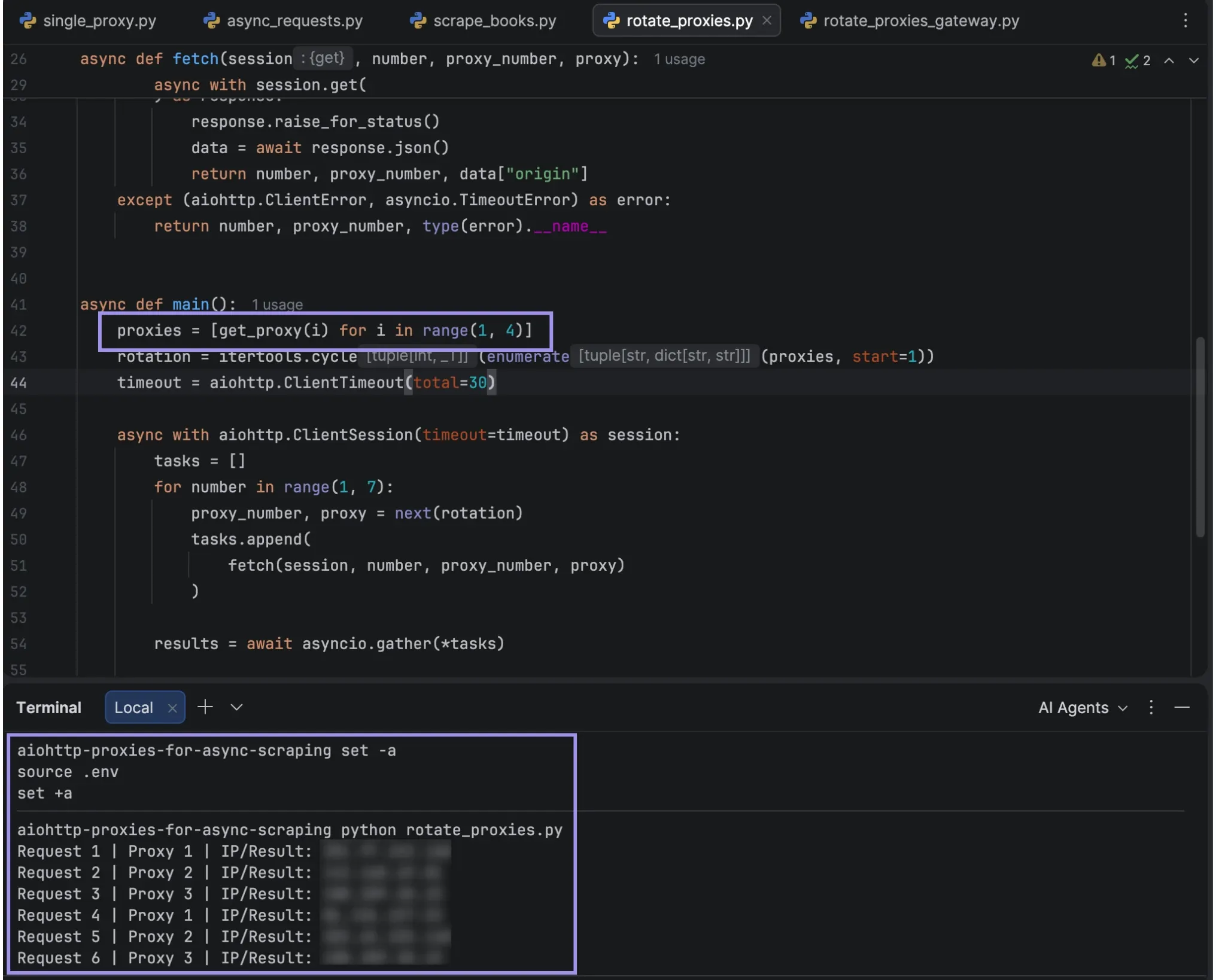
Method 2: Use a Rotating Proxy Gateway
A provider's rotating gateway selects an exit IP on the provider's network. You establish a connection to one endpoint, and the provider selects a residential exit IP for each connection.
This is what our rotating residential proxies are able to help you with. Rotation may offer different exit IPs for requests sent from different connections. When multiple requests need to share the same exit IP, opt for a sticky session. It keeps the IP assigned for a specified period of time (as long as there is no limitation in availability and session settings). Switching from one IP to another in the middle of a login procedure or any other IP-dependent process may result in further verification or in a loss of session.
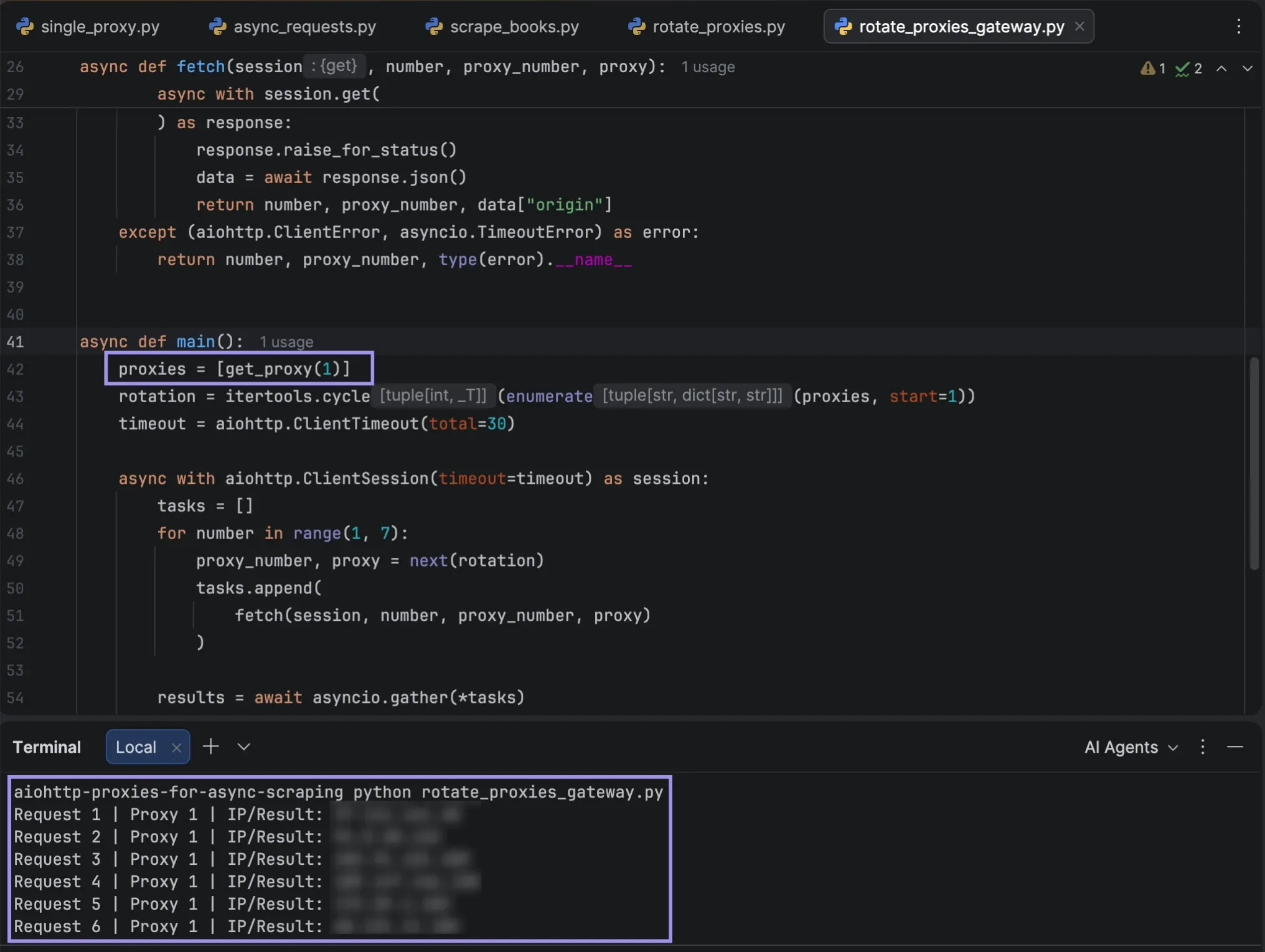
Create rotate_proxies_gateway.py with this code to use a rotating gateway. It's similar to rotate_proxies.py, but main() constructs a list of proxies from a single gateway: proxies = [get_proxy(1)].
import asyncio
import itertools
import os
import aiohttp


def get_proxy(number):
    prefix = (
        "BYTEFUL_PROXY"
        if number == 1
        else f"BYTEFUL_PROXY_{number}"
    )
    url = (
        f"http://{os.environ[f'{prefix}_HOST']}:"
        f"{os.environ[f'{prefix}_PORT']}"
    )
    headers = {
        "Proxy-Authorization": aiohttp.encode_basic_auth(
            os.environ[f"{prefix}_USER"],
            os.environ[f"{prefix}_PASSWORD"],
        )
    }
    return url, headers


async def fetch(session, number, proxy_number, proxy):
    url, headers = proxy
    try:
        async with session.get(
            "https://httpbin.org/ip",
            proxy=url,
            proxy_headers=headers,
        ) as response:
            response.raise_for_status()
            data = await response.json()
            return number, proxy_number, data["origin"]
    except (aiohttp.ClientError, asyncio.TimeoutError) as error:
        return number, proxy_number, type(error).__name__


async def main():
    proxies = [get_proxy(1)]
    rotation = itertools.cycle(enumerate(proxies, start=1))
    timeout = aiohttp.ClientTimeout(total=30)

    async with aiohttp.ClientSession(timeout=timeout) as session:
        tasks = []
        for number in range(1, 7):
            proxy_number, proxy = next(rotation)
            tasks.append(
                fetch(session, number, proxy_number, proxy)
            )

        results = await asyncio.gather(*tasks)

        for number, proxy_number, result in results:
            print(
                f"Request {number} | "
                f"Proxy {proxy_number} | "
                f"IP/Result: {result}"
            )


if __name__ == "__main__":
    asyncio.run(main())
If the BYTEFUL_PROXY_HOST, BYTEFUL_PROXY_PORT, BYTEFUL_PROXY_USER, and BYTEFUL_PROXY_PASSWORD variables are set to the credentials of our rotating residential gateway, you can execute the script in your terminal.
python rotate_proxies_gateway.pyAll six requests are sent via one configured gateway. We don't need to switch between endpoints in Python because our gateway handles exit IP selection.
Verify That Your Proxies Are Rotating
It is important to note that it's the exit IP reported by the destination that matters, not the gateway hostname. Several proxy endpoints can pass through the same exit IP, and one rotating gateway can give out multiple different IP addresses.
Create the file rotate_proxies_verify.py with the code below to count the unique IPs that return success with requests. It is based on rotate_proxies_gateway.py, and includes a summary after the results loop that counts the number of successful and unique exit IPs.
import asyncio
import itertools
import os
from ipaddress import ip_address

import aiohttp


def get_proxy(number):
    prefix = (
        "BYTEFUL_PROXY"
        if number == 1
        else f"BYTEFUL_PROXY_{number}"
    )
    url = (
        f"http://{os.environ[f'{prefix}_HOST']}:"
        f"{os.environ[f'{prefix}_PORT']}"
    )
    headers = {
        "Proxy-Authorization": aiohttp.encode_basic_auth(
            os.environ[f"{prefix}_USER"],
            os.environ[f"{prefix}_PASSWORD"],
        )
    }
    return url, headers


async def fetch(session, number, proxy_number, proxy):
    url, headers = proxy
    try:
        async with session.get(
            "https://httpbin.org/ip",
            proxy=url,
            proxy_headers=headers,
        ) as response:
            response.raise_for_status()
            data = await response.json()
            return number, proxy_number, data["origin"]
    except (aiohttp.ClientError, asyncio.TimeoutError) as error:
        return number, proxy_number, type(error).__name__


async def main():
    proxies = [get_proxy(1)]
    rotation = itertools.cycle(enumerate(proxies, start=1))
    timeout = aiohttp.ClientTimeout(total=30)

    async with aiohttp.ClientSession(timeout=timeout) as session:
        tasks = []
        for number in range(1, 7):
            proxy_number, proxy = next(rotation)
            tasks.append(
                fetch(session, number, proxy_number, proxy)
            )

        results = await asyncio.gather(*tasks)

        for number, proxy_number, result in results:
            print(
                f"Request {number} | "
                f"Proxy {proxy_number} | "
                f"IP/Result: {result}"
            )

        successful_ips = []
        for _, _, result in results:
            try:
                addresses = [
                    str(ip_address(value.strip()))
                    for value in result.split(",")
                ]
                successful_ips.extend(addresses)
            except ValueError:
                continue

        print(f"Successful IP results: {len(successful_ips)}")
        print(f"Unique exit IPs: {len(set(successful_ips))}")


if __name__ == "__main__":
    asyncio.run(main())
Run the script in your terminal:
python rotate_proxies_verify.py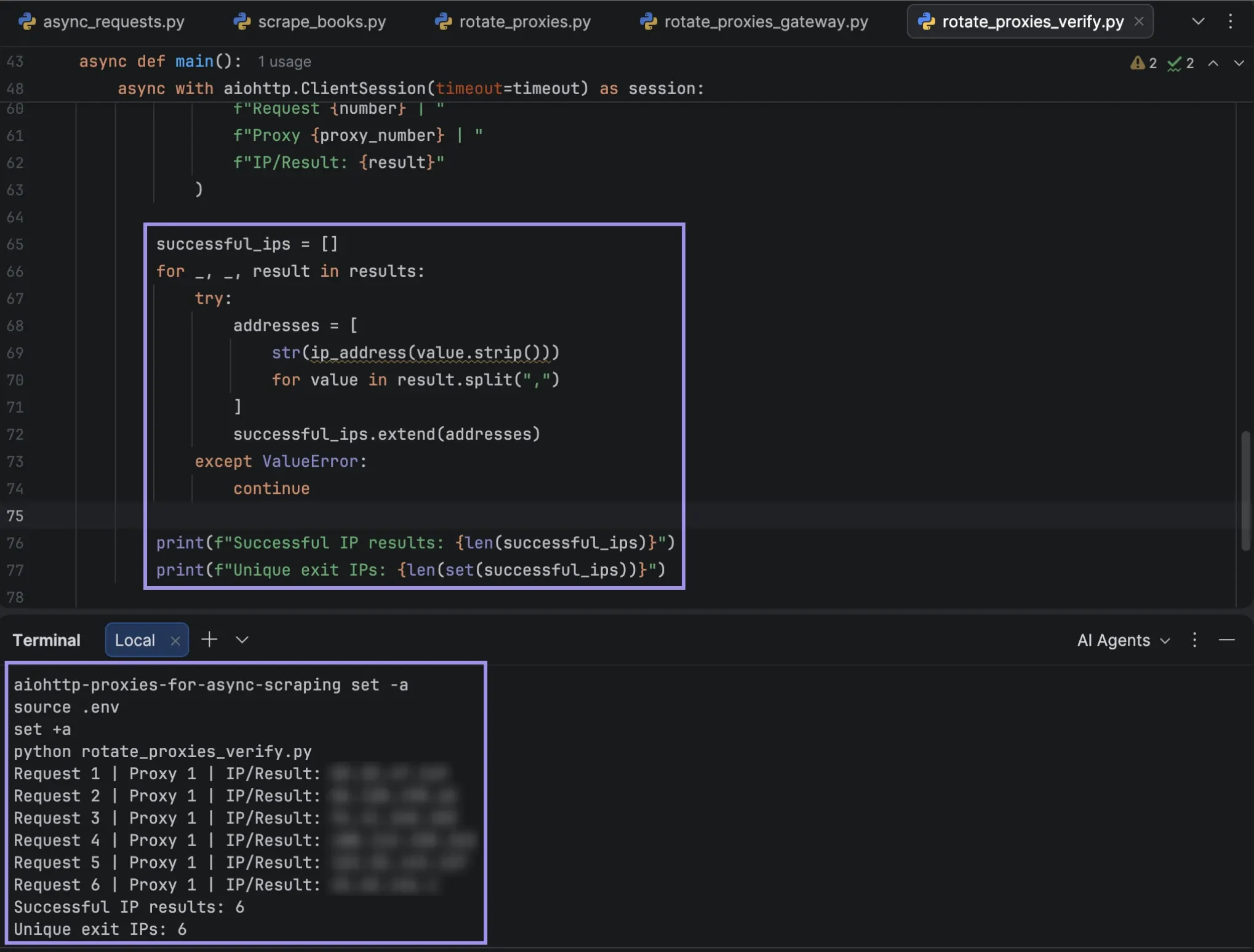
An increase in the number of unique IPs indicates that unique exit addresses have been seen throughout the test. Having fewer unique IPs does not necessarily mean there is a configuration issue, as rotating services can reuse addresses based on session parameters and IP availability.
Typically, rotating gateways assign the exit IP per connection, and aiohttp reuses open connections; therefore, requests on reused connections keep the same exit IP. If a new connection is required for each request, do it using aiohttp.TCPConnector(force_close=True).
How to Manage Concurrency and Troubleshoot Proxy Errors
Too many concurrent requests may exhaust your proxy connections or may cause rate limits on the target server. Having controlled concurrency, reasonable timeouts, and procedures for dealing with requests that fail can help to make your scraper more reliable.
Control Concurrent Requests and Timeouts
aiohttp offers connection limits via TCPConnector, and asyncio.Semaphore limits the number of tasks that can run at the same time in a particular section of your code. They work together, but serve different purposes.
We will only have three requests active, and will have a session pool of five connections, with a 20-second request timeout.
Create controlled_requests.py:
import asyncio
import os
import aiohttp


async def fetch(session, semaphore, request_id, proxy, headers):
    async with semaphore:
        try:
            async with session.get(
                "https://httpbin.org/ip",
                proxy=proxy,
                proxy_headers=headers,
            ) as response:
                response.raise_for_status()
                data = await response.json()
                return f"Request {request_id}: {response.status}, IP: {data['origin']}"
        except (aiohttp.ClientError, asyncio.TimeoutError) as error:
            return f"Request {request_id}: Failed ({type(error).__name__})"


async def main():
    proxy = (
        f"http://{os.environ['BYTEFUL_PROXY_HOST']}:"
        f"{os.environ['BYTEFUL_PROXY_PORT']}"
    )
    headers = {
        "Proxy-Authorization": aiohttp.encode_basic_auth(
            os.environ["BYTEFUL_PROXY_USER"],
            os.environ["BYTEFUL_PROXY_PASSWORD"],
        )
    }

    semaphore = asyncio.Semaphore(3)
    connector = aiohttp.TCPConnector(limit=5)
    timeout = aiohttp.ClientTimeout(total=20)

    async with aiohttp.ClientSession(
        connector=connector, timeout=timeout
    ) as session:
        tasks = [
            fetch(session, semaphore, i, proxy, headers)
            for i in range(1, 7)
        ]
        results = await asyncio.gather(*tasks)

        for result in results:
            print(result)


if __name__ == "__main__":
    asyncio.run(main())
The semaphore will ensure that only a maximum of three jobs can be in the protected section at a time. Both TCPConnector and ClientTimeout can be used to limit the number of open connections in each session and the time each request may spend, respectively.
Execute the script from the terminal, making sure that the earlier loaded environment variables are used:
python controlled_requests.py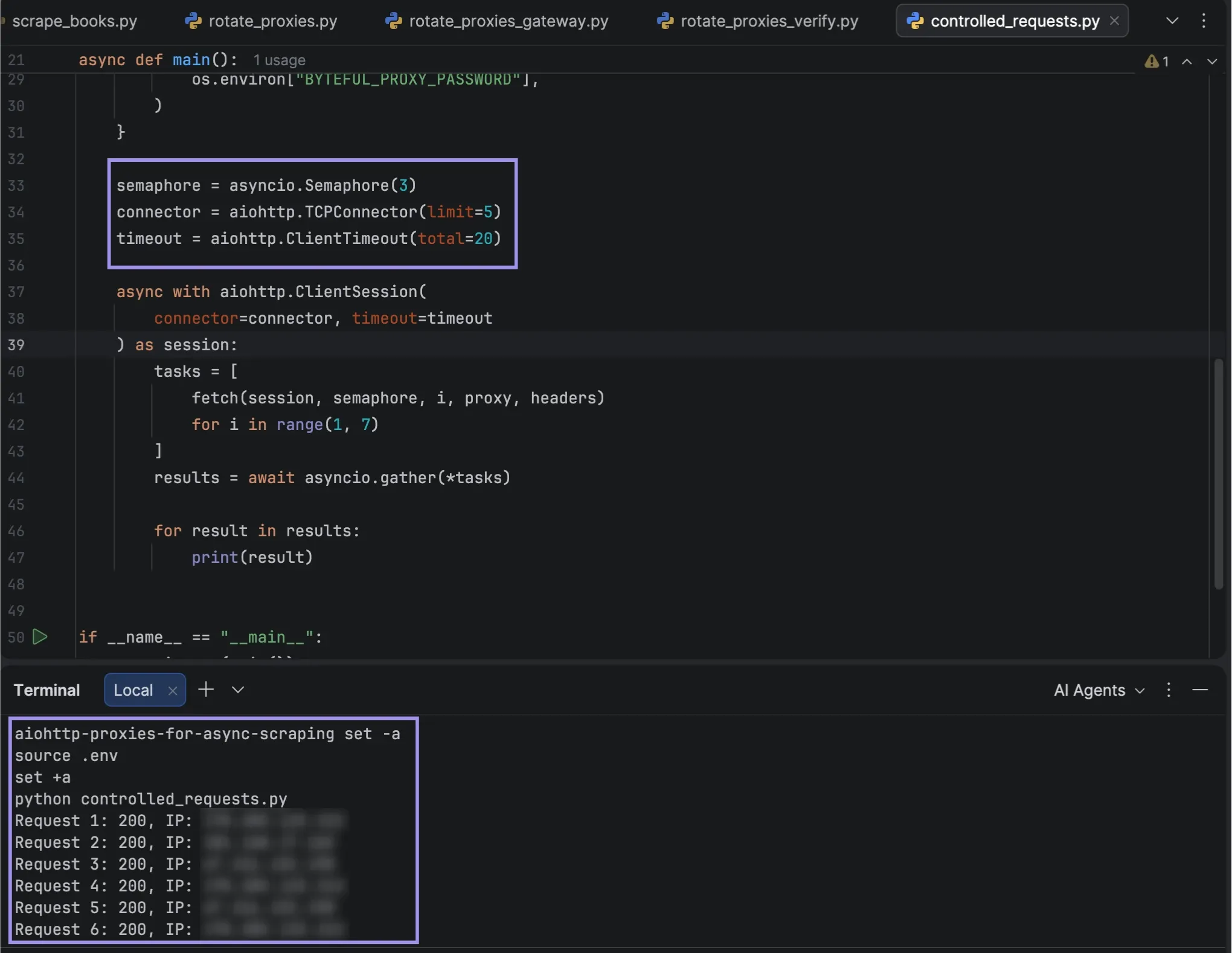
Handle Retries and Failed Requests
Some failures are temporary. A connection timeout or HTTP 503 response might mean that you should try again, but you should not keep retrying if the reason for the failure was that the username or password was incorrect or access is denied.
We can add bounded retries with exponential backoff (increasing the time between retries).
Copy into your file, controlled_requests_retry.py, the following complete script. It is the same as controlled_requests.py, but with the exception of fetch(), which now retries failed requests.
import asyncio
import os
import aiohttp


async def fetch(session, semaphore, request_id, proxy, headers):
    retryable = {429, 500, 502, 503, 504}

    for attempt in range(1, 4):
        try:
            async with semaphore:
                async with session.get(
                    "https://httpbin.org/ip",
                    proxy=proxy,
                    proxy_headers=headers,
                ) as response:
                    response.raise_for_status()
                    data = await response.json()
                    return (
                        f"Request {request_id}: "
                        f"{response.status}, IP: {data['origin']}"
                    )

        except aiohttp.ClientResponseError as error:
            status = error.status
            if status not in retryable:
                return f"Request {request_id}: HTTP {status}"

        except (aiohttp.ClientError, asyncio.TimeoutError) as error:
            status = type(error).__name__

        if attempt == 3:
            return f"Request {request_id}: Failed ({status})"

        delay = 2 ** (attempt - 1)
        print(
            f"Request {request_id}: Attempt {attempt} "
            f"failed ({status}). Retrying in {delay}s"
        )
        await asyncio.sleep(delay)


async def main():
    proxy = (
        f"http://{os.environ['BYTEFUL_PROXY_HOST']}:"
        f"{os.environ['BYTEFUL_PROXY_PORT']}"
    )
    headers = {
        "Proxy-Authorization": aiohttp.encode_basic_auth(
            os.environ["BYTEFUL_PROXY_USER"],
            os.environ["BYTEFUL_PROXY_PASSWORD"],
        )
    }

    semaphore = asyncio.Semaphore(3)
    connector = aiohttp.TCPConnector(limit=5)
    timeout = aiohttp.ClientTimeout(total=20)

    async with aiohttp.ClientSession(
        connector=connector, timeout=timeout
    ) as session:
        tasks = [
            fetch(session, semaphore, i, proxy, headers)
            for i in range(1, 7)
        ]
        results = await asyncio.gather(*tasks)

        for result in results:
            print(result)


if __name__ == "__main__":
    asyncio.run(main())
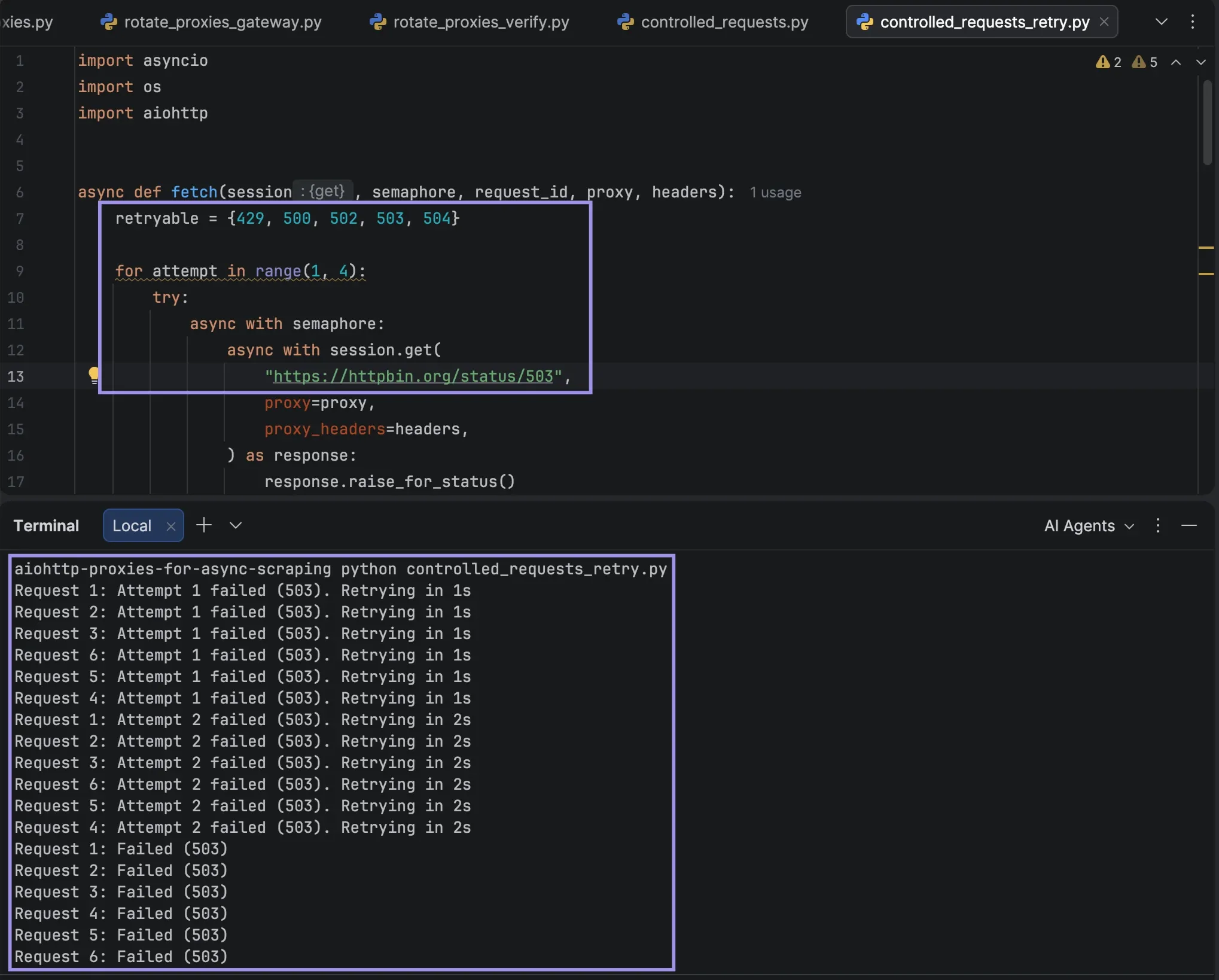
The new fetch() function will attempt to fetch up to three times, with a wait of one second, then two seconds between each attempt. Retries are output in the following format: request number, reason for failure, and delay. While waiting, the semaphore is released, enabling other requests to proceed. Any non-retryable HTTP error (e.g., 403, 407) will prevent any further attempts.
If the server sends a Retry-After header for HTTP 429, then for production workloads, be sure to wait for the specified delay before trying again.
Run the script in your terminal:
python controlled_requests_retry.pyRequests typically will succeed on the first try on https://httpbin.org/ip, so you may not get any retry messages. For testing retry handling, temporarily edit the URL in fetch() in the controlled_requests_retry.py file and change it to https://httpbin.org/status/503 (which always returns HTTP 503). Each retry and delay is displayed in the terminal, and after three attempts, it fails. Once you have tested the URL, revert back to the original URL.
What aiohttp Proxy Errors Mean and How to Fix Them
Context: If requests continue to fail, verify if it's a problem with the proxy connection or the target website. The following table lists common proxy errors, their likely causes, and possible fixes.
| Error | Likely cause | Fix |
|---|---|---|
| HTTP 407 (raised as ClientHttpProxyError for HTTPS targets) | Invalid proxy authentication | Verify username, password, and authorization headers |
| Connection error | Incorrect endpoint, port, or protocol | Confirm the proxy address and connectivity |
| Timeout | Slow response or excessive concurrent requests | Reduce concurrency and review timeout settings |
| HTTP 403 | Target website denies access | Check access permissions and website requirements |
| HTTP 429 | Request rate exceeded | Reduce request frequency and respect Retry-After |
| Wrong exit IP | Incorrect proxy assignment or session behavior | Check routing, rotation settings, and the returned IP |
| SSL error | Certificate validation or TLS configuration issue | Verify certificates and proxy protocol compatibility. On macOS with Python from python.org, run Install Certificates.command in the Python folder under Applications |
Don't turn off SSL verification to fix certificate issues. Fix the certificate or connection problem instead, as disabling verification can allow requests to be intercepted.