
Best Networking Infrastructure for AI Agents


TL;DR
For AI agent networking, proxies are usually the best choice for open-web traffic, while cloud egress suits API-only agents. Tasks with clicks, forms, or logins call for a cloud browser, such as Browser Use, Hyperbrowser, Browserbase, Anchor, Kernel, Browserless, or Steel. Read-only research suits a scraping or content API, such as Firecrawl, Jina Reader, Scrapfly, Tavily, or Exa. For control and visibility, the options include sandbox-runtime, Byteful’s Observability Panel, and LangSmith.
AI networking infrastructure is a multi-layered stack handling web access, authentication, and monitoring. In the simplest setup, your local machine, browser, and personal IP do the work. This may work for the pilot.
However, it starts showing signs of fatigue and failure when the agent scales. Shared IP reputation, rate limiters, slow speed, and lost sessions (on retries) all bottleneck business-scale deployments. This becomes worse for multi-agent environments.
To help, this explainer details different modules that make up AI agent networking. We have discussed the features you need to consider, the tools (in no particular order), and where they might break down.
The layers between an agent and the web
Put simply, IP exits underpin the networking, while cloud browsers and scraping/content APIs manage requests based on the task. Traffic control and visibility wrap around whichever combination you run, either as a separate tool or supplied by the platform itself. Importantly, these modules aren’t sequential hops.
For instance, a setup can run agent > cloud browser > proxy > website, so we describe each module by its functionality and not position.
The following table lists each module, what it does, when your agent needs it, and some tools to get started.
| Module | What it does | When an agent needs it | Options by fit |
|---|---|---|---|
| IP infrastructure | Controls the IP source for outbound requests | For high request volume and targeting specific locations, operating systems, etc. | B2B and APIs: cloud egress. Single-user access: VPN. Open web: residential, ISP, or mobile proxies |
| Cloud browsers | Provides a remote browser for interaction and persistent sessions | Interactive, multi-step, or logged-in workflows | Agent frameworks: Browser Use, Hyperbrowser. Stateful sessions: Browserbase, Anchor, Kernel. Scale or self-hosting: Browserless, Steel |
| Scraping and content APIs | Returns web content in LLM-ready formats (Markdown, JSON, screenshots, etc.) | Read-only research, retrieval, and bulk data collection | LLM-ready content: Firecrawl, Jina Reader. Protected sites: Scrapfly. Research: Tavily, Exa |
| Traffic control and visibility | Restricts outbound traffic, protects credentials, and logs activity | Multi-agent deployments requiring centralized controls | Egress control: sandbox-runtime. Proxy monitoring: Byteful Observability Panel. AI-native observability: LangSmith |
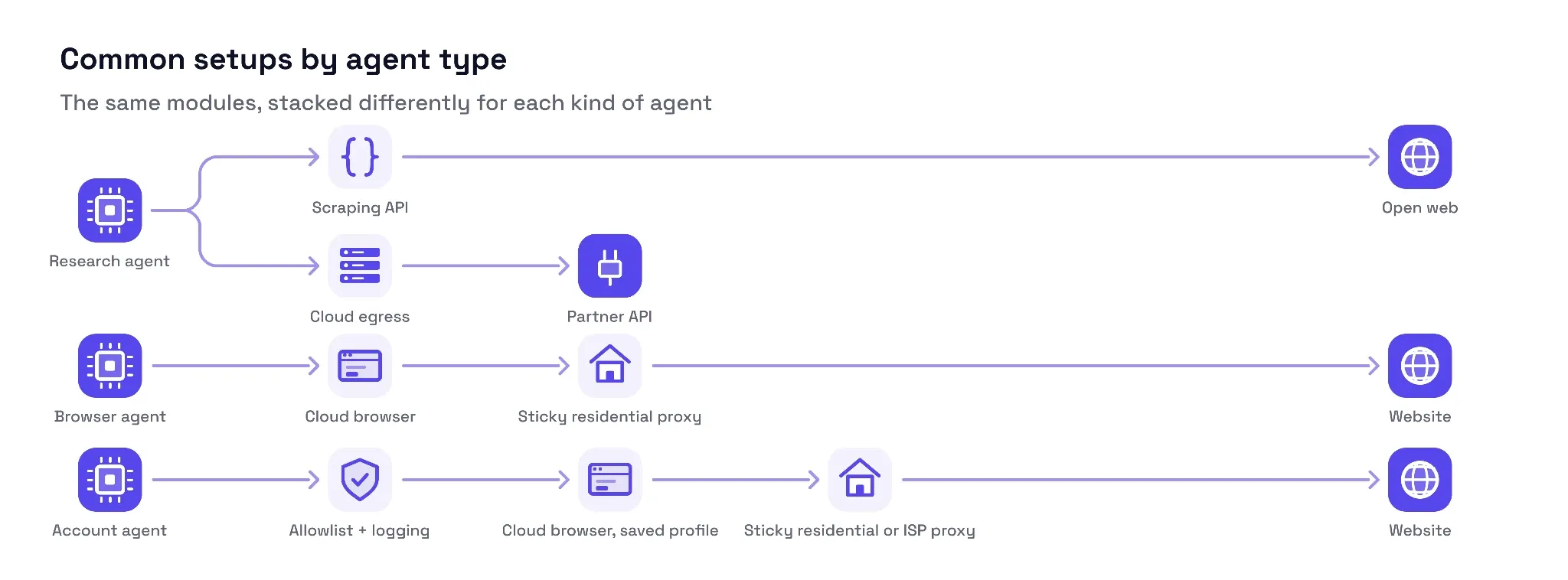
A few common setups might include:
- A research agent calls a scraping API for the open web and uses plain cloud egress for partner APIs.
- A browser agent drives a cloud browser that exits through a sticky residential proxy.
- An account agent runs a cloud browser with a saved profile, exits through a sticky residential or ISP proxy, and sits behind allowlists and per-agent logging.
The following sections discuss each networking module in detail, along with the tools and limitations. The last section also helps pick the networking stack based on the agent type.
IP infrastructure
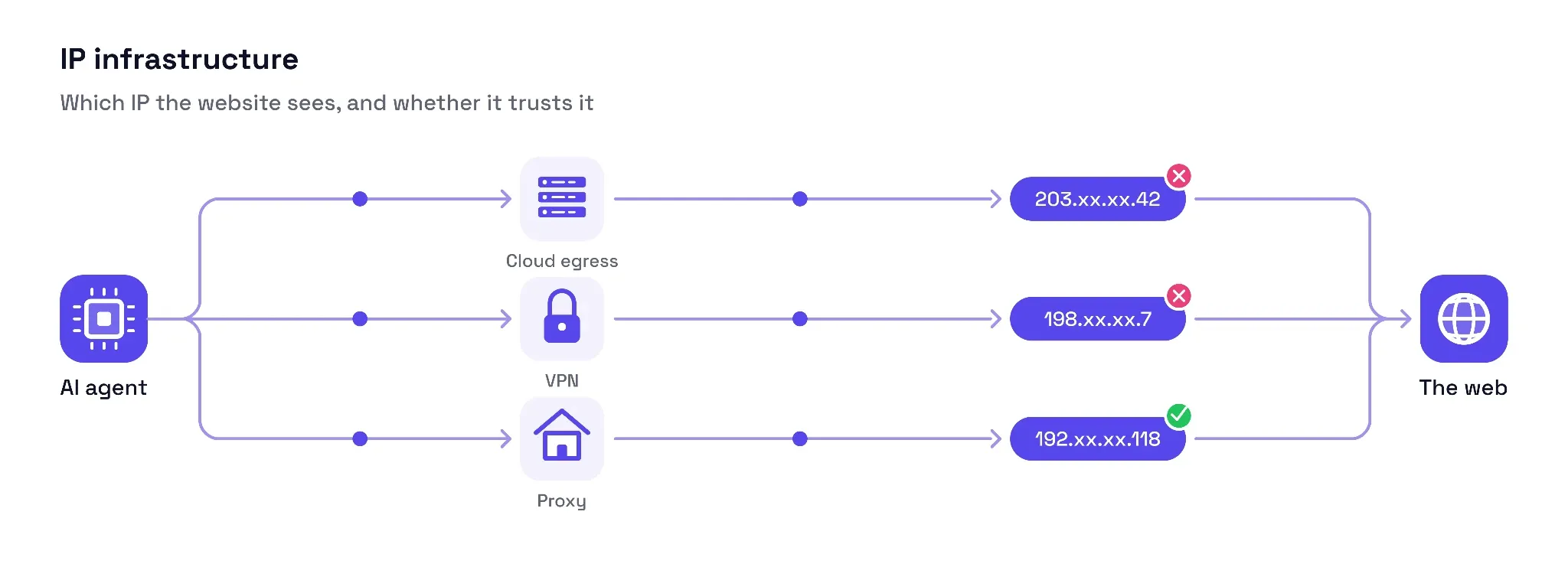
Every time an agent connects to a target server, it gets partly identified by its IP. An AI agent can connect externally in multiple ways, each with its own merits and pitfalls, as discussed below.
- Cloud egress as-is: The de facto first choice for small-scale AI agents is using the static IP provided by their cloud host. This serves well when connecting to secure B2B channels with little connection overhead and simplified auditing.
Where it breaks: IP ranges belonging to hosting providers are listed as such. Therefore, the moment they hit any open web target, security systems tag them as bots. It results in the agent facing rate limits, frequent CAPTCHAs, or blanket IP bans. It affects not only that IP, but also marks all other IPs on the same subnet as low reputation.
Another major risk is running into the egress blind spot. This happens when the agent generates and runs its own code while holding direct internet access, with nothing in between to stop a bad request. It can turn catastrophic if the agent is hit by an attack such as prompt injection. Finally, cloud providers may place concurrency limits on specific IP and port combinations, creating serious bottlenecks at scale.
- Virtual private networks: Using VPNs is a clear upgrade over raw cloud egress. You get encrypted tunnels, location masking, and limited IP rotation support (with some providers).
Where it breaks: Except for a few select cases where you must prioritize security, using a VPN means heavy encryption overhead leading to high latencies. This leads to slower responses, which can be a letdown in a real-time chat-based experience. As a matter of fact, some commercial-grade VPNs such as NordLayer discourage web automation by prohibiting activities which might include high simultaneous connections and excessive data transfer. Furthermore, IP rotation capabilities of VPNs, if present at all, are modest at best. You can’t expect perks such as granular geo-targeting and per-request IP rotation that are standard traits of any good proxy provider. Similarly, there is no guarantee that a VPN can provide sticky IPs, which are critical for login-based workflows. Lastly, IP reputation databases such as IPinfo flag VPN providers, which put agents using VPNs in the same anti-bot buckets as those using raw cloud exits.
- Proxies: Integrating proxies directly into the agent code grants maximum IP-level control, including for geo-targeting, IP rotation, and sticky sessions. For example, Byteful offers 35 million+ residential IPs across 195+ countries, which you can target by country, city, ZIP code, ASN, and operating system, and rotate per request.
Behind the scenes, each proxy type has a role. Datacenter proxies give large, cheap pools but are still classified as datacenter traffic. ISP (static residential) proxies put a residential ASN on a stable address, which suits a few long-lived identities. Rotating and sticky residential proxies are the default for most agent traffic. Mobile proxies carry carrier-grade trust but come from the smallest pools.
Where it breaks: Residential and mobile proxies are billed per GB. An agent browsing the web and downloading data without any constraints or monitoring can waste huge amounts of data. Importantly, the agent still faces anti-bot risk since a proxy fixes only the network identity, and there are other aspects to fingerprinting (such as click/scroll behavior, TLS fingerprinting, and request volume) to manage separately.
For most agent traffic, proxies are the strongest default, with the type chosen by the task. Cloud egress remains the right call for API-only agents. For a provider-level comparison, see our guide to the best proxies for AI agents.
Cloud browsers
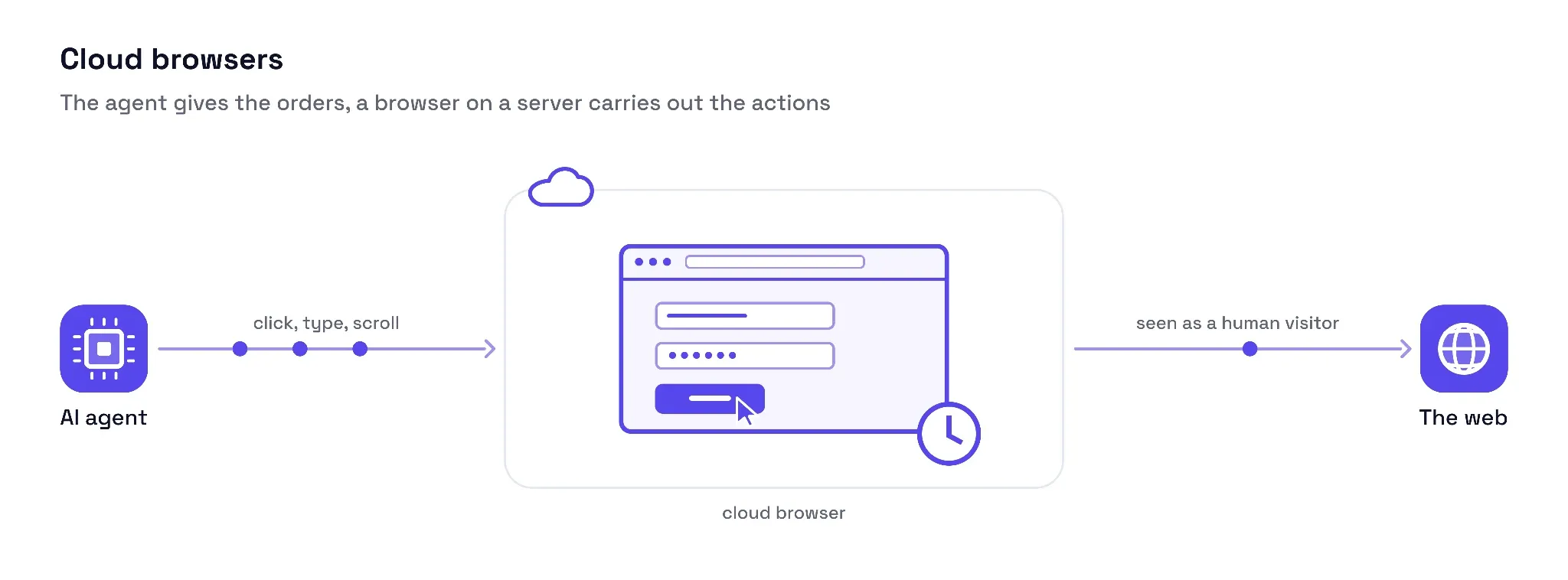
Cloud browsers provide AI agents with a remotely controlled, fully functional browser instance on a secure cloud server with (optional) built-in fingerprinting and other anti-bot measures. This is where an AI agent gets interactive web access and programmatic control (to click, scroll, etc.).
Typically, the platform runs multiple Chrome browsers, which the agent controls with the Chrome DevTools Protocol (CDP). The following features play a critical role in finalizing the matching cloud browser for your use case:
- Session persistence and profile management: AI agents need stay-alive connections that preserve sessions across momentary interruptions, either due to network or agent processing, to act effectively. The platform must also store auth cookies, session states, active logins, localStorage, etc., across connections for multi-step workflows. For instance, Browserbase stays alive for up to six hours, and Browserless allows for a custom reconnect window.
- Concurrency limits: Every cloud browser subscription is usually explicit about the number of simultaneous instances. This is important to verify because personal infrastructure can’t support a business-scale AI agent’s concurrency requirements. Anchor is one such cloud browser. Its free tier allows up to 5 concurrent browsers, the Starter plan allows 25, and higher tiers scale further.
- Integration interface: Chrome DevTools Protocol (CDP) and Model Context Protocol (MCP) are two separate layers the agent can benefit from. CDP is the absolute minimum for programmatic browser control, whereas MCP acts as a translator for LLM-to-browser interactions, which you can also manage with custom code.
- Observability and human intervention: AI agents are known to hallucinate, fail, and get stuck. Therefore, full session video logs are one such feature that allows you to troubleshoot problematic workflows (such as CAPTCHAs or a specific UI). Likewise, human-in-the-loop is required for sensitive or complex tasks. This lets a human supervisor co-browse and take actions in real time with the AI agent.
- Anti-bot measures: A cloud browser needs anti-bot tactics, including device fingerprint emulation, CAPTCHA solvers, canvas & WebGL spoofing, proxies, and TLS fingerprint management. An AI agent might need to plug in some or most of the stealth stack based on the task at hand.
Here are a few cloud browsers based on their use-case fit:
For agent frameworks
- Browser Use: An open-source browser agent framework with a managed cloud. The cloud provides CDP access, stealth, CAPTCHA solving, and proxies (priced separately) on a per-hour billing model.
- Hyperbrowser: Hosted Chrome instances with reusable sessions, live streaming and recording, human intervention (Live View), anti-bot, ad-blocking, residential proxies and BYOP support, and more.
For long, stateful sessions
- Browserbase: Fully isolated and customizable Chromium with session persistence (up to six hours), cookies and file downloads, live sessions & replay, built-in anti-bot, and managed proxies.
- Anchor: Fully managed Chromium with no caps on session length. Offers authentication management, integrated VPN, and flexible deployment (cloud, plus bring-your-own-cloud and on-premises on higher tiers).
- Kernel: Sandboxed Chromium with reusable browser profiles. CDP and WebDriver BiDi, integrated CAPTCHA solvers and proxies, live sessions & recording, and managed authentication.
For headless at scale or self-hosting
- Browserless: Control Chromium with Puppeteer and Playwright. Persistent sessions, agent/human switchover, custom session length, BYOP, CAPTCHA solving, and a custom SDK (for greater stealth).
- Steel: An open-source browser API with support for Playwright, Puppeteer, and Selenium. Resumable sessions, live mode (visual and text), persistent profiles, agent-to-human handoff, integrated stealth, and more.
Where it might break: Remote browsing is extremely resource-intensive and a huge latency hog. And it becomes a substantial risk if the browser opens a malware-ridden page, which then tricks the agent into sabotaging the connected peers and taking unauthorized actions. But the biggest downside is that the agent is never in control of its networking. Geo-targeting and IP rotation support is often limited, and some upstream restrictions (blocked content categories or unavailable locations) might carry over. Bringing your own proxies, where the platform supports it, is how you keep that under control.
Scraping and Content APIs
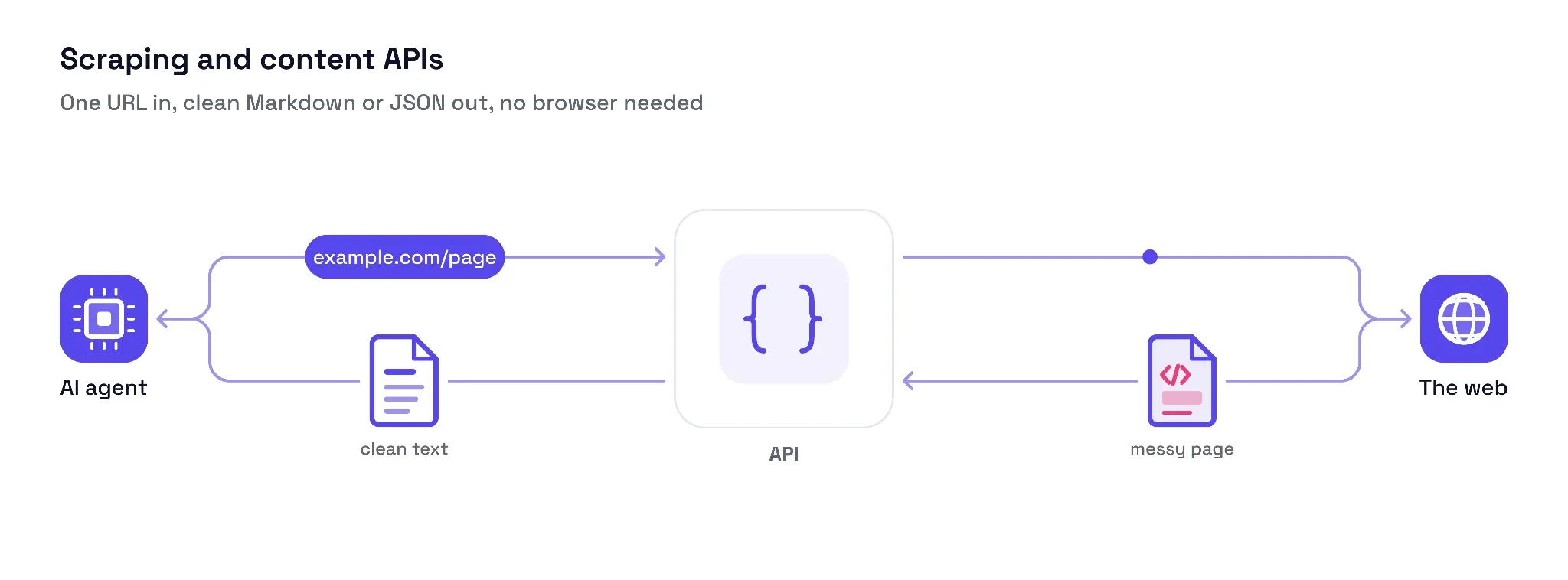
Scraping and content APIs fit when an AI agent doesn’t need a full browser session. One simply sends a URL and gets Markdown, structured JSON, or a screenshot/video. This is essentially a read-only workflow. It is easier on resources and works for anything from simple static pages to JavaScript-heavy, non-interactive content.
Scraping APIs are easy to implement, token-efficient, and allow the AI agent to offer a quick request-response cycle (provided the API backend is performant). The anti-bot layer also becomes the provider's responsibility, reducing web-access complexity for the agent developer. The features mentioned below dictate which scraping API suits a specific use case:
- JavaScript and hydration control: A must-have feature if your AI agent wants to process content built on modern web frameworks. It involves smart wait conditions, custom JS injection (for basic browser control), and handling JavaScript-heavy web pages.
- Context-aware content reduction: This enables on-the-fly token spend optimization by stripping away code bloat to generate clean, LLM-friendly Markdown or JSON. Behind the scenes, the API provider might run a small LLM of their own for real-time content analysis and sifting.
- Crawl depth: This lets the agent visit multiple pages based on contextual links on the primary web page. For instance, Scrapfly’s Crawler API can crawl whole sites and can return WARC archives.
- Anti-bot: Like cloud browsers, scraping APIs need anti-bot-bypassing features. In this context, however, it primarily means the proxy pool strength, TLS fingerprinting, and automatic retries.
- LLM interface: An official MCP server helps the agent inherit specific capabilities, such as web search or image analysis, out of the box. It also reduces development overhead and enables easy integration with AI coding agents such as Cursor and Claude.
- Concurrency: The ability to scale beyond a handful of requests is an important trait for any scraping API. Check for per-minute limits and queue support.
- Output formats: Though Markdown and structured JSON are the industry-standard LLM inputs, raw HTML, links, screenshots, and a summary also have their use cases.
Check the following scraping and content APIs for a head start.
For page-to-LLM-ready content
- Firecrawl: A single open-source API for web search, scraping, and interaction. Features JavaScript rendering, dynamic content, integrated proxies, and an anti-bot layer.
- Jina Reader: Flexible fetching (plain HTTP or headless browser), URL-to-Markdown, JavaScript handling, caching, cookie handling, and more with one API key.
For protected and JavaScript-heavy sites
- ScrapFly: Web scraping with built-in proxies, anti-bot, auto-retries, and JS rendering support. Separate endpoints for real browser screenshots and data extraction.
For research agents
- Tavily: Features multiple endpoints for real-time search and scrape, page extraction, and site and map crawling.
- Exa: Provides structured outputs, URLs, content summary, and multi-tiered search (real-time, deep, and async).
Where it might break: Like cloud browsers, scraping APIs are not meant for multi-step sessions such as login-gated workflows or paginated research. Besides, an API response can have hidden instructions, initiating a prompt injection attack. And though certain scraping APIs can handle JavaScript-driven dynamic content as well, expect a significant increase in cost and latency. Lastly, they enable little control over proxy pools, geo-targeting, and IP rotation.
Traffic control and visibility
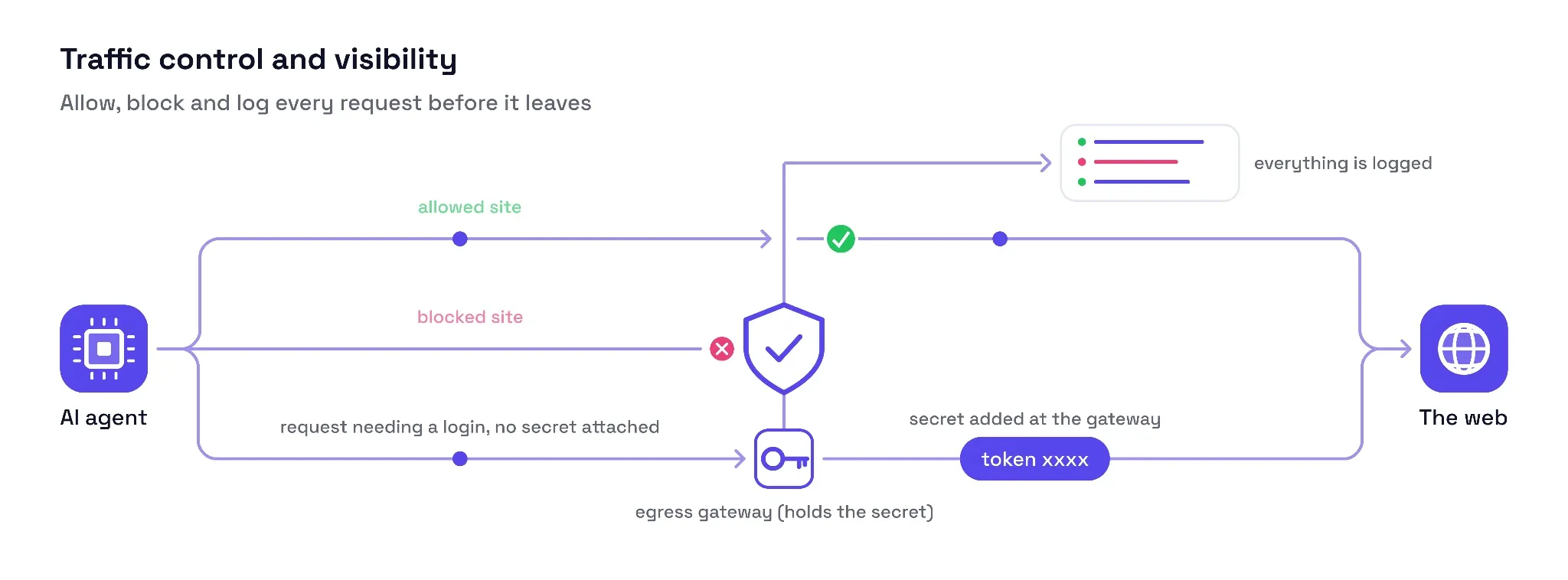
An AI agent granted unrestricted internet access can be disastrous for cybersecurity and financial reasons. Therefore, a safety net should sit in between to regulate the agent’s internet reach, manage auth credentials, stop malicious requests/prompts, and log network activity. Though part of it can be supplied by the proxy or platform itself, the listed features treat traffic control as a standalone aspect.
- Egress allowlists: This dictates which domains an agent can connect to and controls data flow. For instance, Anthropic's sandboxing applies filesystem and network isolation to grant read/write permissions and internet connection selectively.
- Credential handling: Storing credentials outside the agent’s environment and injecting them via a proxy supports secure credential management. Likewise, the agent can also securely handle browser state, including cookies and local storage.
- Data-leak and PII scrubbing: An outbound deep inspection checks every packet for sensitive information (PII, credentials, headers, cookies, etc.) and sanitizes data on the fly.
- Per-agent attribution: This pinpoints errors, data usage, and basically every outgoing request to the respective agent in a multi-agent environment. It works best when each agent carries separate proxy credentials or unique tags.
- Intelligent credit budgeting: Using premium proxies or heavy JS-rendering based on the target/request type and page structure can save resources and support quick responses.
We have included a few proxy and network visibility tools.
sandbox-runtime (Egress control) is an open-source tool from Anthropic that puts file and network controls at the operating system level. It regulates HTTP/HTTPS connections, file and directory access, and local IPC sockets.
Byteful’s Observability Panel (Proxy-side visibility) helps check live traffic, request volume, errors, and up to 90 days of historical data. Filter by hostname, proxy user, network type, and duration.
LangSmith observability (AI-native operations) tracks token spend, latencies, errors, and more. You can plug in its performance evaluation (human and algorithmic checks) module later on, if required.
Where it might break: Allow lists can be restrictive for research/web-search agents since drafting an exhaustive list of permissive domains upfront for every task is not practically possible. But the biggest risk is multiple observability tools giving their version of events without any sync among them. In such cases, tracing a failure means tedious and error-prone manual work or yet another tool to study logs across systems.
How your agent connects: API, CDP, or MCP
There are multiple ways an agent can connect to its networking stack, and each module might allow it differently (proxy endpoints, browser WebSocket connections, REST APIs, MCP servers, etc.). This affects the integration complexity, networking control, and how much work the LLM handles on its own. We have covered three common scenarios in the following sections:
Plain API or SDK is the standard way an agent incorporates IP infrastructure and scraping APIs. You can add the proxy string or an API key to the agent's code and handle auth, request handling, retries, and response parsing yourself. This gives you full control over each request (including for timeouts, headers, session IDs, and geo-targeting) since the LLM doesn't handle this aspect at all. However, you should maintain the integration code in sync with any vendor-led API changes.
The next option is an agent using CDP (or WebDriver). This applies when driving a cloud browser for programmatic browser control to click, scroll, run JavaScript, capture screenshots, and more via a WebSocket connection. In practice, libraries such as Playwright or Puppeteer manage this connection, so the developer calls methods such as page.click() instead of sending raw CDP messages. Agents can also use WebDriver BiDi in some cases, which offers similar bidirectional control.
Lastly, MCP servers offer the easiest integration. These interfaces sit on top and let the LLM call the required tools without custom integration code. On the downside, since the LLM decides which tool to call and with what parameters without any explicit, developer-written code, the behavior becomes less predictable compared to previous methods.
Choosing a stack by agent type
The choice of individual tools within the modules and their capabilities heavily depends on the target, task, workflow, and security requirements. Below is a simplified version based on three major agent categories: research, browser, and account.
| Module | Research agent | Browser agent | Account agent |
|---|---|---|---|
| What it does | Web search, reads documents, and synthesizes public information | Navigates pages, clicks, fills forms, and completes multi-step workflows | Performs tasks inside authenticated accounts and services |
| IP exit | Cloud egress for partner sources; rotating residential proxies for open web | Sticky residential IP for multi-step sessions; rotation for independent tasks | Sticky residential by default, dedicated egress for B2B partners, or ISP/residential/mobile proxies based on task requirements |
| Cloud browser | Usually unnecessary, except where interaction is needed to reach content (for example, click-to-reveal pages) | Core when the workflow requires browser interaction, persistent sessions, or visual controls | Core for logged-in browsers, saved profiles, or session persistence |
| Scraping API | Core tool for search, retrieval, and LLM-ready content | Optional for read-only lookups alongside browser interaction | Usually unnecessary for authenticated work; can fetch public data alongside the core workflow |
| Traffic control | Usage budgets, request attribution, logging and controlled egress. Flexible domain policies for open-ended research | Per-agent credentials or tags, task-scoped domain restrictions and request logging | Isolated credentials, protected browser state, least-privilege access and audit logs |
