

Why do AI agents still get blocked, lose sessions, or give wrong local results when the workflow is functioning? Requests still need to flow out to an IP address. This guide explains how using proxies can help with request distribution, session preservation, and local web data collection.
You will learn where to find proxy settings in Browser Use, how to connect agents to proxies, why different types of agents require different types of proxies, and how to configure the proxies.
Why do AI agents need proxies?
Agents do not get separate network identities. The target sees a web browser or an HTTP client that runs on your laptop, server, or cloud. If every request leaves through the same IP, that address becomes the bottleneck.
A proxy gives you control at this network layer. It distributes independent requests, preserves location or session, and isolates concurrent workers. It also doesn't increase a web page’s limit, so you still need to set controlled request rates and retry limits.
They get IP-blocked and rate-limited
Your agent can request pages at a much greater rate compared to a human. Before you notice a loop, a retry bug, or a worker fleet can send a burst of requests from the same cloud IP address.
Bot management and rate-limiting systems look at the frequency of requests, reputation of the IP and ASN, session, behavior, and browser signals. The target may show a "429 Too Many Requests" page, a "403 Forbidden" page, a CAPTCHA, or a page that looks normal but is missing data.
Rotating proxies distribute independent requests throughout a proxy pool. This reduces how much traffic any single IP accumulates. Rotating proxies do not make unlimited traffic acceptable.
Effective ways to prevent proxy bans also involve limiting concurrency and implementing an exponential back-off and a condition where you stop the requests if the target continuously ignores your requests, and also observing a Retry-After header.
They need geo-specific results
The response page differs on a case-by-case basis, based on the location. The price of a good, how long it takes to deliver that good, the best results a search query can return, media, and advertisements change based on where you live.
Using a server that is not in the target market may lead your agent to collect valid but incorrect results for the market. Using an exit IP in the target country gives the impression of a request originating from that location. Locating an IP is not the only localization signal.
Many sites use account settings, browser settings, language, currency, region-specific ZIP codes, or even store-specific settings/parameters. Align those signals and validate the output. A US IP, but a French locale with a UK store cookie set in an old browser, is not a valid US session.
Their browsing looks non-human
An IP address is only one part of a request's identity. Automation can be detected because of your agent’s repetitive timing, missing headers, new cookies on every page, the navigator.webdriver property, or a TLS fingerprint that doesn’t match the browser.
JA3 and JA4 fingerprints identify how a client begins a TLS connection. Changing the source IP doesn't change those connection characteristics. A residential or mobile proxy removes the hosting-network signal, but it doesn't erase the rest of the browser fingerprint.
Think of a proxy as an IP layer solution, not a complete anti-bot bypass. Use a well-maintained browser, consistent headers, and persistent cookies. Do your best to match the timing of your requests to the task you wish to accomplish. A good IP address can’t magically resolve a browser and network identity match.
Multi-step tasks need a stable identity
A series of steps creates a session. The target will likely associate session-related information with cookies, browser storage, an account, and the current IP address.
If you change your IP address, you will likely be prompted to log in again, and your cart will be emptied. A sticky residential session aims to keep the same pool IP for a certain amount of time. A dedicated static residential proxy maintains the same ISP-backed IP for much longer. Keep the same IP for the full session. Rotate only between independent sessions.
Scale and parallelism
To the target, 10 agents sharing an exit IP look like a single address producing their combined traffic.
A proxy pool lets you assign a different session ID or IP to each agent acting concurrently. If a route slows or gets blocked, the whole fleet doesn't need to stop. Separate sessions also make failures easier to identify. For each worker, record the target, proxy type, session ID, status, latency, and the number of times it has been attempted again.
Without controlled routing, a single IP can trigger fleet-wide 403 responses, 429 responses, CAPTCHAs, or incomplete web data accessed quietly. With controlled routing, a blocked route doesn't stop every worker, and results that are sensitive to location are easier to reproduce.
How to set up a proxy for your AI agent?
Browser Use is a browser-based AI agent framework. We will use their framework to showcase using proxies. They provide an IP checking page that displays the exit IP, allowing you to verify the proxy in the example shown below.
Step 1: Generate a Byteful residential proxy
Go to the Byteful dashboard and select Generator under Residential Proxies. Select Rotating and HTTP. Pick a location if needed. Select a Proxy User. Then click Generate to generate the proxy credentials.
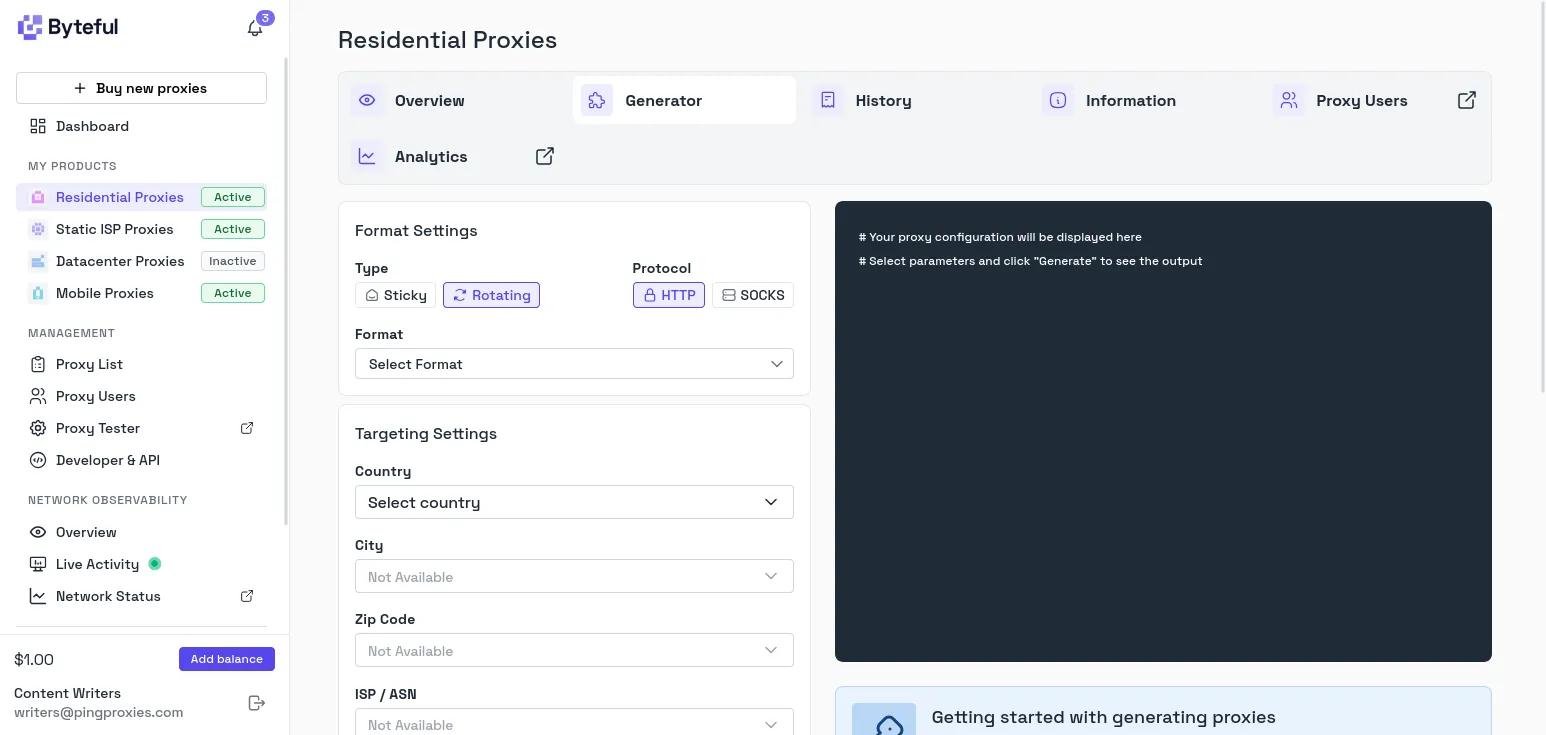
In this example, since we’re checking only a single page, we can use a rotating proxy.
Step 2: Install Browser Use
Browser Use requires Python 3.11+.
uv init
uv add browser-use
uvx browser-use install

# Or:
pip install browser-use
browser-use install
Step 3: Store the keys and proxy credentials outside the script
Use a secret manager in production. For a local Bash test, prompt for the values so they won't be in the shell history:
read -rsp 'Browser Use API key: ' BROWSER_USE_API_KEY
printf '\n'
read -rsp 'Byteful proxy username: ' BYTEFUL_PROXY_USERNAME
printf '\n'
read -rsp 'Byteful proxy password: ' BYTEFUL_PROXY_PASSWORD
printf '\n'
export BROWSER_USE_API_KEY BYTEFUL_PROXY_USERNAME BYTEFUL_PROXY_PASSWORD
Step 4: Create agent.py
Currently, the Browser Use API accepts a ProxySettings object on the Browser.
import asyncio
import os

from browser_use import Agent, Browser, ChatBrowserUse
from browser_use.browser import ProxySettings

async def main() -> None:
# All pages opened by this browser use the Byteful proxy.
browser = Browser(
headless=True,
proxy=ProxySettings(
server="http://residential.byteful.com:8000",
username=os.environ["BYTEFUL_PROXY_USERNAME"],
password=os.environ["BYTEFUL_PROXY_PASSWORD"],
),
)

# The agent visits an IP-echo endpoint and reports the visible exit IP.
agent = Agent(
task=(
"Open https://httpbin.org/ip, read the JSON response, "
"and return only the value of the origin field."
),
llm=ChatBrowserUse(),
browser=browser,
)

try:
history = await agent.run()
print(f"Proxy exit IP: {history.final_result()}")
finally:
# Stop the browser even if navigation or the model call fails.
await browser.stop()

if __name__ == "__main__":
asyncio.run(main())
Step 5: Run the agent
uv run python agent.py
# Or: python agent.py
The output should show the proxy exit IP, not the public IP of your laptop or server. Run it again, and you should usually see a different exit IP. The rotating gateway assigns a new one per connection. If the request fails, check the gateway, port, credentials, proxy-user access, and residential data.
Different ways to add proxies to an AI agent
Set the proxy at the layer that establishes the outbound connection. Setting a proxy at the browser level won't do anything for an external HTTP tool, and setting a proxy for an HTTP tool won't do anything for the browser in a different context.
In the browser layer (for browser agents)
Set the proxy when the browser or browser context starts. This covers agents built with Playwright, Puppeteer, Selenium, and frameworks that expose their settings.
Playwright accepts the server and optional credentials through its proxy settings:
browser = await playwright.chromium.launch(
proxy={
"server": "http://residential.byteful.com:8000",
"username": proxy_username,
"password": proxy_password,
}
)
Browser-level configuration routes navigation, page assets, and JavaScript requests through the proxy. Pair each sticky proxy with a browser context when your agent must preserve a session.
In the HTTP client (for API / tool-calling agents)
Some agents fetch pages through HTTPX, Requests, or aiohttp instead of opening a browser. Configure that client directly:
import httpx

proxy = httpx.Proxy(
"http://residential.byteful.com:8000",
auth=(proxy_username, proxy_password),
)

with httpx.Client(proxy=proxy, timeout=30) as client:
response = client.get(target_url)
response.raise_for_status()
This approach is lighter than launching a browser, but it won't execute page JavaScript, nor will it create a browser runtime. It will still expose HTTP and TLS client characteristics. Use it for APIs and server-rendered pages. Use a browser for rendering, interaction, or browser-managed cookies.
Via environment variables
Many HTTP libraries support HTTP_PROXY, HTTPS_PROXY, and NO_PROXY. Requests recognizes both uppercase and lowercase variants:
export HTTP_PROXY="http://${BYTEFUL_PROXY_USERNAME}:${BYTEFUL_PROXY_PASSWORD}@residential.byteful.com:8000"
export HTTPS_PROXY="$HTTP_PROXY"
export NO_PROXY="localhost,127.0.0.1"
This approach is broad but convenient. Some libraries ignore these variables, and subprocesses inherit them, which means the credentials spread further than you may intend. Confirm how your agent's transport behaves, load the values from a secret manager, and keep them out of shell history, logs, and source control.
In the agent framework’s config
Use a proxy field in the framework if possible. This configuration stays close to the browser and the browser’s lifecycle while avoiding custom proxy wrappers. In Browser Use, configure the proxy by passing a ProxySettings object to the Browser instance, as shown in Step 4.
Which proxy type is best for an AI agent?
For AI agents, it’s not about finding the ‘best’ proxy type, but more about finding the least expensive proxy type that can reliably work on your target. Unless test results warrant a higher type of proxy, avoid moving up the trust ladder.
| Proxy type | Network identity | Session behavior | Best fit | Relative cost |
|---|---|---|---|---|
| Residential | Consumer ISP IPs | Mainly rotating | Protected sites, search, eCommerce, & geo-specific web data | Med-High |
| ISP / static residential | Always-on ISP IPs | Stable, usually dedicated IP | Logins, carts, multi-step tasks, & streaming QA | Per-IP premium |
| Datacenter | Hosting provider IPs | Static or rotating; dedicated available. | Lightly controlled websites, internal tools, APIs & bulk jobs | Low |
| Mobile | Carrier IPs | Rotating or sticky | Extreme site control | Highest |
First try datacenter proxies with sites that allow hosting IPs. Go with residential proxies for sites that need protection. For identity-focused tasks, use static residential. Use mobile only when the target or task specifically calls for it.
We provide all four options. You can pick the route that fits the task. Our residential and mobile pools are ethically sourced and from compensated participants. We are an IWF member and block lists across our network.
In Proxyway's 2026 market research, Byteful recorded the fastest global residential response time at 0.41 seconds and the best residential target success rate of 81.23%. Our global mobile pool was fastest at 0.48 seconds. The report lists advertised pools of 35M residential and 6M mobile IPs.
These numbers aren't a guarantee for your target.
The Byteful proxy tester shows usable exit IPs, location, connection state, and latency. However, it is important to test against your intended workload.
Generate and monitor routes in the Byteful dashboard. New accounts include 1 GB of free residential data for testing the setup. For browser-heavy workloads that don’t need trust at all times, Smartpath routes requests that don’t need a residential IP through datacenter proxies instead, saving residential data.
Why is IP rotation crucial for AI agents?
The work should determine your rotation frequency. Limiting rotation controls how many requests can share an IP in a prescribed time range. Requests that are related may need to hold that IP for the whole session.
If the work to be performed is fully independent, for example, collecting public product pages, checking search results, or monitoring unrelated URLs, each new proxy connection will pull an IP from the pool. This works well for fully independent requests, but cookies and IP identity won't stay aligned across pages.
To perform a group of related or dependent work, each agent or task must be assigned a unique session ID. The ID must be held for the entire flow and retired when the work completes. Byteful's sticky residential proxy format allows session IDs to be embedded into proxy usernames.
Take, for example, a group of machines investigating localized eCommerce availability. Independent product detail page requests can utilize a per-request rotation model. An agent that selects a store to check availability and pricing may need to maintain a sticky IP, cookie, and location alignment for the entire sequence. Another agent can also be utilized for the same function.
Sticky doesn't mean permanent. A residential peer can go offline before the requested session duration ends. Design your agent to detect an identity change, restart a sensitive flow, and avoid replaying irreversible actions.
Scraping API vs. proxies: What does your agent need?
A scraping API manages more of the retrieval pipeline. With an API, you make a structured request, and it may cover proxy selection, retries, browser rendering, CAPTCHAs, and extraction. A scraper MCP server can provide that service as a tool your agent calls directly.
For many quick, simple, or infrequent requests, this is often the fastest option for teams without browser infrastructure. While it is convenient, rendering and structured extraction costs can quickly grow.
Raw proxies only provide the routing layer. For raw proxies, you have to manage the browser, the retry logic, parsing, validation, and observability. Typical pricing is based on bandwidth for rotating residential or mobile traffic, or per IP for static products. Billing for networking can be less expensive, but raw proxies still require a significant amount of work.
If your agent only needs to scrape a minimal number of pages with little to no maintenance required, then go with a managed API. Go with raw proxies for custom browser actions, long sessions, repeated workflows, or precise control over routing and data handling. Byteful provides the raw proxies needed for these situations.
Common mistakes with proxy setup for AI agents
- Reliance on Free or Public Proxies: Open endpoints may have unstable routing, unknown operators, and are potentially risky.
- Flooding the target: Rotation spreads load across IPs, but it doesn't make unlimited traffic acceptable.
- Stateful flows: Frequent changes in IP while in login, cart, and checkout will either break the session or prompt additional verification.
- Using the wrong proxy type: Start with datacenter proxies; move up to residential or mobile only when testing shows the target rejects hosting IPs.
- Ignoring the fingerprint: A proxy hides an IP, it doesn’t hide the user agent, TLS client, cookies, headers, or automation flags.
- Unbounded requests: Throttle on 403 and 429 responses, respect the Retry-After header, cap total attempts, and retry a failed session only when the operation is safe to repeat.
- Relying on status codes: Having a 200 OK response may still return an empty result, a captcha, wrong country, or a block template.
- Leaking proxy credentials: Keep proxy credentials private, never store them in configuration prompts, screenshots, git repositories, exception traces, or log messages that can be viewed by the end user.
