
If you need to check prices for a bunch of different routes or dates on Google Flights, it can be quite tedious. Whether you need to track fares, routes, or flight data on a regular basis, you need to have flight data in a usable format.
You can use a third-party Google Flights API to retrieve prices, routes, and schedules in JSON format, eliminating the need for manual copying and saving; you can then use Python to work with the data. However, Google isn’t offering a publicly available API that will return flight-search results in general.
In this guide, we will discuss the different API options for Google Flights, how you can use the Google Flights API with Python, the pros and cons of using an API to get flight data, and the pros and cons of custom scraping.
Does Google Flights Have an API? What Data Can You Extract?
Google provides no public API for the results of Google Flights searches. Its developer documentation focuses only on airlines and online travel agencies (OTAs) who work with Google to add flight data to their platforms. For all other users, there’s a third-party API that fetches the results of a Google Flights search and returns them in a structured JSON format.
These APIs can be used to search for flights by origin, destination, date, passenger count, and currency. There may be several different itineraries that are included in a response, and each has its own flight components and cost. Additional information like booking conditions, etc., might require a second request for a particular itinerary.
The following information can be gleaned:
| Data type | Available information |
|---|---|
| Flight prices | Ticket prices and currency |
| Airlines | Carrier names and flight numbers |
| Flight schedules | Departure and arrival times |
| Routes | Origin, destination and connecting airports |
| Flight duration | Total travel time and layovers |
| Additional details | Fare options, booking links and emissions estimates, where supported |
Google also has the official Travel Impact Model API for emissions estimates of flights. It is public and free, but it lacks ticket prices and availability.
The specifics of the data you get depend on the API provider, search criteria, and available flights. Not all of the results will contain all the fields, so be sure to look for missing fields when you are extracting data from the JSON result.
Google Flights API vs. Web Scraping: Which Should You Use?
Whether you’re looking for Google Flights search results or more general flight information, it’ll depend on which solution is right for you. The techniques vary in complexity, in the amount of data they collect, and in the hassle they involve.
- Third-party Google Flights APIs: These return flight-search results as structured JSON. They handle data collection, and fees or limits on their data collection depend on the provider.
- Custom web scraping: If the website permits automated access, you can use a tool such as Playwright to interact with the rendered page and extract the data you need. You’re the one who controls the extraction process, but you should be sure to keep the scraper up-to-date whenever there are changes on the pages.
- Other travel data APIs: Google’s Travel Impact Model API is designed to account for emissions from flights; Amadeus has shut down its Self-Service APIs but is still selling flight offers and fares through their Enterprise APIs under commercial agreements. Neither returns Google Flights results.
How the approaches compare:
| Method | Setup | Maintenance | Cost | Main limitation |
|---|---|---|---|---|
| Third-party API | Low | Low | Usually usage-based | Provider dependency and quotas |
| Custom scraper | Moderate to high | High | Development and infrastructure | Site changes and access restrictions |
| Other travel-data APIs | Varies | Generally low | Free or paid, depending on service | Data coverage and access eligibility |
Can You Build Your Own Google Flights Scraper?
Yes, Google Flights renders search results dynamically, so you can use Playwright to interact with the page and pull out flight data. The compromise is maintenance. Selectors fail if the elements they target change, and you must deal with delays in loading and not getting all the results.
Also, please check out the terms and applicable restrictions of Google before auto-requesting. Google does not allow any automated access that breaks its machine-readable instructions.
If you don’t wish to manage your own scraper, you can have a managed API do it. Below are some examples of the use of Python and its structured flight results.
How to Extract Google Flights Data Using Python and an API
We will be using SearchApi.io to get data for a one-way flight from New York (JFK) to Los Angeles (LAX). We are searching for a flight for one adult on a later date, with prices in USD. We will use Python to request flight data, check for results, and export to CSV. Finally, let’s expand the script to be able to compare and track prices for several departure dates.
Step 1: Set Up Python and Your API Credentials
Getting started requires a SearchApi.io account (with 100 free requests to get going), a code editor such as PyCharm or VS Code, and Python version 3.10 or greater. This tutorial doesn’t rely on a proxy; it calls the API provider to get the flight data. In the terminal, make the folder for your project (google-flights-scraper) and create a virtual environment:
mkdir google-flights-scraper
cd google-flights-scraper
python -m venv .venv
On macOS/Linux, run source .venv/bin/activate, and on Windows PowerShell, run ..venv\Scripts\Activate.ps1. Use python3 instead of python if that’s how Python is installed on your system.
Then install the necessary libraries in your terminal:
python -m pip install requests python-dotenvWe will be communicating with the API through requests and securely reading in credentials from .env files with python-dotenv.
Once you register, you’ll have to copy your API key from your SearchApi.io dashboard. Add the .env file to your project folder containing the following:
FLIGHT_DATA_API_KEY=your_api_keySubstitute the placeholder with your own key. If you don’t want to add your API key or your local environment to version control, then create a .gitignore file to include .env and .venv/.
To determine whether both libraries exist, type in:
python -c "import requests, dotenv; print('Python dependencies ready')"The system should output the following:
Python dependencies readyThis is a confirmation that both dependencies are importable. We will check API authentication on the first request to search flights.
Step 2: Configure Your Flight Search Parameters
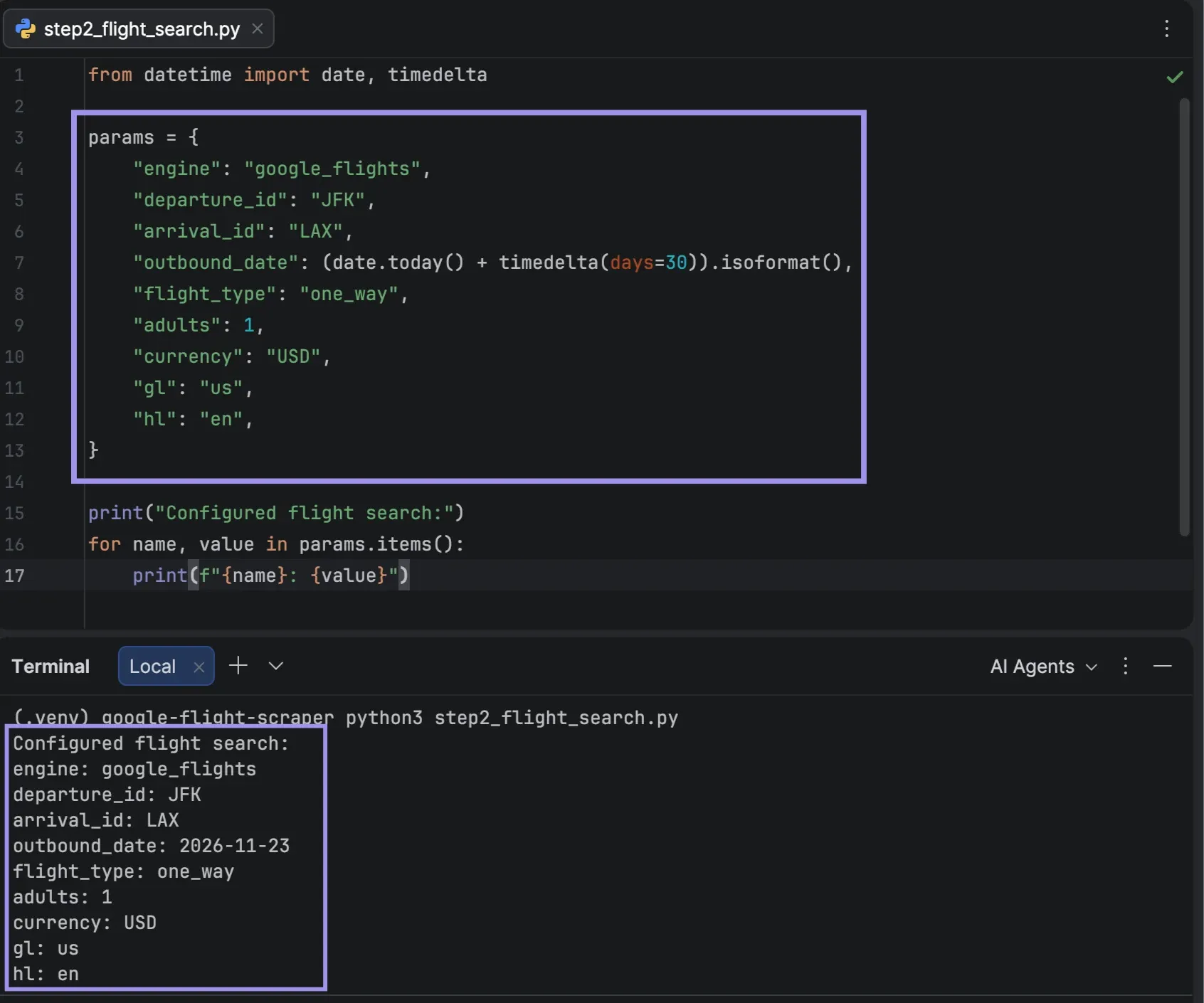
Create a Python program called step2_flight_search.py in your project directory. The one-way search for 1 adult will be from John F. Kennedy International Airport (JFK) to Los Angeles International Airport (LAX) and will be in USD.
from datetime import date, timedelta

params = {
        "engine": "google_flights",
        "departure_id": "JFK",
        "arrival_id": "LAX",
        "outbound_date": (date.today() + timedelta(days=30)).isoformat(),
        "flight_type": "one_way",
        "adults": 1,
        "currency": "USD",
        "gl": "us",
        "hl": "en",
}

print("Configured flight search:")
for name, value in params.items():
        print(f"{name}: {value}")
departure_id and arrival_id use three-letter airport codes, and outbound_date is the flight date 30 days in advance, formatted YYYY-MM-DD. If you specify flight_type as one_way, it will be a one-way flight and no return date will be needed. If flight_type is not provided, the API defaults to a round trip, which requires a return_date.
The gl parameter will determine the country (US), the hl parameter will determine the language (en), and the currency parameter will determine the currency for prices (USD). Many Google Flights APIs offer optional filters such as travel class, number of stops, and sort order, whose names can vary by provider.
To see the configuration, run python step2_flight_search.py. This script will print the parameters selected, which can be used in the API call in the following step.
Step 3: Send a Google Flights API Request
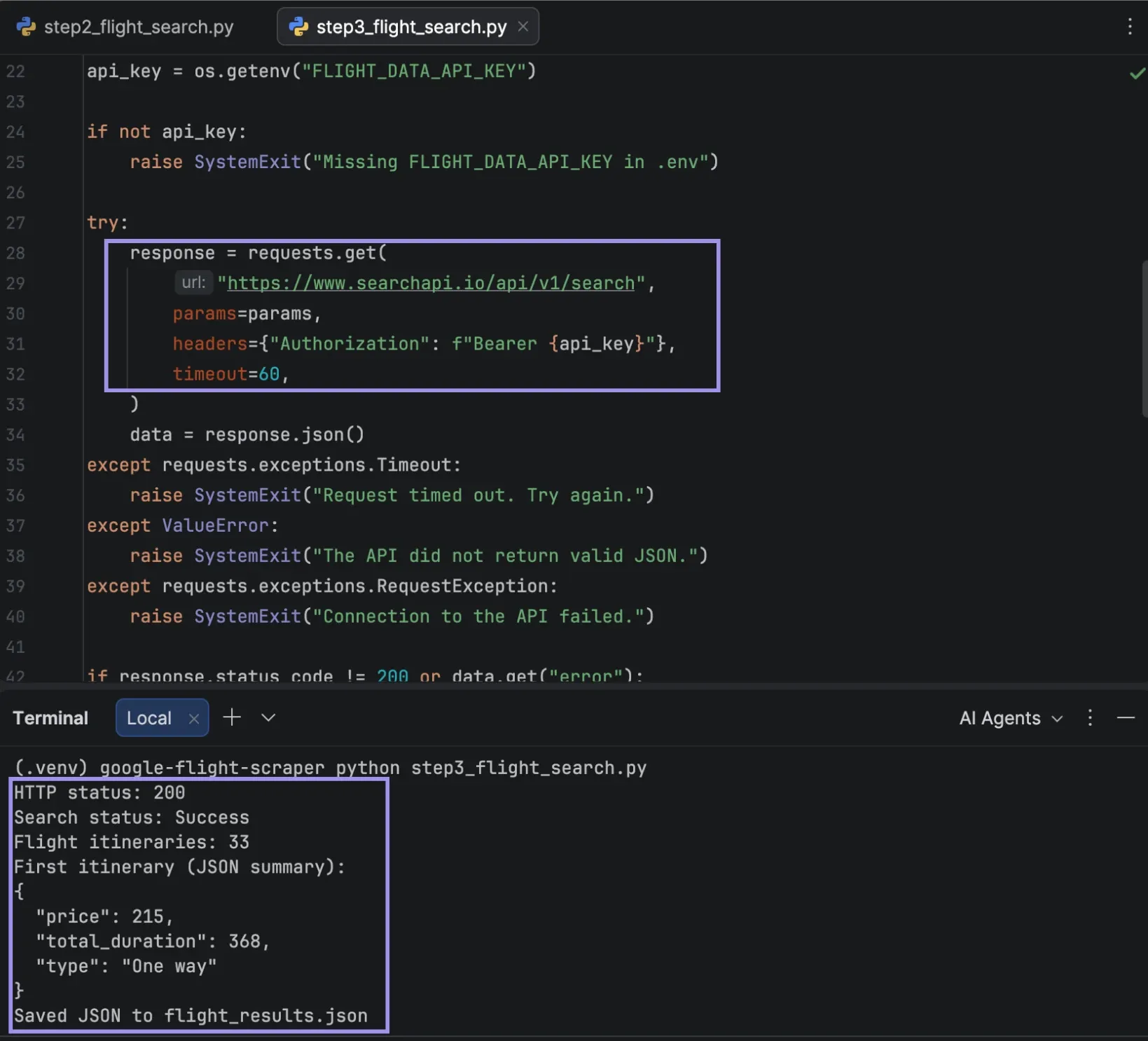
After establishing the search parameters, we can make an HTTP GET call against the API’s search endpoint. Your key is submitted in an Authorization header to the API, so it does not appear in the URL of the request, and the API returns the results in JSON format.
Make a new file called step3_flight_search.py. It includes the parameters from Step 2, plus the imports and code to load your API key, send the request, and save the response:
import json
import os
import requests
from dotenv import load_dotenv
from datetime import date, timedelta

params = {
        "engine": "google_flights",
        "departure_id": "JFK",
        "arrival_id": "LAX",
        "outbound_date": (date.today() + timedelta(days=30)).isoformat(),
        "flight_type": "one_way",
        "adults": 1,
        "currency": "USD",
        "gl": "us",
        "hl": "en",
}

# Step 3: Send the API request
load_dotenv()
api_key = os.getenv("FLIGHT_DATA_API_KEY")

if not api_key:
        raise SystemExit("Missing FLIGHT_DATA_API_KEY in .env")

try:
        response = requests.get(
        "https://www.searchapi.io/api/v1/search",
            params=params,
            headers={"Authorization": f"Bearer {api_key}"},
            timeout=60,
        )
        data = response.json()
except requests.exceptions.Timeout:
        raise SystemExit("Request timed out. Try again.")
except ValueError:
        raise SystemExit("The API did not return valid JSON.")
except requests.exceptions.RequestException:
        raise SystemExit("Connection to the API failed.")

if response.status_code != 200 or data.get("error"):
        raise SystemExit(
            f"API error (HTTP {response.status_code}): "
            f"{data.get('error', 'Check your parameters or account limits.')}"
        )

status = data.get("search_metadata", {}).get("status", "Unknown")
if status != "Success":
        raise SystemExit(f"Search status: {status}. Check the API response.")

with open("flight_results.json", "w", encoding="utf-8") as file:
        json.dump(data, file, indent=2)

flights = data.get("best_flights", []) + data.get("other_flights", [])

print(f"HTTP status: {response.status_code}")
print(f"Search status: {status}")
print(f"Flight itineraries: {len(flights)}")

if flights:
        print("First itinerary (JSON summary):")
        print(json.dumps({
            "price": flights[0].get("price"),
            "total_duration": flights[0].get("total_duration"),
            "type": flights[0].get("type"),
        }, indent=2))

print("Saved JSON to flight_results.json")
The script uses your API key from .env to do the search and to check the result. It also supports connection failure, timeout, and API errors such as an invalid API key error returned in the JSON response (e.g., {"error": "Invalid API key."}).
Run the script:
python step3_flight_search.pyIn a successful response, the script displays the HTTP status, the status of the search, the number of flight itineraries found, and a short summary of the first flight itinerary in JSON format. The complete answer is stored in flight_results.json for retrieval in the subsequent step.
Step 4: Extract Flight Prices and Route Information
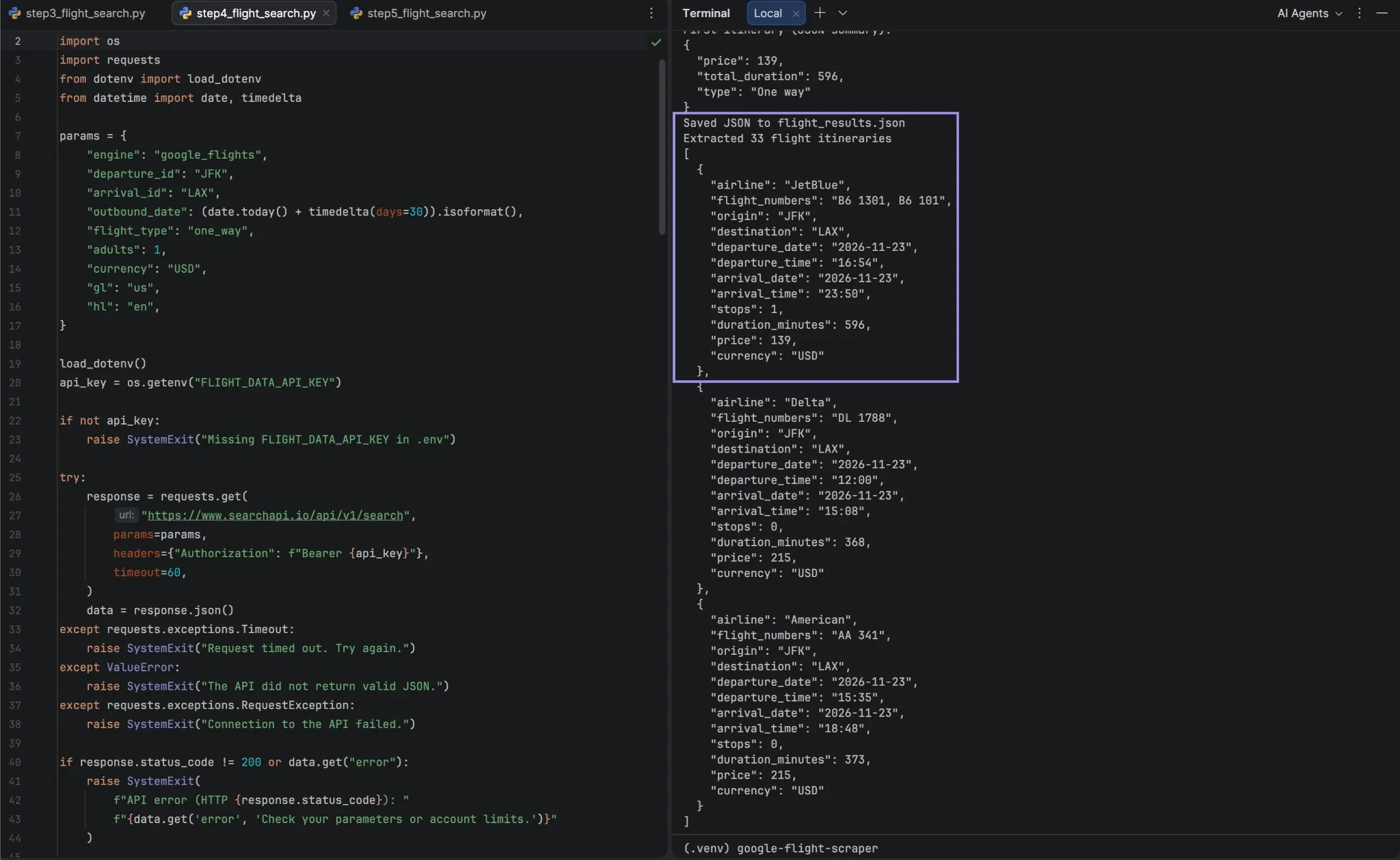
Search results are organized into the following arrays in the API: best_flights and other_flights. Each itinerary has a list of flights with individual flight segments, and some fields such as price and total_duration can be used for the entire itinerary.
If there is a connecting flight, then the departure info is from the first flight and the arrival info is from the last flight. This records the entire trip as a single row, rather than one record for each segment.
Write a program in step4_flight_search.py using the following code. It repeats Step 3 and adds the extracted code at the end:
import json
import os
import requests
from dotenv import load_dotenv
from datetime import date, timedelta

params = {
        "engine": "google_flights",
        "departure_id": "JFK",
        "arrival_id": "LAX",
        "outbound_date": (date.today() + timedelta(days=30)).isoformat(),
        "flight_type": "one_way",
        "adults": 1,
        "currency": "USD",
        "gl": "us",
        "hl": "en",
}

load_dotenv()
api_key = os.getenv("FLIGHT_DATA_API_KEY")

if not api_key:
        raise SystemExit("Missing FLIGHT_DATA_API_KEY in .env")

try:
        response = requests.get(
        "https://www.searchapi.io/api/v1/search",
            params=params,
            headers={"Authorization": f"Bearer {api_key}"},
            timeout=60,
        )
        data = response.json()
except requests.exceptions.Timeout:
        raise SystemExit("Request timed out. Try again.")
except ValueError:
        raise SystemExit("The API did not return valid JSON.")
except requests.exceptions.RequestException:
        raise SystemExit("Connection to the API failed.")

if response.status_code != 200 or data.get("error"):
        raise SystemExit(
            f"API error (HTTP {response.status_code}): "
            f"{data.get('error', 'Check your parameters or account limits.')}"
        )

status = data.get("search_metadata", {}).get("status", "Unknown")
if status != "Success":
        raise SystemExit(f"Search status: {status}. Check the API response.")

with open("flight_results.json", "w", encoding="utf-8") as file:
        json.dump(data, file, indent=2)

flights = data.get("best_flights", []) + data.get("other_flights", [])

print(f"HTTP status: {response.status_code}")
print(f"Search status: {status}")
print(f"Flight itineraries: {len(flights)}")

if flights:
        print("First itinerary (JSON summary):")
        print(json.dumps({
            "price": flights[0].get("price"),
            "total_duration": flights[0].get("total_duration"),
            "type": flights[0].get("type"),
        }, indent=2))

print("Saved JSON to flight_results.json")

# Step 4: Extract flight details
records = []

for itinerary in flights:
        legs = itinerary.get("flights") or []
        if not legs:
            continue

        airlines = list(dict.fromkeys(
            leg["airline"] for leg in legs if leg.get("airline")
        ))

        departure = legs[0].get("departure_airport") or {}
        arrival = legs[-1].get("arrival_airport") or {}

        records.append({
            "airline": ", ".join(airlines) or None,
            "flight_numbers": ", ".join(
                leg["flight_number"] for leg in legs
                if leg.get("flight_number")
            ) or None,
            "origin": departure.get("id"),
            "destination": arrival.get("id"),
            "departure_date": departure.get("date"),
            "departure_time": departure.get("time"),
            "arrival_date": arrival.get("date"),
            "arrival_time": arrival.get("time"),
            "stops": len(legs) - 1,
            "duration_minutes": itinerary.get("total_duration"),
            "price": itinerary.get("price"),
            "currency": params["currency"],
        })

print(f"Extracted {len(records)} flight itineraries")
print(json.dumps(records[:3], indent=2))
The script combines the airline name, counts the connecting stops, and extracts the duration in minutes. We keep the date and time for each airport as separate items in the API, thus in separate columns. Further, the .get() method does not throw any error if an optional field is not present in the dictionary, and returns None in such a case.
Run python step4_flight_search.py. The number of itineraries extracted will be displayed in the terminal, and the first three itineraries will be displayed in the terminal with their prices and route details normalized.
In Step 5, the extracted itineraries are validated with the same records list structure.
Step 5: Verify the Extracted Flight Data
Check if the extracted records are the same as our initial search, before saving the results. A successful API request does not necessarily indicate that the itinerary is exhaustive or that it is the same as what we are searching for.
Create step5_flight_search.py. It adds a validation block at the end and extends Step 4:
import json
import os
import requests
from dotenv import load_dotenv
from datetime import date, timedelta

params = {
        "engine": "google_flights",
        "departure_id": "JFK",
        "arrival_id": "LAX",
        "outbound_date": (date.today() + timedelta(days=30)).isoformat(),
        "flight_type": "one_way",
        "adults": 1,
        "currency": "USD",
        "gl": "us",
        "hl": "en",
}

load_dotenv()
api_key = os.getenv("FLIGHT_DATA_API_KEY")

if not api_key:
        raise SystemExit("Missing FLIGHT_DATA_API_KEY in .env")

try:
        response = requests.get(
        "https://www.searchapi.io/api/v1/search",
            params=params,
            headers={"Authorization": f"Bearer {api_key}"},
            timeout=60,
        )
        data = response.json()
except requests.exceptions.Timeout:
        raise SystemExit("Request timed out. Try again.")
except ValueError:
        raise SystemExit("The API did not return valid JSON.")
except requests.exceptions.RequestException:
        raise SystemExit("Connection to the API failed.")

if response.status_code != 200 or data.get("error"):
        raise SystemExit(
            f"API error (HTTP {response.status_code}): "
            f"{data.get('error', 'Check your parameters or account limits.')}"
        )

status = data.get("search_metadata", {}).get("status", "Unknown")
if status != "Success":
        raise SystemExit(f"Search status: {status}. Check the API response.")

with open("flight_results.json", "w", encoding="utf-8") as file:
        json.dump(data, file, indent=2)

flights = data.get("best_flights", []) + data.get("other_flights", [])

print(f"HTTP status: {response.status_code}")
print(f"Search status: {status}")
print(f"Flight itineraries: {len(flights)}")

if flights:
        print("First itinerary (JSON summary):")
        print(json.dumps({
            "price": flights[0].get("price"),
            "total_duration": flights[0].get("total_duration"),
            "type": flights[0].get("type"),
        }, indent=2))

print("Saved JSON to flight_results.json")

records = []

for itinerary in flights:
        legs = itinerary.get("flights") or []
        if not legs:
            continue

        airlines = list(dict.fromkeys(
            leg["airline"] for leg in legs if leg.get("airline")
        ))

        departure = legs[0].get("departure_airport") or {}
        arrival = legs[-1].get("arrival_airport") or {}

        records.append({
            "airline": ", ".join(airlines) or None,
            "flight_numbers": ", ".join(
                leg["flight_number"] for leg in legs
                if leg.get("flight_number")
            ) or None,
            "origin": departure.get("id"),
            "destination": arrival.get("id"),
            "departure_date": departure.get("date"),
            "departure_time": departure.get("time"),
            "arrival_date": arrival.get("date"),
            "arrival_time": arrival.get("time"),
            "stops": len(legs) - 1,
            "duration_minutes": itinerary.get("total_duration"),
            "price": itinerary.get("price"),
            "currency": params["currency"],
        })

print(f"Extracted {len(records)} flight itineraries")
print(json.dumps(records[:3], indent=2))

# Step 5: Verify the records
if not records:
        raise SystemExit("No flight records found. Check the API response.")

valid_records = []

for record in records:
        price = record.get("price")

        if (
            record.get("origin") == params["departure_id"]
            and record.get("destination") == params["arrival_id"]
            and record.get("departure_date") == params["outbound_date"]
            and isinstance(price, (int, float))
            and price > 0
        ):
            valid_records.append(record)

print(f"Matching itineraries: {len(valid_records)}/{len(records)}")
print(f"Requested currency: {params['currency']}")

if valid_records:
        first = valid_records[0]
        print(
            f"Sample fare: {first['origin']} to "
            f"{first['destination']} - "
            f"{first['price']} {first['currency']}"
        )
else:
        print("No matching itineraries. Review flight_results.json.")
Run python step5_flight_search.py. The script verifies the airport codes and departure date and verifies if each matched itinerary has a numeric price that’s greater than zero. It then displays a number of corresponding records and a sample fare. Matching itineraries are stored in the valid_records list, which can be exported in Step 6 as a CSV file.
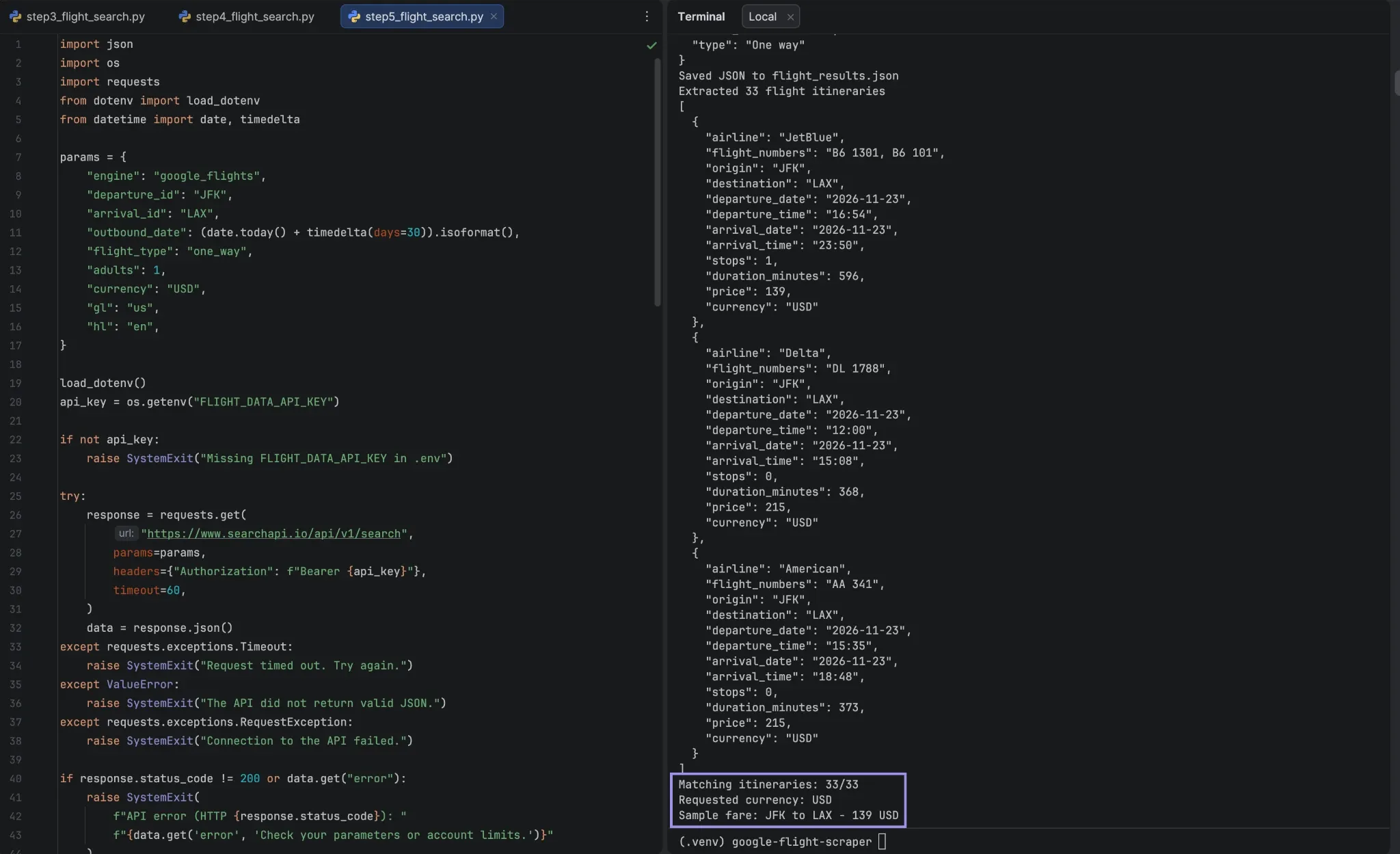
The currency is based on our request settings. Verify the prices are in the appropriate currency, and compare a couple of records to flight_results.json. Airfare prices may differ from search to search, and the price displayed may not be available at the time of booking because of fare changes and availability.
Step 6: Export the Flight Data to CSV
Now that you’ve verified the flight records, save them as a CSV file. This makes it convenient to compare fares, filter routes, and analyze the data in Excel or other applications.
Create step6_flight_search.py. Include import csv in imports and a block at the end for exporting CSV:
import csv
import json
import os
import requests
from dotenv import load_dotenv
from datetime import date, timedelta

params = {
        "engine": "google_flights",
        "departure_id": "JFK",
        "arrival_id": "LAX",
        "outbound_date": (date.today() + timedelta(days=30)).isoformat(),
        "flight_type": "one_way",
        "adults": 1,
        "currency": "USD",
        "gl": "us",
        "hl": "en",
}

load_dotenv()
api_key = os.getenv("FLIGHT_DATA_API_KEY")

if not api_key:
        raise SystemExit("Missing FLIGHT_DATA_API_KEY in .env")

try:
        response = requests.get(
        "https://www.searchapi.io/api/v1/search",
            params=params,
            headers={"Authorization": f"Bearer {api_key}"},
            timeout=60,
        )
        data = response.json()
except requests.exceptions.Timeout:
        raise SystemExit("Request timed out. Try again.")
except ValueError:
        raise SystemExit("The API did not return valid JSON.")
except requests.exceptions.RequestException:
        raise SystemExit("Connection to the API failed.")

if response.status_code != 200 or data.get("error"):
        raise SystemExit(
            f"API error (HTTP {response.status_code}): "
            f"{data.get('error', 'Check your parameters or account limits.')}"
        )

status = data.get("search_metadata", {}).get("status", "Unknown")
if status != "Success":
        raise SystemExit(f"Search status: {status}. Check the API response.")

with open("flight_results.json", "w", encoding="utf-8") as file:
        json.dump(data, file, indent=2)

flights = data.get("best_flights", []) + data.get("other_flights", [])

print(f"HTTP status: {response.status_code}")
print(f"Search status: {status}")
print(f"Flight itineraries: {len(flights)}")

if flights:
        print("First itinerary (JSON summary):")
        print(json.dumps({
            "price": flights[0].get("price"),
            "total_duration": flights[0].get("total_duration"),
            "type": flights[0].get("type"),
        }, indent=2))

print("Saved JSON to flight_results.json")

records = []

for itinerary in flights:
        legs = itinerary.get("flights") or []
        if not legs:
            continue

        airlines = list(dict.fromkeys(
            leg["airline"] for leg in legs if leg.get("airline")
        ))

        departure = legs[0].get("departure_airport") or {}
        arrival = legs[-1].get("arrival_airport") or {}

        records.append({
            "airline": ", ".join(airlines) or None,
            "flight_numbers": ", ".join(
                leg["flight_number"] for leg in legs
                if leg.get("flight_number")
            ) or None,
            "origin": departure.get("id"),
            "destination": arrival.get("id"),
            "departure_date": departure.get("date"),
            "departure_time": departure.get("time"),
            "arrival_date": arrival.get("date"),
            "arrival_time": arrival.get("time"),
            "stops": len(legs) - 1,
            "duration_minutes": itinerary.get("total_duration"),
            "price": itinerary.get("price"),
            "currency": params["currency"],
        })

print(f"Extracted {len(records)} flight itineraries")
print(json.dumps(records[:3], indent=2))

if not records:
        raise SystemExit("No flight records found. Check the API response.")

valid_records = []

for record in records:
        price = record.get("price")

        if (
            record.get("origin") == params["departure_id"]
            and record.get("destination") == params["arrival_id"]
            and record.get("departure_date") == params["outbound_date"]
            and isinstance(price, (int, float))
            and price > 0
        ):
            valid_records.append(record)

print(f"Matching itineraries: {len(valid_records)}/{len(records)}")
print(f"Requested currency: {params['currency']}")

if valid_records:
        first = valid_records[0]
        print(
            f"Sample fare: {first['origin']} to "
            f"{first['destination']} - "
            f"{first['price']} {first['currency']}"
        )
else:
        print("No matching itineraries. Review flight_results.json.")

# Step 6: Export to CSV
fieldnames = [
        "airline", "flight_numbers", "origin", "destination",
        "departure_date", "departure_time", "arrival_date", "arrival_time",
        "stops", "duration_minutes", "price", "currency"
]

with open("flight_data.csv", "w", newline="", encoding="utf-8") as file:
        writer = csv.DictWriter(file, fieldnames=fieldnames)
        writer.writeheader()
        writer.writerows(valid_records)

print(f"Exported {len(valid_records)} itineraries to flight_data.csv")
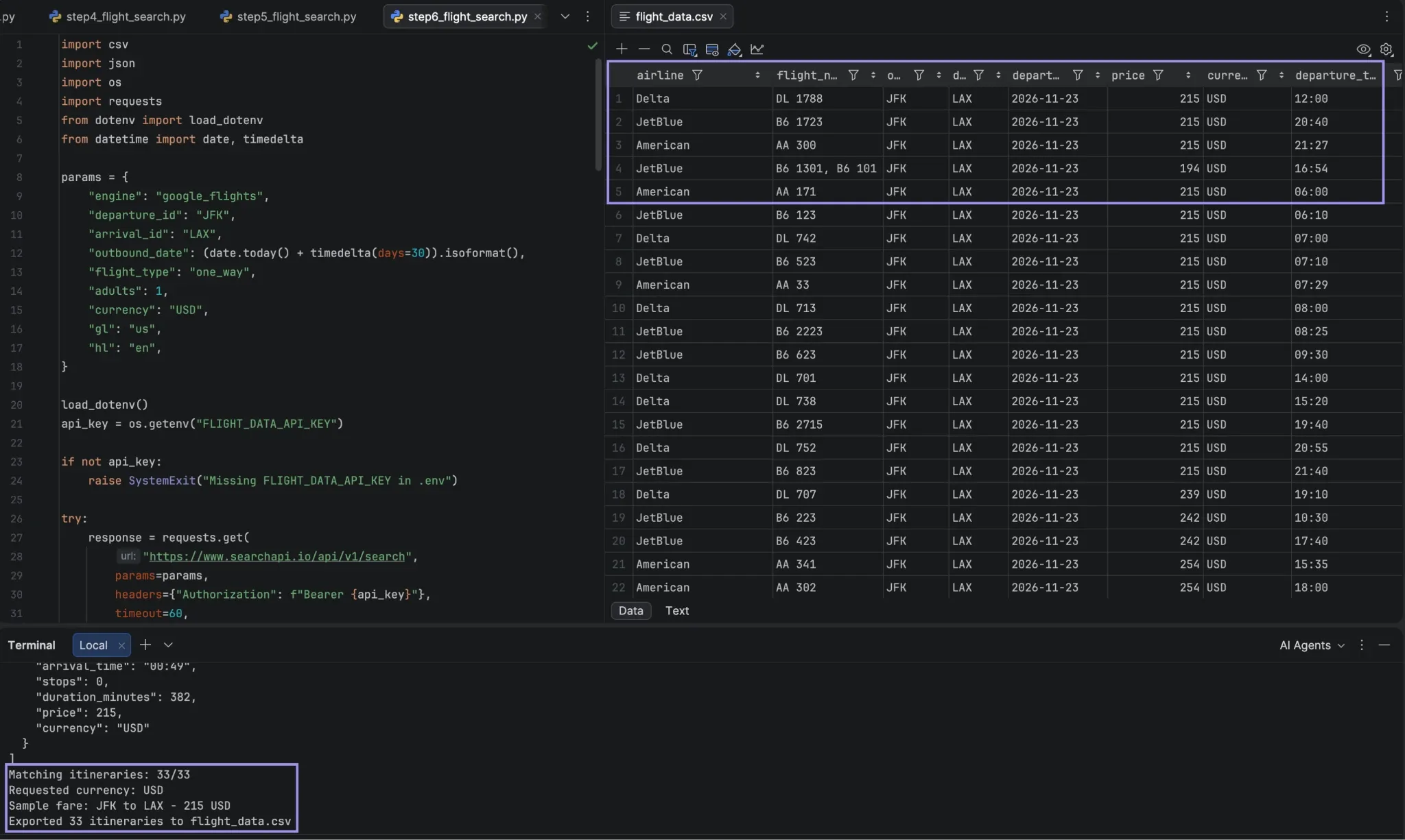
Our valid_records list contains each itinerary that we have verified, and the csv.DictWriter class writes each of these valid itineraries as one row in our CSV. writeheader() writes column names, and the fieldnames list sets the order of the columns. If the value is not available, then it is left blank.
Run python step6_flight_search.py. It will generate flight_data.csv in your project folder, which will contain the confirmed journeys.
The CSV that is exported includes all 12 columns that you configure, and values returned by the API.
Step 7: Compare and Track Flight Prices Across Dates
Each search is only for one departure date. The same search will run on several dates, and the validated fare results for each date will be appended to a historical CSV file to compare fares across dates and track changes over time.
Create step7_flight_search.py. Uses code from Step 6 but modifies it to make the script search through any date of departure. Here’s what changes:
- The params dictionary and the code in Steps 3-5 are placed in a function called search_flights(). It takes the departure date and returns the validated records for that date.
- Instead of loading the API key before each search, it is loaded at the top of the file.
- The Step 6 export is replaced by code that writes the departure dates to a JSON file, with each search being added to a history CSV.
Here’s the complete file:
import csv
import json
import os
import requests
from dotenv import load_dotenv
from datetime import date, datetime, timedelta, timezone

load_dotenv()
api_key = os.getenv("FLIGHT_DATA_API_KEY")

if not api_key:
    raise SystemExit("Missing FLIGHT_DATA_API_KEY in .env")

def search_flights(outbound_date):
    params = {
        "engine": "google_flights",
        "departure_id": "JFK",
        "arrival_id": "LAX",
        "outbound_date": outbound_date,
        "flight_type": "one_way",
        "adults": 1,
        "currency": "USD",
        "gl": "us",
        "hl": "en",
    }

    try:
        response = requests.get(
            "https://www.searchapi.io/api/v1/search",
            params=params,
            headers={"Authorization": f"Bearer {api_key}"},
            timeout=60,
        )
        data = response.json()
    except requests.exceptions.Timeout:
        raise SystemExit("Request timed out. Try again.")
    except ValueError:
        raise SystemExit("The API did not return valid JSON.")
    except requests.exceptions.RequestException:
        raise SystemExit("Connection to the API failed.")

    if response.status_code != 200 or data.get("error"):
        raise SystemExit(
            f"API error (HTTP {response.status_code}): "
            f"{data.get('error', 'Check your parameters or account limits.')}"
        )

    status = data.get("search_metadata", {}).get("status", "Unknown")
    if status != "Success":
        raise SystemExit(f"Search status: {status}. Check the API response.")

    with open("flight_results.json", "w", encoding="utf-8") as file:
        json.dump(data, file, indent=2)

    flights = data.get("best_flights", []) + data.get("other_flights", [])

    print(f"HTTP status: {response.status_code}")
    print(f"Search status: {status}")
    print(f"Flight itineraries: {len(flights)}")

    if flights:
        print("First itinerary (JSON summary):")
        print(json.dumps({
            "price": flights[0].get("price"),
            "total_duration": flights[0].get("total_duration"),
            "type": flights[0].get("type"),
        }, indent=2))

    print("Saved JSON to flight_results.json")

    records = []

    for itinerary in flights:
        legs = itinerary.get("flights") or []
        if not legs:
            continue

        airlines = list(dict.fromkeys(
            leg["airline"] for leg in legs if leg.get("airline")
        ))

        departure = legs[0].get("departure_airport") or {}
        arrival = legs[-1].get("arrival_airport") or {}

        records.append({
            "airline": ", ".join(airlines) or None,
            "flight_numbers": ", ".join(
                leg["flight_number"] for leg in legs
                if leg.get("flight_number")
            ) or None,
            "origin": departure.get("id"),
            "destination": arrival.get("id"),
            "departure_date": departure.get("date"),
            "departure_time": departure.get("time"),
            "arrival_date": arrival.get("date"),
            "arrival_time": arrival.get("time"),
            "stops": len(legs) - 1,
            "duration_minutes": itinerary.get("total_duration"),
            "price": itinerary.get("price"),
            "currency": params["currency"],
        })

    print(f"Extracted {len(records)} flight itineraries")
    print(json.dumps(records[:3], indent=2))

    if not records:
        raise SystemExit("No flight records found. Check the API response.")

    valid_records = []

    for record in records:
        price = record.get("price")

        if (
            record.get("origin") == params["departure_id"]
            and record.get("destination") == params["arrival_id"]
            and record.get("departure_date") == params["outbound_date"]
            and isinstance(price, (int, float))
            and price > 0
        ):
            valid_records.append(record)

    print(f"Matching itineraries: {len(valid_records)}/{len(records)}")
    print(f"Requested currency: {params['currency']}")

    if valid_records:
        first = valid_records[0]
        print(
            f"Sample fare: {first['origin']} to "
            f"{first['destination']} - "
            f"{first['price']} {first['currency']}"
        )
    else:
        print("No matching itineraries. Review flight_results.json.")

    return valid_records

# Generate three departure dates on the first run.
# Save them so future runs track the same travel dates.
if os.path.exists("departure_dates.json"):
    with open("departure_dates.json", encoding="utf-8") as file:
        departure_dates = json.load(file)
else:
    departure_dates = [
        (date.today() + timedelta(days=days)).isoformat()
        for days in (30, 37, 44)
    ]
    with open("departure_dates.json", "w", encoding="utf-8") as file:
        json.dump(departure_dates, file, indent=2)

fieldnames = [
    "searched_at_utc", "airline", "flight_numbers", "origin",
    "destination", "departure_date", "departure_time", "arrival_date",
    "arrival_time", "stops", "duration_minutes", "price", "currency"
]
write_header = not os.path.exists("flight_price_history.csv")

with open("flight_price_history.csv", "a", newline="", encoding="utf-8") as file:
    writer = csv.DictWriter(file, fieldnames=fieldnames)
    if write_header:
        writer.writeheader()

    for departure_date in departure_dates:
        if date.fromisoformat(departure_date) < date.today():
            print(f"Skipping past date: {departure_date}")
            continue

        try:
            valid_records = search_flights(departure_date)
        except SystemExit as error:
            print(f"Search failed for {departure_date}: {error}")
            continue

        searched_at = datetime.now(timezone.utc).isoformat(timespec="seconds")

        for record in valid_records:
            record["searched_at_utc"] = searched_at

        writer.writerows(valid_records)
        print(f"{departure_date}: saved {len(valid_records)} itineraries")

print("Price history saved to flight_price_history.csv")
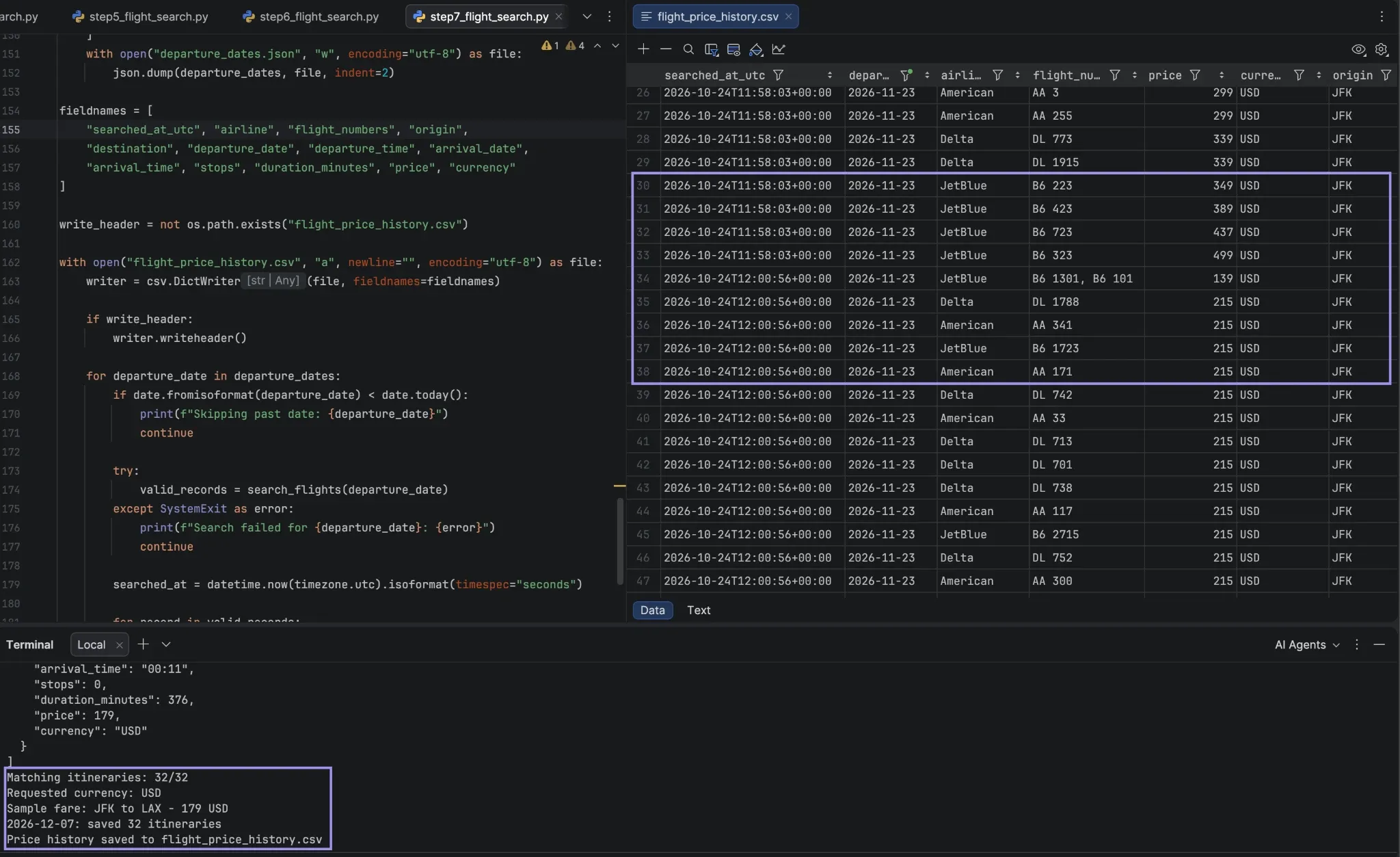
Inside the terminal, use Python to execute the file step7_flight_search.py. It creates 3 departure dates for departures (30, 37, 44 days ahead) on the first run, which it saves to departure_dates.json.
It then iterates through all the dates and requests the flights from search_flights(), exactly as described above – it requests, extracts, and validates. Itineraries are only added to flight_price_history.csv if they are validated. Each row includes the search time and the date it was searched. The terminal shows messages for all previous operations for each date, followed by the number of itineraries saved.
If a search fails, the script proceeds to the next date because the loop catches the SystemExit raised on timeout or API error. If the API key is not found, the script will not even run any searches.
Comparing dates is not the same as tracking prices. The script stores the computed dates, and the next time it runs, it doesn’t redo the computations; it only adds new prices for the same dates to compare over time.
The file is opened for adding new rows to it (in “a” mode), so previously added rows are never overwritten, and the header row is only written when the file is created. If you want to follow some other set of dates, remove the file departure_dates.json from your project folder.
For macOS and Linux, you may automate the tracking by scheduling the script with cron; on Windows, use Task Scheduler. The script reads and writes its files in the project folder, so make sure to set the job to run from the project folder. There are up to three dates to handle for each run, so adjust frequency to your plans.
Some of the providers will provide a calendar endpoint where prices for an entire date range can be obtained in a single call for those who require the lowest price for each date over a wider range. SearchApi.io has a google_flights_calendar engine for this, which takes a start and end date for the outbound leg. The google_flights_deals engine also finds discounted flights with no set destination.
How to Search Round-Trip Flights
The tutorial above uses one-way flights, but SearchApi.io can also be used for round-trip searches. Make flight_type round_trip and enter return_date as YYYY-MM-DD.
The API first sends outbound itineraries with departure_token values. For a given itinerary, to see the return flights, send another request with the same departure_token. Once a return flight is selected, pass the booking_token returned with that flight to another request to get booking options for the whole trip.
The following script runs the first two requests. It searches for round-trip flights, prints the first outbound flight, and then requests the matching return flights with a departure_token. In your project directory, create a file called round_trip_search.py and add:
import os
import requests
from dotenv import load_dotenv
from datetime import date, timedelta

load_dotenv()
api_key = os.getenv("FLIGHT_DATA_API_KEY")
if not api_key:
    raise SystemExit("Missing FLIGHT_DATA_API_KEY in .env")

params = {
    "engine": "google_flights", "flight_type": "round_trip",
    "departure_id": "JFK", "arrival_id": "LAX",
    "outbound_date": (date.today() + timedelta(days=30)).isoformat(),
    "return_date": (date.today() + timedelta(days=37)).isoformat(),
    "adults": 1, "currency": "USD", "gl": "us", "hl": "en",
}

def search(search_params):
    try:
        response = requests.get("https://www.searchapi.io/api/v1/search", params=search_params,
                                headers={"Authorization": f"Bearer {api_key}"}, timeout=60)
        data = response.json()
    except (requests.exceptions.RequestException, ValueError):
        raise SystemExit("The request failed or didn't return JSON. Try again.")
    if response.status_code != 200 or data.get("error"):
        raise SystemExit(f"API error (HTTP {response.status_code}): {data.get('error')}")
    return data.get("best_flights", []) + data.get("other_flights", [])

def summarize(itinerary):
    legs = itinerary["flights"]
    start, end = legs[0]["departure_airport"], legs[-1]["arrival_airport"]
    airlines = ", ".join(dict.fromkeys(leg.get("airline", "?") for leg in legs))
    return (f"{airlines} | {start['id']} to {end['id']} | {start['date']} {start['time']}"
            f" | {itinerary.get('price')} {params['currency']}")

outbound = search(params)
print(f"Outbound itineraries: {len(outbound)}")
if not outbound:
    raise SystemExit("No outbound itineraries found. Check your search parameters.")
print(f"First outbound: {summarize(outbound[0])}")
if not outbound[0].get("departure_token"):
    raise SystemExit("No departure_token returned, so return flights can't be requested.")

returns = search({**params, "departure_token": outbound[0]["departure_token"]})
print(f"Return options: {len(returns)}")
for itinerary in returns[:3]:
    print(f"Return: {summarize(itinerary)}")
Run python round_trip_search.py. The terminal displays the number of outbound itineraries, a summary of the first one, and up to three return itinerary options for that flight. This script performs two API requests in each run.
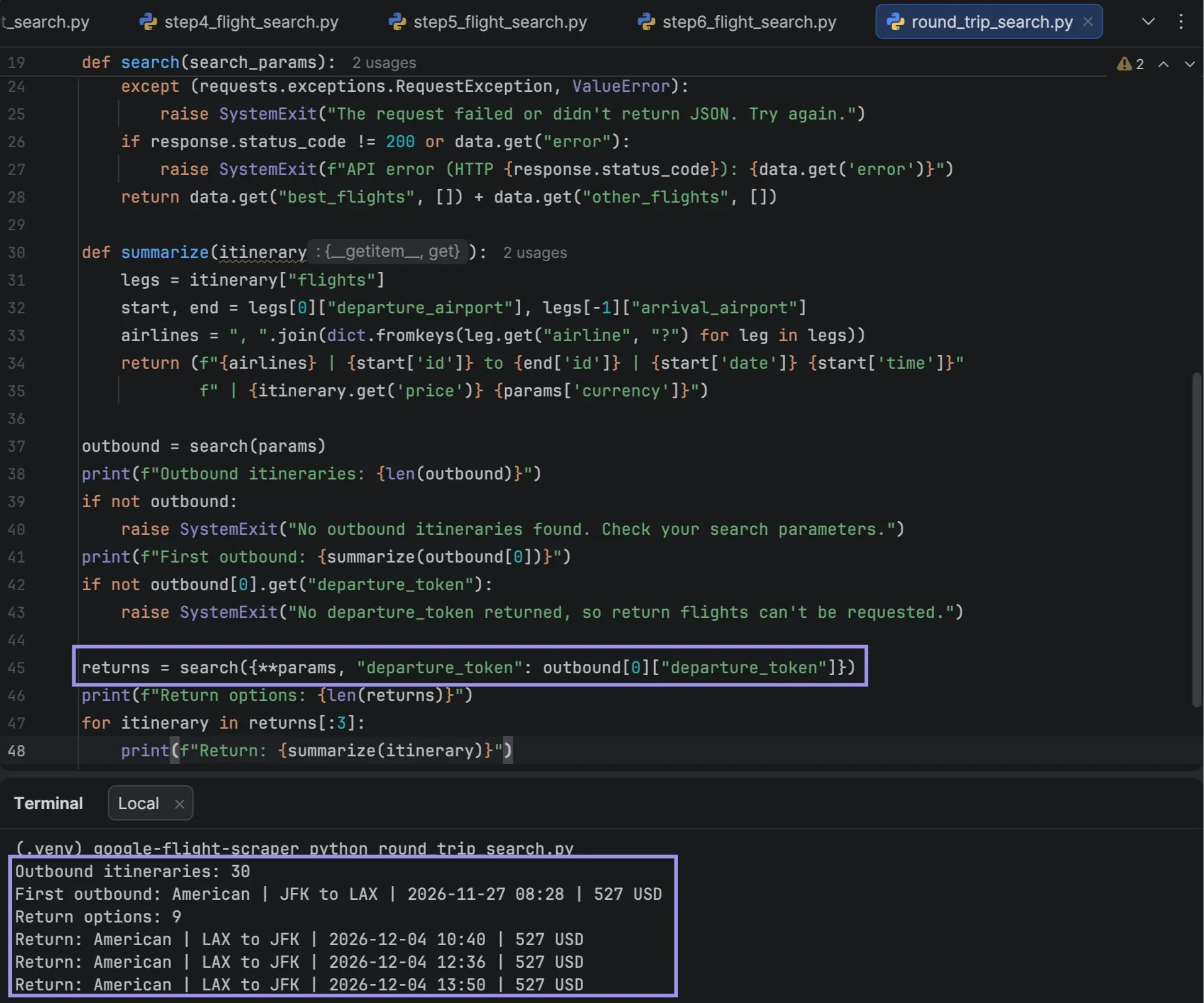
The price field in a round-trip result is not the outbound route price, but rather the entire route price. For the outbound list, it is the lowest outbound/return total for that outbound flight, and each return alternative has the outbound/return total. Final price is also subject to the booking option chosen.
Changes are also needed to the one-way extraction code to export both legs to CSV. If you are scraping a travel site, however, you should also take into account whether proxies suit your setup.
Which Proxy Type Works Best for Flight Data Collection?
Proxies can be useful for custom scraping on travel websites that allow automated access, such as the ability to search for travel destinations in different regions or to consistently use the same IP address.
Here are three options:
- Mobile proxies: They are assigned IPs from mobile carriers. They might come in handy when traveling websites are handling mobile traffic differently than datacenter traffic, especially in the course of regional testing. However, they don’t guarantee access or different fares.
- Residential proxies: These are IP addresses that are connected to residential Internet services, which are useful for verifying content from various areas. IPs can be rotated between requests, or sticky sessions can be used if you want to keep the same IP. The price of availability and bandwidth depends on the location and plan.
- ISP proxies: These are ISP-assigned IPs that use datacenter hosting, providing more stable connections. They’re helpful for recurrent checks that require a consistent IP and not constant rotations.
For supported residential and mobile connections, you can also use the OS Targeting feature to choose between Windows, Linux, or Android proxy devices. It is in beta and may not be available in all of the locations.
Review the access policies for the website and make a couple of requests with the location and proxy settings you want to use to test if they will be allowed.
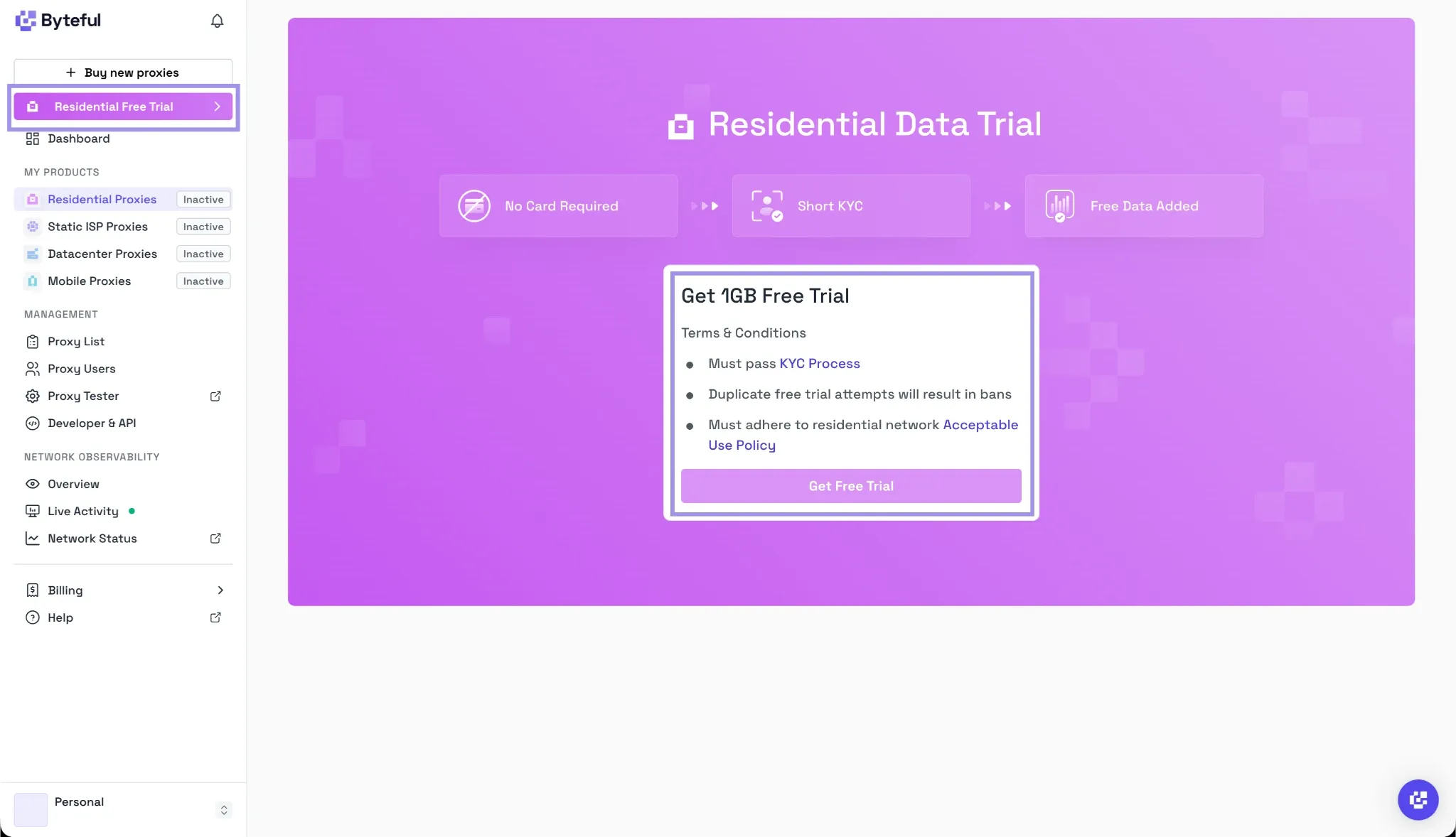
If you are using residential IPs for regional checks, you can always get started with a 1 GB free trial of residential data to test the setup prior to signing up for a plan.
How to Fix Google Flights API Errors and Incorrect Flight Results
A request can fail if there is a problem with the authentication, search parameters, or API usage limits. Even though successful, requests may still receive partial itineraries or misquoted prices. Check for any error message or the HTTP status code in the API response and look at the data returned.
| Problem | Likely cause | What to check or fix |
|---|---|---|
| API authentication fails | Invalid API key or insufficient access | Confirm that .env contains the correct key and check your API provider’s dashboard |
| No flights are returned | Incorrect airport codes, dates, or unavailable routes | Review departure_id, arrival_id, outbound_date and flight_type |
| HTTP 429 error | Hourly request limit reached or search credits exhausted | Check your remaining quota and respect any Retry-After instructions |
| Flight prices don’t match | Currency, travel dates, or changing fare availability | Verify currency, gl, travel dates, and itinerary details |
| Missing flight details | Optional fields are absent from the response | Use .get() to handle missing values without breaking the parser |
| JSON parsing fails | The API returned an unexpected or non-JSON response | Check the HTTP status and response content before parsing |
When troubleshooting, please note the following information: HTTP status, search parameters, and error messages, but not your API key. You can also check flight_results.json to see if there are any missing fields, or if there are any unforeseen itinerary structures.
If the server is temporarily down, please try a few times with a few seconds between. Authentication errors or incorrect parameters must be corrected, not repeated.