Playwright can be very helpful for testing different applications and for scraping public data. But a Playwright script can get restricted and banned from the target for various reasons. One of them is a large number of requests from the same IP.
This is where using proxies with Playwright helps. Proxies help you avoid IP bans and dodge rate limits by spreading requests across multiple IPs. In this guide, we cover different approaches to integrating proxies in Playwright, their scope, common errors you might face during proxy integration, and the types of proxies you can use.
Which Playwright Proxy Method Should You Use?
Playwright is a multi-browser and multi-language framework. It supports multiple browsers like Chromium, Firefox, and WebKit while supporting its implementation in different languages like Node.js, Python, Java, and .NET. No matter the browser or language you use, the proxy option is the same everywhere.
Playwright offers different approaches to configuring proxies, each at a different level and in a different way. Below is the table summarizing each approach, which is also explained further in a later part.
Configuration Method
Scope
Best For
Browser-level proxy
To all pages & contexts in a browser instance.
When you need a single proxy for the entire scraping project
Context-level proxy
Configures proxy per context; different contexts can use different proxies without relaunching the browser.
Running multiple browser contexts through different proxies in the same script. Also helps in simulating multiple users without browser relaunching.
Proxy configuration in rotation
Per-context rotation from a defined proxy list or a rotating endpoint
Large-scale scraping when you need to prevent hitting rate limits
Corporate network/System proxies
Enterprise proxies with special authentication
Corporate networks requiring domain auth (NTLM) or self-signed SSL certificates. Internal company networks.
Note: Configuring a proxy in Playwright just changes the IP address your target sees. It is not an anti-bot bypass tool and is just one factor of many others that can help to reduce your chances of blockage on the target.
Prerequisites
To start using Playwright, you will first need to install it on your system. Here's how to install Playwright via Python:
pip install playwrightplaywright install
To install Playwright via Node.js:
npm i playwrightnpx playwright install
Method 1: Browser-Level Proxy Configuration
Configuring a proxy in Playwright at browser launch applies the proxy configuration to all pages and contexts from that browser instance.
The following Node.js code integrates an unauthenticated proxy in a simple script that uses the ‘http’ protocol with the Chromium browser.
If you want to use HTTPS or SOCKS5 proxies, you can do so just by replacing the ‘http’ part of the proxy URL with ‘https’ or ‘socks5’.
The same script would also work with browsers other than Chromium, like Firefox and WebKit. All you have to do is import Firefox or WebKit from Playwright instead of Chromium and launch the browser with firefox.launch or webkit.launch method.
Add Authenticated Proxies
Unlike Selenium, Playwright handles credentials natively without a third-party extension, but it doesn't handle them well when combined in a proxy URL like http://user:pass@host:port. You will need to configure the server, username, and password separately.
When using authenticated proxies, avoid hardcoding your credentials in the script, as then you may have to commit these sensitive credentials to a git repository, which is considered a bad security practice. Consider using environment variables instead. You can set the PROXY_URL variable on Windows CMD using:
set PROXY_URL=``http://user:pass@PROXY_HOST:PROXY_PORT
The following Playwright script configures an authenticated proxy and uses a function to parse the proxy URL from an environment variable into server, username, and password.
Playwright does not support credential authentication for SOCKS5 proxies. If you need to use authenticated SOCKS5 proxies, switch to IP whitelisting instead, which is explained next.
No-Code Authentication: IP Whitelisting
ProxyIP whitelisting lets you skip credential authentication and authenticate your connection to the proxy server based on whitelisted IP addresses. IP whitelisting availability depends on the proxy provider, and many leading providers, including us (Byteful), offer IP whitelisting. Here’s how to whitelist your IP address from the Byteful dashboard:
Use an IP-echo page like httpbin.org/ip to get your public IP address.
Log in to the dashboard.
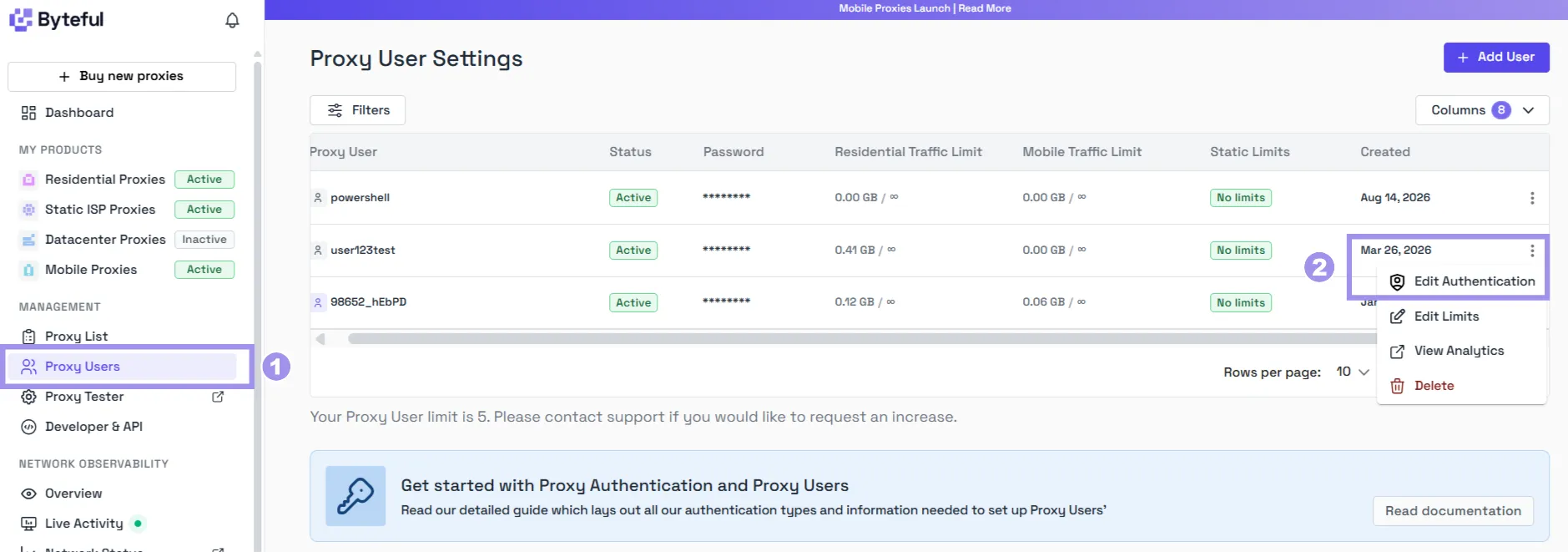
Navigate to ‘Proxy Users’ from the left-side menu and click “Edit Authentication” for a proxy user.
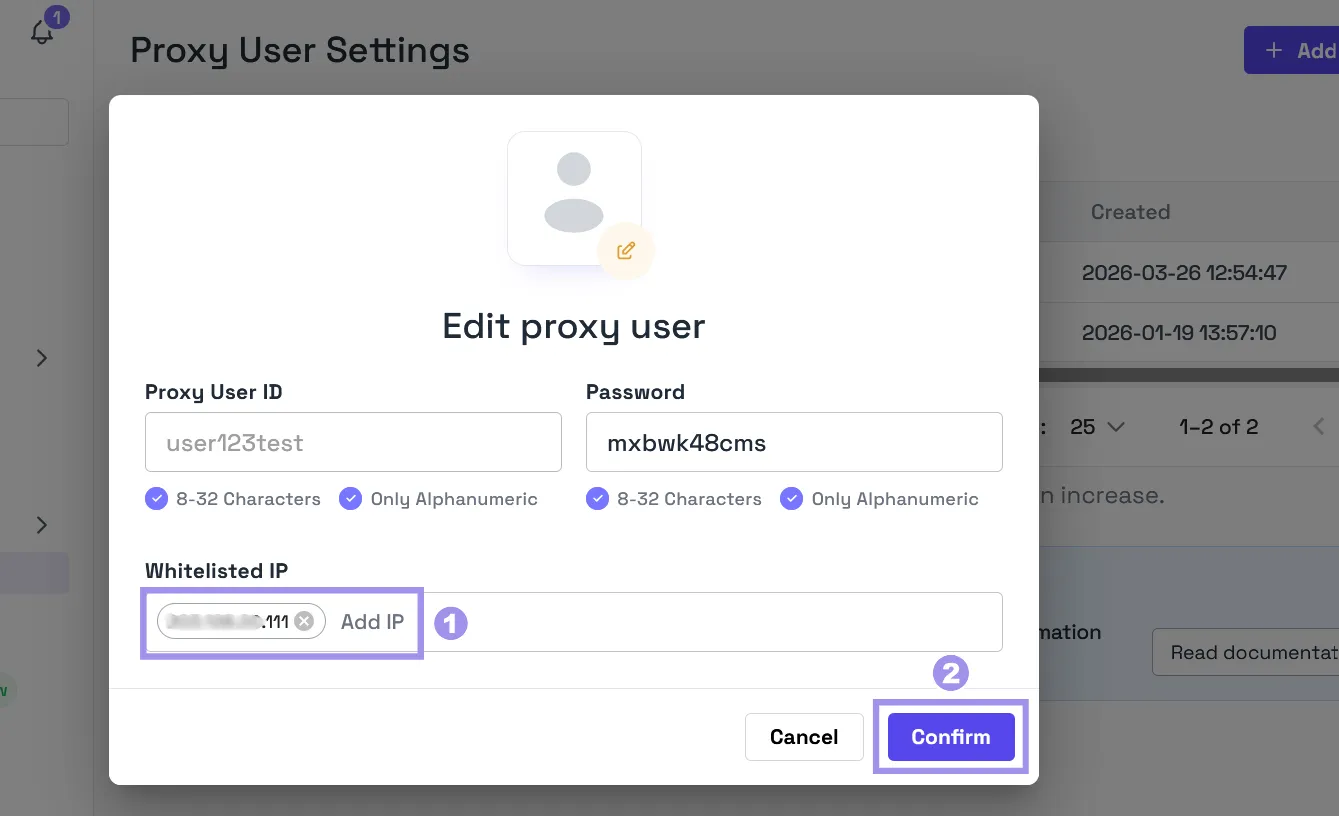
In the edit proxy user pop-up, enter the IP address you got from the first step, hit “Enter”, and finally, click “Confirm”.
Verifying Playwright Proxy Setup
Once done with the proxy configuration, ensure it's working by pointing your Playwright script towards any IP-echo page and running the script with:
node script.js
If the script outputs the proxy IP, the proxy configuration was successful.
Method 2: Per-Context Proxy Configuration
Configuring a proxy per browser context lets you run multiple browser contexts through different proxies using the same script, without relaunching the browser. Each browser context is separate from the others, has its own session, and also serves as a cheap way to simulate multiple users.
The following script configures two different proxies for two different IP-echo pages:
const { chromium } = require('playwright');(async () => {// Launch ONE browser without a proxyconst browser = await chromium.launch();// Context 1const context1 = await browser.newContext({proxy: {server: 'http://PROXY1_HOST:PROXY1_PORT',username: 'user1',password: 'pass1'}});// Context 2const context2 = await browser.newContext({proxy: {server: 'http://PROXY2_HOST:PROXY2_PORT',username: 'user2',password: 'pass2'}});// Each context runs independentlyconst page1 = await context1.newPage();const page2 = await context2.newPage();// Both navigate simultaneously on different proxiesawait page1.goto('https://httpbin.org/ip');await page2.goto('https://api.ipify.org');// Output: Different IPs from different proxiesconsole.log('Context 1 IP:', await page1.textContent('body'));console.log('Context 2 IP:', await page2.textContent('body'));await context1.close();await context2.close();await browser.close();})();
Running the script will visit both pages using different proxies and will show the results:
When routing a context through a specific country’s IP, consider setting geolocation, locale, and timezoneId to match the IP location. Otherwise, the site detects a mismatch, and that can lead to blockage.
Method 3: Rotating Proxies To Avoid Blocks at Scale
Rotating proxies in Playwright is an efficient way to distribute requests across multiple IPs, which helps reduce the blockage by dodging rate limits.
You can rotate proxies in Playwright via the main approaches below:
Use a Proxy List
To rotate proxies via a list, you will define a list of available proxies in your script and then rotate proxies per context. The rotation can be done in various ways, such as random or round-robin rotation.
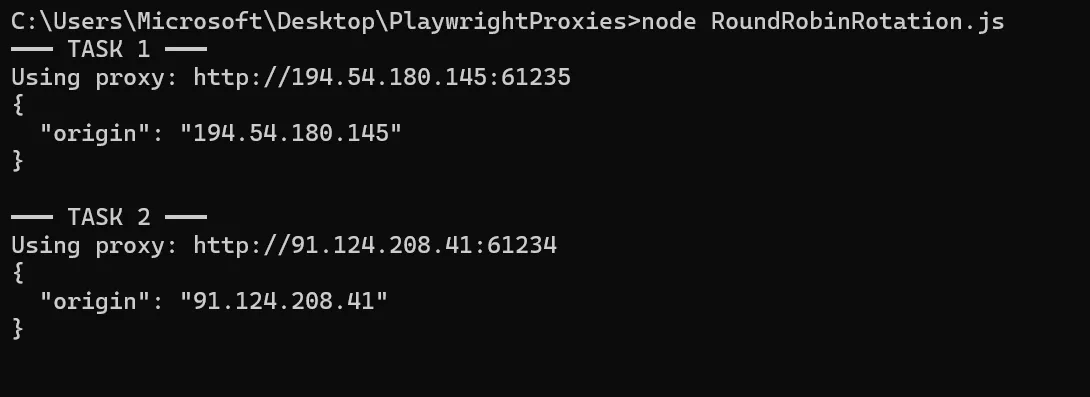
The following script uses a list to rotate proxies via round-robin:
When executed, the script visits httpbin.org/ip while routing through the proxies listed in the ‘proxyPool '.
Use a Rotating Endpoint
Many leading proxy providers offer a rotating endpoint that handles proxy rotation, so you don't need to configure it in your script.
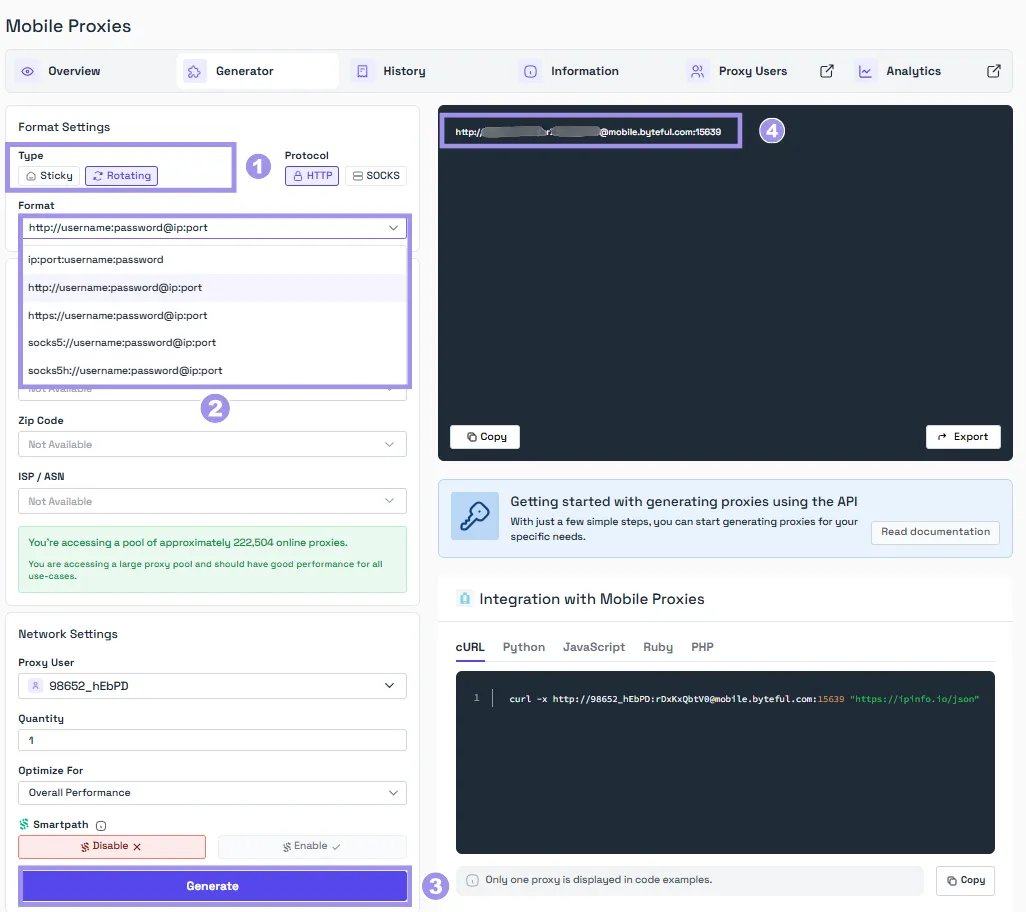
Byteful also provides rotating endpoints for the residential and mobile proxies. All you have to do is log in to the dashboard and generate a rotating endpoint. It also lets you specify geo-locations and rotation types. You can rotate proxies per request or after a specified interval, called a sticky session.
For Corporate and System Proxies
Corporate environments require special proxy handling. These proxies usually require domain authentication, such as New Technology LAN Manager (NTLM), and use self-signed SSL certificates for traffic inspection.
If your proxy accepts standard credential authentication, the following configuration works; NTLM negotiation support varies by browser engine, so test with Chromium first, and if it fails, ask your IT team for a Basic-auth or IP-whitelisted gateway.
The proxy configured in the script is bypassed for internal company domains and local addresses to prevent unnecessary latency and authentication loops for resources already inside your network.
Windows domains usually use the ‘DOMAIN\user’ format in the proxy username. If that is the case, it must be escaped by using two backslashes (\).
Troubleshooting Playwright Proxy Setup Issues
You may face several problems when configuring proxies in Playwright. This section lists the most common problems users face along with the possible solutions:
net::ERR_PROXY_CONNECTION_FAILED: This can happen if the proxy is down or is not configured properly. Use a proxy tester like Byteful’s to ensure that the proxy is working. If your proxy requires authentication, make sure it is configured properly using separate server, username, and password fields, or use IP whitelisting.
Pages load slowly: Using a proxy with your Playwright script adds an extra hop the data has to travel through, and that can slow the speed down a little. It also depends on the type of proxy being used. Residential and mobile proxies are usually slower than datacenter and ISP proxies. To improve the script speed, consider blocking unnecessary resource loading using the Playwright route() function.
Still getting blocked: A proxy just changes the IP address your request goes to and is not an anti-bypass tool. Fingerprinting of your automation setup can get you blocked even when you are using proxies. Consider using stealth tooling like playwright-extra and puppeteer-extra-plugin-stealth to prevent detection. Neither comes built into Playwright. Install them separately via npm: npm install playwright playwright-extra and npm install puppeteer-extra-plugin-stealth. If using datacenter proxies, consider switching to residential or mobile proxies for a better trust level.
Authentication failure or unknown exceptions: It can happen if you are using SOCKS5 authenticated proxies, which are not supported in Playwright. Consider using IP-based authentication when using SOCKS5 proxies. The exception can also be a result of using a proxy URL with credentials in that format (user:pass@host:port) and not specifying the credentials separately. Playwright proxies work when credentials and proxy URLs are defined separately.
Which Proxy Type Fits Playwright?
You can configure all types of proxies on Playwright, but not every type suits every use case. All different types also differ in ways the proxies are sourced, route traffic, and the cost. Here is a breakdown of each type.
Datacenter proxies: These usually cost the least, have the highest speed, but are easily flagged on targets as they are sourced from datacenters. These are most suitable for use when speed is the priority, and the targets have little to no restrictions.
Static ISP proxies: These proxies are registered with real ISPs and are hosted in datacenters, which gives them datacenter speed and residential reputation. These proxies are best when speed and reputation are both priorities and work well against targets with moderate anti-bot detection.
Residential proxies: These proxies route traffic through real home networks, which makes them hard to block. These proxies are expensive and slow compared to datacenter and static ISP proxies. Use residential proxies when success rate is the priority over speed, and the target has a strict bot detection system.
Mobile proxies: These are the most expensive and hardest of all to get blocked, as mobile carriers use Carrier-Grade NAT (CGNAT) to place thousands of real users behind shared IP addresses. Blocking one IP means blocking thousands of legitimate customers. These proxies can be a great choice for extremely protected targets or for testing mobile web experiences through carrier IPs.
Byteful offers all four types of proxies. Our proxies are ethically sourced and have the fastest mobile response time globally (0.48s), the fastest residential proxy response time (0.41s), and the best residential success rate (81.23%) against real-world targets. These numbers are taken from Proxyway's Proxy Market Research 2026, where they tested our proxies alongside 12 other well-known proxy providers.
You can also test our proxies with our no-credit-card 1 GB of free, non-expiring residential data. You can get the trial data after signing up on the dashboard and completing a short KYC. We KYC every user to ensure that everyone sharing the pool is a legitimate user, which translates to cleaner, less-abused IPs for every user.
FAQs
Playwright Proxy FAQs
FAQs
No. A proxy just changes the IP address your request is going through. Websites can still detect automated activities through fingerprinting signs. To decrease your chances of getting detected on targets, combine proxies with realistic user-agents, viewport, locale, and tools like playwright-extra and stealth.
Mainly, Playwright is a testing tool, but it works very well for scraping JavaScript-heavy sites. When using Playwright to scrape at scale, configure proxies along with rotation and stealth to avoid getting rate-limited and to mask fingerprints of the automated setup.
Proxy integration in Playwright is relatively easier compared to proxy configuration in Selenium. Playwright also provides native support for authenticated proxies, while Selenium relies on CDP for the configuration of authenticated proxies. With Playwright, you can also set and use a proxy per context without relaunching the browser, while Selenium fixes the proxy at the start of the driver.
Yes, you can use free proxies with Playwright, but they're usually slow, overused, abused, and probably already blocked on your target site. These proxies can be good for a quick, one-time test but not for use in any project. If you want to use proxies in Playwright, consider a reputable proxy provider; most offer a free trial. So basically, you can use proxies for free, but from a reputable provider. Byteful also provides 1 GB of free residential data for new users.
When using Playwright with Chromium or WebKit, these browsers may pick up system proxy settings, which include these environment variables on some platforms, while Firefox does not. We recommend you don't rely on this behavior and always pass an explicit proxy object. If your proxy lives in an environment variable, parse it in your script as shown earlier.
Looking at a few past legal cases, scraping public data is generally more acceptable than scraping password-protected pages. But even when scraping public data, respect the target’s terms of service and robots.txt file, and avoid scraping personal data, as privacy laws apply to that. This is not legal advice but a general pointer. For commercial projects, consult a lawyer for legal advice specific to your use case.
Use Cookies
This website uses cookies to enhance user experience and to analyze performance and traffic on our website.