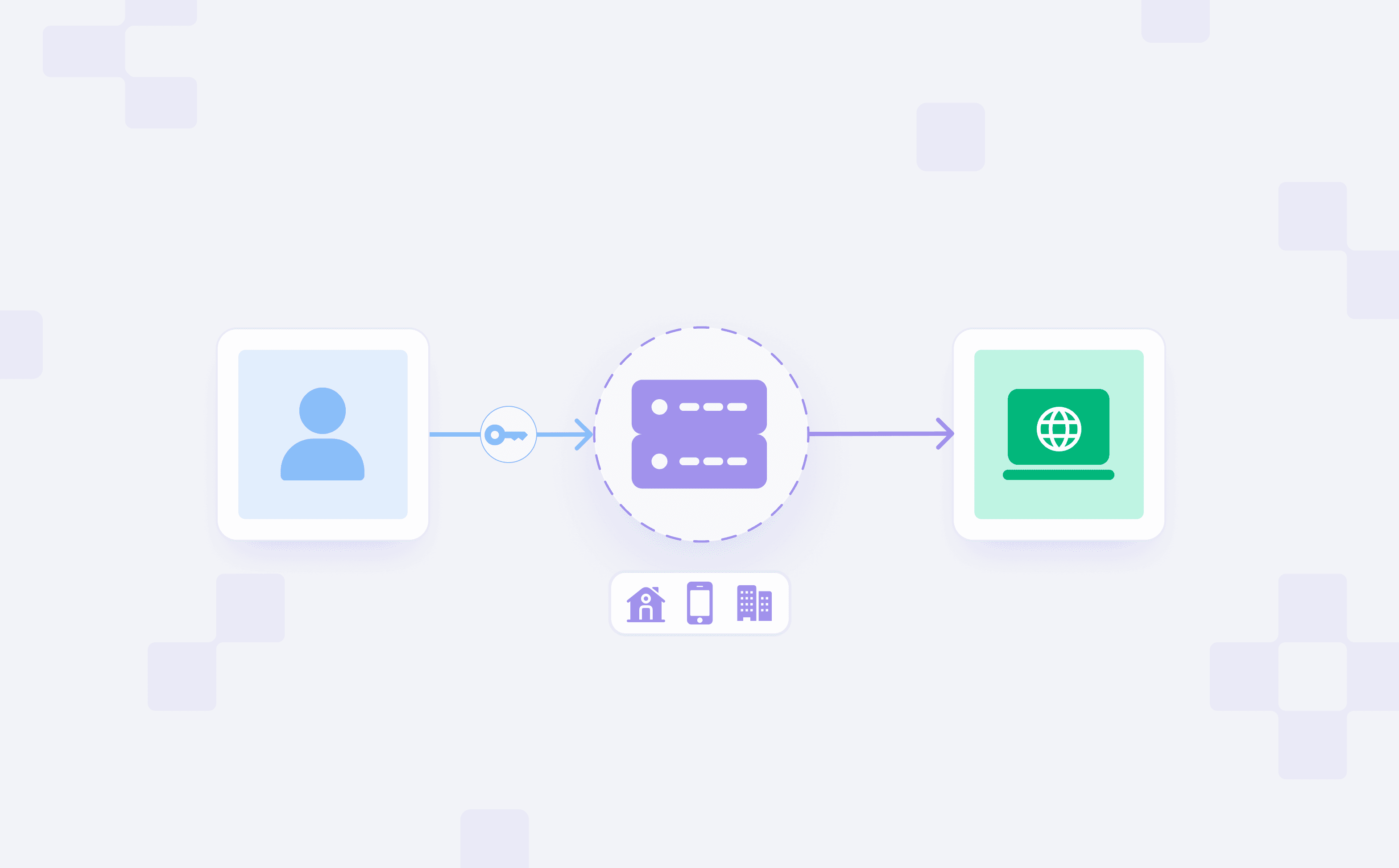
A proxy endpoint is the address your client connects to when it wants to send traffic through a proxy server or proxy network instead of connecting directly to the target website or API. Proxy endpoints specify where a request is authenticated, how it is routed, what traffic constraints exist, and how responses are returned.
In this guide, you'll see how proxy endpoints work, how traffic moves between a client, proxy endpoint, proxy network, and target server, the differences between provider-style endpoints and API gateways, and how to select the best approach to meet the needs of your workload.
TL;DR
A proxy endpoint is the address, route, or gateway a client uses to transmit traffic through a proxy layer.
Endpoints combine support for various protocols, authentication, routing, access control, and even operational constraints.
Provider-style proxy endpoints manage the outbound traffic of proxy networks.
What is a proxy endpoint?
A proxy endpoint is a route or gateway through which a client can access a proxy layer. Connection methods depend on the integration model:
Protocol-based proxy endpoints are configured as a hostname or IP address plus a port, such as proxy.example.com:8000. This model is common for HTTP, HTTPS, and SOCKS5 proxy integrations in browsers, scrapers, command-line tools, and applications. A client connects, authenticates, and transmits traffic through a provider's proxy network.
API-based proxy endpoints are configured as standard HTTPS API routes, such as /v1/scrape. This model is common when your application sends a programmatic request to a proxy API and passes the target URL as a query parameter, request body field, or JSON payload.
When using API-style endpoints, the proxy layer is usually an API gateway, reverse proxy, or service mesh component that validates the request and routes it to the correct backend service.
At a high level, the lifecycle of a request is easy to understand:
Your client connects
The endpoint validates the request
The proxy forwards it
The response returns through the same path
A proxy endpoint is different from a target endpoint. A proxy endpoint is where the client connects first, whereas a target endpoint is the final destination where the request is sent after being forwarded by the proxy, such as a service, a website, an API, or an origin server.
How the request path works?
You don't need to trace every packet to understand proxy endpoints. Most issues become easier to debug when you break the path into three phases: connection, forwarding, and response.
Connection flow
The client first creates a connection to the proxy endpoint. For service provider proxy endpoints, this connection is usually established over HTTP, HTTPS, or SOCKS5. For API gateways and reverse proxies, the endpoint may also support WebSocket, TCP/TLS, or gRPC traffic, depending on how the backend service is exposed.
This is usually where authentication happens. For example, a service provider endpoint may authenticate by verifying user credentials, an IP allowlist, or account metadata. An API Gateway may validate a bearer token, API key, claims in a JWT, an mTLS certificate, a tenant header, or a signed request.
The endpoint then decides whether the client can use the proxy.
Forwarding flow
After the connection is established, the proxy decides where to send the request.
To make that decision, a proxy can take into consideration the target domain, URL path, headers, geographic area, tenant, proxy pool, API version, protocol, and load-balancing rules.
A web scraping endpoint may rotate IPs for each request, route the requests through a region-specific pool, or establish a sticky session to maintain session continuity.
API proxy endpoints may implement routing based on the application. For example, requests made to /users may be routed to an identity service, /billing to a payment service, while /v2/orders may be routed to a newer backend service. The gateway may implement transformations, handle request retries, caching, and enforce various policies.
Response flow
The last step in this process is that the target responds to the request via the proxy layer, and the proxy forwards the response back to the client.
Provider-style endpoints typically try to keep the responses from the target unchanged, while controlling the routing path, the behavior of the session, and the exit session IP.
API gateways are more exposed to modifying the response. For example, they can change the response to fit a certain security policy by normalizing the errors that the service received, controlling a cached response, or inserting an identifier to the response.
How do backconnect proxy endpoints route your requests?
A backconnect proxy endpoint provides you with a single gateway which then routes you out a specific exit IP based on parameters. Rather than setting up a different endpoint for each location or session requirement, you can use the same gateway and provide routing instructions using the proxy authentication string.
Proxy providers commonly encode these instructions in the username or password field. At Byteful, for example, you can set up residential proxies in the following format:
When your client connects to the endpoint, it authenticates the proxy user and reads the routing parameters. The endpoint then selects an exit IP that matches the routing parameters. This means that a backconnect endpoint is both an access point and a routing control point.
Country, city, state, and ZIP code targeting
Geolocation parameters let you request an IP from a particular location. For example, adding _c_gb asks for an exit IP in the United Kingdom:
More precise targeting also narrows the eligible proxy pool. A country-level route will generally have more available IPs than a city, state, or ZIP-code route, so use the most specific option your workflow actually needs.
We also support geolocation targeting for mobile proxies. Although city, state, and ZIP-level mobile targeting can be less consistent than country-level targeting because mobile carrier networks use large dynamic IP pools.
ASN and ISP targeting
If your task requires an IP from a specific carrier or network, you can target an ASN (Autonomous System Number).
Unless you specifically need an ISP or ASN, leaving that selector off usually gives the endpoint a larger available pool.
Sticky vs rotating sessions
A rotating endpoint allows the proxy network to select a new residential exit IP for each request. This is a good fit for independent requests, such as broad public web data collection, price checks, ad verification, or SEO monitoring.
A sticky session, on the other hand, tells the endpoint to try to keep the same residential exit IP across related requests. This is useful when your workflow depends on cookies, a login session, a cart, or another multi-step interaction.
At Byteful, you create a sticky session by adding a session ID with _s:
Because residential proxies depend on real devices being online, a sticky session attempts to preserve the IP but cannot guarantee that the device will remain available indefinitely.
TTL and other routing modes
If you need a sticky session for a requested duration, you can add a TTL (time to live) parameter. TTL requires a session ID and supports minutes, hours, or days:
TTL ranges from 1 minute to 24 hours. The requested duration controls how long we try to maintain the same IP, subject to residential node availability.
Other settings can also change endpoint behavior. For example, Smartpath is enabled through the username field:
Smartpath can dynamically route suitable traffic through residential or datacenter IPs. This is why a backconnect proxy endpoint is not simply a host and port: it authenticates your access, reads your routing intent, and selects an appropriate network path for the request.
When you look at a proxy endpoint in three parts: addressing, access control, and routing, it becomes easier to design, document, and debug one.
Addressing model
The addressing model is used to determine how the client arrives at the endpoint. For instance, the client can determine the endpoint by:
Hostname or IP with the port
URL path
Hostname specific to a region
Tenant-specific route
Endpoint of a specific protocol
Static endpoints retain the same address while the routing changes. A dynamic endpoint provides different addresses for different regions, products, customers, protocols, or proxy pools.
The addressing model has an impact on routing, failover, latency, DNS management, and complexity of the setup.
Having a single global endpoint is easier to work with during integration. Endpoints that are region-based or tenant-based may have an advantage over that single endpoint in terms of latency, meeting regulatory requirements, or providing isolation, but they increase complexity and the amount of work that needs to be done to manage the endpoint.
Access controls
Access control determines who can use the endpoint and under what conditions.
It can be implemented with account permissions, IP allowlisting, mTLS, bearer tokens, API keys, user credentials, rate limits, and quota policies. The key question is what each credential or policy maps to.
For provider-style endpoints, access credentials usually map to accounts, plans, regions, sessions, proxy pools, rotation behaviors, or bandwidth controls. In API gateways, access credentials usually map to users, apps, services, tenants, scopes, or contracts.
Preventing abuse is another aspect of access control. This can be achieved by:
Setting up quotas
Limiting concurrency
Validating requests
Keeping logs
Detecting anomalies
Endpoints that process user data, capture account-related actions, and control workflows that are subject to regulation, need to have policies around authentication, authorization, logging, data retention, and change control defined and instituted.
Routing controls
Routing controls decide where traffic goes after it reaches the endpoint.
They can consider the domain, path, method, headers, query parameters, region, and tenant, as well as the protocol, session, the proxy pool, and how healthy the target is.
Provider-style routing handles questions like, does this request need to exit using a specific country IP? Should it have a static IP, have a per-request rotating IP, or use a residential proxy as opposed to a datacenter proxy?
If you are scraping a lot of public web data, datacenter proxies are generally a great starting point. If the webpage that you are trying to scrape is likely to be more blocking to datacenter origin IP requests, then a residential proxy may be better.
If your workflow is going to require session stability, then static residential proxies will be a better fit as they will minimize the disruption from IP changes.
Running through an API gateway, routing controls will determine, for example, should version 1 and version 2 of the API point to different backends? Should unhealthy targets be removed from the rotation? Also, routing, load balancing, and failover are handled at this layer.
Provider-style proxy endpoints vs API proxy endpoints
Provider-style proxy endpoints and API proxy endpoints are quite similar in that both sit between a client and a destination. However, the purpose of each proxy endpoint is designed to accommodate specific traffic patterns.
Provider-style proxy endpoints vs API proxy endpoints
Area
Provider-style endpoint
API proxy endpoint
Main purpose
Send outbound client traffic through a proxy network
Control access to backend APIs and services
Common address shape
Hostname or IP plus port, such as proxy.example.com:8000
HTTPS route, such as https://api.example.com/v1/users
Traffic direction
Usually outbound from your client to external targets
Usually inbound from clients to your API estate
Routing inputs
Country, city, session, proxy pool, rotation rules, target domain
Path, method, headers, tenant, version, service health
Identity model
Account, plan, proxy product, session, location, allowlisted IP
User, app, service, tenant, scope, token claim
Best fit
Scraping, testing, regional access, public Web data collection, automation workflows
API governance, authentication, versioning, service abstraction, traffic control
Common endpoint variations
The endpoint design typically varies in three dimensions:
Protocol
Exposure
Control
The right mix of these dimensions is dependent on the characteristics of your client, workload, risk profile, and operating model.
Protocol differences
Each protocol specifies how the client communicates with the proxy endpoint.
An HTTP proxy is easy to set up and is most likely available. An HTTPS proxy endpoint adds TLS protection between the client and the proxy server, which protects the credentials from anyone watching the local network path.
SOCKS5 operates at a lower protocol level than HTTP and can accommodate different traffic types depending on the client.
Reverse proxies and API gateways will commonly expose some HTTP(S) routes, while WebSocket and gRPC endpoints add protocol-specific requirements.
Even if the endpoint is structurally correct, it may still fail due to the client not supporting the required protocol.
Exposure models
An exposure model defines who can reach an endpoint.
The most straightforward endpoints are public, internet reachable endpoints. However, they require good authentication, rate limiting, credential hygiene, monitoring, and abuse controls.
Private VPC and internal endpoints reduce exposure to the internet. However, they increase the complexity of routing and network infrastructure, like the addition of private DNS, firewall rules, VPNs, and service discovery.
The models that sit between those two extremes are partner-only, tenant-specific, and region-specific. They can improve isolation, control data residency, and reporting, and latency, but they increase management overhead.
Provider-style proxy endpoints are usually likely public. However, access is controlled through credentials, limits, and allowlists.
An API gateway can be public, private, or hybrid, depending on whether they serve external developers, internal services, partners, or a combination of the three.
Control patterns
Control patterns explain how much logic an endpoint applies before forwarding traffic:
Pass-through endpoints accept and forward traffic with minimal logic applied.
Policy-enforced endpoints apply routing logic rules like authorization, quotas, tenant checks, schema validation, and method restrictions.
Transforming proxies modify requests and responses to assist with migration, but add to the complexity of debugging.
Caching proxies reduce the logic done at an upstream endpoint, and the control is clear.
Rotating proxies assign different exit IPs across requests or connections, which helps distribute traffic across a proxy pool.
Sticky sessions use client-side cookies to route all requests from a specific session ID to the same backend server for a set duration.
API gateway endpoints add an extra layer of protection to the upstream service and control the request rate.
Limitations and workarounds of proxy endpoints
Proxy endpoints provide control over access, routing, and policy. Nonetheless, they cannot eliminate the restrictions imposed by your client, proxy provider, gateway, network, and target system.
Client constraints
There may be limitations in clients with respect to the types of proxies they support. Common constraints include missing SOCKS5 support, limited HTTPS proxy support, incompatible authentication handling, broken CONNECT behavior, DNS resolution problems, connection pooling quirks, and proxy timeout misconfiguration.
Also, environment variables can also mislead you. In many tools, HTTPS_PROXY=http://proxy.example:8080 means "send HTTPS-destination traffic through this HTTP proxy," not "connect to the proxy over HTTPS."
Platform limits
Proxy endpoints also inherit limitations from the systems behind them. Common limits include:
Rate limits and connection limits
Limits on the available bandwidth or amount of data transferred
Geographical restrictions
Limits on the supported protocols
Limits on the size of the request body and headers
Timeouts
Those limits are rarely apparent simply by looking at an endpoint string.
Provider-style endpoints also have limits set by the pool size, availability of locations, frequency of IP address rotation, duration of the session, the degree of permitted concurrency, and available bandwidth.
An API gateway may impose limits on the size of requests and responses, integration timeouts, or limits on the number of allowed routes.
When benchmarking proxy performance, measure the entire path: connection time, target latency, status-code distribution, retry rate, regional behavior, and response quality from the target system. A proxy tester can help validate endpoint behavior before you connect it to a large scraping or automation workflow.
Debugging paths
Proxy failures are hard to debug because several systems can fail at once: the client, proxy endpoint, authentication layer, routing layer, gateway, target, or network path.
To start, gather all of the details about the client configuration, including the endpoint address, the expected protocol, authentication credentials, any environment variables, the behavior of the DNS, and any timeout settings.
After identifying these values, move to identifying any issues in the connection to the proxy endpoint.
After the proxy connection works, check authentication and status codes:
403 Forbidden may point to the proxy policy layer, API gateway, or target system.
429 Too Many Requests may point to proxy provider limits, API gateway quotas, or target-side rate limits.
TLS handshake failures and connection-refused errors often point to a protocol mismatch, certificate trust problem, wrong port, unreachable endpoint, or proxy server issue.
Choosing the right proxy endpoint model
Choose the endpoint model by starting with the workload, not the endpoint shape. A simple hostname, regional proxy endpoint, private gateway, or policy-heavy API gateway can all be right depending on what the traffic needs to do.
Business requirements - Match a target endpoint to a job, whether for public Web data, account workflows, internal APIs, partner APIs, or service-to-service communications.
Performance needs - Identify whether the most important performance metric is throughput, latency, consistency of performance, cacheability, or low retry rates.
Security considerations - Credential information, account sessions, customer data, and strong admin workflows call for stronger authentication methods and tighter logging.
Scalability requirements - Identify your expectations of concurrency, rate limits, pool sizes, regional capacity, and failover before volume and demand grow significantly.
Governance and compliance - Understand who has the authority to alter your endpoint policies, determine the destination of your logs, identify the approved regions, and decide if tenant separation is necessary.
Operational complexity - Simple endpoints are easier to maintain. Rich gateways add control, but they need owners and monitoring.
Developer experience (DX) - Select a model that is client-facing, keep documentation up to date, and facilitate error debugging.
FAQs
Proxy Endpoints Frequently Asked Questions
FAQs
A proxy-protocol endpoint is configured in your client as a proxy address, usually a hostname or IP address with a port, such as proxy.example.com:8000. It is common for HTTP, HTTPS, and SOCKS5 proxy setups.
A scraping API endpoint is called like a normal HTTPS API route, such as /v1/scrape. Instead of configuring a proxy in the client, you send the target URL to the API, and the API returns HTML, JSON, or another response format.
No. A proxy endpoint is where the client connects first. A target endpoint is the final website, API, or server the request is trying to reach.
For example, if your client connects to proxy.example.com:8000 to access https://example.com, the proxy endpoint is proxy.example.com:8000, and the target endpoint is https://example.com.
Yes, an API gateway can act as a proxy endpoint because clients connect to it before reaching backend services.
The difference is purpose. A provider-style proxy endpoint usually manages outbound traffic to external websites or APIs. An API gateway usually manages inbound access to your own backend services.
Use a proxy endpoint when you already have a scraper, browser automation setup, or custom client and need control over requests, sessions, headers, and retries.
Use a scraping API when you want the provider to handle more of the workflow, such as proxy rotation, rendering, retries, and returning HTML or JSON.
Byteful backconnect endpoints authenticate the proxy user, then read routing parameters from the proxy username. Those parameters can request a country, city, state, ZIP code, ASN/ISP, sticky session, rotating behavior, TTL, or other routing mode.
For example, _c_gb targets the United Kingdom, _city_london targets London, _asn_7018 targets a specific ASN, and _s_{session_id} creates a sticky session
Use Cookies
This website uses cookies to enhance user experience and to analyze performance and traffic on our website.