Checking a few Bing results manually is easy, but collecting rankings across a set of keywords quickly becomes repetitive, particularly when the dataset needs positions, URLs, snippets, and consistent search conditions.
Doing the same job in Python makes it repeatable and produces a structured file you can check against the live search engine results page (SERP) instead of trusting it at a glance.
This guide will show you how to use Python to extract Bing organic results, capture the ranking position, the title, the URL, the snippet, and then export the results to CSV, check that you are capturing the data that Bing returns, and introduce the notion of proxies if you are going to do repeated or location-specific collections, because they would be worth it.
What Data Can You Scrape From Bing Search Results?
The information on a Bing results page is sufficient to create a valuable organic ranking dataset. The key fields for each search are the query, position in the results, title of the search result, destination URL, and visible description.
If you're searching for several keywords, the query will appear with every result, providing ranking context. You can use this information to track rankings, monitor SEO health, gain competitor insights, and analyze how SERP composition shifts over time.
One field needs attention. The link on each result does not point directly to the destination site. It is a click-tracking redirect, and it must be resolved back to the real destination before the URL is stored or used to identify duplicates.
In addition to the search results, Bing SERPs might also show sponsored results, People Also Ask questions, related searches, and sitelinks. During testing, there were no sponsored results, People Also Ask, or related searches were returned as HTML for a plain HTTP query, even in commercial and question queries, so do not create selectors for sponsored results, People Also Ask, or related searches. Sitelinks are the exception and did appear in testing.
If the sitelinks appear, they are not a separate position in the results and don't count toward the position counter; the position counter should only be incremented for the parent result.
How Bing Results Pages Are Structured and Behave
Since Microsoft retired the Bing Search APIs in August 2025, there is no general-purpose Microsoft search API to fall back on for this workflow. Microsoft's replacement, Grounding with Bing Search, feeds web context to Azure AI agents rather than returning structured results, so this guide assumes you're scraping the visible results page.
A Bing SERP isn't a single list of links; it's a collection of different result types, each with its own organization, so a scraper must identify which blocks contain organic results.
Organic Results and the Position Counter
Typical organic results display a headline, a destination link, and a visible description. There is also a Bing pagination control in the results container as a last item (which is not a result and shouldn't be counted). A scraper that counts every element marked as a result will produce incorrect rankings, because the count will include items like the pagination control that are not organic results.
Why Bing's Deeper Pages Repeat Page One
Bing's additional result pages are accessed through a first parameter instead of a /page/2 URL pattern, with first=11 for page two and first=21 for page three, plus a FORM parameter and per-render token.
In testing, those links produced no new results. Bing reproduced the first ten organic results in the same order as the page one results when we followed its page two and page three results exactly as they were written, and it did the same when we built our own URLs with and without the additional parameters.
That was true in a direct connection, via a residential proxy, within a browser session where cookies were present, and within a real browser when clicking these links manually, for both a wide and narrow query. Use the ten organic results per query as the benchmark target: increase the data set size gradually with more keywords rather than deeper pages.
Why Location Matters
Microsoft documents that Bing weighs the searcher’s location and the page's language when ranking results, so the same query can produce different SERPs across markets. During testing, changing the connection changed which results were returned rather than simply their order.
With the structure of a Bing results page clear, we can start collecting organic results in a form that preserves the query and ranking position. We wrote and ran every code block below against live Bing before publication, and the findings shaped the guide rather than the other way around.
Prerequisites
The setup is short. You will need:
- Python 3.10 or later, which is the version this scraper was built and tested on.
- requests, for sending the search and handling the response.
- beautifulsoup4, for parsing the returned HTML. The Beautiful Soup basics are worth a look if the library is new to you.
- Developer Tools in your browser, for inspecting Bing’s current markup.
Install the two required packages with python -m pip install requests beautifulsoup4. CSV export does not require anything extra because it uses Python’s standard library.
Before automating collection from Bing, review Microsoft's applicable terms and the legal requirements for your use case. Limit collection to publicly accessible information and keep request volumes reasonable.
Step 1: Inspect a Live Bing Search Result
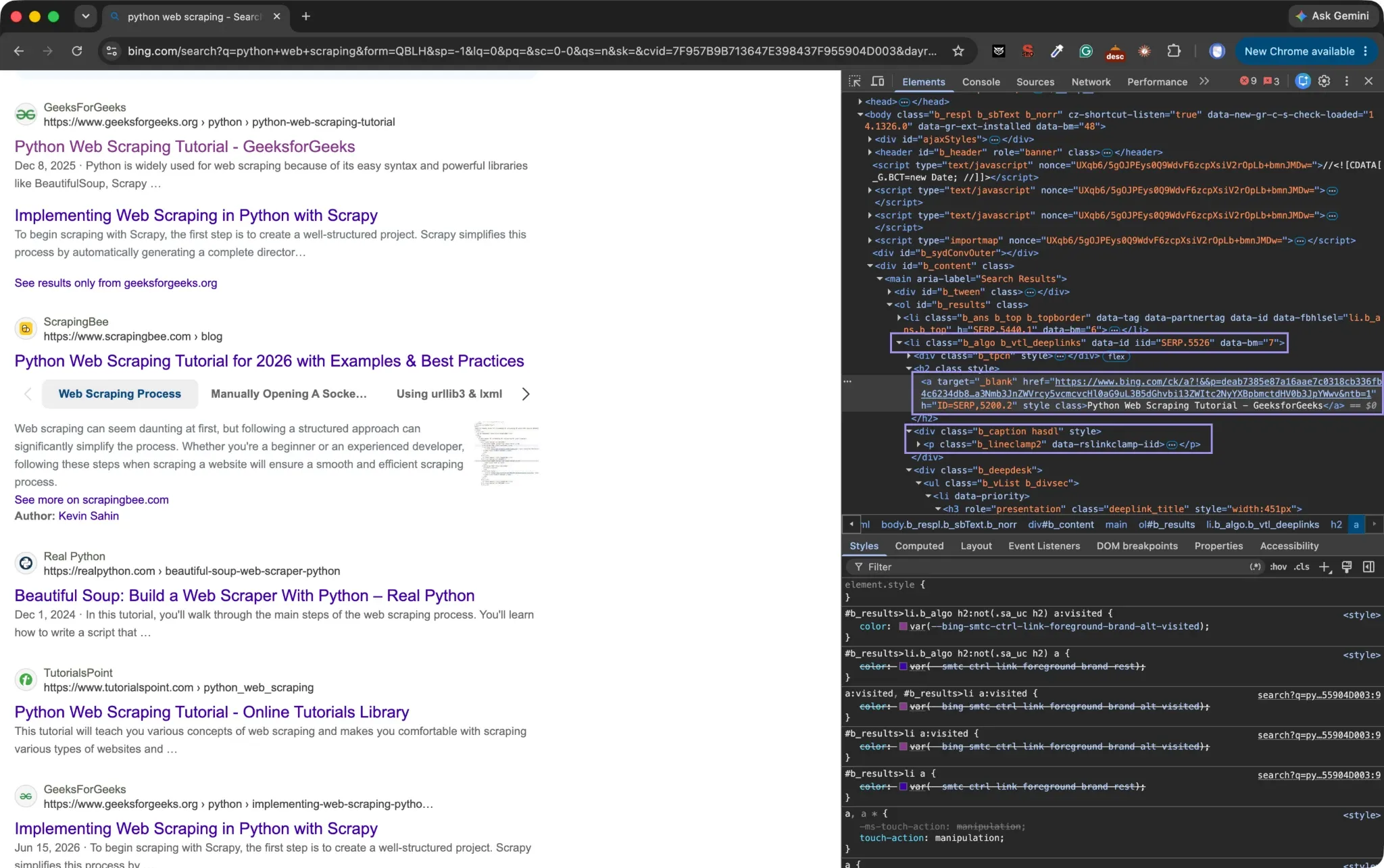
Do a regular Bing search in your browser, then open Developer Tools and inspect a normal organic result. Bing's organic results live inside #b_results, each individual result is an li.b_algo element, the headline link is h2 a, and the description is .b_caption p. All of these selectors matched all of the organic results Bing returned during testing.
With the inspector open, inspect the href link on the headline. It leads to bing.com/ck/a rather than the destination shown in the result, so don't store that address.
Never copy the longest CSS path that DevTools generates. If Bing rearranges the page, paths bound to multiple parent elements or a specific position in the document will break, even if Bing's result doesn't.
Find the simplest CSS selector that fully distinguishes an organic result from the rest of the page; examine more than one result and decide, since some results may also include additional elements like sitelinks.
Step 2: Request and Verify the First Bing Results Page
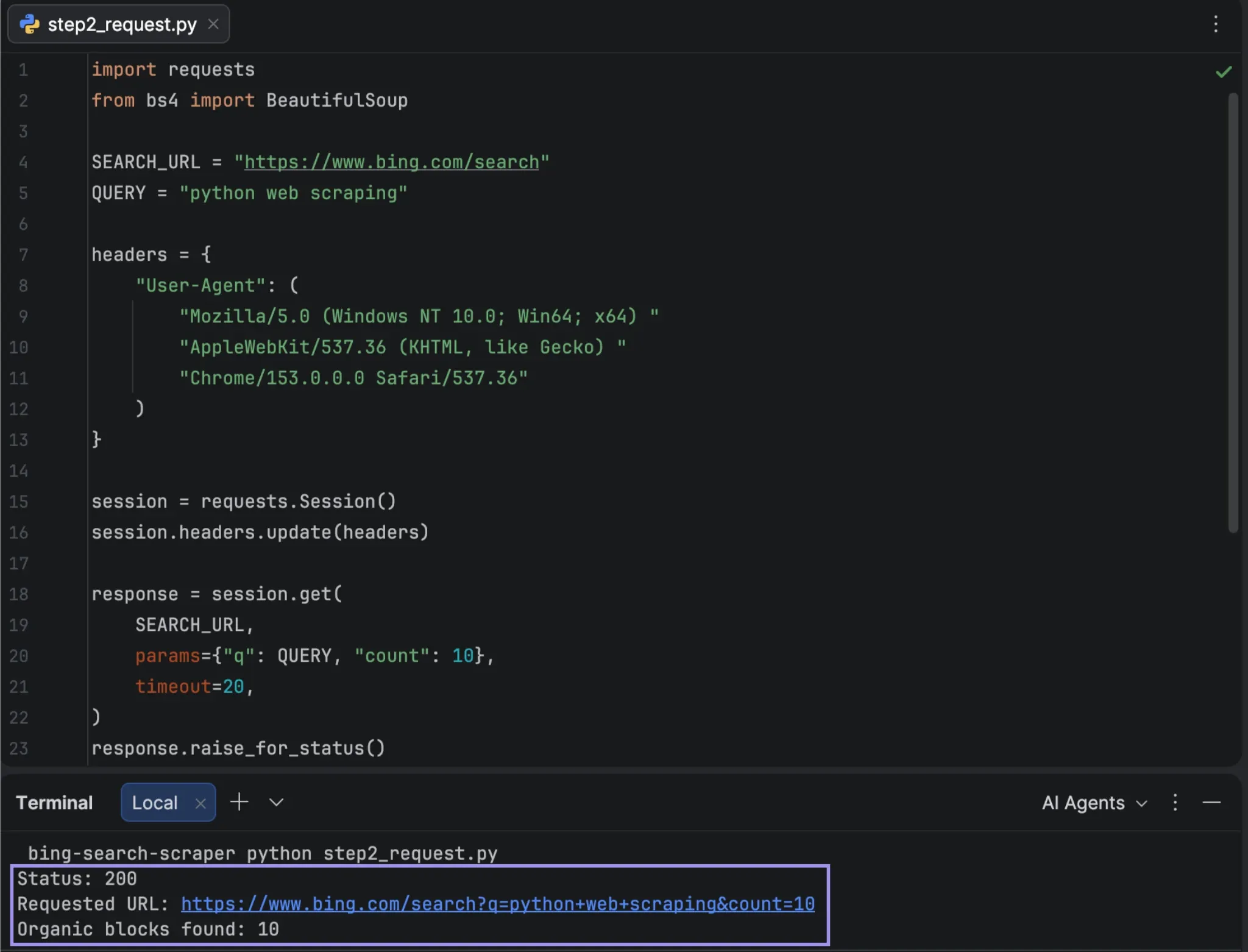
Now send the same search from Python. Pass the query through params rather than building the search URL by hand, which lets Requests handle the encoding.
Use a requests.Session() rather than calling requests.get each time directly. The scraper sends one request per keyword, and a session reuses the underlying connection across all of them instead of opening a new one for every search. It also gives the proxy configuration one place to route everything through.
import requests
from bs4 import BeautifulSoup

SEARCH_URL = "https://www.bing.com/search"
QUERY = "python web scraping"

headers = {
        "User-Agent": (
            "Mozilla/5.0 (Windows NT 10.0; Win64; x64) "
            "AppleWebKit/537.36 (KHTML, like Gecko) "
            "Chrome/153.0.0.0 Safari/537.36"
        )
}

session = requests.Session()
session.headers.update(headers)

response = session.get(
        SEARCH_URL,
        params={"q": QUERY, "count": 10},
        timeout=20,
)
response.raise_for_status()

soup = BeautifulSoup(response.text, "html.parser")
organic_blocks = soup.select("#b_results li.b_algo")

print("Status:", response.status_code)
print("Requested URL:", response.url)
print("Organic blocks found:", len(organic_blocks))
The count parameter is included because Bing carries it in its own pagination links, so keeping it makes the constructed URL match what Bing generates. It has no effect on the number of results: requests with a count of 10, 20, 30, or 50 all returned the same 10 organic blocks
Don't stop at the HTTP status. A 200 means that Bing returned something, but the HTML still needs to contain the parts that the scraper was looking for. Printing the number of matched organic containers catches the silent failure scenario, where the request succeeds but the parser has nothing to work on.
Step 3: Extract Organic Results and Ranking Positions
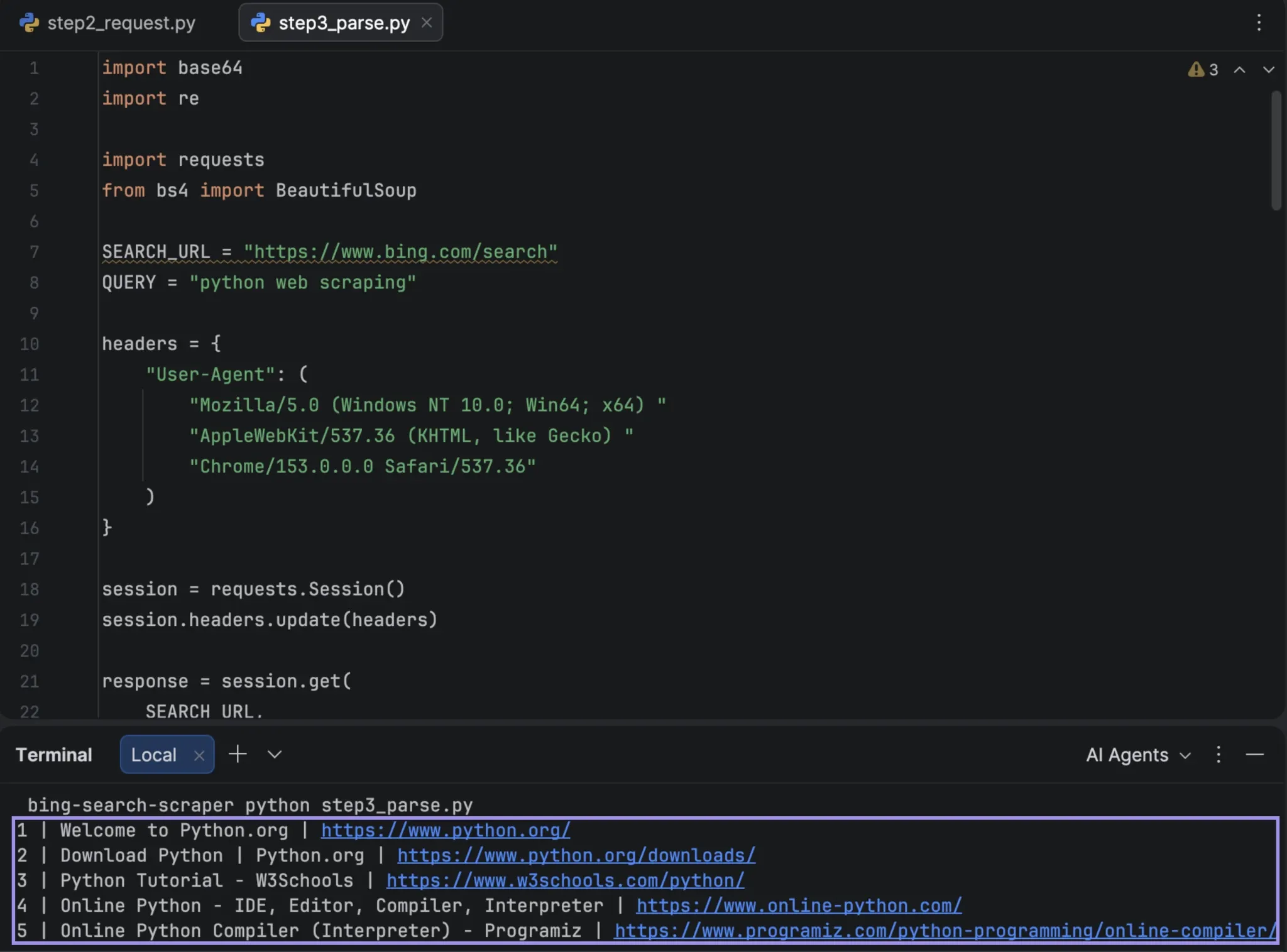
After the expected result blocks have been found, extract each block into a regular record. It is easier to modify a selector later on without changing the request and export code since the parsing logic is in its own function.
This step also resolves the tracking redirect. The bing.com/ck/a link's u parameter contains the destination URL base64-encoded, and decoding it gives a real URL that stays consistent across requests, even though the raw tracking links themselves change every render. That stability is what makes deduplication possible: the resolved URL serves as the key for spotting repeats.
import base64
import re

def resolve_bing_url(href):
        """Organic links are wrapped in a bing.com/ck/a tracking redirect.
        The destination is base64 encoded in the u parameter. Falls back to
        the raw href if that format ever changes."""
        match = re.search(r"[?&]u=([^&]+)", href)

        if not match:
            return href

        value = match.group(1)

        if value.startswith("a1"):
            value = value[2:]

        padded = value + "=" * (-len(value) % 4)

        try:
            return base64.urlsafe_b64decode(padded).decode("utf-8")
        except Exception:
            return href

def parse_organic_results(html, query, page=1, start_position=1, seen_urls=None):
        if seen_urls is None:
            seen_urls = set()

        soup = BeautifulSoup(html, "html.parser")
        results = []
        position = start_position

        for item in soup.select("#b_results li.b_algo"):
            link = item.select_one("h2 a")

            if not link or not link.get("href"):
                continue

            url = resolve_bing_url(link["href"])

            if url in seen_urls:
                continue

            seen_urls.add(url)
            snippet = item.select_one(".b_caption p")

            results.append({
                "query": query,
                "page": page,
                "position": position,
                "title": link.get_text(" ", strip=True),
                "url": url,
                "description": (
                    snippet.get_text(" ", strip=True)
                    if snippet else None
                ),
            })

            position += 1

        return results

results = parse_organic_results(response.text, QUERY)

for result in results[:5]:
        print(
            result["position"],
            result["title"],
            result["url"],
            sep=" | "
        )
The function skips blocks that lack a usable headline link and records a missing description as None rather than guessing. The position counter only increments when a result is actually added, and duplicates are skipped before they can take up a position number. That check lives inside the parser rather than the calling loop; if positions were assigned first and duplicates removed afterward, the sequence would be left with gaps.
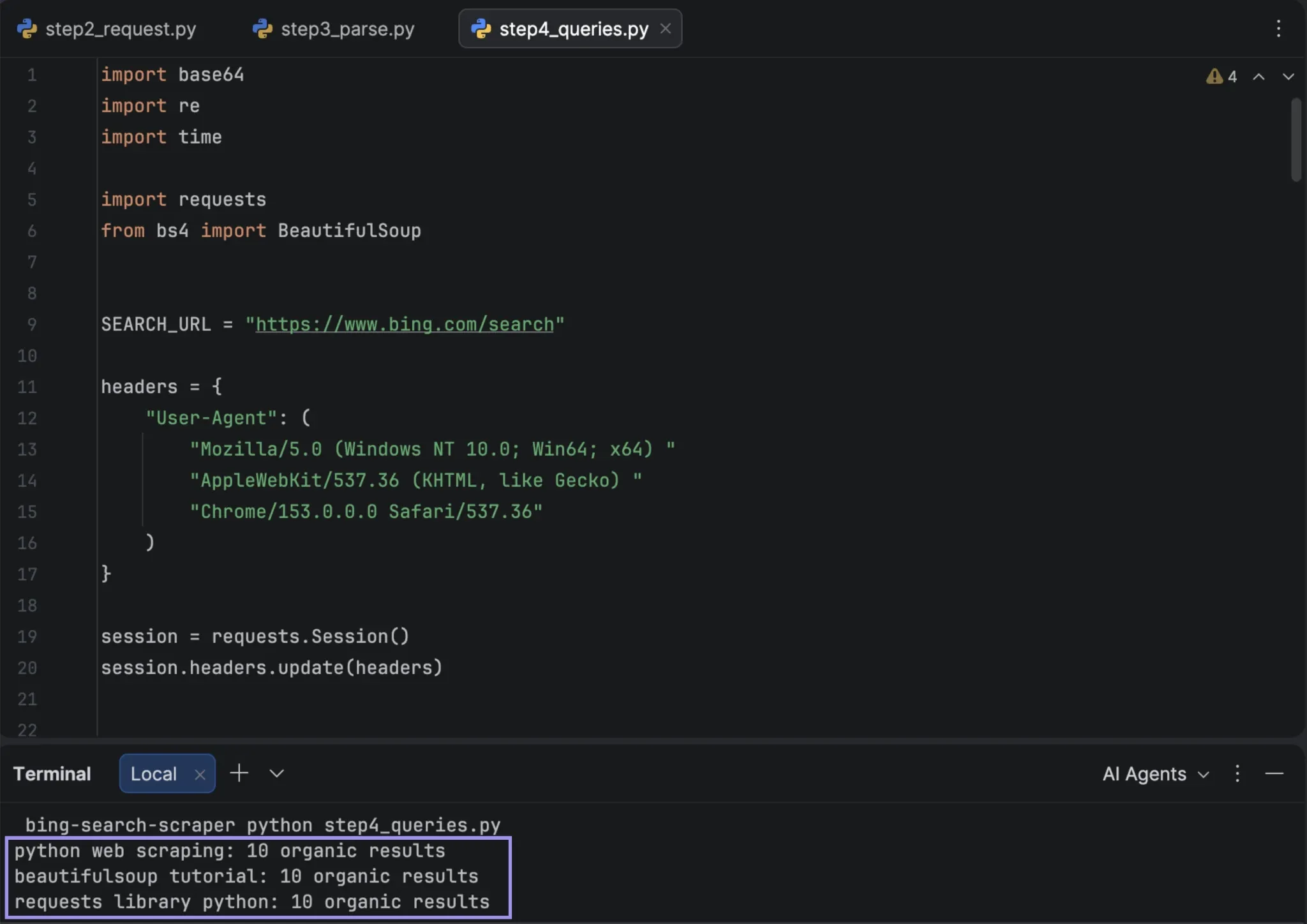
Step 4: Collect Results Across Multiple Queries
In testing, the first page returned up to 10 organic listings and there was no genuine second page, so a larger dataset means more keywords, not deeper pages. That is why max_pages defaults to 1 in scrape_bing. If you do raise that default, keep the duplicate check in place: a repeated page returns zero new results, which stops the run.
import time

def fetch_bing_page(query, page):
        first = ((page - 1) * 10) + 1

        response = session.get(
            SEARCH_URL,
            params={
                "q": query,
                "count": 10,
                "first": first,
            },
            timeout=20,
        )
        response.raise_for_status()
        return response

def scrape_bing(query, max_pages=1, delay=1.5):
        all_results = []
        seen_urls = set()

        for page in range(1, max_pages + 1):
            response = fetch_bing_page(query, page)

            page_results = parse_organic_results(
                response.text,
                query=query,
                page=page,
                start_position=len(all_results) + 1,
                seen_urls=seen_urls,
            )

            if not page_results:
                print(f"page {page}: no new results, stopping")
                break

            all_results.extend(page_results)

            if page < max_pages:
                time.sleep(delay)

        return all_results

def scrape_queries(queries, delay=1.5):
        collected = []

        for query in queries:
            results = scrape_bing(query)
            collected.extend(results)
            print(f"{query}: {len(results)} organic results")
            time.sleep(delay)

        return collected

QUERIES = [
        "python web scraping",
        "beautifulsoup tutorial",
        "requests library python",
]

results = scrape_queries(QUERIES)
Each query gets its own seen_urls set, because the same destination URL can legitimately rank for two different keywords and should appear once per query rather than being dropped the second time. The delay between queries is a courtesy default rather than a measured Bing requirement.
Step 5: Export the Bing Search Data
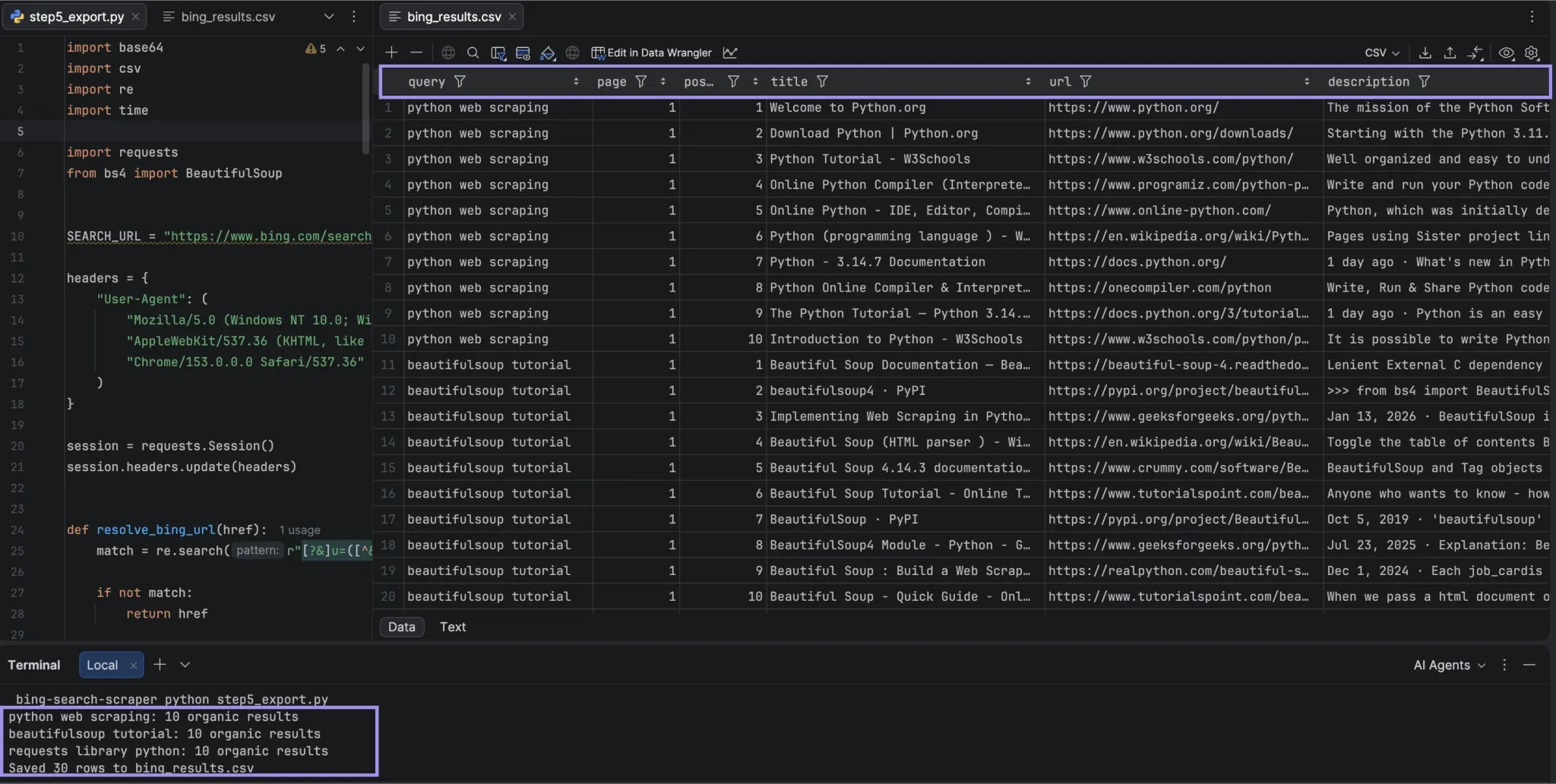
Once the records are structured, Python’s built-in csv module is enough to save the dataset. Keep the query with every row so the exported positions retain their context.
import csv

def export_csv(results, filename="bing_results.csv"):
        fields = [
            "query",
            "page",
            "position",
            "title",
            "url",
            "description",
        ]

        with open(filename, "w", newline="", encoding="utf-8-sig") as file:
            writer = csv.DictWriter(file, fieldnames=fields)
            writer.writeheader()
            writer.writerows(results)

export_csv(results)
print(f"Saved {len(results)} rows to bing_results.csv")
utf-8-sig encoding includes a Byte Order Mark, which lets Excel recognize the file as UTF-8 so accented characters and Bing's truncation ellipsis display correctly instead of as garbled text. The non-ASCII character set is present in at least one of the descriptions returned in the tests, so this is not an edge case.
The page column was 1 in testing, as page two did not return anything new. It's not hardcoded, and becomes meaningful if Bing's behavior changes.
Step 6: Run the Full Scraper and Check the Results
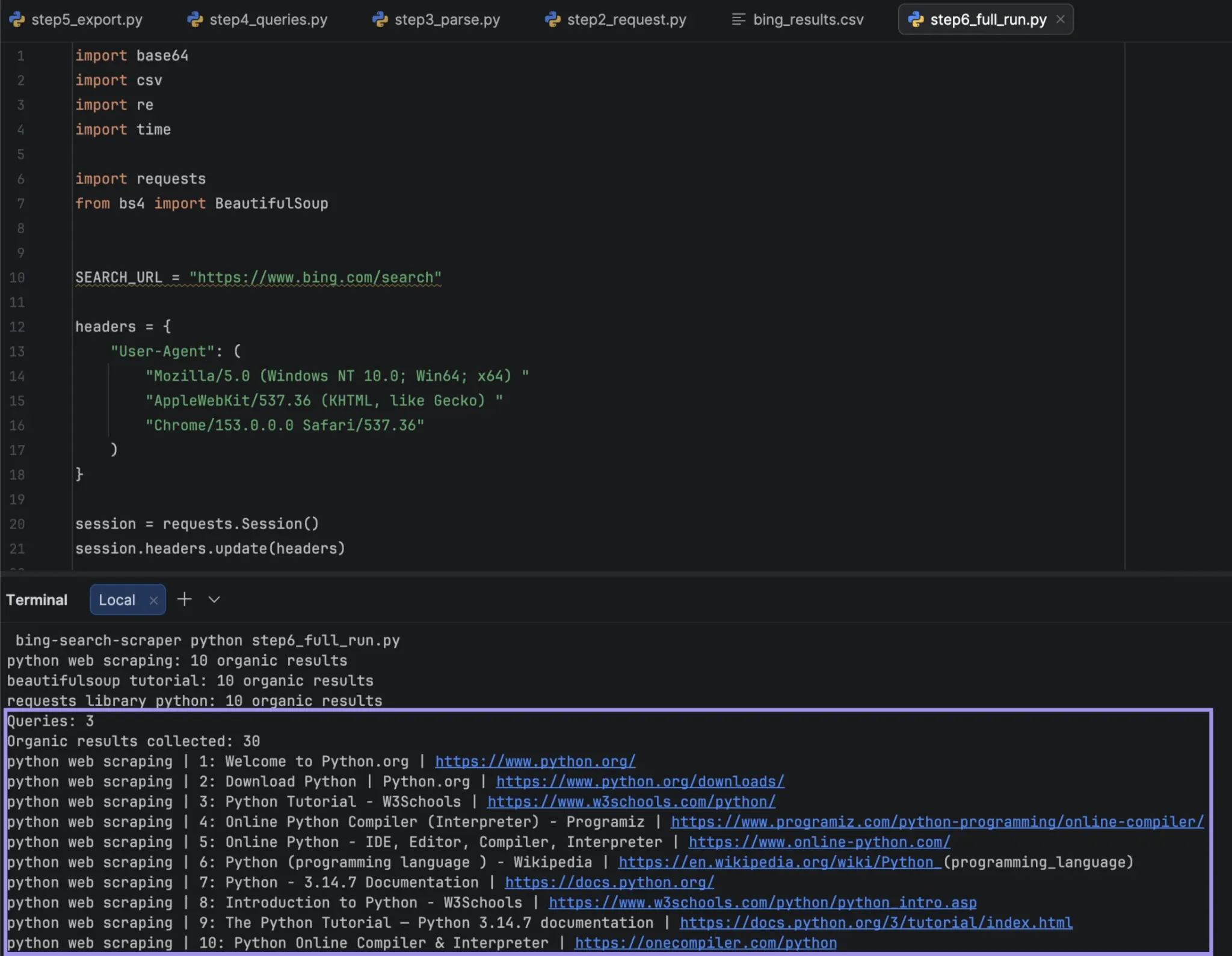
Only run the full scraper after each part works on its own. The block below collects the same data as in Step 4, then exports it and prints a sample to compare against Bing in the same market and language.
QUERIES = [
        "python web scraping",
        "beautifulsoup tutorial",
        "requests library python",
]

results = scrape_queries(QUERIES)

export_csv(results)

print(f"Queries: {len(QUERIES)}")
print(f"Organic results collected: {len(results)}")

for result in results[:10]:
        print(
            f'{result["query"]} | '
            f'{result["position"]}: '
            f'{result["title"]} | '
            f'{result["url"]}'
        )
Look beyond the number of rows. Ensure that each title and URL belong to the same result, that the positions in each query start at 1 and stay continuous, that each URL is a destination address (not a link to bing.com), and that the results relate to the keyword. If they don't relate, that can be Bing rather than the scraper; see the troubleshooting section before changing anything.
Then compare a number of records to a live Bing page in the same search context and settings, because a scraper can run without throwing an exception and still produce the wrong ranking.
How Location and Request Volume Affect Bing Scraping
You don't have to use a proxy for each and every Bing scraping job. However, once the direct scraper works, repeated runs over many keywords, location-specific SERP research, and larger recurring jobs are all cases where changing or keeping the exit IP becomes relevant.
Match the Connection Location to the Search Market
What Bing returns can depend on the origin of the request. When the same query was sent by directly connecting and by proxy via a UK residential IP within minutes of each other, they returned different results rather than the same results in a different order. The UK run returned different results, not more accurate ones, so treat proxy location as a way to see a specific market's SERP rather than a way to improve result quality.
The results of the same searches that were run weeks apart on the same connection differed, while runs a minute apart on the same connection stayed identical. Collect and verify in a single sitting; compare runs that take place under similar circumstances; don't use an older SERP as a standard.
Choose the Proxy Type Based on the Collection Pattern
What matters most is what the scrape needs to preserve: low-cost request volume, a particular type of network connection, or a stable IP across repeated searches.
- Datacenter proxies: Good option to begin SERP general public collection. They typically offer speed and cost, making them a sound choice when you're gathering a large volume of independent queries, without the specific need for residential routing. When searching for a particular region, ensure that the proxy provider you are testing has service in that area.
- Residential proxies: More appropriate for location-based collection, when requests must come from the target area's residential network. They help when comparing results Bing returns from different geographic locations, but they don't guarantee more relevant or less restricted results.
- Static Residential Proxies - ISP: useful when keeping the same exit IP matters more than rotating through a pool. This may aid repeated comparison runs if changing the connection would add another variable to the data set.
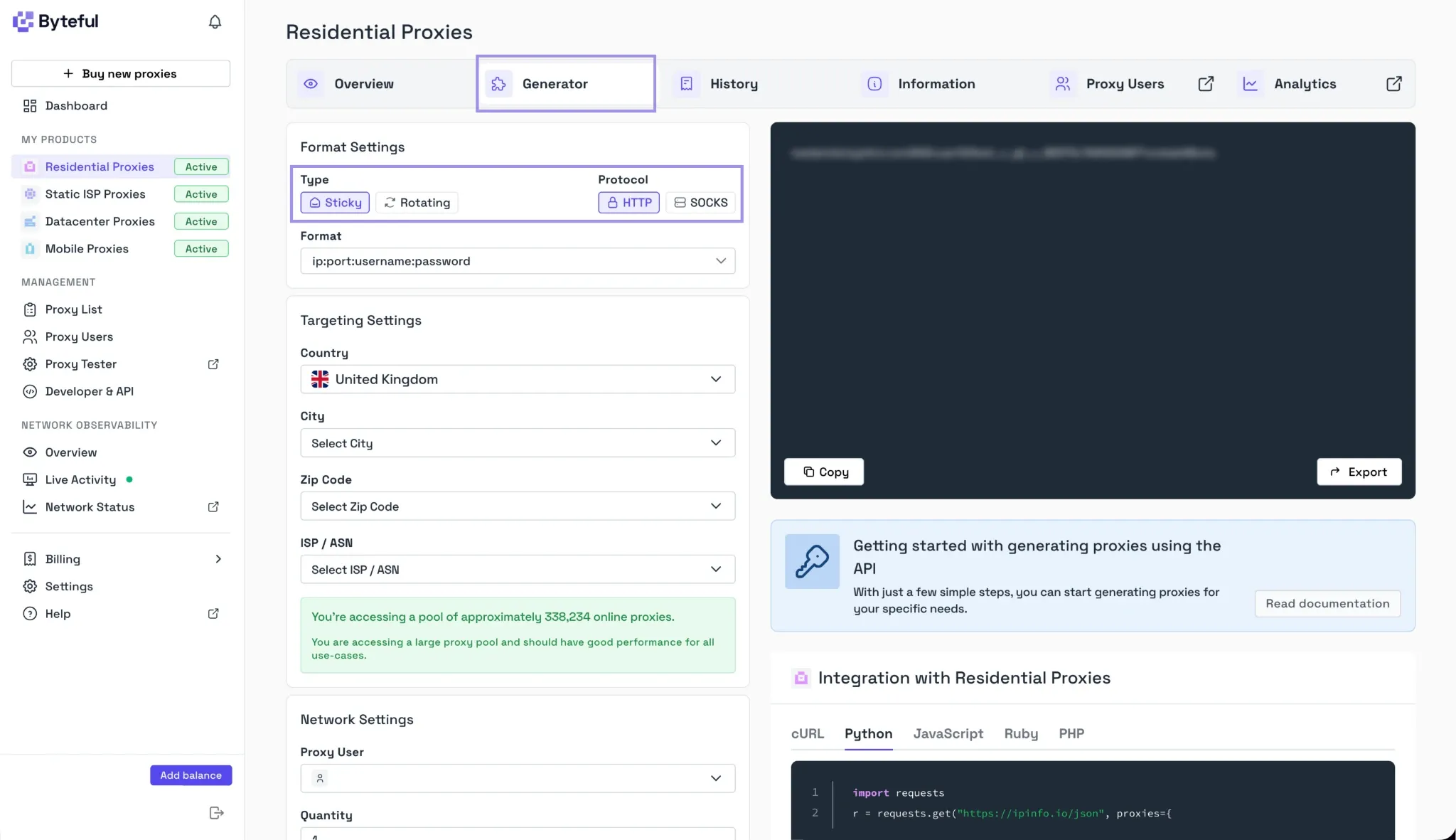
Sessions are also a factor. Residential sessions can rotate to a different residential IP for each independent search, but sticky sessions can have one residential IP for a set period. Static proxies stay the same for a longer period.
If you're collecting a wide range of keywords, you'll want to use rotation so that you're getting requests through to different exit IPs; if you're looking to find out how these keywords perform side-by-side, you'll want to use a stable or sticky connection to make it easier to keep the network conditions consistent.
Add and Verify a Proxy in the Existing Scraper
With Byteful, copy the HTTP proxy information from the dashboard and save the credentials outside of the Python script. One straightforward approach is to store them in a local .env file, which can hold the host, port, username, and password separately from the code you might share or commit to version control. We currently offer 1 GB of free residential data if you want to test this setup.
python-dotenv allows Python to load the contents of that .env file and place them in the script's environment. Install it alongside the packages already used by the scraper:
python -m pip install python-dotenv
Make sure to create a .env file in the project folder and fill in your own Byteful proxy information:
BYTEFUL_PROXY_HOST=your_proxy_host
BYTEFUL_PROXY_PORT=your_proxy_port
BYTEFUL_PROXY_USER=your_proxy_username
BYTEFUL_PROXY_PASSWORD=your_proxy_password
Add .env to .gitignore to prevent credentials from being uploaded when committing the project.
Note: This block extends the scraper built in Steps 2 and 3, so run it in the same script where session, SEARCH_URL, QUERY, and parse_organic_results are already defined.
import os
from urllib.parse import quote
import requests
from dotenv import load_dotenv

load_dotenv()
proxy_host = os.environ["BYTEFUL_PROXY_HOST"]proxy_port = os.environ["BYTEFUL_PROXY_PORT"]proxy_user = quote(os.environ["BYTEFUL_PROXY_USER"], safe="")proxy_password = quote(os.environ["BYTEFUL_PROXY_PASSWORD"], safe="")
proxy_url = (         f"http://{proxy_user}:{proxy_password}"         f"@{proxy_host}:{proxy_port}" ) proxies = {         "http": proxy_url,         "https": proxy_url,
}
ip_check = requests.get(         "https://api.ipify.org?format=json",         proxies=proxies,         timeout=20,
)
ip_check.raise_for_status()
session.proxies.update(proxies)
response = session.get(        SEARCH_URL,        params={"q": QUERY, "count": 10},        timeout=20,
)
response.raise_for_status()
results = parse_organic_results(response.text, QUERY)
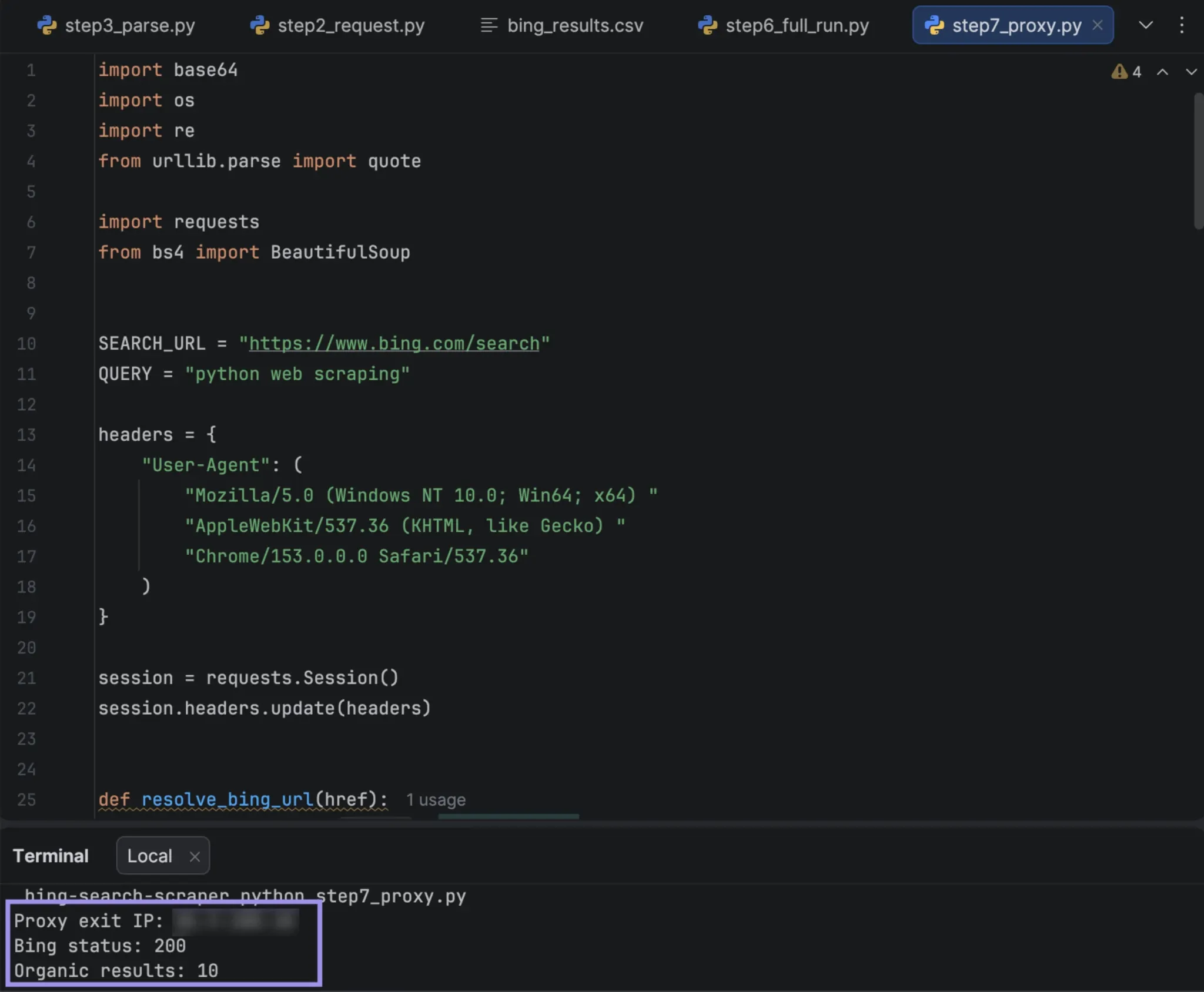
print("Proxy exit IP:", ip_check.json()["ip"])print("Bing status:", response.status_code)print("Organic results:", len(results))
The .env file is read first by load_dotenv(), before the four os.environ calls, so the scraper is able to access the proxy credentials without having to hardcode them. The username and password are URL-encoded before being added to the proxy URL to prevent special characters in the password from breaking the connection string. The IP check uses requests.get, not the session, because it verifies the proxy works before sending traffic to Bing.
Verify the exit IP first, then confirm that Bing still returns organic results and that the proxy region matches the market you intended to collect. If this connection leads to the wrong regional SERP, it isn't useful for that market.
Why Is Your Bing Scraper Returning Missing or Incorrect Results?
The markup that Bing returns can vary according to query, market, and request context, and the structure of the returned pages may change over time. If the scraper acts in an unusual way, before changing the parser, see what Bing actually returned.
| Problem | What to check | What to do |
|---|---|---|
| 200 response but no organic results | A successful HTTP response does not guarantee that #b_results or the expected organic containers are present. | Save the response HTML and inspect the returned markup before changing your selectors. |
| Results do not match the query | Run the same search in a browser at the same time. If Bing shows similarly unrelated results there, the parser is probably not the cause. | Log the raw response and retry later rather than rewriting selectors. Neither a session nor a proxy made a measurable difference during testing. |
| URLs point to bing.com | Check whether the result link still uses Bing's click-tracking format and contains the encoded u parameter. | Make sure resolve_bing_url() is being applied. If Bing changes the redirect format, the function falls back to the raw URL so the issue remains visible. |
| Page two repeats the same ten results | Compare resolved destination URLs rather than the raw tracking links, whose tokens can change between requests. | Treat the repeated page as the stopping point and collect more queries instead of continuing deeper. |
| Titles, URLs, or snippets are missing | Compare the affected record with the live SERP. Some results may genuinely omit a snippet or use slightly different markup. | Leave unavailable values as None rather than filling them from an unrelated element. |
| Ranking positions do not match the browser | Check the market, language, collection time, session context, and proxy exit region used for both runs. Also check whether a sponsored block entered the sequence. | Compare rankings only under consistent conditions and keep sponsored results out of the organic position counter. |
| 429, 403, or challenge responses | Check whether the body is a real error or a challenge page, since the two need different responses. | Slow the request rate for 429 responses. For 403 or challenge pages, save the returned HTML and diagnose the response instead of retrying continuously. |