
HTTP cookies seem simple until sessions start breaking. You log in, move between pages, and suddenly you’re logged out or stuck in a loop. In automation or testing workflows, this turns into failed requests, repeated verification, or sessions that won’t stay stable.
HTTP is stateless, so websites use cookies to connect separate requests into one session. When browsing normally, that usually happens in the background. When testing, automating it or doing region-specific workflows, the session also depends on the request context, which makes cookie behaviour easier to break.
In this guide, we’ll break down how cookies work, their types, and how to manage them effectively in real workflows.
How HTTP Cookies Work?
Because HTTP is stateless, the server has no memory of earlier requests. This is solved with cookies, which store a small value in the browser and send it along with future requests, enabling the server to associate them as being for an ongoing session.
Request and Response Flow
All interactions with a website follow a request-response pattern. Your browser makes a request, the server gives you a response, and that’s it. On its own, the server does not automatically know whether the next request came from the same user.
The server deals with it by adding a cookie to its response via the Set-Cookie header. It is then stored in the browser and included on every subsequent request using the Cookie header. This creates a connection between otherwise distinct requests.
The Set-Cookie and Cookie Headers
You can clearly see how this flow looks in real situations.
Once you log in successfully, the server may respond with:
Set-Cookie: session_id=abc123; HttpOnly; Secure
Your browser stores this value. When you make a subsequent request, like opening your dashboard, the browser says:
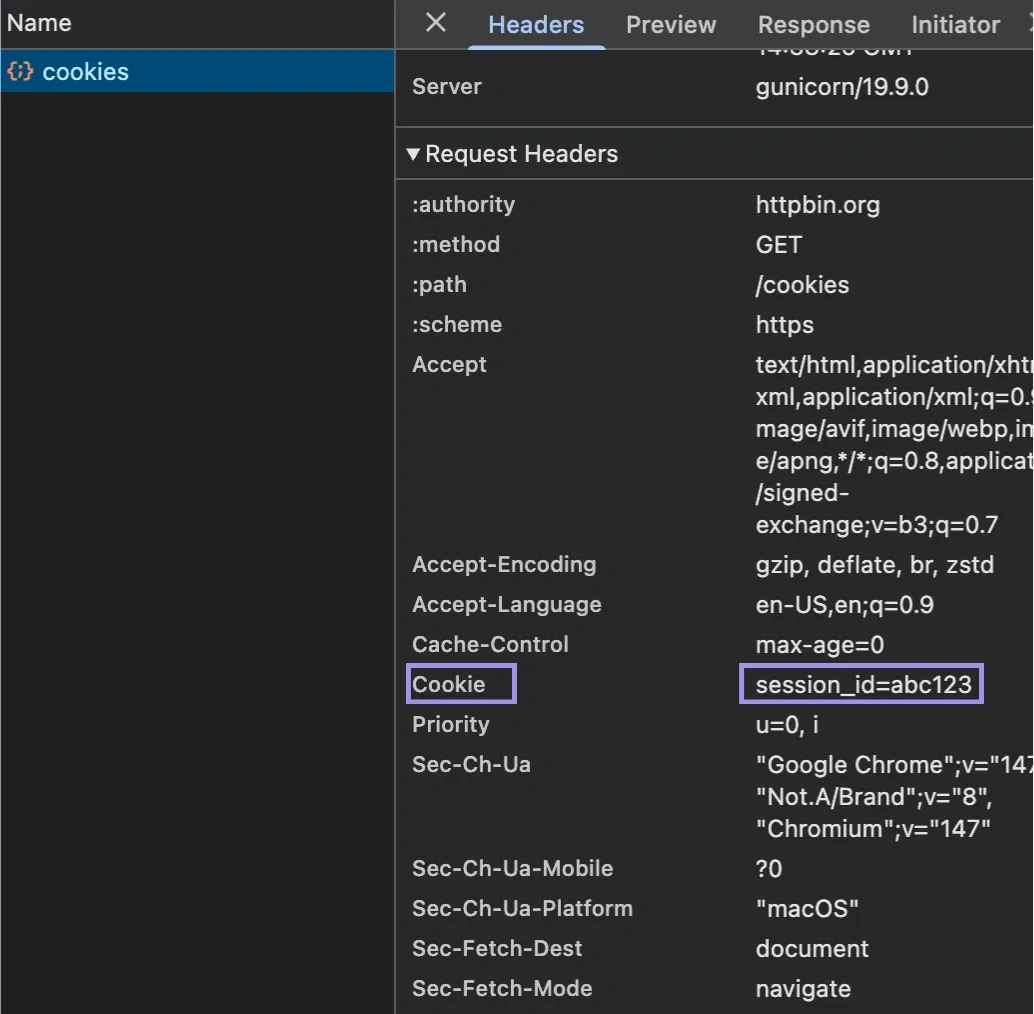
Cookie: session_id=abc123
The server will then be able to correlate the request with a previously established session. You can observe directly in your browser network requests:
- Shopping carts: Cart ID is stored to persist items between pages
- Page navigation: Preferences for language or region are consistent
- User settings: Themes and saved filters persist between visits
The browser takes care of it and sends it to the server, and now the server uses that cookie value to get its corresponding state.
What are Session Identifiers?
Most cookies do not save user data. Instead, they store a reference to data on the server, called a session identifier (session ID). Think of it as a lookup key, not the session itself.
Once you log in, the server generates a session record containing user ID, permissions and the activity state. It may also track expiry and recent activity. So the cookie stores the session ID, and the server looks up that session each time it gets sent back.
With this design, sensitive information stays on the server side while giving the server control of session behaviour from the backend. When something changes, it can terminate sessions, revoke access or repeat additional checks.
That is why session IDs must be treated carefully. The server must refuse the session or request a re-authentication from the user if they are exposed, reused incorrectly, or stored after expiration.
Example of Sending an HTTP Cookie with cURL
This behaviour can be recreated by sending a cookie manually with a request:
curl "https://httpbin.org/headers" -H "Cookie: session_id=active_user_456; region=us; currency=usd"
Here:
- session_id represents an active session
- region and currency simulate location-based preferences
The server reads these values like a normal browser request. Here’s what that looks like when the request is sent:
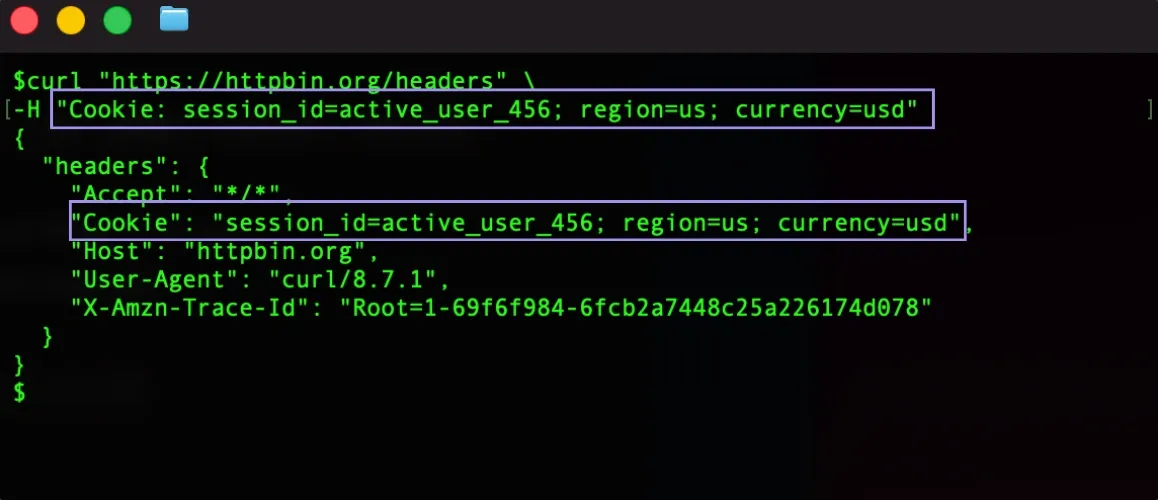
The reflection in the server's response shows that the values are successfully sent in the cookie header.
The cURL example shows what happens when stored cookies are sent with a request. When a proxy is involved, the client configuration still needs to match the proxy protocol, whether using HTTP or SOCKS5. In higher-volume workflows, HTTP/3 proxying can also change how requests are routed, reused, or timed, which matters when cookies need to stay tied to the same session context.
Types of HTTP Cookies
Not all cookies work alike. Some help with session management, some are persistent across visits, and others help with securing content, analytics, preferences or tracking.
Session Cookies vs. Persistent Cookies
Session cookies are temporary. They are built in a session that is discarded at the end of your visit, for example, if you close the browser.
For example, they are being used for:
- Staying logged in on different pages
- Maintaining a shopping cart for a single visit
- Workflows on temporary scope, like form submissions or checkout steps
Persistent cookies include an expiry time and stay after the browser closes.
You’ll see these used for:
- Saving your Login Preferences (stay logged in)
- Saving language or region settings
- Storing user preferences across visits
The key difference is lifespan. These cookies expire at the end of a browsing session. Session cookies are removed automatically when you close your web browser, while persistent cookies will remain on your device until their expiration date or until you purge them.
First-Party vs. Third-Party Cookies
Cookies can also be differentiated based on their source.
First-party cookies are set by the website you are currently visiting. They are generally used for core functions, like session management, preferences and basic analytics.
Third-party cookies are set by domains that are not the one you are visiting. These are commonly used for:
- Cross-site tracking
- Advertising and attribution
- Using an embedded service or an external script/widget
Because third-party cookies are closely tied to cross-site tracking and advertising, browsers now restrict them much more heavily. Safari and Firefox already block many third-party cookies by default through privacy protections like Intelligent Tracking Prevention (ITP).
Chrome also planned to phase out third-party cookies as part of its Privacy Sandbox initiative, although Google later adjusted that plan and shifted toward giving users more control over cookie settings instead of fully removing them outright.
Authentication, Preference, Analytics, and Tracking Cookies
They are also separated by purpose, which is an important differentiation, as they separate authentication and preferences from analytics and tracking.
- Authentication cookies: They tell the site whether you are logged in. That is why they are usually retained as session IDs and are essential for parts of the website to give it security.
- Preference cookies: Used to remember preference information that changes the way the site behaves or appears, such as a language, theme or layout preferences.
- Analytics cookies: They are a way to enable companies to track users to find out how they navigate a site (ie, what pages and for how long or clickstream).
- Tracking cookies: Track user behaviour from one session to another or across multiple websites, often for advertising, attribution, or audience measurement.
Secure, HttpOnly, SameSite, and Cookie Prefixes
Several properties control how cookies behave and what they can access.
- Secure: The Secure flag is a direct order which will prevent the sending of cookies on an insecure channel and whitelist it to work only via HTTPS.
- HttpOnly: Using this option will set the cookie to not be available on the client-side (e.g. it will be unavailable to JavaScript). This minimises exposure from attacks such as XSS (Cross-site scripting), where scripts attempt to read or write sensitive cookie values.
- SameSite: Used to control whether a cookie is sent with same-site or cross-site requests. Strict is the most restrictive setting and keeps the cookie within the same-site navigation. Lax allows the cookie with safer top-level navigation and is now the default when SameSite is not specified. None allows cross-site cookie use, but it must be paired with Secure.
- Cookie prefixes (__Secure-, __Host-): add more constraints to specific cookies. So they may require HTTPS or disallow cookies scoped to too many domains.
While these settings do not alter the function of a cookie, they determine when it is sent, where it can be used and how secure its operation is. That is important for normal browsing, logged-in sessions and any workflow where cookies should survive requests.
Why do websites use cookies?
Cookies are used wherever a website needs to remember state across requests. The main use cases are session management, personalisation, security, analytics, attribution, and feature control.
Session management
Eliminating cookies would mean that every page load would be a new interaction, and you would have to log in with each click.
A session cookie allows the server to identify that a user is making multiple requests. This is very useful because it helps you stay logged in while moving from dashboards to pagination and also going through filling multi-page workflows.
Personalization
Cookies are used to maintain user-specific settings chosen by them on the websites. The stored reference values on the website can thus be reused per visit instead of reverting back to the default status every time accessed.
Cookies help the site work properly for you each time you visit the site, storing data, like language and region, theme, and default layout preference.
Security and fraud prevention
Cookies are also used to track session integrity and to curb behaviour that is out of the ordinary. When a request is different from the traditional session in the past, the system can engage additional checks or have stricter measures.
For example, if a session cookie is suddenly found from a wildly different location/device context, the server may require re-authentication. It reduces the risk of unauthorised and inappropriate usage of live sessions.
Analytics and attribution
Cookies are meant to assist websites in understanding how the user is engaging with that content. That includes where they clicked, the route they took and other general usage data.
These insights allow site owners to analyse what works, where users drop off, and what campaigns or referral sources bring in traffic.
Feature control and experimentation
Cookies are good at controlling feature rollouts and experiments. A site could put a user into a testing group and then put that decision in a cookie.
This keeps the user on the same feature version across the session, so the test experience does not change from one page load to the next.
How do cookies relate to proxies and IP changes?
Session IDs are stored in cookies, while proxies alter the path a request uses to reach through the network. While these layers are different, websites typically check them together to see if a session still looks valid. This is how cookie handling is important in geo-targeted testing, automation and authenticated sessions.
Cookies vs. IP address
A cookie identifies the session. That IP address provides context to the server as to what network the session is occurring on. These are separate signals, but a lot of sites will check them together.
As with both of those, repeat visits are predictable when they have some consistency. Nevertheless, if there is such a request with the same session cookie but entirely different IP or geography, then the server has to decide whether that context still looks valid. And depending on the session logic of the site where you land, this might lead to resetting sessions, asking for re-authentication or losing some parts of the state.
Impact of rotating proxies on authenticated sessions
Rotating proxies change the exit IP on every request or after short intervals. This may help with broad data collection, but it can also disrupt workflows where cookies, cart state, and location context need to remain consistent across requests.
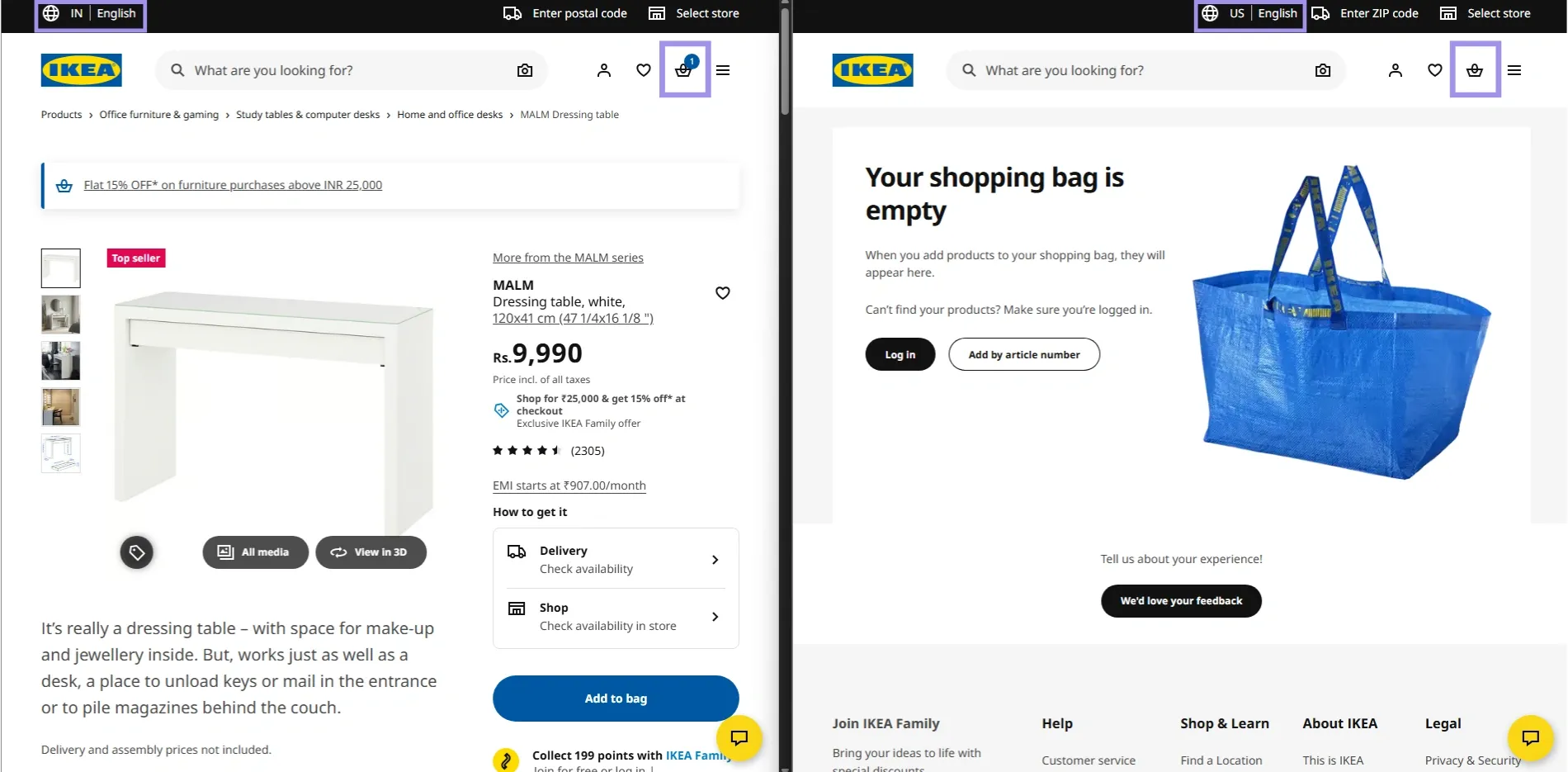
Typical examples include a checkout for an e-commerce store. A user can add products to a cart from one IP address, then successfully proceed to checkout through another region after the proxy rotation occurs. Even if the same cookie is still there, the site could treat the request as a new context because now those network and session signals don't match anymore.
This can result in carts disappearing, checkout flows restarting, pricing or localisation mismatches, or extra verification steps before payment.
This is what that kind of session breakdown can look like during a checkout flow:
In setups handling multiple parallel requests, connection-level behaviour can also affect how requests line up within the same checkout flow. If rotation is too aggressive, requests may no longer appear consistent enough for the site to maintain the original cart session correctly.
Benefits of sticky sessions over rapid IP address rotation
Sticky sessions maintain the same exit IP over a small window of time, and are dependent on a given setup; it could be anywhere from a couple of minutes to several hours. Static proxies, such as static residential proxies, go further by keeping the same IP long-term until you change it. Instead of switching the network context each time a request is made, they allow concurrent requests on the same route while the session is still active.
It is worth noting here, too, that in workflows where you depend on the login state or cart data (eg. carts, dashboards, multi-step actions), sticky/static residential setups are likely to behave much more predictably than rapid rotation configurations.
Syncing proxy location with cookie data
Some cookies are location-sensitive, which means they can remember some state information localised at a regional level, such as market selected, currency/language/availability/cart, and so on.
This discrepancy can be seen especially when the session starts from one region and gets continued in another, as the data for the cookie and IP location both may not match. This is relevant for geo-targeting tests, content localisation, or region-specific carts and checkouts.
It is for this reason that using the location of your proxies close to where the cookie was set in each request will mitigate most of these discrepancies.
When cookie data & region context are both synchronised, this is what a stable location-aware session looks like:
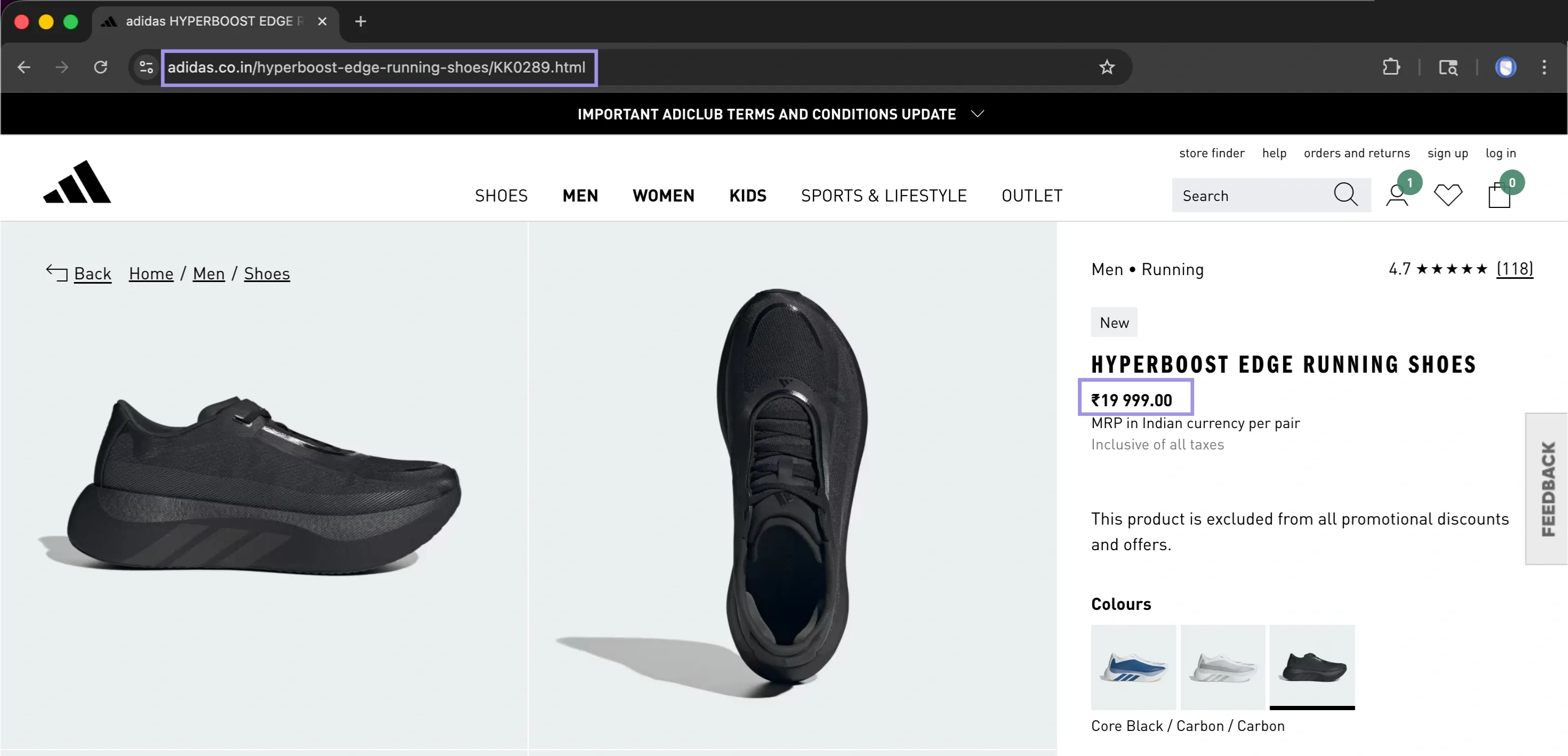
With persistent location data and cookies, that session is preserved on the server, so predictable localised content can be returned without surprises.
Residential IPs, often used in residential proxy setups, can help keep network context more consistent across region-sensitive workflows, while ethical proxy sourcing avoids trust issues stemming from poorly managed IP pools.
Handle Cookies in Web Scraping and Automation
Cookies should be managed intentionally when scraping and automating. Browsers store them automatically in the background, but scripts, headless browsers and HTTP clients quite often require you to manually declare where your cookies live (for how long) and when they should be refreshed.
In workflows where session state or location does not matter as much, datacenter proxies are often used for speed and scale, but they tend to be less reliable for maintaining stable authenticated sessions.
Where to Store Cookies?
Cookie storage depends on the workflow:
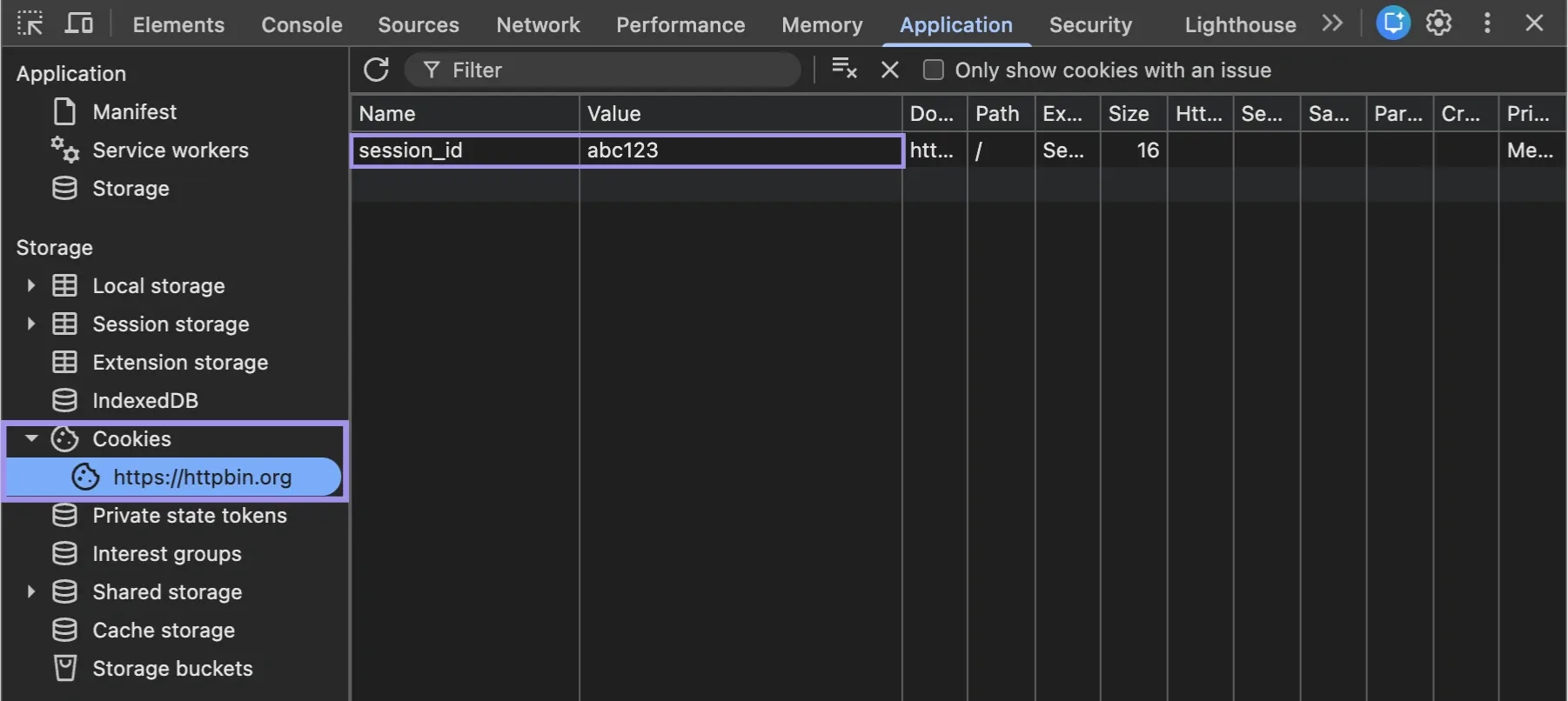
Thus, it enables the browser to retain session data and reuse it without any manual resolution across requests.
- Cookie jars: Use these with HTTP clients such as Python requests or cURL to store cookies returned in responses and send them with later requests.
- Browser profiles: this comes in handy for tools like Selenium or Playwright with the need to keep a login state, preferences, or page behaviour between runs.
- Headless browsers: This comes in handy when a site is reliant on JavaScript to create/fix cookies in order for the session to work correctly.
How to Safely Reuse Authenticated Sessions?
You can reuse authenticated cookies for hassle-free login, provided the surrounding session context does not change. Most of the time, any cookie you create from one IP or region, browser profile, or device context will not work when reused in a different location.
Never put confidential information in cookies; try to keep the context around your proxy and browser, e.g. how long a session is valid for. Request timeouts also apply if the workflows are longer-running, as requests that take too long or aren't raised at all might exceed a cookie's expiration even though the cookie itself is valid.
For browser-based workflows, cookie attributes should match the expected behaviour of authenticated sessions on the site (Secure, HttpOnly and SameSite).
Verify cookie persistence before assuming session reusability. Some sites will have the cookie set in the response while others create/update the cookies post JavaScript execution.
How Do Anti-Bots Use Cookies to Detect and Block Scrapers?
Cookies are commonly checked with respect to browser activity, request timing, JavaScript runtime environment and proxy context. They do not serve as distinct identifiers but instead provide information to sites that a session appears consistent with certain behaviour across multiple events over time.
For example, a site might render the page and then send out a JavaScript challenge that ends with the result saved in a cookie. That cookie becomes proof that the browser completed the expected step. Then, if subsequent requests are missing that cookie, or use it from a different IP address, browser profile or region, the session can look incomplete or out of sequence.
These cookies should follow along with subsequent requests once they are created. If a cookie is missing, incomplete, or reused incorrectly, it can cause re-verification or partial responses.
When Should You Clear, Persist, or Refresh Your Cookies?
Cookie management is not only about where cookies live. It is also about when they should be reused, cleared, or refreshed.
You need to persist cookies when your workflow depends on reusing the same login state, saved preferences, cart or multi-step session. Delete cookies if a session is malfunctioning, shows mixed user data, or needs to be reset. It indicates the website begins a fresh session, rather than continuing to an invalid/expired state.
Refresh the session before expiry to keep the workflow running without full restarts. Deploying that in addition to a stable proxy setup minimises mismatches and keeps the workflows steady.
Common Cookie Problems and Troubleshooting
Most cookie issues show themselves as logouts, missing data, request/response prompts, and a workflow that works differently in different environments.
In this manner, a quick proxy verifier or proxy tester check can prevent mismatches between session data and system settings. Free proxy servers can help with basic checks, but they’re not suitable for workflows that depend on stable cookies, authenticated sessions, or consistent location.
Unexpected Logouts
This type of logout usually happens when the session cookie is absent, expired or invalid for that request.
This can occur when the request context changes, like IPs or locations, during a session. In such cases, it may declare the session to be invalid from the server side and ask the user to log in again.
Sync Errors
Sync errors happen when the cookie state does not match up with a server-side session state. So the cookie is still in your browser or script, but the server-side session no longer matches it.
This can lead to missing data or actions that did not go through. This is typically solved by reloading or regenerating the session so that both sides are back in agreement.
Environment Shifts
Environment shifts happen when cookies are reused from another setup (e.g. device, browser profile, or network context).
Sites use this context in order to validate sessions, and related changes are typically shortly followed by either a re-authentication or a session reset. When that environment is kept close together, stabilised session behaviour will follow.
Blocking Policies
Blocking policies are triggered when a site notices suspicious patterns or low-trust IP signals that do not align with normal session usage. This may occur when cookies are absent, request patterns are repeated too aggressively, or session data does not correlate with the context of your requests. In practice, this manifests itself as incomplete data, multiple requests to say the same thing or limited utility.