
Backconnect proxies can do a lot. However, they are mostly known for, or confused with IP rotation. In general, a backconnect proxy is a great choice for anyone who doesn't want to manage IP lists themselves.
This guide will clear up common questions about backconnect proxies. It covers how these proxy servers work, their use cases and limitations, and how to choose a backconnect proxy provider.
What is a backconnect proxy?
Think of backconnect proxies as gateways (~server configuration) that allow a user to indirectly access multiple IPs and features without changing the endpoint. The objective is to geo-target a location, rotate IPs, maintain an IP for a duration, or enable a provider-specific feature by simply changing a few characters in the proxy string.
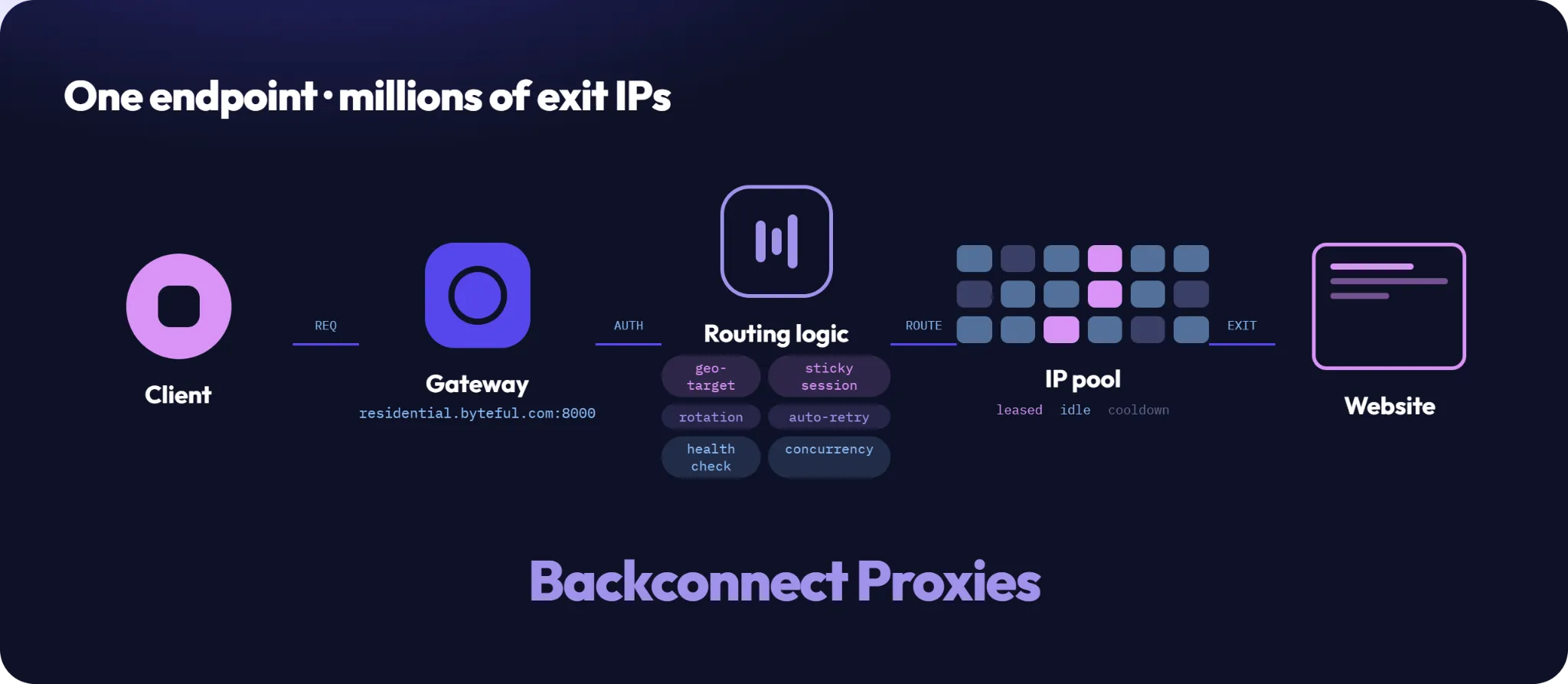
Their conventional opposite is a proxy list where one manually plugs proxy strings based on their required features, such as a specific location. This can be manageable at a small scale, but it's a pain for big projects, such as large-scale scraping workflows.
How backconnect proxies work?
There are multiple, provider-specific ways to make backconnect proxies behave differently. For instance, this is the basic residential proxy format with per-request rotation enabled by default at Byteful:
residential.byteful.com:8000:{username}:{password}
But you can append the username in the following ways for sticky sessions and maintaining the IP for a set duration using the _ttl_{number}{unit} parameter:
residential.byteful.com:8000:{username}_s_{random_alphanumeric}:{password}
residential.byteful.com:8000:{username}_s_{random_alphanumeric}_ttl_{number}{unit}:{password}
Likewise, adding a country ISO 3166 code in the base structure will provide an IP from the requested country.
residential.byteful.com:8000:{username}_c_{country_iso_code}:{password}
We also have similar formats for geo-targeting by state, city, ZIP code, and ASNs, and users can also enable our bandwidth-saving SmartPath AI by suffixing the username with _smartpath.
For geo-targeting and IP rotation, a user can verify IP changes and other details by hitting IP echo services such as IPinfo and WhatIsMyIPAddress. This helps confirm the IP switch per the proxy string modifications. Still, it depends on a particular attribute, and the steps to verify whether it indeed worked may vary accordingly.
To sum up, a backconnect proxy server is a multi-functional gateway that allows users to enable features (including IP rotation) by simply modifying the connection string, without having to switch to a different proxy endpoint each time.
Are backconnect and rotating proxies the same?
No. Backconnect is an architectural setup, and IP rotation is a feature that might be included in that configuration or implemented separately.
If offering rotation, a backconnect proxy server allows a user to rotate through the underlying IP pool while remaining connected to a single endpoint. In addition, providers can offer much more than mere IP rotation with their backconnect configurations.
On the other hand, IP rotation without a backconnect setup is handled on the user's side, either by the client switching through a proxy list (where the endpoint changes with every switch) or by self-hosted middleware such as mubeng, which runs a local rotating gateway in front of your own list. Either way, the pool, the rotation logic, and the dead proxies are yours to manage.
Therefore, while rotating proxies highlight a single specialty: IP rotation, backconnect proxies usually have much more to offer, including geo-targeting, sticky sessions, and basically any provider-configured feature.
What are backconnect proxies used for?
As already stated, backconnect proxies aren't some special kind of proxies. This is simply about using multiple proxies and features with a "modular" proxy string. Therefore, backconnect proxies are deployed similarly for multiple use cases, such as:
- Web scraping
- Social media management
- Competitor analysis
- Ad verification
- SERP monitoring
Backconnect proxies vs a traditional proxy list
Though it's about using different proxy IPs at its core, backconnect proxies and a traditional proxy list vary significantly, as compared in the following table.
| Feature | Backconnect Proxy | Standard Proxy List |
|---|---|---|
| What you receive | A single endpoint that selects an IP automatically based on the proxy string | A list of individual proxy IP:port pairs |
| Proxy management and selection | Provider managed | User managed |
| Connection endpoint | Usually never changes | Changes per proxy switch |
| Underlying IP | Changes behind the gateway | Fixed until you manually choose another |
| IP rotation | Provider-specific. Automatic or configured (request, interval, or session-based) | Manual IP changes or with 3rd-party proxy managers |
| Proxy pool size | Often thousands to millions of IPs | Limited to the purchased list |
| Adding/removing dead IPs | Provider handles it | User must replace or remove bad proxies |
| Scaling | Simple. Same endpoint regardless of pool size | Requires managing increasingly larger lists |
| Sticky sessions | Usually supported via session IDs | Native, since each IP remains fixed |
| Geo-targeting | Often controlled with username or gateway parameters | Choose a proxy from the desired location |
| Authentication | Username/password or IP whitelist | Same |
| Failure recovery | Gateway automatically picks another IP | User must retry with another proxy |
| Bandwidth management | Provider-managed aggregate consumption | User manages utilization across proxies |
| Pricing model | Usually traffic-based (GB) | Often priced per IP/month |
| IP ownership visibility | Generally unknown until connected | Known beforehand |
| Ability to pre-test IPs | Limited | Easy because you know every IP |
| Latency | More, due to an additional hop to the gateway | Comparatively less |
| Reproducing a request | Difficult. Same credentials, different exit IP (unless configured for sticky sessions) | Straightforward. Same credentials, same exit IP |
| Best for | Large-scale scraping, automation, frequent IP changes | Account management, long-lived sessions, applications requiring specific IPs |
Types of backconnect proxies
- Residential IPs: Residential (including mobile) proxies are the ones most commonly managed with a backconnect setup, since they almost always rotate. However, users also benefit from other features, including geo-targeting, with such backconnect servers. Residential IPs are issued by internet service providers to real users, which allows developers/marketers to leverage greater IP trust and excellent geographic/ASN coverage.
- Datacenter IPs: Easier on the budget, datacenter proxies are generally the fastest and are a good match against low-risk targets. Similar to residential proxies, datacenter IPs can also be configured for geo-targeting, IP rotation, etc., with backconnect setups.
- Static residential IPs: Often considered a middle ground between residential and datacenter proxies, ISP proxies can also be delivered through a backconnect setup. However, IP rotation is generally not the point here; the value is accessing vendor-defined features through the same endpoint while your IP stays fixed.
Limitations and trade-offs of backconnect proxies
- The extra hop adds latency: Compared to directly connecting to an IP, using a backconnect setup introduces some additional latency. This happens because you're now connecting to a gateway (the extra hop), which facilitates the routing to an IP based on the requested parameters. You can try connecting via a server that is closer to your target to mitigate the latency overhead to an extent.
- Limited control over which IP you get: The biggest backconnect drawback is that a user has no visibility or control over the assigned IPs. That's why pre-workflow testing and debugging per IP is out of scope, unless facilitated by the proxy provider.
- Shared pools and IP reputation: The standard way of deploying backconnect proxies indicates shared infrastructure under the hood. This can result in a higher failure rate if the IPs have low reputation track records from historical abuse. Besides, sharing the IPs with multiple other users also affects the speed and overall performance. Against extremely sophisticated targets, a list of dedicated IPs might fare better. However, this excludes enterprise users, where getting a dedicated IP pool for backconnect proxies might be possible.
How to evaluate a backconnect proxy provider
This can be short process where one can simply check the pool, features, and any imposed limit before signing up. However, we still recommend taking an entry level plan or trial before going big and not just focus too much on the stated features.
Pool composition and sourcing
It's common to advertise millions of IPs in the proxy industry. But as a user, you must evaluate how many of those IPs fall in your regions of interest. On top of that, ensure ethical sourcing, since such frameworks duly compensate users acting as exit nodes. In the absence of similar policies, one might unknowingly become a part of sinister botnets, like what was exposed in the recent Google and FBI's NetNut proxy network crackdown.
Session controls
A backconnect setup can't provide features that the proxy provider doesn't natively support. So, the best strategy to begin is to request a trial or subscribe to the base plan for testing the waters. Alternatively, have a quick pre-sales chat with the provider's customer service about your specific session control requirements, and validate their responses with the support documentation.
Billing and concurrency limits
Backconnect proxies are generally billed per GB, and the leading providers put no concurrency limits. For instance, we offer unlimited concurrent connections across our proxy lineup and non-expiring bandwidth with our residential and mobile proxies. These features can make a huge difference to your project cost and overall efficiency.
IP rotation and geo-targeting
These remain the primary features for which users seek backconnect proxies. You must inquire about IP rotation support with your proxy provider: whether it's per-request, interval-based, or session-based. Likewise, check the geo-targeting depth, because it varies significantly. For ex., we offer IP selection by country, state, city, ZIP code, and ASN.