
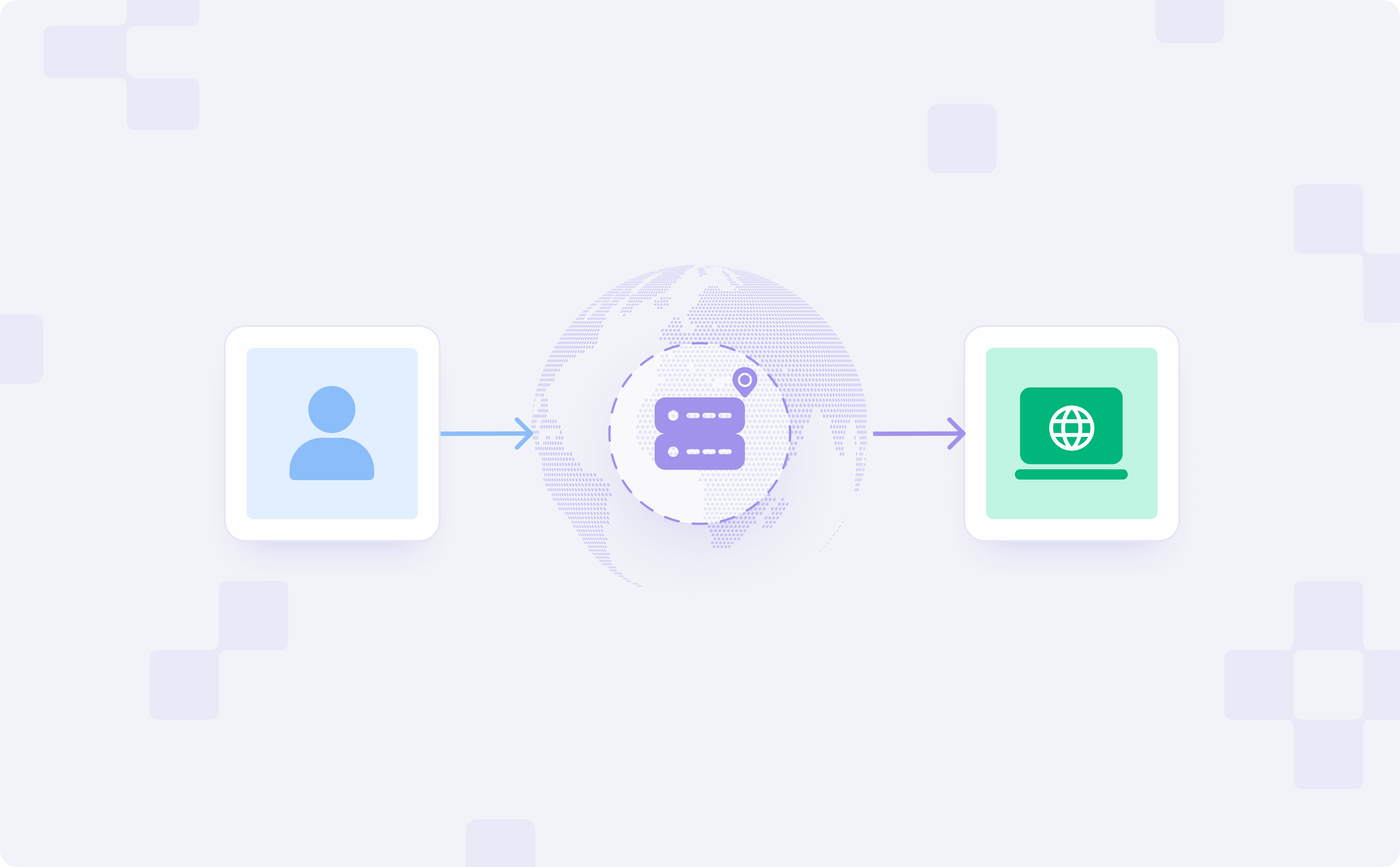
If you have ever tried to access content or test a service from another country, you may have noticed that what you see does not match what users in that location actually get. Prices differ, results change, and the experience can look wrong because most sites use your IP address to decide what content to show.
Geo proxies help by routing your traffic through IPs that geolocation databases map to specific locations, so you can approximate a local view without changing your tooling.
This guide is about what geo proxies are, how geographic IP distribution really works, and what you can expect realistically when targeting different regions.
Why Location-Aware Routing Matters?
Location-based workflows can fall apart when your traffic comes from a different market than the one you are testing. These types of checks are meant to provide visibility into what the end users see in that market.
Growth & Market Intelligence
SERPs and ad delivery vary by location. If you test from the wrong market, you can misread rankings, competitors, and regional demand. Geo-targeted checks let you validate what users in a specific country/region actually see.
And a simple search returns results that are worlds apart, depending on which location you appear from.
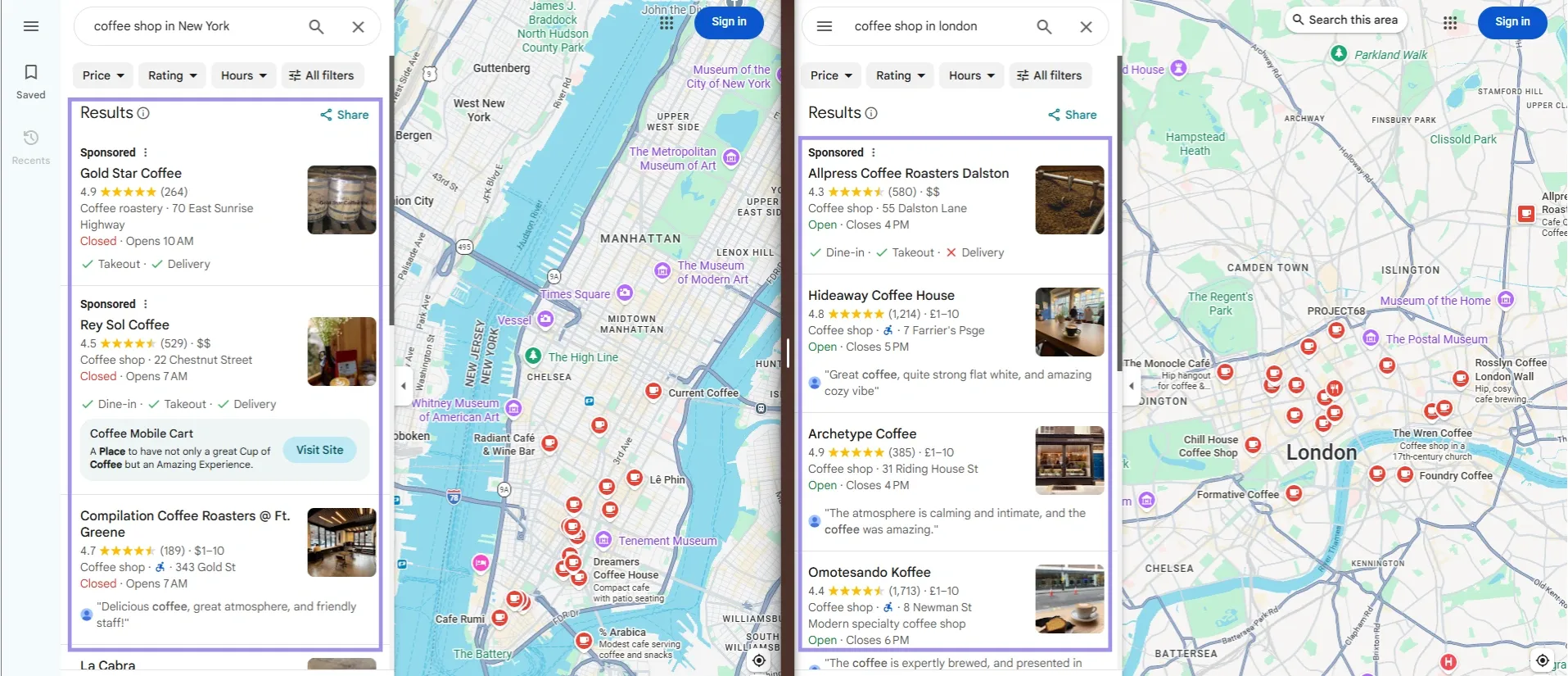
This is why local visibility checks need to happen in the right market. Otherwise, teams may make decisions based on rankings, ads, or regional trends that their real users never see.
Product QA & Localization
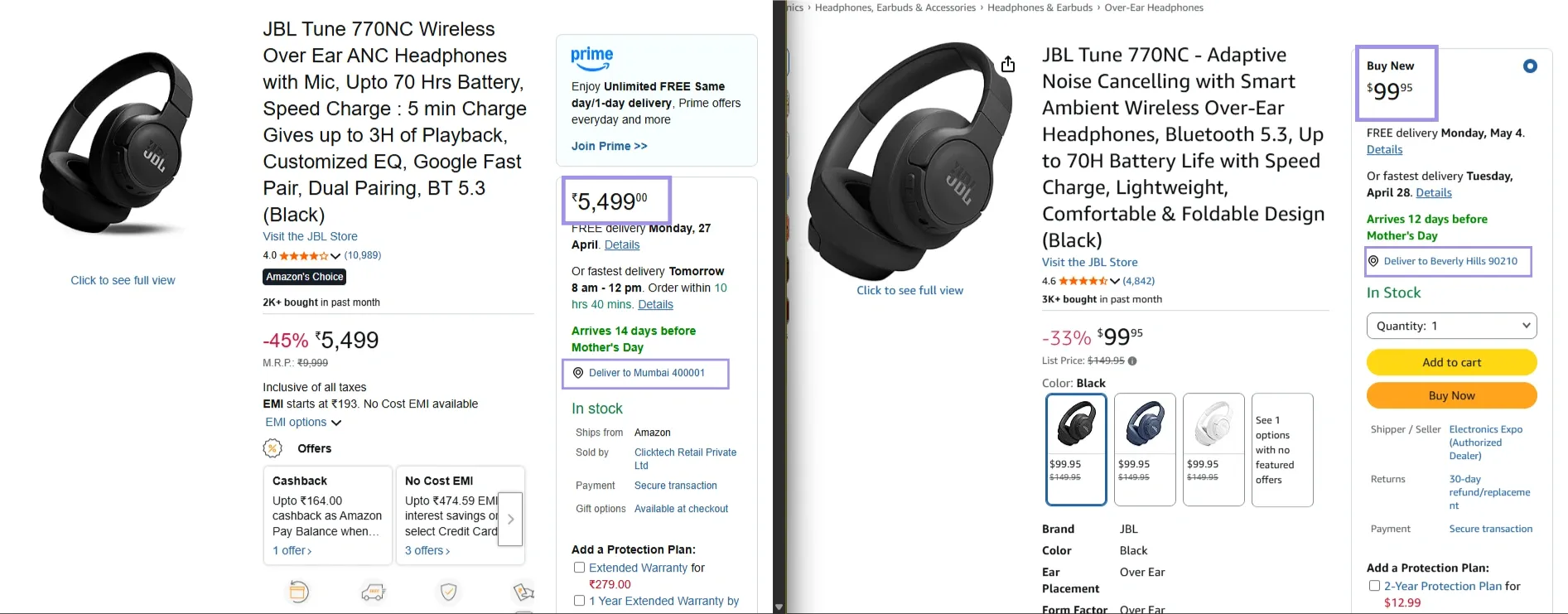
Regional differences can change pricing, features, catalogs, language rendering, and delivery rules. Testing from the target market helps catch mismatched assets, wrong catalogs, and region-specific bugs before launch.
For instance, the same product page may show different prices, availability, or delivery conditions when viewed from different locations.
Risk, Compliance & Brand Protection
Due to regulations, many platforms apply regional rules such as regional access restrictions, changing what users can buy or view, or monitoring suspicious activity. It means you must understand how these controls work in each locality and create additional alarms specifically for counterfeit listings on the identified main markets.
The quality and source of the IP pool are also important in those workflows, which is why ethically sourced proxies work better than recycled or unclear sources when consistency and trust matter.
Ops and support teams use geo checks to confirm what users see in specific markets (job listings, help flows, localized UI) and to review region-linked fraud or abuse patterns.
How Geo Proxies Help You Target the Right Location?
Geo proxies route your traffic through an IP that geolocates to the target area, so many sites respond as if the request is coming from that market. You can see how this works in practice when the same connection shows completely different locations based on the IP being used.
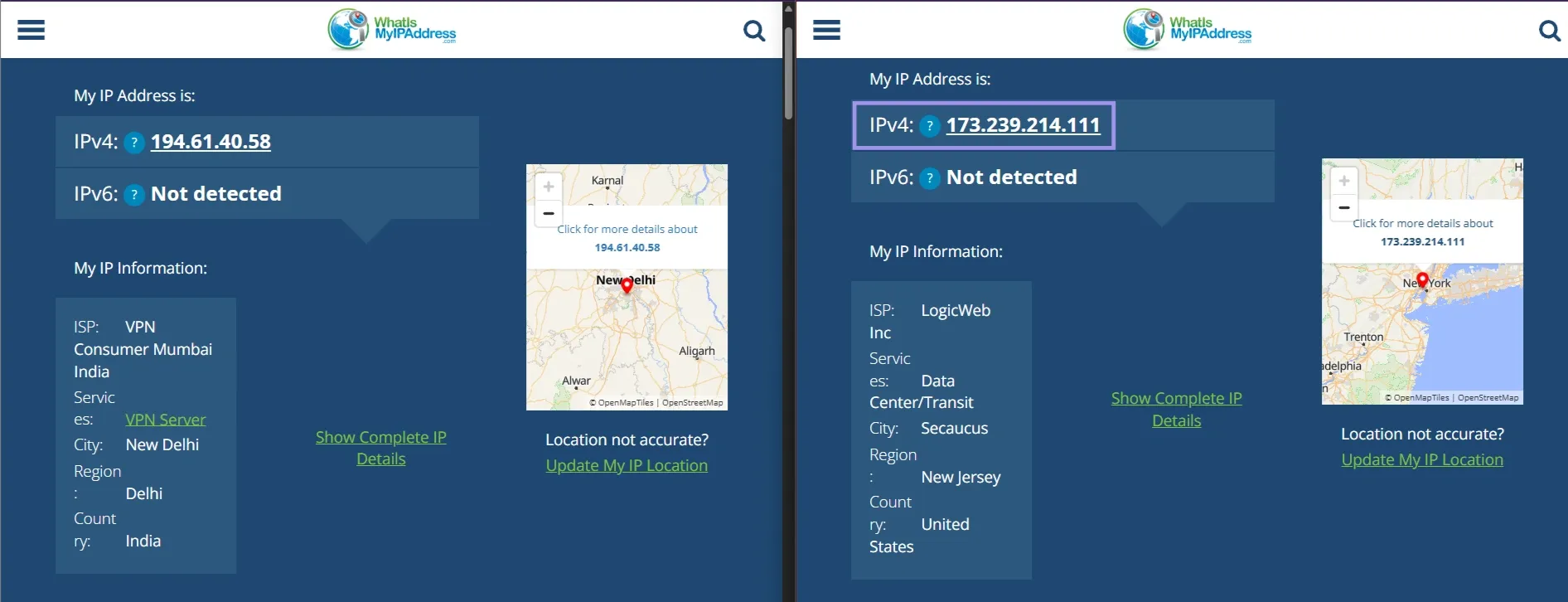
Choosing a country is only the starting point. Meaningful results also depend on target precision, session stability, and live inventory in that location. That is why geo-targeting works best as a routing strategy, not a guarantee.
Country, Region, and City Targeting
Country targeting is the most reliable option for pricing, language, and SERP checks. Use region/state targeting when experiences differ within a country. City/ZIP targeting is the most granular, but availability is often limited, and results can vary by inventory and geolocation databases.
Sticky vs. Rotating Sessions
Sticky sessions keep the same IP for a time window, which helps with multi-step journeys (logins, carts, checkout). Sticky routing makes more sense when you're testing a multi-step user journey where the location needs to stay consistent across pages.
Rotating sessions change IP per request or interval, which helps distribute load across a pool for large-scale collection. If continuity matters, prefer sticky or static endpoints. For example, if you are collecting location-based data at scale, rotation can help avoid overusing the same endpoint, which is also why it often shows up in web scraping proxies workflows.
Pool Availability and Fallback Logic
A proxy pool is only going to help you if it can route you through locations that actually have live usable inventory. Geo-targeting depends on live inventory in the requested location.
Broad targets (country) usually have deeper pools and more stable results. Narrow targets (city/ZIP) can have limited supply, leading to less consistent sessions or the need to broaden the match. Validate several assigned IPs before scaling, and use dashboard indicators (like node count) where available.
Ultimately, the only way to know for sure is to test the assigned IP before scaling. In the Byteful dashboard, node count can also help you understand how much live inventory is available for a selected location before you rely on it for a larger workflow.
This is where validation comes in, ensuring the assigned IP matches your intended location.
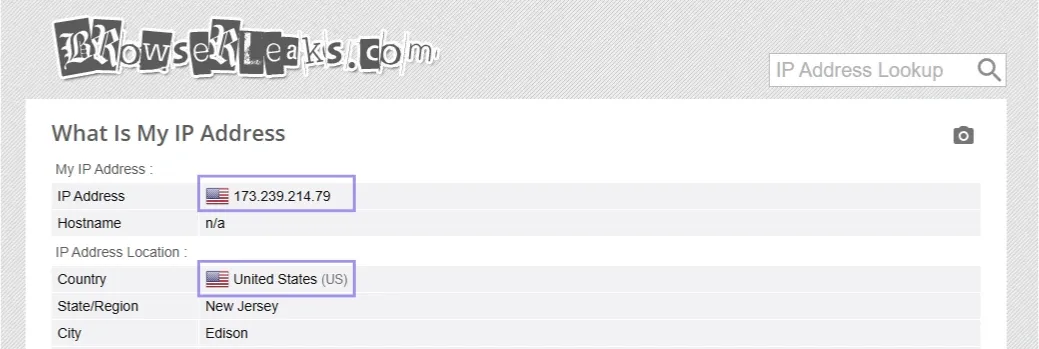
If running this in a larger workflow, you can shorten the time it takes to validate that an IP responds from its actual location by using tools like Byteful Proxy Tester to perform both validity checks on your behalf before scaling.
For larger tests, do this check across a handful of assigned IPs instead of just one output. You can see more clearly whether your target location will be stable enough for your workflow.
How is Geo-targeting implemented?
The geo-targeting is controlled by using a combination of routing rules, session control and provider-side infrastructure. The goal is for your request to travel through an IP, in the location of your choosing, but how this works depends on the provider.
- Endpoint selection: Some providers offer region-specific endpoints. You select a country, state, or city and the system sends your traffic through a pool linked to that area.
- Username parameters and tags: In other setups, location is parameterized in the username or request. They can be country, city, session type, or session ID values. These tags affect the same endpoint in different ways.
- Session ID and sticky logic: Sticky Sessions are based on a session ID or token. When the same session ID is reused, it attempts to keep your traffic on the same exit IP for the longest time possible. This is good to use for logins, carts etc where the IP address should not change mid-session during multi-step workflows.
- Provider-side routing vs client-side rotation: For provider-side routing, the proxy network chooses an IP from the pool being chosen. With client-side rotation, your script or tool decides when to rotate IPs. Provider-side routing is simpler, while client-side rotation gives you more control over switching behavior.
How to validate geo-targeting?
The first step is to check your IP with two or three geolocation databases, as results can vary. Review the country, city, ASN, and ISP information
Then confirm your browser environment matches the target location, including timezone and language settings. Send multiple requests for sticky sessions and check if the IP remains the same. For rotating setups, track IP uniqueness and failure rate.
Finally, from the website itself. Ensure that your location is not set via account data, cookies, or saved session data. Lots of platforms change prices, availability, or listings based on where the user is located, sometimes in addition to the underlying IP-based location.
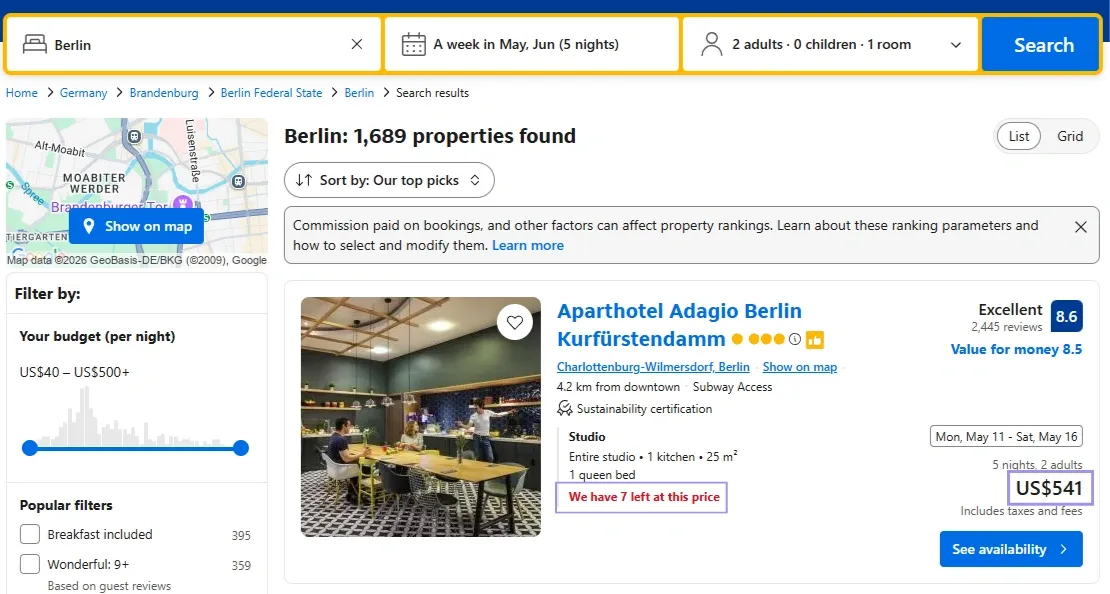
When combined, all of the above checks confirm whether your geo-targeting configuration behaves as expected in a production environment.
Choosing The Right Proxy Type For Geo Targeting
The type of proxy you use greatly affects the reliability, accuracy, and scaling of your geo-targeting. It really depends on whether you are after realism, session persistence, or wide coverage.
Residential Proxies
Residential proxies use IP addresses from actual residential Internet Service Provider (ISP) connections. These tend to boast the best granularity, offering geo-targeting at (at least) a country, state (if applicable), ZIP code (if available) and city level.
These are useful for anything you need geo-targeted (e.g., localized search results) or for generating/posting local information. This also means that there is more variation at the smaller levels, such as city or zip code.
This is why residential proxies are usually a better fit when you need stronger location realism across country, state, or city-level targeting.
Mobile Proxies
Mobile proxies are IPs assigned by mobile providers. Rotation is controlled by the provider, so it's not always the fastest to rotate out of the box.
These are useful when carrier-type traffic patterns (mobile ASN behavior) matter more than precise city-level pinning. City-level mapping can vary due to carrier routing and shared IP ranges. Otherwise, location mapping can be imprecise because of carrier networks and shared IP ranges, and this varies by region and provider.
ISP Proxies
Internet Service Provider (ISP) proxies combine datacenter infrastructure with ISP-registered IPs. This gives you a more stable identity than rotating pools, which can be useful when your workflow depends on consistency over time.
They're ideal for repeated checks, extended sessions, or arrangements where you have a more stable location footprint. They often provide less granular targeting flexibility than residential proxies, so that is the tradeoff.
Datacenter Proxies
Datacenter proxies come from datacenters (server farms). They are ubiquitous and usually provide reasonably accurate support for country targeting.
They are best for high-volume tasks in which performance and scale take precedence over local accuracy, but may not be as reflective of actual user behaviour compared to a residential or ISP option.
In other words, datacenter proxies make more sense when broad country-level coverage and speed matter more than highly local precision.
Is a Geo Proxy The Same As A VPN?
Both a geo proxy and a VPN can change the way your location is shown, but they are different tools. A geo proxy is still a type of proxy server, while a VPN is built around encrypted traffic and device-level privacy.
VPNs deal with security and privacy. They encrypt your traffic and are used to protect against data exposure and browsing activity.
That said, a VPN provider will still be able to technically observe things like timestamps of connections made, bandwidth size used for sessions over a period of time, your real IP address, and the servers you connect to.
A geo proxy is focused on routing. It allows you to control the appearance of the source of your requests, but it lacks the same level of security or encryption. It must not be treated as a privacy tool.
Tor works differently. You route traffic through multiple nodes to hide the origin, and while you can sometimes influence the exit region, it is not reliable or built for stable geo-testing.
If your goal is privacy or encrypted browsing, a VPN or Tor makes more sense. If your goal is controlled location-based routing, geo proxies are the better fit.
What To Expect from Geo-Targeting Accuracy
Geo targeting is a kind of precision, not an exact local guarantee. The result will, of course, depend on how narrowly the target is defined, how much inventory there is on offer, and how location signals are read by those platforms.
When Country-Level Targeting Is Enough
The vast majority of workflows only require country targeting. This usually has enough details in it for you to be able to confirm search results, compare pricing or look at content differences by region. At that level, it is not so much about narrowly local variation as it is about language, currency, and major content changes.
More often than not, when you want reliable testing, research or content validation minus the variation of tighter location filters this is the way to go.
Why City-Level Results Vary
City targeting is more granular but has more variation. And one reason is simply that some cities have fewer available IPs than others. That makes it harder to stay in one location across requests.
Another factor is geolocation databases. As each platform calculates the location data differently, the same IP is not always resolved to the same city.
In contrast, some platforms rely not just on IP signals. Hence, why even in the case of an accurately targeted request, it can give different results on a city level.
Accuracy Vs. Availability Tradeoffs
The available pool tends to be smaller for more specific locations. Going down to the level of state, ZIP code or city means fewer IPs, which will influence session volume, velocity, and reliability.
The tradeoff is simple: local granularity (narrower targeting) vs. stability (broader targeting).
And because specific areas also do not always reliably support targeting by ZIP or city, wider targeting is often the more realistic choice when availability is inconsistent.
Handling Geo-Targeted Proxy Issues
At times, geo-targeted workflows fail to perform as expected even after configuring them correctly. If this happens, you can review your setup with the following points:
Context: Most problems stem from unstable sessions, insufficient inventory or location signals outside of the proxy itself. The following checks help you troubleshoot which one is creating the issue.
Sessions keep dropping or switching unexpectedly
This usually comes down to session type. If you need the same IP for several requests, use a sticky session instead of rotating. Also, keep in mind that short session windows can lead to more frequent IP changes.
- The proxy location doesn’t match the target: This usually happens when the exact target is unavailable or the site interprets the location differently. In these cases, the system may return a nearby location or a broader region instead. If you test the assigned IP on a geolocation service, it will show what location is actually being used.
- City-level options are limited: This usually has to do with a tight supply in that area. If a particular city or ZIP code has too many fluctuations, then consider expanding the target to the state or even country-wide, getting you more stable results.
- Local content still doesn’t look local: It depends on the platform, but some work off of non-IP signals, such as cookies or session data. Clear session data, set a new environment, and double-check the request setup in case another signal is invalidating your proxy.
- Speed drops in faraway or hard-to-reach locations: Making traffic bounce off distant or rarely used places increases latency. That can make for an inevitable case sometimes, but opt for the nearest or most widely available place. If you have a configuration that was previously working for a given region, and then it suddenly drops in performance, check the status page of the provider first to ensure that there is not some kind of larger network issue at play before turning to adjusting or changing the setup.
- Experiencing too many blocks or failures: This usually stems from request behaviour, though lower-quality or free proxy server setups can make the issue worse. The right proxy type, appropriate rotation, and avoiding repeated requests from the same endpoint should help reduce failures.