

Websites use CAPTCHA to shield themselves from illegal data scraping, credential stuffing, and spam bot activities. While effective, these defenses often block legitimate automated scraping of public data, halting workflows. This is exactly what AI-powered CAPTCHA solvers like Capsolver help with.
But modern CAPTCHA systems do not only check for a valid CAPTCHA token, but also the IP it was solved from and the IP of your setup that sent it for validation. Any mismatch there can get the token rejected despite its validity. This is why Capsolver gives you an option to integrate your own proxies for CAPTCHA solving.
In this guide, we will cover what Capsolver is, how to use it, and how to integrate proxies with Capsolver.
What is CapSolver?
CapSolver is a machine-learning-based CAPTCHA solution service that recognizes and auto-solves CAPTCHA on its own. You can integrate CapSolver into your workflow through its browser extension for Chrome and Firefox and the API, which is useful for web scraping and automation workflows.
Note: While a service like CapSolver helps with legitimate tasks like scraping public data, abusing it for spam or prohibited activities, such as creating fake accounts, can lead to serious consequences. We strongly recommend you check your target’s terms of service and local law before using it on any website.
What CAPTCHAs Can CapSolver Solve?
As of this writing, the CapSolver website mentions CAPTCHA solutions for the following tasks. Some of them are supported by both the API and the extension, while the other are only supported by the API:
- reCAPTCHA v2 and reCAPTCHA v3, supported by both the API and the browser extension, with API only support for the enterprise version of both tasks.
- Cloudflare Turnstile, ImageToText, and AWS WAF are supported by both the API and the browser extension.
- GeeTest v2 and v3 are supported only by the API at the time, but Capsolver documentation mentions that support for the extension is coming soon.
- Cloudflare Challenge, VisionEngine, MTCaptcha, and DataDome are supported by the API only.
Why Choose Capsolver as a CAPTCHA Solver?
A handful of things set CapSolver apart from the rest of the solver market:
- AI-powered solving: Because it is AI-powered and supports integration via API, you create a task and get back a token or solved value within seconds. It also supports whitelisting IP addresses to restrict API key access to specific IPs.
- Browser extension: CapSolver also provides an extension that runs in the background while you are browsing the internet. It detects and solves CAPTCHA automatically without requiring any manual work. For now, the CapSolver extension is available only for Google Chrome and Firefox.
- SDKs & integrations: Official SDKs cover Python, JavaScript/Node.js, PHP, Go, and more, with documented integration paths for Selenium, Playwright, Puppeteer, and n8n, so it slots into most existing automation stacks without requiring a rebuild.
- Dashboard & analytics: The CapSolver dashboard tracks balance and usage, which is useful for keeping an eye on cost across larger scraping operations. Analytics on the dashboard show CAPTCHA solve success and failure rate as well.
- Proxy support: CapSolver supports both proxy and proxyless tasks. In proxyless mode, CapSolver uses its own built-in proxy, and you do not have to provide any. But if you want to use your own proxy, that is supported as well in both CapSolver’s API and the browser extension. Whether you need your own proxy or not depends on the CAPTCHA type and how strict the target site's IP or fingerprint checks are.
All these pointers, along with billing that only counts successful solves and broad CAPTCHA coverage, make CapSolver a good choice as a CAPTCHA solver.
But there are some downsides to take into account as well. Some tasks, like Cloudflare Challenge, require your own proxy rather than a built-in one. CapSolver's prices aren't the absolute lowest either, and CapMonster can undercut it on certain task types like image recognition and reCAPTCHA v2.
Success rates aren't fixed. They vary by target site and can dip whenever the site updates its bot protection. And the browser extension supports fewer CAPTCHA types than the full API, so heavier workflows will want the API directly.
Why Use Proxies With CapSolver?
Modern CAPTCHA tasks tie the solved CAPTCHA token with the IP address that solved it. If the IP address that solved the CAPTCHA does not match the IP that is validating the token, then the request may still get rejected despite the token being valid.
To tackle this issue, you can configure your own proxy with Capsolver to match the CAPTCHA solving IP with the IP that your scraper or browser session is using already.
Capsolver supports HTTP, HTTPS, SOCKS4, and SOCKS5 protocols for proxy integration, along with support for credential-based and IP-based proxy authentication.
If you are using IP-based authentication for your proxies, then you will need to whitelist the IP addresses mentioned in CapSolver’s API proxy integration documentation, which include the following IP addresses:
47.253.53.46, 47.253.81.245, 47.253.148.135, 47.252.73.71, 47.253.123.100, 47.253.144.89, 47.89.153.185, 47.253.44.80, 47.253.210.178
Whitelisting these IP addresses will allow Capsolver to access and use your integrated proxies.
What Type of Proxies Work Best With Capsolver?
You can use any type of proxy with Capsolver, but to avoid being blocked on the target and to get a good reCAPTCHA v3 score (>=0.7), using residential or mobile proxies is helpful.
The recommended workflow when using a service like CapSolver is to rotate proxies while browsing to avoid proxy bans. Switch to sticky when any CAPTCHA appears to solve, and submit the CAPTCHA token from the same IP. Once done, switch back to rotating proxies.
Most task types support both proxy and proxyless versions, while some require a proxy rather than it being a choice. An example of that is a Cloudflare Challenge because the cf_clearance cookie is strictly bound to the solving IP address. Any inconsistencies in the solving IP and the IP that uses the token in a request can invalidate the token.
When choosing a proxy provider for CAPTCHA with Capsolver, choose one that offers clean, fast proxies with a high success rate.
A good example of that is Byteful’s ethically sourced proxies with the fastest mobile response time globally (0.48s), the fastest residential proxies response time (0.41s), and the best residential success rate (81.23%) against real-world targets. These numbers are not assumed but taken from Proxyway's Proxy Market Research 2026, where they tested our proxies along with twelve other well-known proxy providers.
You can also test our residential proxies before buying through our no-credit-card 1 GB of free and non-expiring residential data.
How To Set Up Proxies on CapSolver?
You can integrate proxies with CapSolver using their API and the browser extension. This section covers both of these ways of integration.
Using the CapSolver API
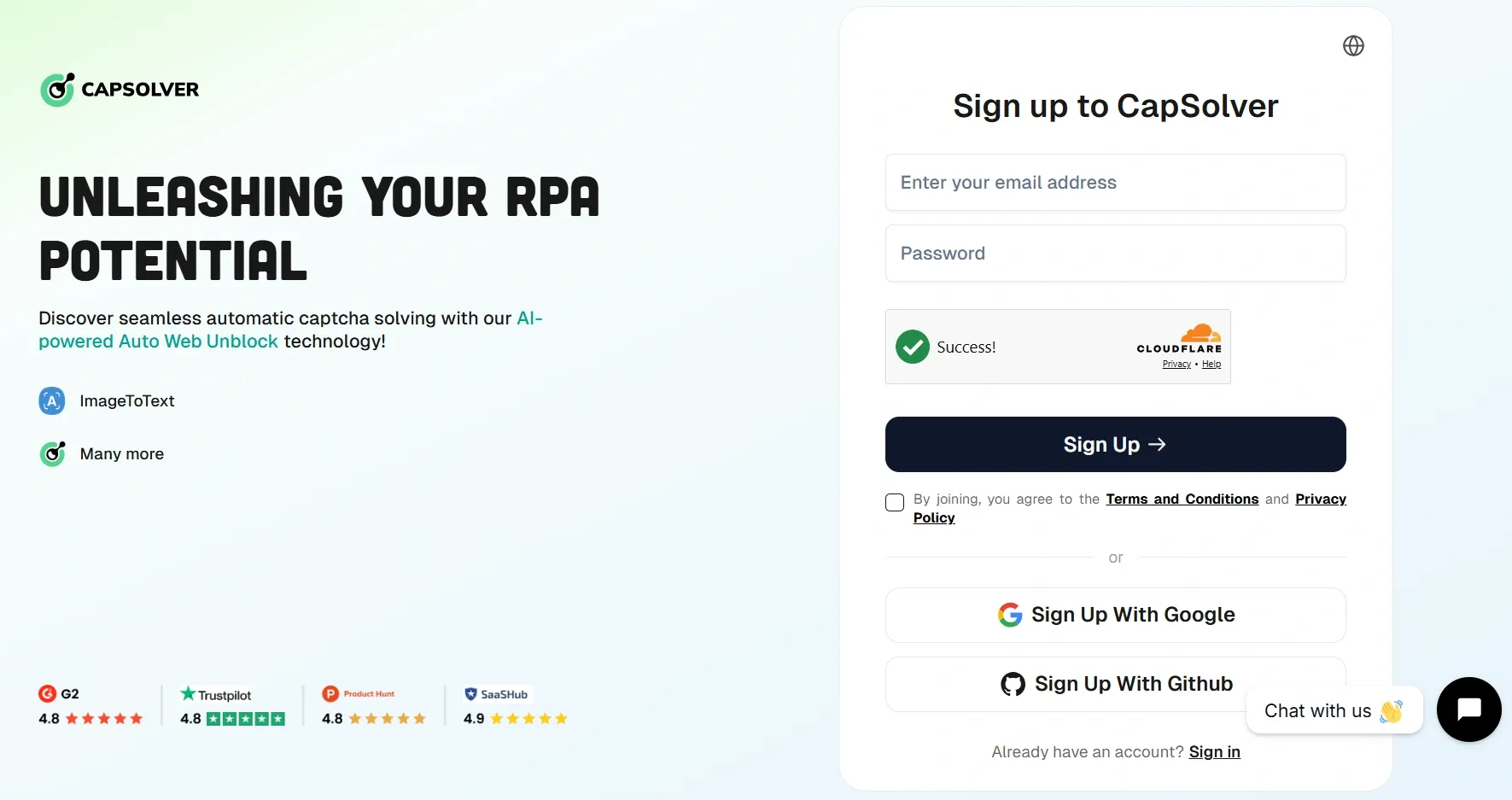
1. The first step for both ways of proxy integration is creating an account on CapSolver and adding funds to the account.
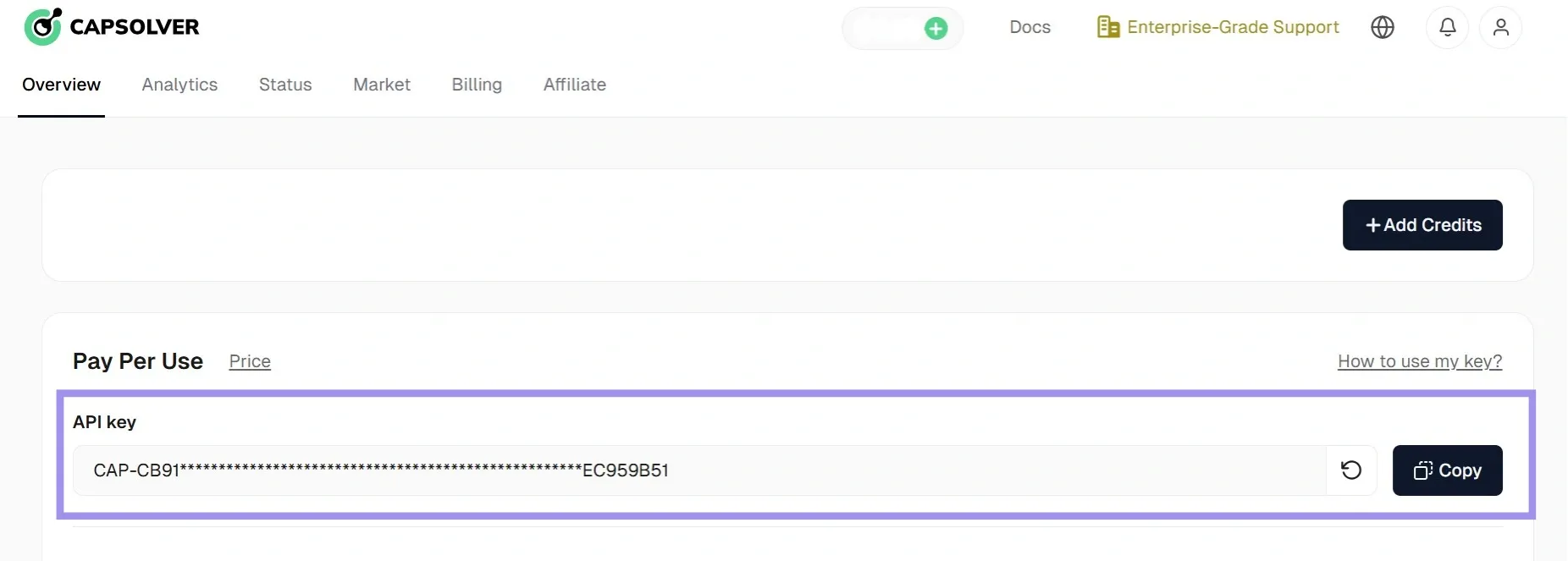
2. Get your API key from the dashboard.
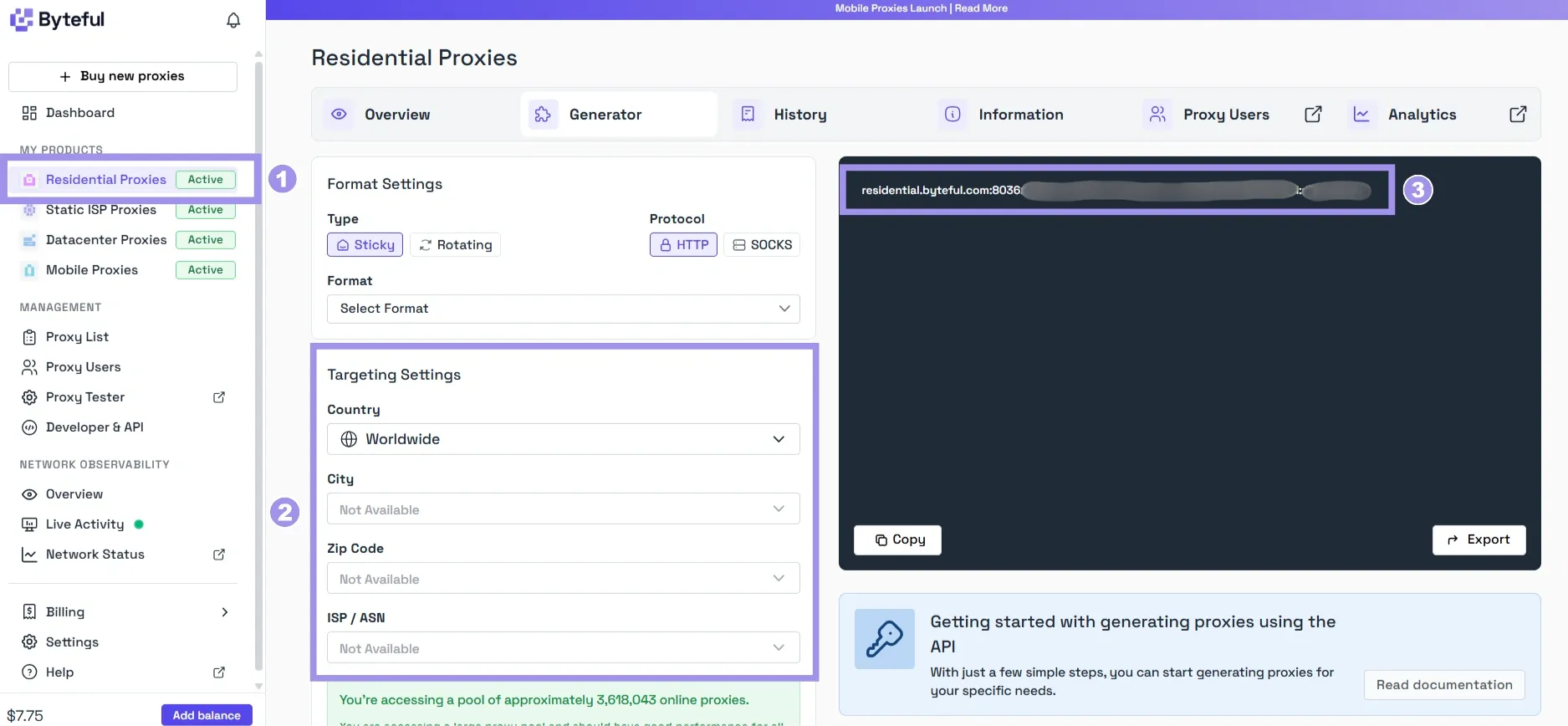
3. Get your residential proxy credentials from the provider’s dashboard. With Byteful, you can target specific countries, states, cities, ZIP codes, and ISPs for your residential proxies.
4. Create the task using CapSolver’s API method createTask using the following parameters, along with proxy details, in your HTTP request:
# Request headers
POST https://api.capsolver.com/createTask
Host: api.capsolver.com
Content-Type: application/json

# Request body
{
 "clientKey": "capsolver_api_key",
     "task": {
     "type": "ReCaptchaV2Task",
     "websiteURL": "site_url",
     "websiteKey": "site_key",
     "cookies": "your_cookies",
     "proxyType": "https",
     "proxyAddress": "residential.byteful.com",
     "proxyPort": 8036,
     "proxyLogin": "user",
     "proxyPassword": "pass"
}}
Here, ReCaptchaV2Task is an example for solving reCAPTCHA v2 with your own proxy. Use the task type that matches your target CAPTCHA (check CapSolver's task-type documentation for the full list).
5. You can also replace all of the proxy parameters with one concatenated string. Remove the authentication parameters if you are using IP-based authentication for the proxy:
"proxy": "http:residential.byteful.com:8036:user:pass"If you use IP-based authentication, you'll also need to whitelist CapSolver's outbound IPs on your Byteful proxy, or the requests will fail. Check CapSolver specific IPs lists.
6. The response to your createTask request returns a taskId. Pass it to the getTaskResult method to retrieve your result:
# Request headers
POST https://api.capsolver.com/getTaskResult
Host: api.capsolver.com
Content-Type: application/json

# Request body
{ "clientKey": "capsolver_api_key",
"taskId": "taskId_received_in_previous_api_response"
}
7. In the end, you will get 7.the following successful response if the request was sent with sufficient balance and correct parameters:
 {
"errorId": 0,
"solution": {
"userAgent": "xxx",
"gRecaptchaResponse": "successfully_solved_CAPTCHA_token"
}
  "status": "ready"
}
Now, you can use the token from gRecaptchaResponse to validate your request on the target site.
An important point to keep in mind here is that task types with the “ProxyLess” suffix, such as ReCaptchaTaskProxyLess, do not take proxy parameters and use CapSolver’s built-in proxy to solve tasks. Removing the suffix will require you to enter proxy details as demonstrated in the example above.
Using the Browser Extension
CapSolver currently provides the extension for Google Chrome, Firefox, Cloud, and Fingerprint browsers.
1. If you are on Google Chrome, get the CapSolver extension (Chrome Web Store), and if you are on Firefox, get the extension from Firefox Add-ons. For Cloud and Fingerprint browsers, you can download the extension ZIP file from CapSolver’s GitHub page.
Note: You can also pin your extension in the browser for easier access.
2. To start using the extension, get your API key from the Capsolver dashboard.
3. Input the API key in the extension configuration panel:
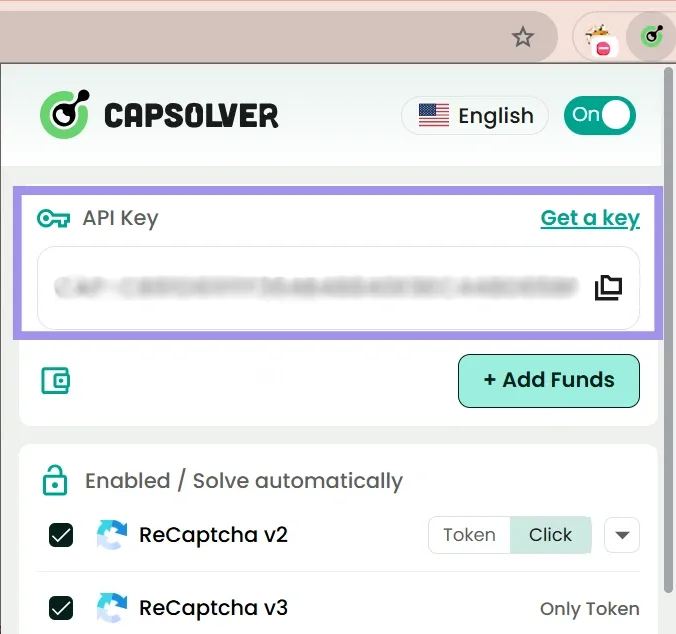
4. To integrate proxies, scroll down in the extension settings, turn the proxy toggle on, and fill in your proxy details.
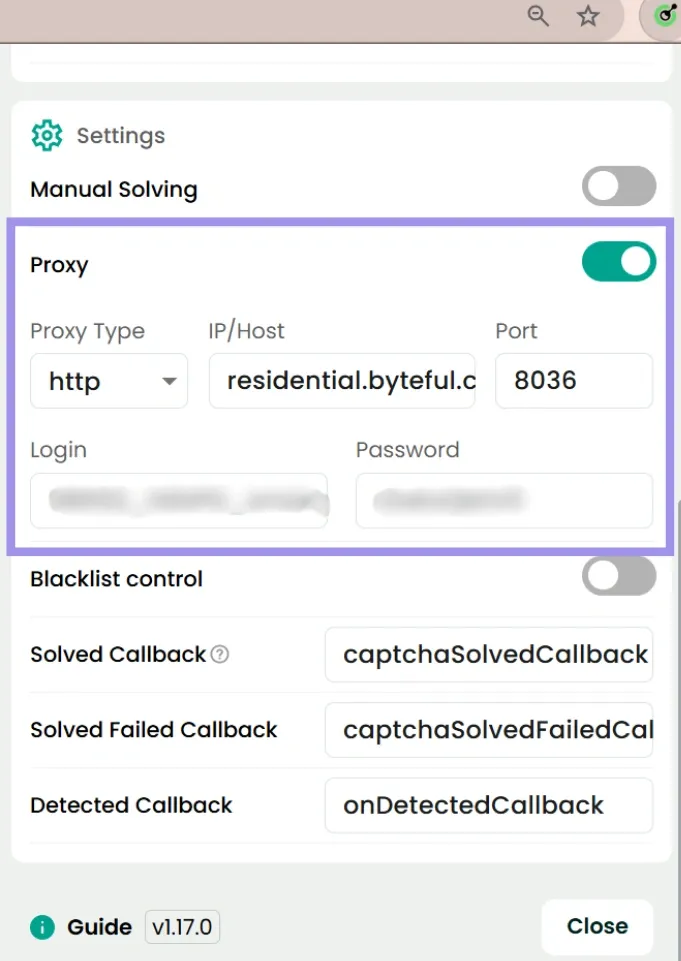
5. Now that the proxy integration is done, whenever a CAPTCHA is detected on a website while the CapSolver extension is running in the background, it will use your integrated proxy to solve the CAPTCHA.
Note that in order to work properly, this extension will require the permission to read and change all of your data on every website you visit. If you do not want this extension to access the data on any specific websites, then turn the “Blacklist control” toggle on and list that website’s URL in the blacklist.
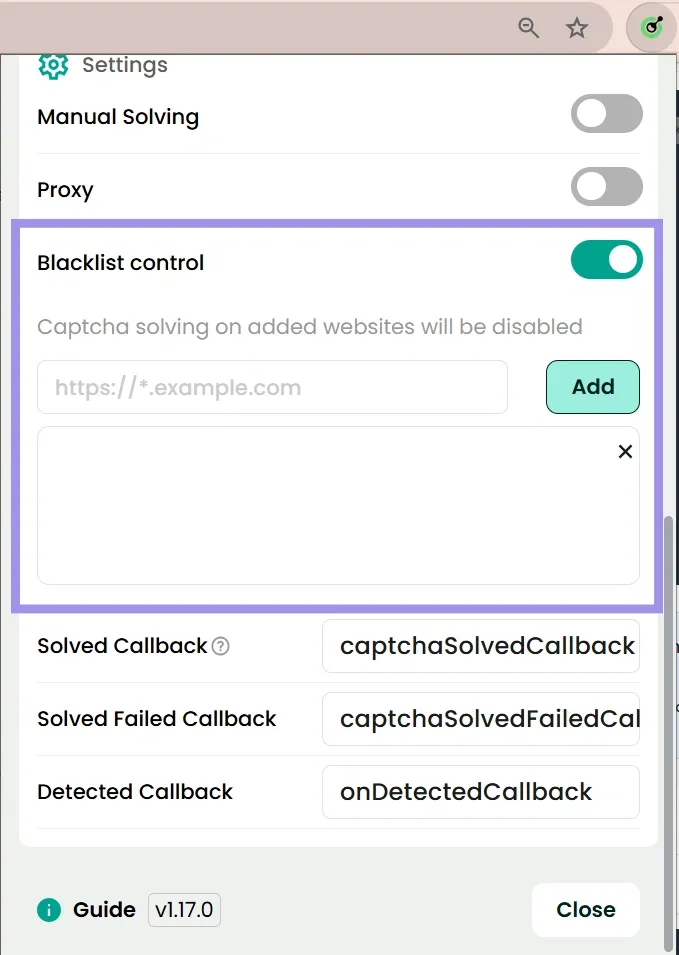
Doing so will disable this extension while you are on a blacklisted website.
