
How to Integrate Proxies in Crawl4AI: A Complete Setup Guide


Crawl4AI is known for scraping data in the form of clean markdown, ready to feed into an LLM or RAG system. But it quickly hits rate-limiting walls when used in large-scale scraping workflows. This is where proxies help by spreading requests across multiple IPs and dodging rate limits.
This guide covers different approaches to integrating proxies in Crawl4AI, troubleshooting common integration issues, and explaining which proxies fit your use case.
Proxy Integration Methods in Crawl4AI
There are multiple ways to configure proxies in Crawl4AI, and they can also be combined depending on what you need. Below is a table summarizing what each adds and when to reach for it, which is then also explained later in separate sections.
| Configuration Method | Scope | Best For |
|---|---|---|
| CrawlerRunConfig(proxy_config=) | Direct proxy configuration passed per request; supports single proxy setup with hardcoded URL or dictionary format | When using a single proxy with a simple setup for quick testing and development |
| Load from environment variables | Proxy details stored in the PROXIES environment variable and loaded with ProxyConfig.from_env(), then passed to proxy_config | Using authenticated proxies or when using multiple proxies stored in environment variables; keeps sensitive credentials out of code |
| Use IP whitelisting | Authenticates connection to proxy server based on whitelisted IP address instead of credentials | When using authenticated SOCKS5 proxies or facing any proxy authentication issue |
| Proxy configuration in rotation | In-script rotation via RoundRobinProxyStrategy on CrawlerRunConfig, or a provider-side rotating endpoint configured as a single proxy_config entry | Large-scale scraping when you need to prevent hitting rate limits |
Prerequisites
To start using Crawl4AI with proxies, you first need to install it, which also requires Python 3.9+. To get Python on your system and start using Crawl4AI:
- Download the Python 3.9 or newer installer from python.org.
- Use the downloaded installer to install Python on your system.
- Verify the successful installation of Python using the command: python –-version
- Once done, install Crawl4AI on your system via the command: pip install -U crawl4ai
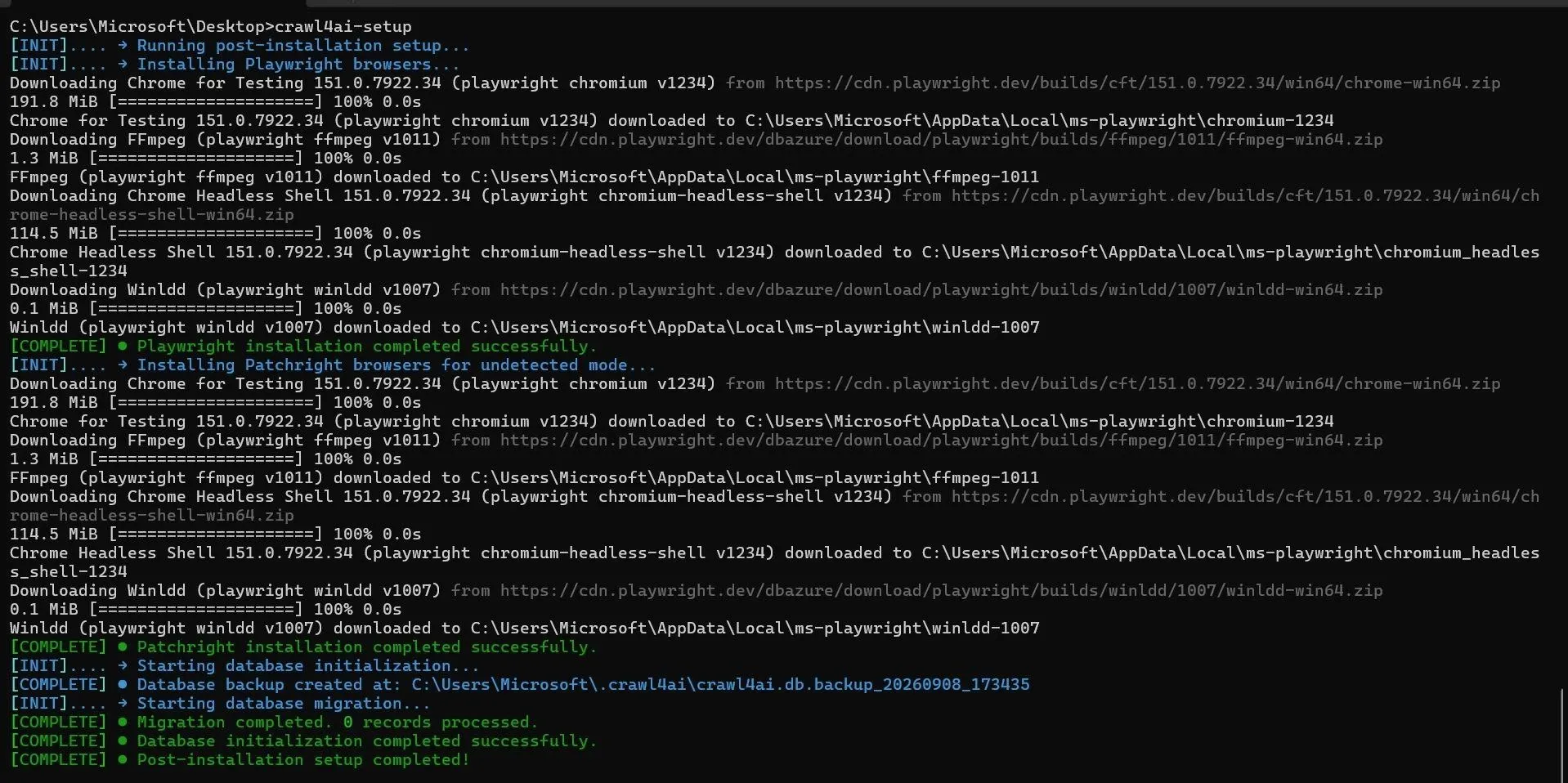
- Finally, run the following command to download and configure the Playwright browser binaries needed for Crawl4AI to operate. Skipping this step will result in the problem of Chromium not being launched. crawl4ai-setup
Crawl4AI’s Built-in Proxy
Crawl4AI supports proxy integration via the proxy_config parameter. Many old guides demonstrate the Crawl4AI proxy integration via the ‘proxy’ parameter, but the proxy parameter is deprecated now and does not work. Use proxy_config instead, as demonstrated next.
The following code demonstrates a simple Crawl4AI script that prints the Markdown of httpbin.org/ip while using the integrated proxies.
Note: Every code snippet in this article is tested and validated on Crawl4AI 0.9.3.
import asyncio
from crawl4ai import AsyncWebCrawler, CrawlerRunConfig, ProxyConfig

run_config = CrawlerRunConfig(proxy_config="http://PROXY_HOST:PROXY_PORT")
#The following also work
#run_config = CrawlerRunConfig(proxy_config=ProxyConfig(server="http://PROXY_HOST:PROXY_PORT"))
#run_config = CrawlerRunConfig(proxy_config={"server": "http://PROXY_HOST:PROXY_PORT"})

async def main():
    async with AsyncWebCrawler() as crawler:
        result = await crawler.arun(url="https://httpbin.org/ip", config=run_config)
        print(result.markdown)

if __name__ == "__main__":
    asyncio.run(main())[k][l][m]
Save the script file with a name of your choice. We are going to use a placeholder SCRIPT_NAME.py for demonstration purposes.
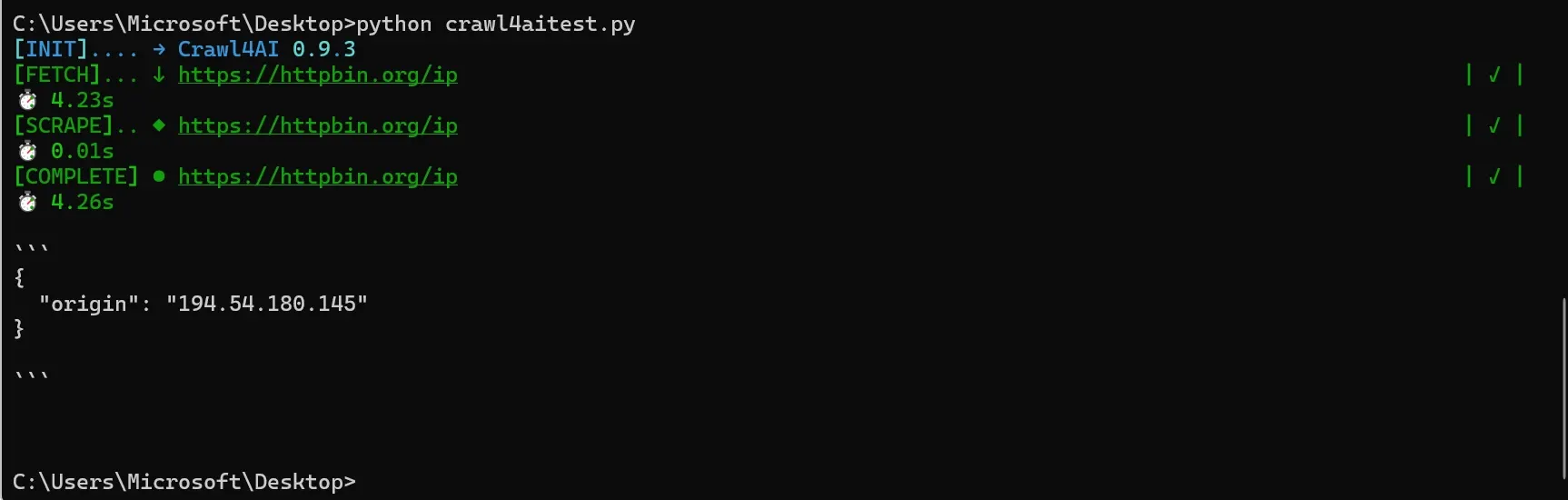
When executed using python SCRIPT_NAME.py, the script will output the IP of the configured proxy.
Crawl4AI recommends configuring proxies per request through CrawlerRunConfig.proxy_config. This also gives you precise control and lets you use different proxies for different URLs within the same script.
If you want to use HTTPS or SOCKS5 proxies, you can do so just by replacing the ‘http’ part of the proxy URL with ‘https’ or ‘socks5’. However, Crawl4AI does not support authenticated SOCKS5 proxies. Switch to proxy IP whitelisting (explained later) when using authenticated SOCKS5 proxies.
Note: If you want to use HTTPS proxies, make sure that your HTTP proxy supports SSL tunneling. Byteful supports SSL tunneling on all proxy offerings.
Load Proxy From Environment Variables
You can also use proxies in your Crawl4AI script by loading the configured environment variables as well.
Configure proxies via the PROXIES environment variable on Windows CMD using: set PROXIES=PROXY_HOST:PROXY_PORT
When using PowerShell, use:
$env:PROXIES="PROXY_HOST:PROXY_PORT"You can also set multiple proxies separated by commas in the PROXIES variable.
Note: Variables set via these commands are temporary, specific to that command-line session, and reset when you close the CMD window.
The following code loads the proxies from the ‘PROXIES’ environment variable into the script, crawls the target URL, and prints the markdown.
import asyncio
from crawl4ai import AsyncWebCrawler, ProxyConfig, CrawlerRunConfig

# Loading proxies from environment variables
proxies = ProxyConfig.from_env()
print(f"Loaded {len(proxies)} proxies")

if proxies:
    run_config = CrawlerRunConfig(proxy_config=proxies[0])

    async def crawl():
        async with AsyncWebCrawler() as crawler:
            result = await crawler.arun(url="https://httpbin.org/ip", config=run_config)
            print(result.markdown)
    asyncio.run(crawl())
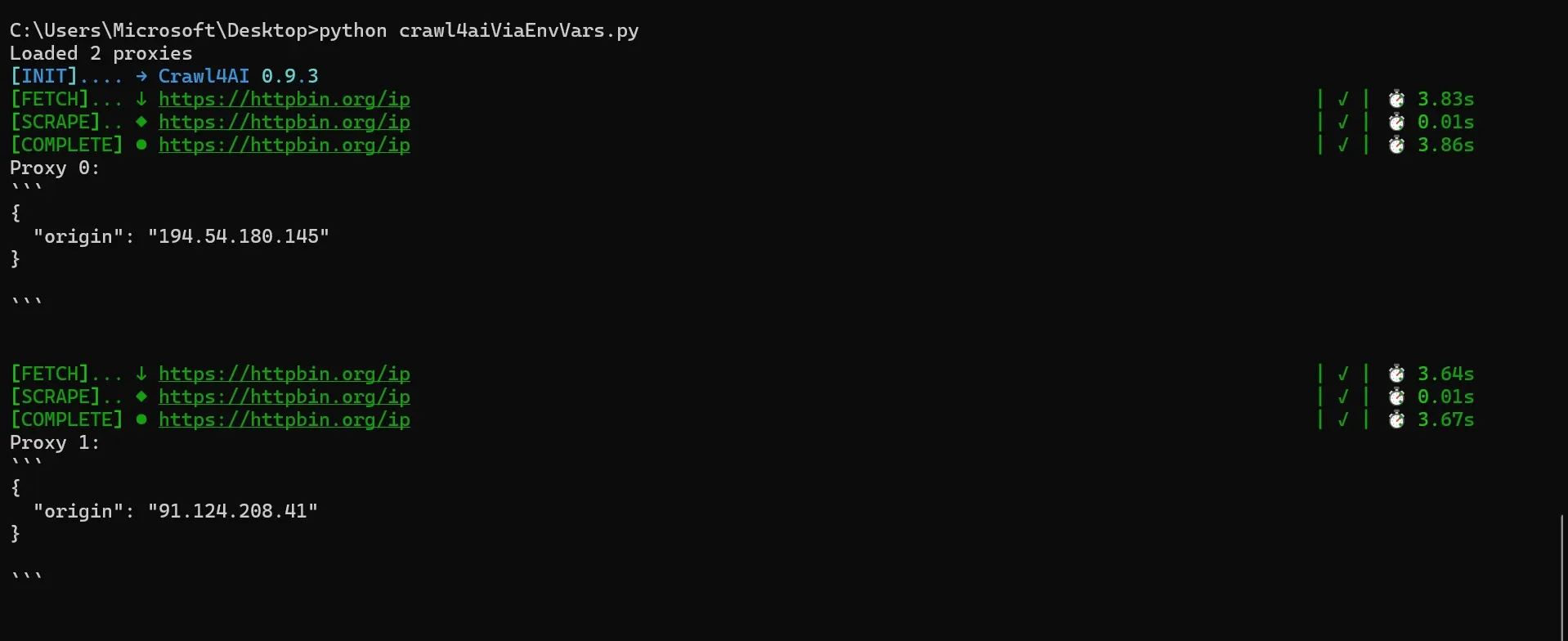
In this script, proxies[0] uses the first proxy configured in the PROXIES variable. If you set multiple proxies in the PROXIES variable, change the index number (0, 1, 2, etc.) to use a different proxy.
You can also use all of the configured proxies with automatic rotation by using this logic:
async def crawl():
    async with AsyncWebCrawler() as crawler:
        for i, proxy in enumerate(proxies):
            run_config = CrawlerRunConfig(proxy_config=proxy)
            result = await crawler.arun(url="https://httpbin.org/ip", config=run_config)
            print(f"Proxy {i}: {result.markdown}")

asyncio.run(crawl())
This script will rotate each proxy sequentially for each request.
Verify Crawl4AI Proxy Integration
When done with the proxy integration, verify it's working by using an IP-echo page (like httpbin.org/ip) as the target URL. Run the script using the command:
python SCRIPT_NAME.py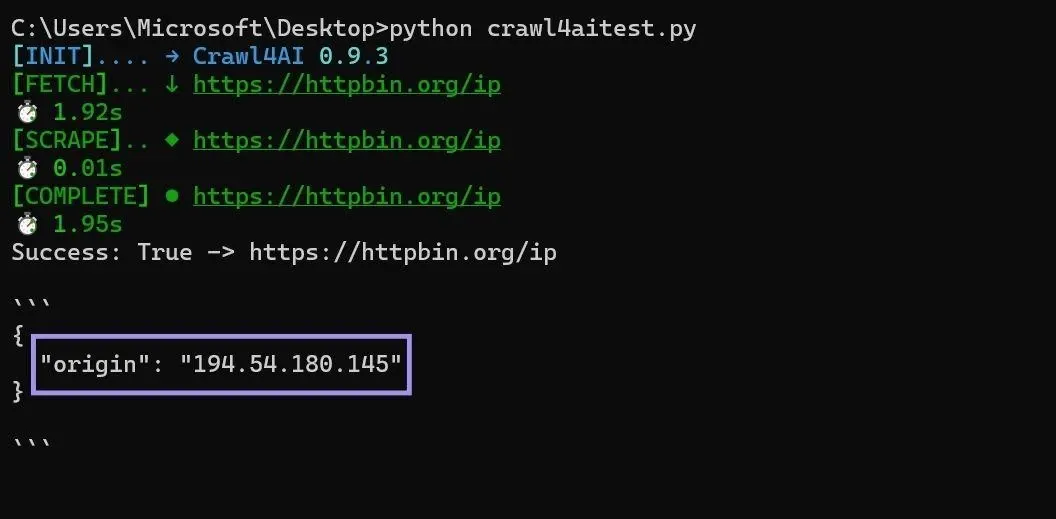
If the output shows the proxy IP in the printed Markdown, the configuration is successful.
Using Authenticated Proxies
When using authenticated proxies, avoid hardcoding your credentials in the script, as you may accidentally commit these sensitive credentials to a git repository. If committed to a git repository, anyone with access to the code can get access to your proxy credentials and hence can abuse them. Consider using the environment variables method instead. You can use the same PROXIES variable to configure proxies as demonstrated previously.
For authenticated proxies, you will need to configure the proxy credentials as well in your PROXIES environment variable. set PROXIES=PROXY_HOST:PROXY_PORT:PROXY_USER:PROXY_PASS
When using PowerShell, use:
$env:PROXIES="PROXY_HOST:PROXY_PORT:PROXY_USER:PROXY_PASS"Once the PROXIES environment variable is set, you can use the same code as given in the “Proxy From Environment Variables” section to use the proxies configured in the variable.
You can verify the working of the script by using an IP-echo page as the target URL and running the script with python SCRIPT_NAME.py.
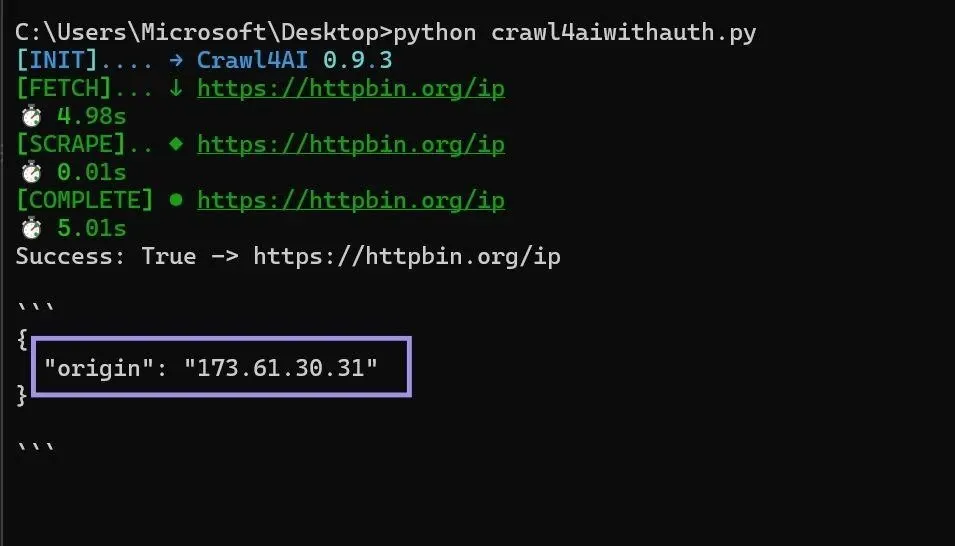
As Crawl4AI is built on Playwright, it inherits Playwright’s inability to support authenticated SOCKS5 proxies. When using authenticated SOCKS5 proxies, switch to proxy IP whitelisting instead, which is explained next.
Use IP Whitelisting
With IP whitelisting, you don't need proxy credentials, and your connection can be authenticated based on whitelisted IP addresses. Many proxy providers support IP whitelisting for their proxies. Ask your proxy provider to know if your proxies support whitelisting.
Byteful supports proxy IP whitelisting for the static ISP and datacenter proxies. To whitelist your IP address from the Byteful dashboard:
- Visit an IP-echo page like httpbin.org/ip to get your public IP address.
- Log in to the Byteful dashboard.
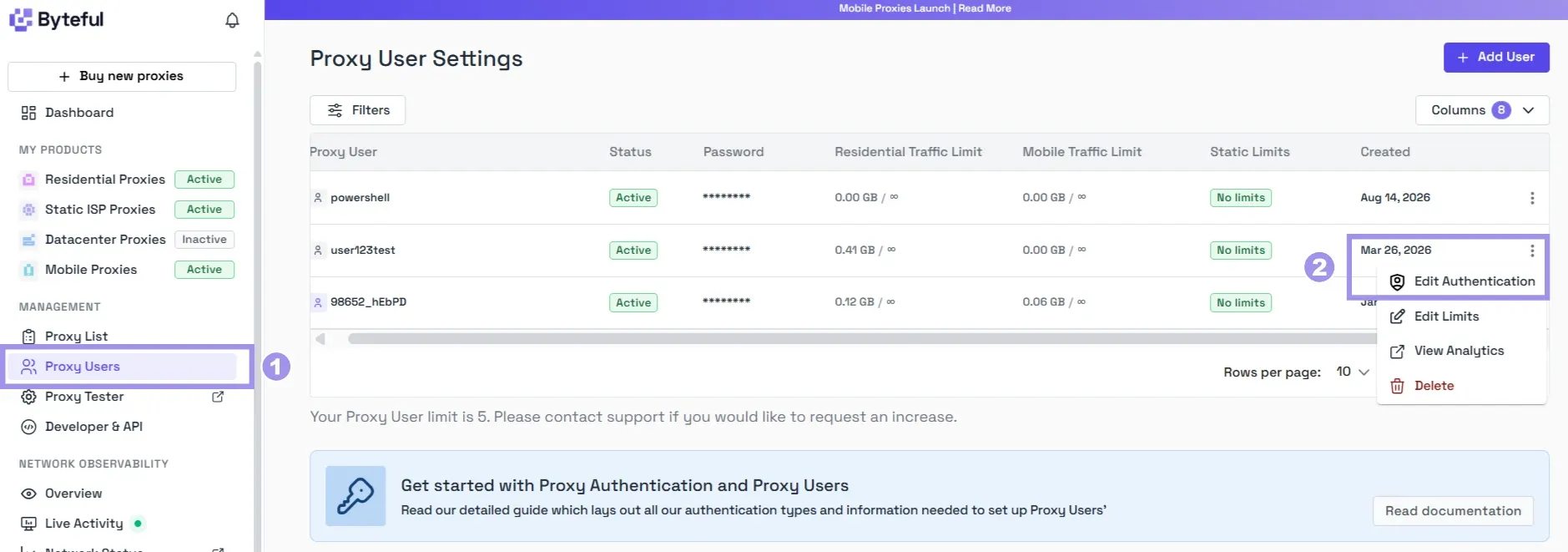
- Navigate to ‘Proxy Users’ from the left-side menu and click “Edit Authentication” for a proxy user.
- In the edit proxy user pop-up, enter the IP address you got from the first step, hit “Enter”, and finally, click “Confirm”.
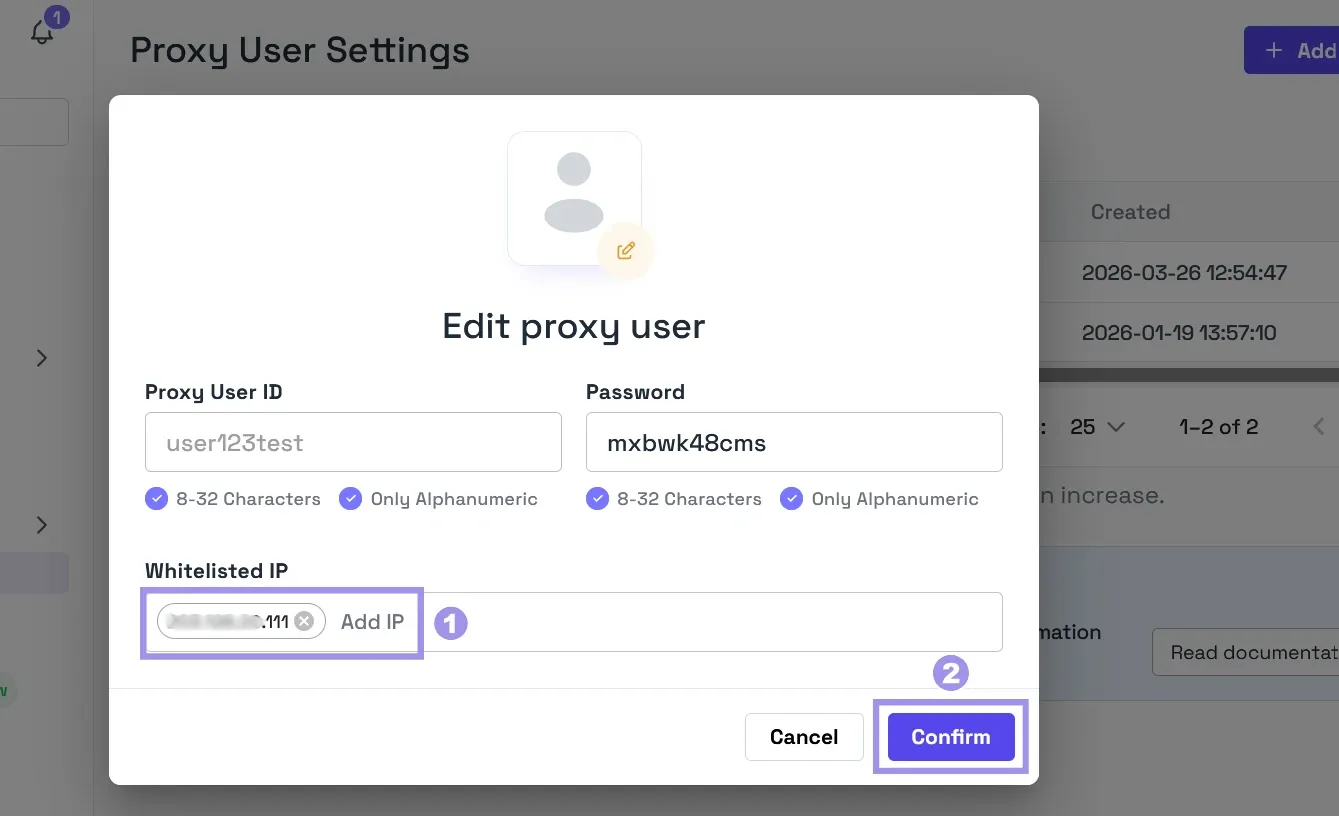
Once your IP is whitelisted, you can use the proxy in Crawl4AI with no credentials. Just configure the proxy host and port in the script. This approach is especially helpful when using authenticated SOCKS5 proxies.
run_config = CrawlerRunConfig(proxy_config="socks5://PROXY_HOST:PROXY_PORT")Apply Proxy Rotation
Rotating proxies efficiently distributes requests across multiple IPs, helping reduce blocks by dodging rate limits. There are two main approaches to configure proxy rotation in Crawl4AI:
Use RoundRobinProxyStrategy
Crawl4AI supports automatic proxy rotation via RoundRobinProxyStrategy. It applies rotation per request using the rotation strategy in CrawlerRunConfig.
The following code is adapted from Crawl4AI’s official documentation and demonstrates proxy rotation via RoundRobinProxyStrategy:
import asyncio
import re
from crawl4ai import AsyncWebCrawler, BrowserConfig, CrawlerRunConfig, CacheMode, ProxyConfig
from crawl4ai.proxy_strategy import RoundRobinProxyStrategy

async def main():
    # Load proxies from environment
    proxies = ProxyConfig.from_env()
    if not proxies:
        print("No proxies found! Set PROXIES environment variable.")
        return

    # Create rotation strategy
    proxy_strategy = RoundRobinProxyStrategy(proxies)

    # Configure per-request with proxy rotation
    browser_config = BrowserConfig(headless=True, verbose=False)
    run_config = CrawlerRunConfig(
        cache_mode=CacheMode.BYPASS,
        proxy_rotation_strategy=proxy_strategy,
    )

    async with AsyncWebCrawler(config=browser_config) as crawler:
        urls = ["https://httpbin.org/ip"] * (len(proxies) * 2)  # Test each proxy twice

        print(f" Testing {len(proxies)} proxies with rotation...")
        results = await crawler.arun_many(urls=urls, config=run_config)

        for i, result in enumerate(results):
            if result.success:
                # Extract IP from response
                ip_match = re.search(r'(?:[0-9]{1,3}\.){3}[0-9]{1,3}', result.html)
                if ip_match:
                    detected_ip = ip_match.group(0)
                    proxy_index = i % len(proxies)
                    expected_ip = proxies[proxy_index].ip

                    print(f" Request {i+1}: Proxy {proxy_index+1} -> IP {detected_ip}")
                    if detected_ip == expected_ip:
                        print(" IP matches proxy configuration")
                    else:
                        print(f" IP mismatch (expected {expected_ip})")
                else:
                    print(f" Request {i+1}: Could not extract IP from response")
            else:
                print(f" Request {i+1}: Failed - {result.error_message}")

if __name__ == "__main__":
    asyncio.run(main())
Note: The IP-match check in the script works well only for proxies configured using the proxy IP address. If your PROXIES entries use proxy gateway hostnames or rotating endpoints, the detected IP will legitimately differ. In that case, a successful response from a different-from-your-own IP is the pass condition.
You can also create a custom proxy rotation function to implement proxy rotation in Crawl4AI. But using RoundRobinProxyStrategy is cleaner, as it comes built-in with Crawl4AI.
Use a Rotating Endpoint
This is an easier, more convenient way to rotate proxies. Many leading proxy providers offer a rotating endpoint that handles proxy rotation, so you don't need to configure it in your script.
Byteful also provides rotating endpoints for residential and mobile proxies. All you have to do is log in to the dashboard and generate a rotating endpoint. It also lets you specify geo-locations and rotation types. Choose rotating to get a new IP on every request, or a sticky session to keep the same IP for a set time, anywhere from one minute to 24 hours.
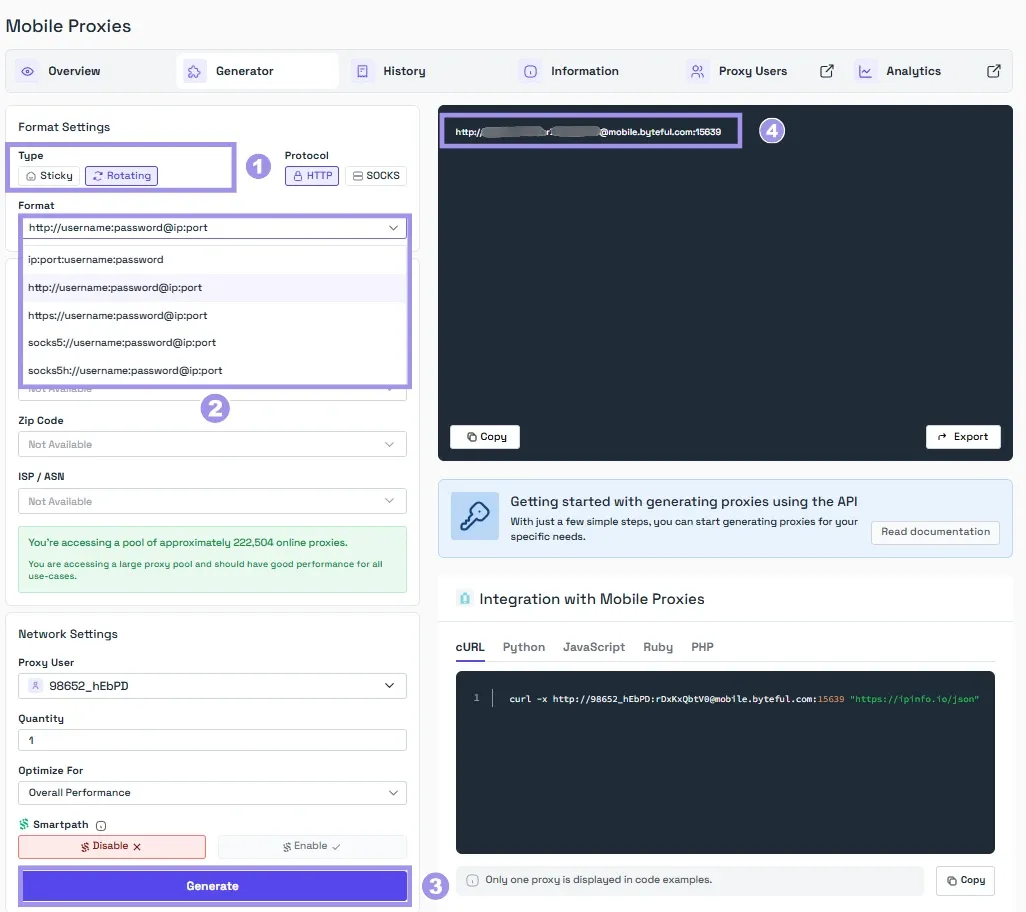
Once you have a rotating endpoint, use that in place of a proxy IP in your Crawl4AI script:
run_config = CrawlerRunConfig(proxy_config={
"server": "http://ENDPOINT_HOST:ENDPOINT_PORT",
"username": "PROXY_USER",
"password": "PROXY_PASS",
})
Troubleshooting Crawl4AI Integration Issues
You may face several problems when configuring proxies in Crawl4AI, and this section lists the most common ones users face along with the possible solutions:
- Proxy connection failed: This can happen for several reasons, for example, if the proxy is unreachable, the credentials are wrong, or the protocol doesn’t match. First, make sure that the proxy is reachable by using Byteful’s proxy tester. Then verify that the proxy URL, credentials, and the protocol are all spelled and used correctly.
- Chromium fails to launch: This can happen if you skipped the step of running the command ‘crawl4ai-setup’, or your system’s firewall is blocking Chromium. To resolve this problem, run the crawl4ai-setup command and allow the connection to Chromium in your firewall configuration.
- ProxyConfig.from_env() returns no proxies: Environment variables from a terminal session are applied to that terminal session only. Confirm that you are running the script from the same terminal session where you set the PROXIES variable. Also make sure that the used proxy format is correct. The correct format is PROXY_HOST:PROXY_PORT:USER:PASS, separated by commas, with no protocol prefix (e.g., http://).
- Proxy set on BrowserConfig isn’t working properly: This is happening because BrowserConfig is deprecated. Consider using CrawlerRunConfig(proxy_config=...) instead, as demonstrated in the code snippets earlier.
- Still getting blocked: A proxy only changes the IP address your request appears to come from and is not an anti-bypass tool. Fingerprinting of your automation setup can get you blocked even when you are using proxies. Consider using Crawl4AI’s undetected browser mode and stealth mode for better anti-bot protection. If using datacenter proxies, consider switching to residential or mobile proxies for better trust on the target site.
Which Proxy Type Fits Your Crawl4AI Crawler?
Each proxy type differs in the way it is sourced, routes traffic, and the cost. To use different proxy types effectively while staying on budget, you need to know what each type is for.
- Datacenter Proxies are usually the cheapest of all types and are sourced from datacenters. This sourcing makes them fast but easy to detect. These are best to use when speed is the priority, and the target has little to no restriction for datacenter IPs.
- Static residential ISP proxies are registered under the ASNs of real ISPs and are hosted in datacenters. This combination of the sourcing and hosting gives them datacenter speed with residential reputation. Use these proxies when speed and reputation are both concerns. These proxies can be effective against targets with moderate anti-bot detection, but struggle against stricter detection systems.
- Residential proxies route traffic through real home networks, making them hard to block, but they can be expensive. These proxies are more reliable to use when the target has a strict bot detection system, and the success rate takes priority over speed.
- Mobile Proxies are the hardest of all to get blocked, as mobile carriers use Carrier-Grade NAT (CGNAT) to place thousands of real users behind shared IP addresses, and blocking one IP means blocking legitimate customers along with it. These proxies can be a great choice for extremely protected targets or for testing mobile web experiences through carrier IPs.
Byteful offers all four types of proxies. Our proxies are ethically sourced, have the fastest mobile response time globally (0.48s), the fastest residential proxy response time (0.41s), and the best residential success rate (81.23%) against real-world targets. These numbers are taken from Proxyway's Proxy Market Research 2026, where they tested our proxies alongside 12 other well-known proxy providers.
You can also test our proxies with our no-credit-card 1 GB of free, non-expiring residential data. You can get the trial data after signing up on the dashboard and completing a short KYC. We KYC every user to ensure that everyone sharing the pool is a legitimate user, which translates to cleaner, less-abused IPs for every user.
When using proxies, know that the proxies will just change your exit IP address and not your fingerprint or request patterns. Proxies alone won’t be enough to reduce bans and restrictions. You will need to pair them with Crawl4AI’s anti-detection mechanisms like undetected browser mode and stealth mode for better anti-bot protection.
