
How to Set Up Proxies in Scrapy: A Complete Beginner’s Guide

Scrapy is a powerful open-source web crawling framework that helps in scraping public data. But it can quickly trigger the website's anti-bot systems for various reasons. One of those reasons is a large number of requests from the same IP.
This is exactly where using proxies with Scrapy helps. Proxies can help you dodge rate limits by spreading the requests across multiple IPs.
In this guide, we will cover multiple approaches to configuring proxies with Scrapy, some common problems you may encounter along with the solution, and what type of proxy is useful in which use case.
Prerequisites:
To use Scrapy and proxies with Scrapy, you first need to install Scrapy. You also need Python 3.x (Python 3.10+) installed on your system. To get Python on your system and start using Scrapy:
- Get the Python installer from python.org.
- Use the downloaded installer to install Python on your system.
- Verify the successful installation of Python using the command:
python –-version - Once done, install Scrapy on your system via the command:
pip install scrapy
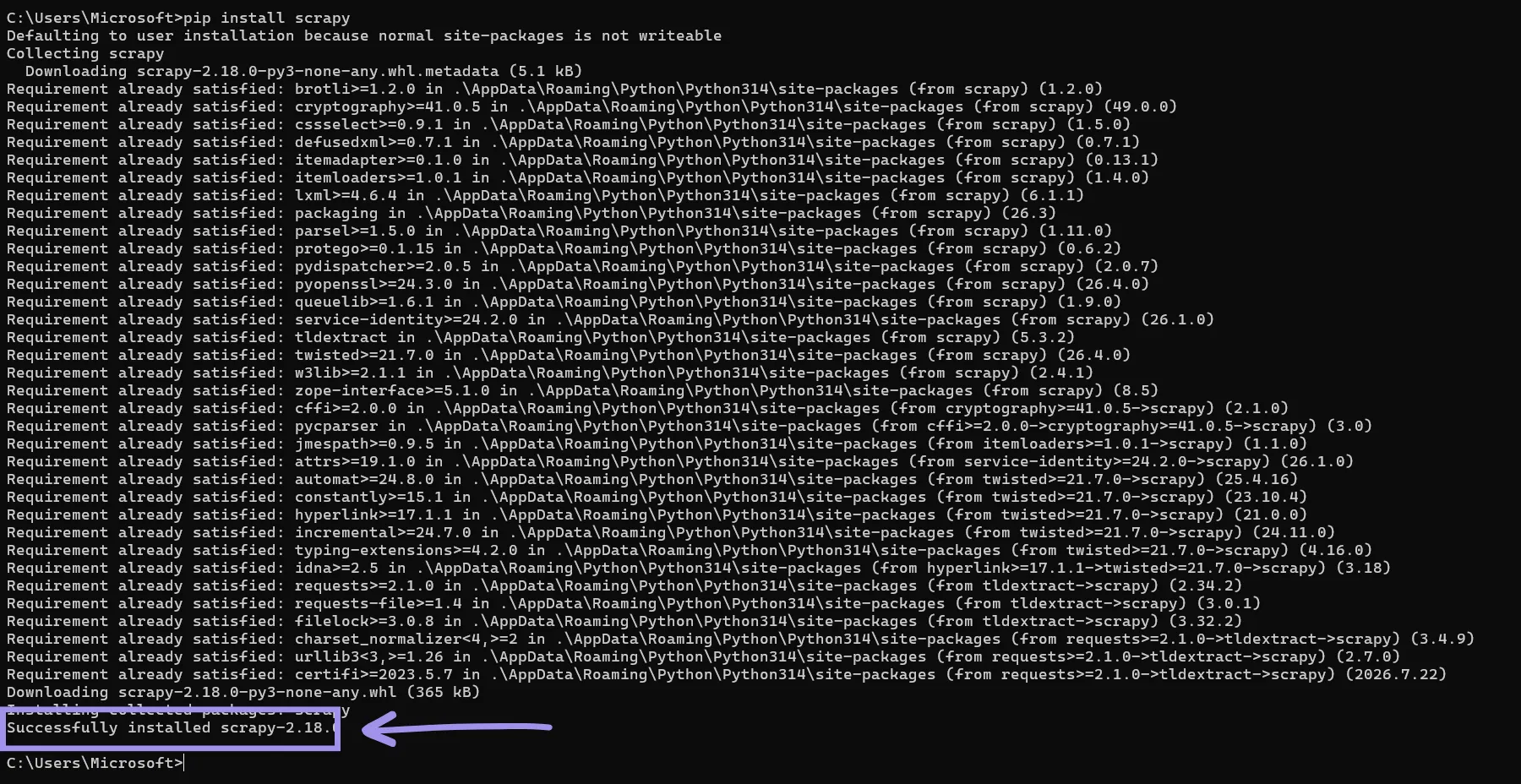
- Start your Scrapy project using:
scrapy startproject PROJECT_NAME - Navigate into your Scrapy project directory and create a spider for your target URL:
cd PROJECT_NAME
scrapy genspider SPIDER_NAME TARGET_URL
The last command creates a basic Python script for the spider, which you can modify based on the data you want to scrape from the target.
Method 1: Scrapy’s Built-In Proxy Support
Scrapy provides built-in proxy support via the default Scrapy proxy middleware, HttpProxyMiddleware, which is enabled by default, so you don't need to install or configure anything separately.
There are mainly two ways to configure proxies using HttpProxyMiddleware:
Via Environment Variables:
The process of configuring a proxy for Scrapy via environment variables can vary depending on the system in use.
To configure a proxy via environment variables on Windows, you can use the following commands in CMD:
set http_proxy=http://PROXY_HOST:PROXY_PORT
set https_proxy=http://PROXY_HOST:PROXY_PORT
Configuring environment variables for a proxy on Linux or macOS takes different commands. We’ve tested it on Ubuntu.
export http_proxy="http://PROXY_HOST:PROXY_PORT"
export https_proxy="http://PROXY_HOST:PROXY_PORT"
If your proxies use credential authentication, you can modify the proxy URL to include the credentials:
http://PROXY_USER:PROXY_PASS@PROXY_HOST:PROXY_PORTYou can also use “no_proxy” environment variables to exclude any domains from using the configured proxy.
set no_proxy=localhost,127.0.0.1 When you configure a proxy via environment variables, Scrapy’s HttpProxyMiddleware will route requests through the proxy by reading the variable values.
Note: Variables set via these commands are temporary, specific to that command-line session, and reset when you close the CMD window.
Via meta Parameter:
Configuring a proxy in the meta parameter of the start_requests function of the spider script (SPIDER_NAME.py) sets the proxy for each request individually. The set value of the meta parameter will be used to route the request through the configured proxy.
Proxy configuration via the meta parameter requires the proxy URL, like this: http://PROXY_HOST:PROXY_PORT
If your proxies require authentication, you can include the authentication credentials in the proxy URL:
http://PROXY_USER:PROXY_PASS@PROXY_HOST:PROXY_PORTSince Scrapy 2.6.2, the Proxy-Authorization header is tied to the proxy URL. When you use credential-authenticated proxies, Scrapy base64-encodes the credentials and attaches them to the requests as a Proxy-Authorization header.
If set manually without keeping the credentials in the meta proxy URL, or if the proxy value changes between requests, Scrapy drops the header, and the request fails with a 407. The simplest way to avoid this is to keep the credentials embedded in the proxy URL itself and let Scrapy manage the header.
Alternatively, you can also use proxy whitelisting to whitelist your IP address in the proxy provider’s dashboard. Many leading proxy providers like Byteful support whitelisting for their proxies.
When using whitelisting, you would not need credential authentication to use the proxy, and your connection will be authenticated based on the whitelisted IP addresses.
Verify It’s Working
To verify the successful proxy configuration, you can point the spider at any IP echo page and print the output.
Here is what the code of a simple spider that crawls and displays the results from api.ipify.org looks like with a proxy configured in the meta parameter:
import scrapy

class SpiderSpider(scrapy.Spider):
name = "myspider1"
allowed_domains = ["api.ipify.org"]
start_urls = ["https://api.ipify.org"]

def start_requests(self):
start_urls = ['https://api.ipify.org/']
for url in start_urls:
yield scrapy.Request(
url=url,
callback=self.parse,
meta={"proxy": "http://PROXY_USER:PROXY_PASS@PROXY_URL:PROXY_PORT"},
)

def parse(self, response):
ip = response.text.strip()
print(f"Got IP: {ip}")
print(f"Proxy used: {response.request.meta.get('proxy', 'None')}")[l][m][n][o]
You can use the following command to execute the spider:
scrapy crawl SPIDER_NAMEHere is what the results will look like:
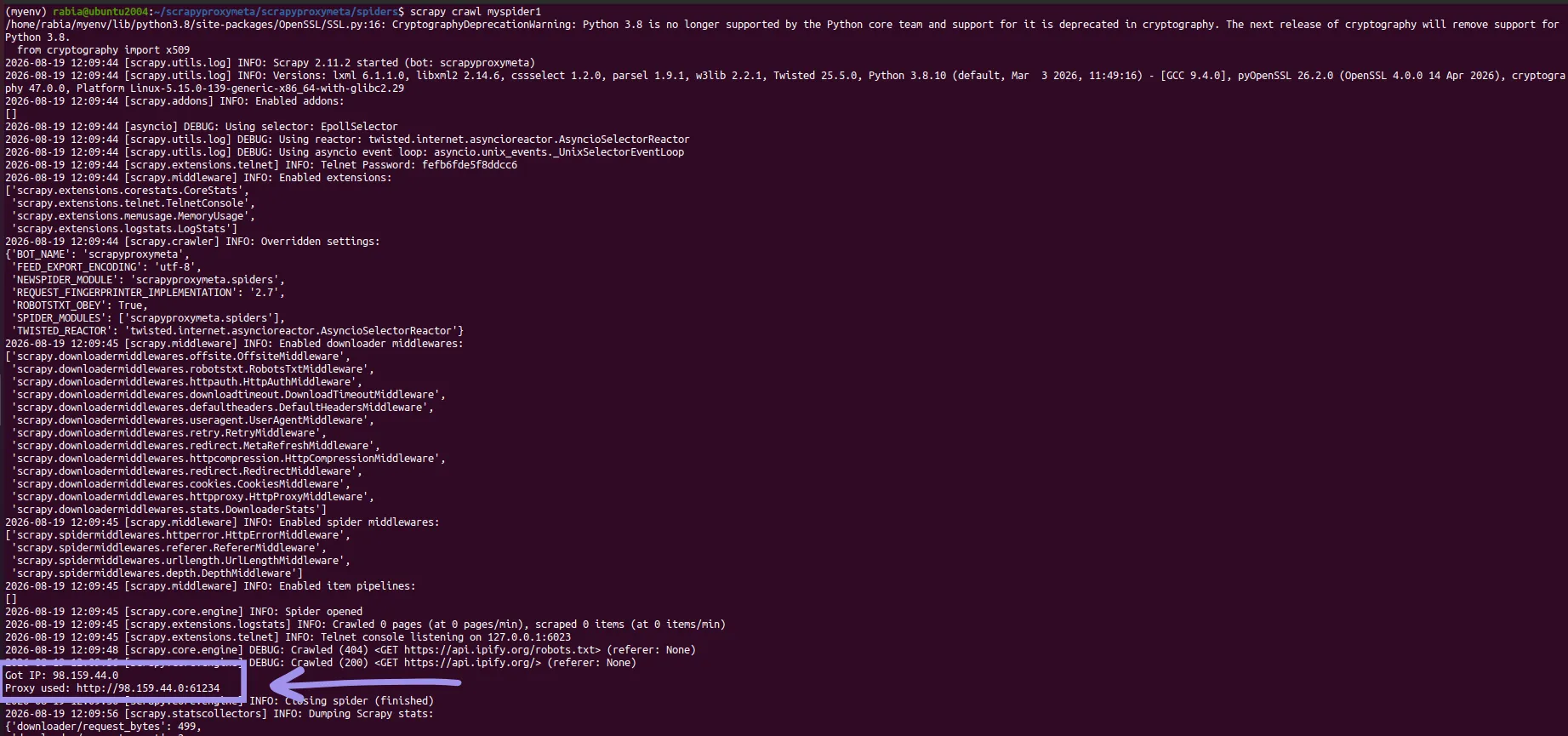
The execution of the spider will print the required output defined in the parse function along with all the crawl logs. If you just want the output and not the logs, add LOG_LEVEL = 'WARNING' in your Scrapy project’s settings.py file.
Note that the "Proxy used" line shows the proxy URL without credentials. Scrapy strips the credentials from the meta value and moves them into the Proxy-Authorization header, so this is expected behavior, not a configuration failure.
Method 2: A Custom Proxy Middleware
Writing a custom Scrapy middleware is a clean way to integrate proxies in Scrapy, especially when you have multiple spiders. A custom Scrapy middleware makes it easy to modify proxies configured for spiders without changing the spiders’ code.
The following is a custom proxy middleware script that you can use in your Scrapy project’s ‘middlewares.py’ file:
class ProxyMiddleware:
    def __init__(self, proxy_url):
        self.proxy_url = proxy_url

    @classmethod
    def from_crawler(cls, crawler):
        proxy_url = crawler.settings.get('PROXY_URL')  # Fixed: use a settings key
        return cls(proxy_url)

    def process_request(self, request, spider):
        if self.proxy_url:
            request.meta['proxy'] = self.proxy_url
        return None
The class ProxyMiddleware expects all the proxy details (proxy_url) and then adds them to the meta parameter of the request.
The next step will be to define proxy_url and register the custom ProxyMiddleware in the Scrapy project’s ‘settings.py’ so that the requests can go through it.
PROXY_URL = 'http://PROXY_USER:PROXY_PASS@PROXY_HOST:PROXY_PORT'

DOWNLOADER_MIDDLEWARES = {
'PROJECT_NAME.middlewares.ProxyMiddleware': 100,
}
How Does It Work?
When you execute your spider after configuring custom middleware, your spider starts the request, which then goes to the DOWNLOADER_MIDDLEWARE pipeline.
In the DOWNLOADER_MIDDLEWARE pipeline, your request is processed in the priority order of the middlewares. The lower the number, the higher the priority.
If you set your custom proxy middleware’s priority to 100, then it runs before the built-in HttpProxyMiddleware, which has the priority of 750.
This ordering matters because HttpProxyMiddleware is what extracts the credentials from your proxy URL and converts them into the Proxy-Authorization header. Your custom middleware must set the meta parameter before HttpProxyMiddleware (priority 750) processes the request. Otherwise, authenticated proxies will fail with a 407 error.
Once the meta parameter and the authentication header are in place, Scrapy's downloader sends your request to the target through the configured proxy.
Rotating Proxies To Avoid Bans at Scale
Rotating proxies helps you avoid problems like hitting rate limits. There are two main approaches to rotate proxies in spider requests:
Use a Proxy List
To rotate proxies from a list, you will need to install the package scrapy-rotating-proxies:
pip install scrapy-rotating-proxiesOnce you install this package, define a list of available proxies in your Scrapy project’s ‘settings.py’ file:
ROTATING_PROXY_LIST = [
'http://PROXY1_USER:PROXY1_PASS@PROXY1_HOST:PROXY1_PORT',
'http://PROXY2_USER:PROXY2_PASS@PROXY2_HOST:PROXY2_PORT',
.
.
.
'http://PROXYn_USER:PROXYn_PASS@PROXYn_HOST:PROXYn_PORT'
]
To enable the rotating proxies functionality, you will need to add ‘RotatingProxyMiddleware’ and ‘BanDetectionMiddleware’ to the DOWNLOADER_MIDDLEWARE list in settings.py
DOWNLOADER_MIDDLEWARES = {
'rotating_proxies.middlewares.RotatingProxyMiddleware': 610,
'rotating_proxies.middlewares.BanDetectionMiddleware': 620,
}
RotatingProxyMiddleware handles proxy selection and re-schedules failed requests with a different proxy, while BanDetectionMiddleware detects ban responses and marks dead or unresponsive proxies so they're removed from rotation.
Once done, the rotating proxies configuration is complete, and when you execute your spider, it will use any proxies from the defined ‘ROTATING_PROXY_LIST’.
Use a Rotating Endpoint
This is an easier, more convenient way to rotate proxies. Many reputable proxy providers offer an endpoint that rotates the IP on every request or after a specified time (sticky session). With a rotating endpoint, you won't have to handle rotation in your script. The proxy service will do it for you.
Byteful also provides rotating endpoints for the residential and mobile proxies. From the dashboard, you can choose the session type, proxy URL format, specify targeting settings, and click ‘Generate’. This gives you a proxy URL that rotates your IP on each request or after the specified interval, depending on whether you generated a rotating or sticky proxy.
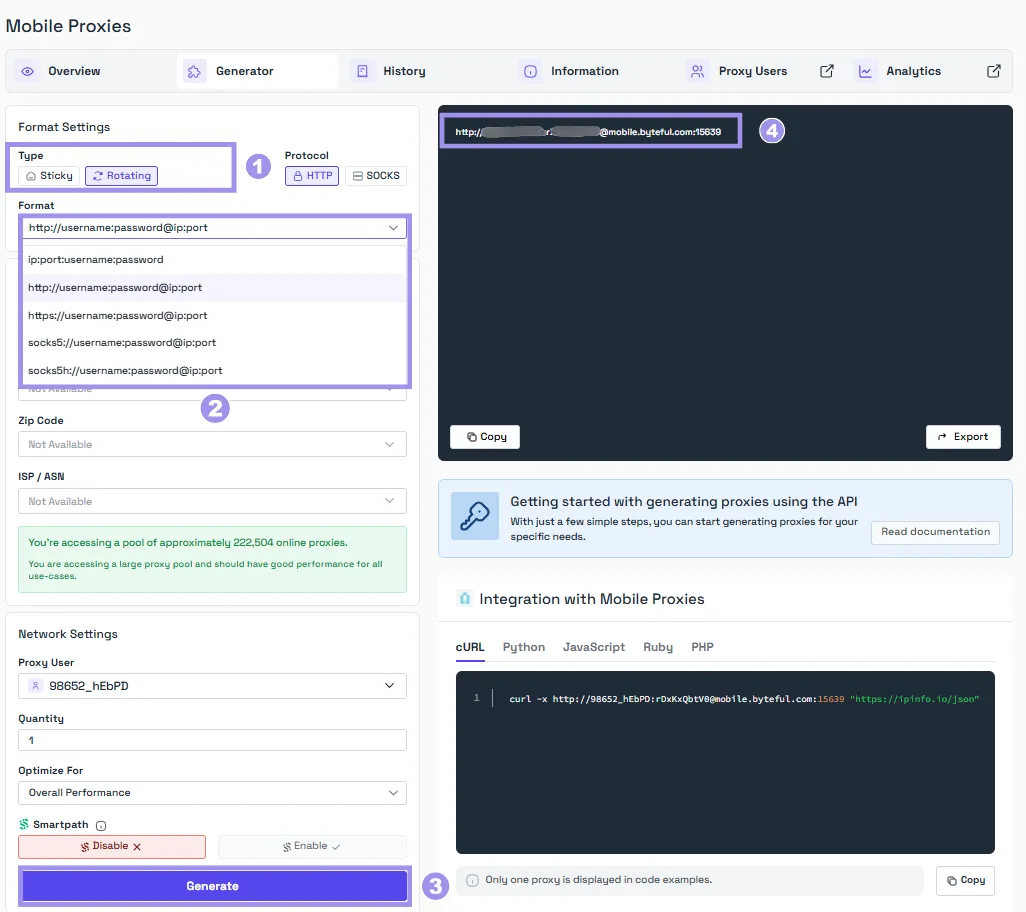
Once you have your rotating endpoint, replace your current proxy URL with this endpoint.
Is Rotation Alone Enough To Reduce Bans?
Rotation of proxies is not enough on its own to reduce your chances of getting banned on the target.
By default, Scrapy fires many requests at once, which can lead to hitting rate limits and can also get you banned on the target. To counter this problem, there are a few settings that you can configure in your ‘settings.py’ file:
- AUTOTHROTTLE_ENABLED: This setting is a part of Scrapy’s AutoThrottle extension, which automatically throttles crawling speed based on the load of both the Scrapy server and the website you are crawling. AUTOTHROTTLE_ENABLED setting, when set to ‘True’, will auto-adjust the delay between requests to be polite to the target, which helps in preventing rate limits:
AUTOTHROTTLE_ENABLED = True - DOWNLOAD_DELAY: It is the minimum amount of time (in seconds) to wait between two consecutive requests to the same domain and has a default value set to ‘1’. This setting supports using decimal numbers and is also affected by the RANDOMIZE_DOWNLOAD_DELAY setting, which is enabled by default.
- CONCURRENT_REQUESTS: This defines the maximum number of concurrent requests sent by the Scrapy downloader. The value of this setting is set to 16 by default but is commented in ‘settings.py’. You can uncomment that line or rewrite it to activate and change this setting. Adjust the value according to the detection levels and strictness of your target.
- CONCURRENT_REQUESTS_PER_DOMAIN: It defines the maximum number of concurrent requests per domain and is set to ‘1’ by default.
- RetryMiddleware Settings: This is a middleware to retry failed requests and can be controlled via different settings: RETRY_ENABLED is set to ‘True’ by default and retries the failed requests. RETRY_TIMES defines the number of times to retry a failed request, and its default value is set to ‘2’. RETRY_HTTP_CODES defines which HTTP response codes to retry. By default, it retries requests with the response codes of 500, 502, 503, 504, 522, 524, 408, and 429. Other errors like DNS lookup and connection loss are always retried.
- ROBOTSTXT_OBEY: The settings.py file generated by the
startprojectcommand sets this to True, telling Scrapy to follow the target’s robots.txt policies. Scrapy's own internal default is False and is enabled by the project template
All of these settings, especially throttling, when configured properly and paired with rotating proxies, help keep the spider up and running as expected. Proxy rotation alone will just change the IP, but if the spider is hammering the target with requests without any delay, it can still get you banned in no time.
Troubleshooting common Scrapy proxy problems
You may face several problems when configuring proxies in Scrapy, and this section lists the most common problems users face along with the possible solutions:
- IP didn’t change after configuring the proxy: This happens when the proxy is not configured properly, and the fix depends on how the proxy was configured. If the proxy was configured via environment variables, check whether the configured environment variables were permanent or temporary, because temporary environment variables only apply to the active CMD session. If your target uses HTTPS, configure the https_proxy variable as well along with http_proxy. If using the meta parameter, verify spelling and proxy URL. For custom middleware, ensure it runs before HttpProxyMiddleware, which is ordered at 750.
- Getting restricted/banned/403: It can happen if the concurrency of the Scrapy requests is too high. Consider adjusting the concurrency via AUTOTHROTTLE and DOWNLOAD_DELAY. If you are using datacenter proxies, they can also be the reason for restriction or blockage. Consider shifting to residential proxies for higher trust and rotate proxies to avoid hitting the rate limits. This can help you avoid the rate limits but is not the ultimate solution to bans and is certainly not an anti-bot bypass.
- Requests are failing constantly: If you are rotating proxies via a list and facing this problem, the reason can be that the list contains dead proxies. For the solution, you can use the ‘scrapy-rotating-proxies’ package, which will rotate the proxies and will also detect which proxies are causing failed requests and then exclude those proxies from the rotation. You can also enable retries and configure them via settings.py to retry failed requests.
- HTTPS pages fail through the proxy: It can happen if you are using an HTTP proxy that does not support HTTPS/CONNECT tunneling. Confirm with your proxy provider if your proxies support HTTPS/CONNECT tunneling.
- ‘scrapy-proxies’ isn’t working on modern Scrapy: It's because ‘scrapy-proxies' hasn't been maintained for years and breaks on current versions. Switch to the 'scrapy-rotating-proxies' package to manage rotation from a list (note that it's no longer actively developed either, but it works with the current Scrapy version), or skip the package entirely by using a rotating endpoint.
Which proxy type fits your scraper
There are four different types of proxies that fit different use cases. The table below presents a summary of all four along with the details of which proxy suits which use case.
| Proxy Type | Best in and Suitable for | Trade-offs |
|---|---|---|
| Datacenter proxies | Fast in speed, suitable for targets with little to no protection. | Easily flagged on protected sites. |
| ISP proxies | Combines residential trust with datacenter speed, suitable for sticky sessions or logins on targets with medium-level protection. | Expensive as compared to datacenter proxies, not suitable for strict targets. |
| Residential Proxies | Route traffic through real home connections and hence are trusted as real users; work very well on strict targets and are suitable for specific geo-targeting. | Real home connections carry latency and can be slower and more expensive than the datacenter and ISP proxies. |
| Mobile Proxies | Carry the highest level of trust, hence work well on toughest targets, and also provide specific geo-targeting. | Priciest of all and has the highest latency. |
Byteful offers all four proxy types with industry-leading performance. Our proxies scored the fastest residential response time globally (0.41s), fastest mobile response time globally (0.48s), and the best residential target benchmark success rate (81.23%) in Proxyway’s market research 2026, where we tested our proxies alongside 12 other providers.
All of our proxies are ethically sourced, and you can also try our residential proxies with 1 GB of free residential data. You can get the trial by signing up on our dashboard and completing a short KYC. We KYC every user to ensure that everyone sharing the pool is a legitimate user, which directly translates to cleaner, less-abused IPs for every user.
When using proxies, you need to know that the proxies will just change your exit IP address and not your fingerprint or request patterns. Proxies alone won’t be enough to reduce bans and restrictions. You will need to pair them with throttling and some headers when dealing with tough targets.
