The Proxy-Status HTTP response header, standardized in RFC 9209, goes beyond HTTP status codes. This header lets intermediary servers, including proxies, gateways, and CDNs, report how they handled a response, errors, and other contextual information
This explainer discusses Proxy-Status briefly, what can be reported, how to debug, and how it differs from other similar headers.
What is a Proxy-Status value?
Defined by RFC 9209, Proxy-Status is an HTTP Response Header Field that enumerates intermediary servers’ response handling, including errors. This applies to both proxy types, forward and reverse, with the sole objective of simplifying debugging by relaying more details than mere HTTP status codes.
Proxy-Status is represented as a list, with each member indicating responses by intermediary servers in chronological order, from the origin server to the client. We will take the same example illustrated in RFC 9209 before elaborating further:
Proxy-Status: revproxy1.example.net, ExampleCDN
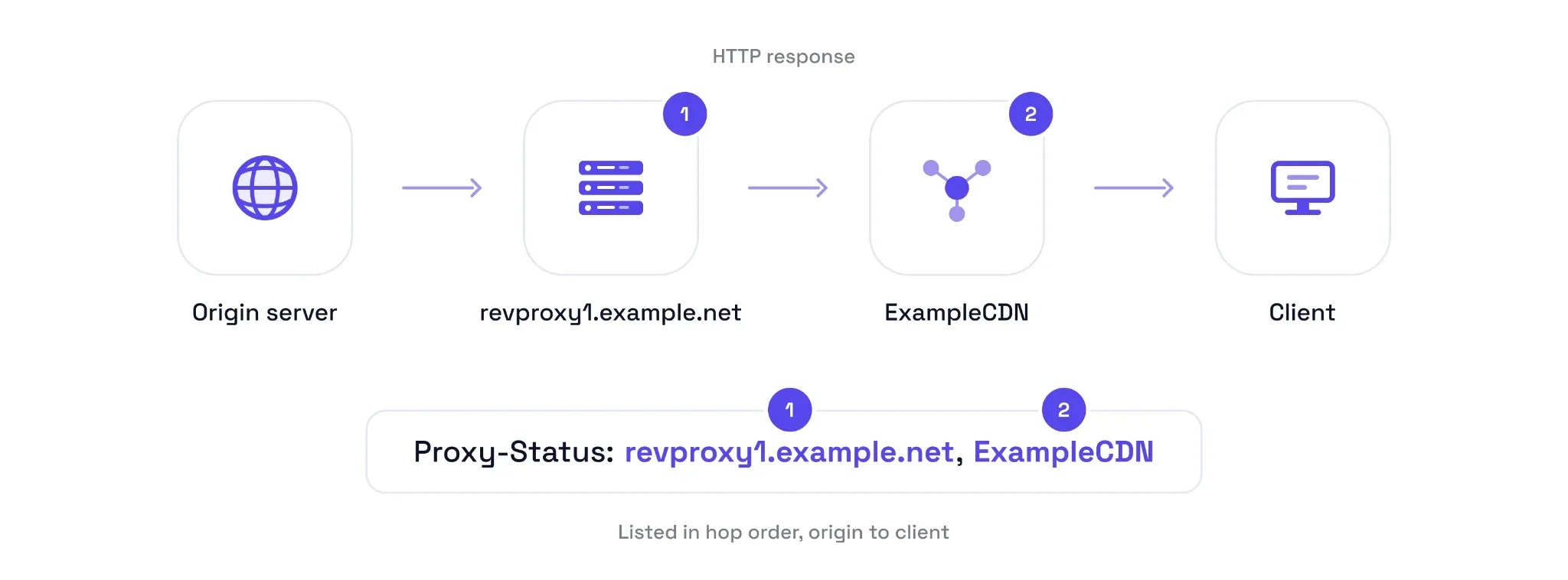
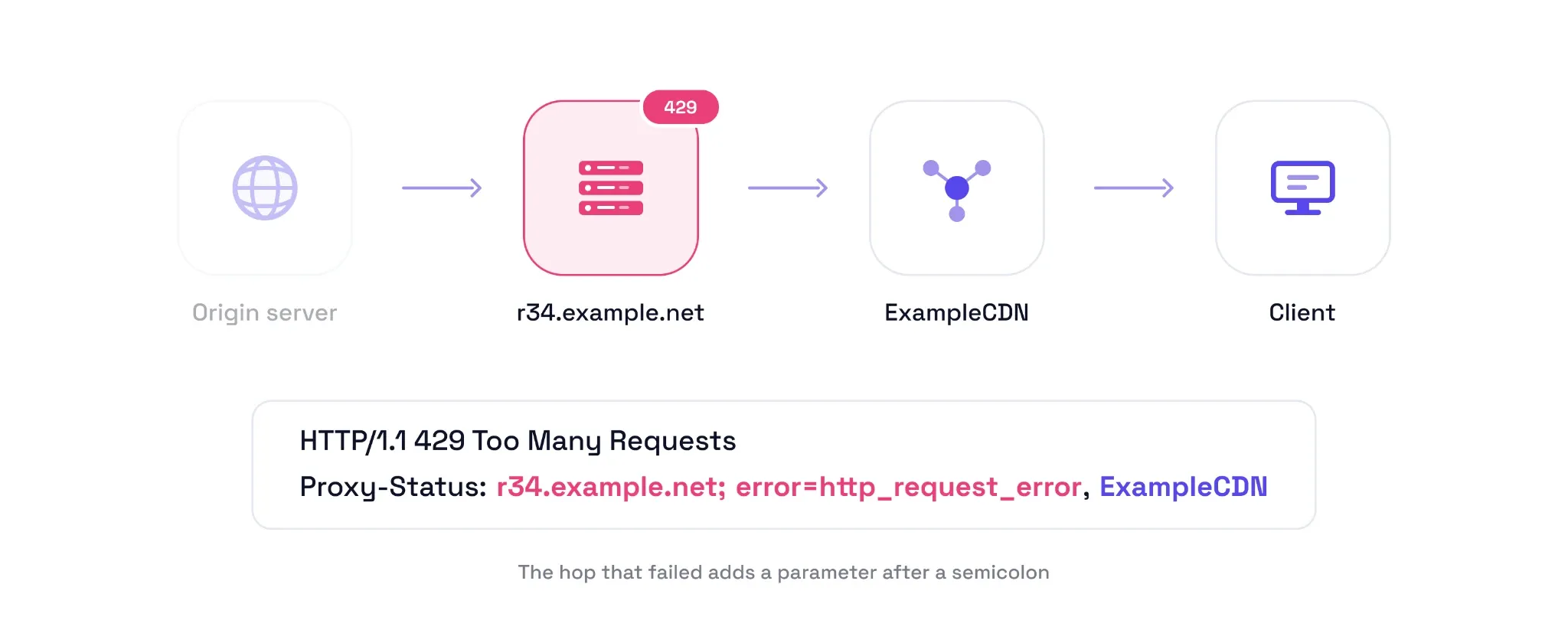
In this field, the two listed members represent two hops, with “revproxy1.example.net” being closer to the origin server and “ExampleCDN” stationed adjacent to the client. This is the simplest instance without any additional information, which an intermediary could've added using a semicolon. However, the below-mentioned is a much richer response showing a 429 error generated by the intermediary server, r34.example.net (not the CDN or the origin):
HTTP/1.1 429 Too Many Requests
Proxy-Status: r34.example.net; error=http_request_error, ExampleCDN
Although this header field makes it convenient for the developers to troubleshoot errors, sending Proxy-Status is up to the intermediary server’s discretion. One might configure proxy servers to relay such lists with every response or selectively. Furthermore, every entry must either be a String or Token, and should indicate the underlying deployment/service. Hostname, IP address, service name, etc., can make for suitable Proxy-Status members.
RFC 9209 asks intermediary servers to preserve existing members and suggests appending Proxy-Status fields with their own information. However, these servers can handle Proxy-Status otherwise if explicitly configured, such as for removing certain members for privacy reasons. Likewise, origin servers have no say in generating Proxy-Status. If a problem surfaces only after the header is sent (say, mid-stream), an intermediary that already added its entry to the header can send a Proxy-Status trailer field with updated details for that entry.
What can a proxy report?
RFC 9209 defined five standard parameters, and the list is extensible: a sixth, next-hop-aliases (RFC 9532), has since joined the IANA registry. The following table summarizes each parameter, with explanations below.
| Parameter | Value type | What it tells you | Example |
|---|---|---|---|
| error | Token | Problem obtaining the response | HTTP/1.1 504 Gateway TimeoutProxy-Status: ExampleCDN; error=connection_timeout |
| next-hop | String or Token | The intermediary or origin server selected as the next hop | next-hop=backend.example.org:8001 |
| next-protocol | Token or byte sequence | The TLS ALPN protocol identifier for the connection to the next hop | next-protocol=h2 |
| received-status | Integer | The HTTP status code received from the next hop | received-status=200 |
| details | String | Additional implementation-specific diagnostic information | details="Malformed response header" |
In addition to the above, RFC 9209 has defined multiple cases (discussed later) that can be reported with the error parameter. Some of these error types account for proxy DNS timeouts, generic DNS errors, destination IP prohibited or unroutable, connection refused or terminated, TLS protocol error, etc. The document also outlines a procedure for registering new HTTP error types, which can be used after approval.
Put simply, error identifies a failure category, next-hop the selected destination, received-status the HTTP status code from the next-hop, and details can provide additional information. Besides, next-protocol is the reported protocol used for reaching the next hop, labeled with an ALPN identifier. But keep in mind that every Proxy-Status value is a claim you can’t verify from the response alone.
Reading the Error Types
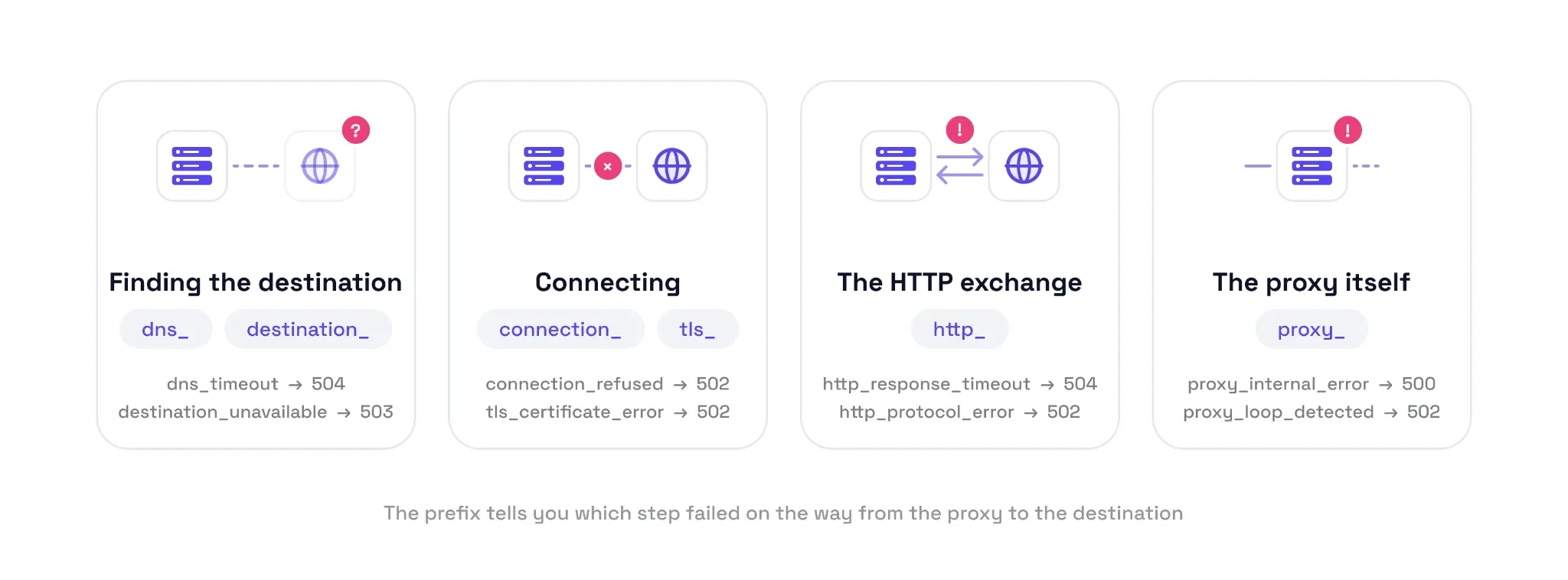
RFC has documented 32 error types originally. However, it has been extended afterward (e.g., incremental_refused, added in 2026), and the current full list you can check out at the IANA registry. For simplicity, we categorized these errors into four groups and listed the major types in the following table.
| Group | What went wrong | Representative types (recommended status) |
|---|---|---|
| Finding the destination (dns_, destination_) | The proxy couldn't resolve the destination, select a usable next hop, or reach the destination because of routing or access restrictions. | dns_timeout (504); dns_error (502); destination_not_found (500); destination_unavailable (503); destination_ip_prohibited (502); destination_ip_unroutable (502) |
| Connecting (connection_, tls_) | The proxy identified the next hop but couldn't establish, secure, or maintain the connection. | connection_refused (502); connection_timeout (504); connection_terminated (502); connection_read_timeout (504); tls_certificate_error (502); tls_protocol_error (502) |
| The HTTP exchange (http_) | The HTTP request or response encountered an error, timeout, protocol violation, or other limitation. | http_request_error (applicable 4xx); http_request_denied (403); http_response_timeout (504); http_protocol_error (502); http_response_incomplete (502) |
| The proxy itself (proxy_) | The intermediary encountered an internal failure or configuration problem, detected a forwarding loop, or generated a response itself. | proxy_internal_error (500); proxy_configuration_error (500); proxy_loop_detected (502) |
Importantly, some error types (such as proxy_internal_error and http_protocol_error) are generic fallbacks used when no specific registered type fits the problem.
On top of that, an intermediary can choose to avoid sharing confidential details (such as backend hostnames and ports) in insecure environments. Lastly, an upstream server might generate the response, and errors can also be conveyed via HTTP trailers. Therefore, treat Proxy-Status as guidance and troubleshoot only based on factual evidence.
How to read Proxy-Status when a request fails
Though RFC 9209 outlines the header format and parameters, it sheds no light on how to debug. Therefore, we summarized the following pointers on problem identification, checking modified responses, and inspecting the next hop.
- Find the intermediary: Look for the entry that carries an error parameter. This is the first step, which becomes important if there are multiple intermediary servers in the network chain. Here, remembering the order (leftmost is closer to the origin) can come in handy. But please note that this order only shows the hop’s position and has nothing to do with which proxy server encountered the problem.
- Identify the error: The next obvious step is to match the value of the error parameter (e.g., connection_timeout) against IANA’s HTTP Proxy Error Types registry. Also, check received-status for every intermediary and compare it with the final response status to identify where the status might have changed.
- Inspect next-hop and next-protocol: This assists with step-by-step investigation and validating the network chain. It reveals the specific protocols used to connect to the respective next hops, as reported by the proxy servers. If these parameters are absent, use proxy configuration and logs to find the upstream path.
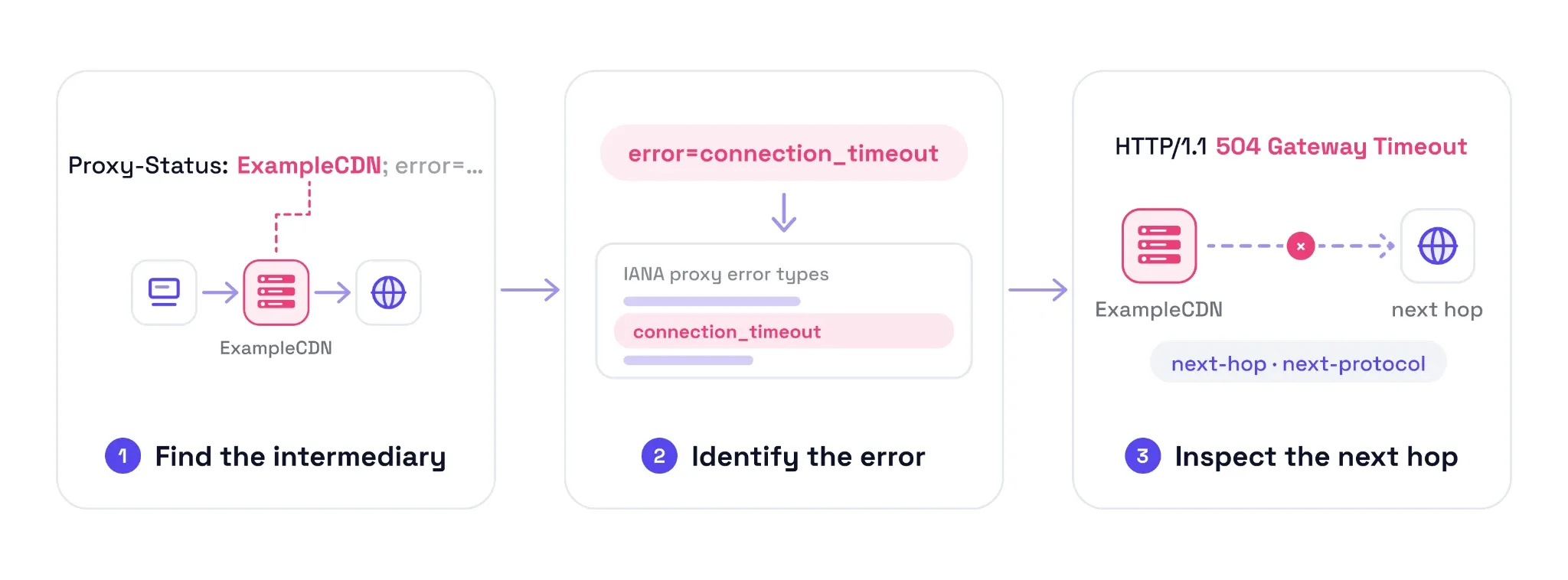
Let’s take an example from the RFC itself.
HTTP/1.1 504 Gateway Timeout
Proxy-Status: ExampleCDN; error=connection_timeout
This represents that the CDN couldn’t connect to the next hop and is reporting a connection error. In this case, verify whether the next hop is reachable by other means. If the next hop is the origin, check the origin directly; if it is another intermediary, work through the chain using the debugging steps in our proxy timeout troubleshooting guide.
Where it sits among Via, Server, and vendor debug headers
Via, server, and vendor-specific debug headers handle similar intermediary communications, more or less. However, Proxy-Status presents them in a more standardized manner, while giving the intermediary autonomy to share details as per the security landscape. The following table compares them briefly on who adds these headers, what they contain, and whether they are mandatory.
| Header | Who adds it | What it records | Is it required? |
|---|---|---|---|
| Proxy-Status | HTTP intermediaries, including forward proxies, reverse proxies, and CDNs | Intermediary's response handling. Can include an error type and other details | No. The header and its parameters are optional. |
| Via | Proxies and gateways | The protocol version and intermediary identifier for each forwarding hop. | A proxy must add it to messages it forwards. |
| Server | The origin server | Information about the software handling the request at the origin server. | No. |
| Vendor-specific headers (e.g., Cf-Ray, Cf-Cache-Status) | The relevant service provider | Provider-specific information. For example, Cf-Ray supplies a request identifier, while Cf-Cache-Status describes cache handling. | Depends on the provider and header. |