Async web scraping is the standard way developers scrape at scale. The idea is to stop waiting on one response before sending the next request, so the job never turns into a single long queue.
Python’s aiohttp and httpx clients both support asynchronous HTTP requests, connection pooling, and proxies. This guide compares both of them, demos a concurrent scraper build, covers common failures, and tests how concurrency and proxies affect the overall performance.
How does asynchronous scraping work?
The core principle of asynchronous scraping is firing simultaneous requests while stacking aside the requests waiting for I/O. This overlaps multiple I/O timeframes, and it takes far less than the sum of every request’s time when processed sequentially.
Rather than opening multiple resource-heavy threads, async uses an event loop, such as Python’s asyncio, which parks each request when it hits await and sends the next one. This ultimately helps since the majority of scraping time is consumed mid-flight.
For this demonstration, we built a 50-page sequential scraper to test its performance. It wasted 14 of the entire 14.8 seconds mostly on network wait (see the timing table in the next section), whereas roughly 0.8 seconds went into parsing.
Since parsing is entirely CPU work, with no provision for overlapping, it never gets to use await. So the event loop can’t process another request when one is being parsed. This is how BeautifulSoup and lxml run inside a coroutine. It works for small pages fairly well. However, you'd better switch parsing to something like loop.run_in_executor() or a process pool for pages taking substantially more parsing time.
That said, we are discussing ordinary HTML scraping here, where the workflow can typically look like this:
- Create an asynchronous HTTP client.
- Schedule multiple requests.
- Await each response without blocking other runnable tasks.
- Read and parse the response.
- Store the extracted data.
- Close the client and release its connections.
Importantly, you should plan concurrent request volume around the target’s rate limits and server capacity, and around how many IPs you have to spread it across. For this, you can code a separate concurrency limit and keep aiohttp connection limits or HTTPX resource limits as safety nets.
aiohttp or httpx: Which Async client to use?
aiohttp excels in high-concurrency scraping projects with flexible proxy configurations, whereas httpx works out with its HTTP/2 support and a single client for managing both synchronous and asynchronous scraping workflows.
The following table compares them across several factors, including protocol support, timeouts, and proxy configuration.
| aiohttp | httpx | |
|---|---|---|
| HTTP/2 | Not supported natively | Supported with httpx[http2] and http2=True |
| Proxy configuration | Per request or session | Configured per client (proxy=; the old proxies= was removed in 0.28) |
| Connection limits | Total and per-host limits through TCPConnector | httpx.Limits controls connection-pool limits, but no built-in per-host limit |
| API | Async client only | The same API in sync( httpx.Client ) and async( httpx.AsyncClient ) |
| WebSockets | Built-in WebSocket client support | No built-in WebSocket client API |
| SOCKS proxy support | aiohttp-socks | httpx[socks] |
| Timeout configuration | ClientTimeout supports a total request timeout and granular connection/read timeouts | Separate connect, read, write, and pool timeouts; no overall request timeout |
The following scraper build uses aiohttp since we’ll also demonstrate per-request proxies in later sections.
Prerequisites
To follow along, you need Python 3.11+ and these dependencies:
pip install aiohttp "httpx[http2]" beautifulsoup4 lxml tenacity aiolimiterFor SOCKS proxies, add aiohttp-socks or "httpx[socks]". And check our Python web scraping basics if you’re an absolute beginner.
The following setup was tested with Python 3.15.0, aiohttp 3.14.5, httpx 0.28.1, tenacity 9.2.1, and Beautiful Soup 4.15.0 on Windows 11.
Build a concurrent scraper
We built the following scraper to test concurrency against books.toscrape.com, a well-known site for learning scraping. This scraper fetches 50 pages of the target with 10 simultaneous requests (we benchmarked 1 to 50 below) to save 1,000 rows as a CSV.
import asyncio
import csv

import aiohttp
from bs4 import BeautifulSoup

URLS = [f"https://books.toscrape.com/catalogue/page-{n}.html" for n in range(1, 51)]
CONCURRENCY = 10


def parse(html: str) -> list[dict]:
    soup = BeautifulSoup(html, "lxml")
    return [
        {"title": book.h3.a["title"], "price": book.select_one(".price_color").text}
        for book in soup.select("article.product_pod")
    ]


async def fetch(session: aiohttp.ClientSession, url: str) -> str:
    async with session.get(url) as resp:
        resp.raise_for_status()
        return await resp.text()


async def main() -> None:
    sem = asyncio.Semaphore(CONCURRENCY)  # at most 10 requests in flight
    timeout = aiohttp.ClientTimeout(total=30, connect=5, sock_read=10)
    rows: list[dict] = []

    async with aiohttp.ClientSession(timeout=timeout) as session:  # one session for every request

        async def scrape(url: str) -> None:
            async with sem:
                html = await fetch(session, url)
            rows.extend(parse(html))  # parse after releasing the slot

        async with asyncio.TaskGroup() as tg:
            for url in URLS:
                tg.create_task(scrape(url))

    with open("books.csv", "w", newline="", encoding="utf-8") as f:
        writer = csv.DictWriter(f, fieldnames=["title", "price"])
        writer.writeheader()
        writer.writerows(rows)

    print(f"Saved {len(rows)} books")


if __name__ == "__main__":
    asyncio.run(main())
We have covered timeouts and error handling subsequently, but you can check our Beautiful Soup web scraping guide for selector details. We also used a single ClientSession to pool connections so multiple requests can reuse TCP and TLS handshakes and share cookies. Here’s the terminal screengrab of the output:
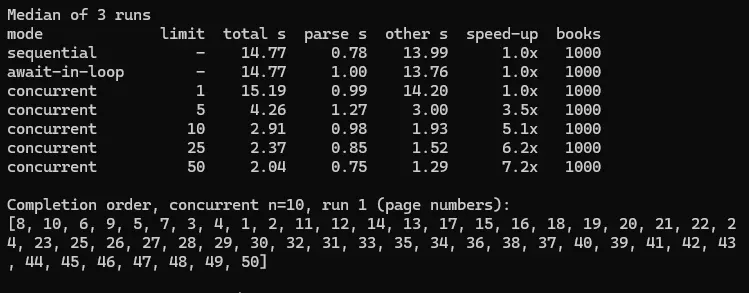
The unordered sequence is a testament to async requests, since a task is marked finished when its response arrives and not in a specific order, as in the case with sequential.
You can see the total sequential scraping time dropped from 14.77 seconds (sequential) to 2.04 seconds with 50 simultaneous requests. However, the gains eventually flattened out because parsing runs on the event loop and never benefited from concurrency.
You should note that choosing 50 concurrent requests for every target might not work. In some cases, you might underutilize the target’s capacity; in other cases, requests might slow down, indicating the scraper should back off.
The httpx variant
The scraper’s structure stays the same: the semaphore, the TaskGroup, and parse() don’t change. Three things do. fetch() gets simpler, since httpx returns the response directly and resp.text is a property rather than an awaited method. The timeout moves to httpx.Timeout, and httpx.Limits sets the connection pool.
import httpx

async def fetch(client: httpx.AsyncClient, url: str) -> str:
    resp = await client.get(url)
    resp.raise_for_status()
    return resp.text

# in main():
limits = httpx.Limits(max_connections=CONCURRENCY, max_keepalive_connections=CONCURRENCY)
timeout = httpx.Timeout(30.0, connect=5.0, read=10.0)
async with httpx.AsyncClient(limits=limits, timeout=timeout, http2=True) as client:
    ...
Please note that http2=True needs pip install "httpx[http2]". With this, one connection can carry many requests, and it’s the semaphore (and not httpx.Limits) that caps the concurrent requests.
Handle timeouts, retries, and failures
In an (ideal) 100% scraping-tolerant universe, we wouldn’t be writing this section at all. But since that isn’t the case, scrapers need to handle timeouts and retry logically after failures like 503s, 429s, and more.
So, in this section, we’ll walk through the three timeouts from the build, retry temporary failures, and record persistent ones
In the build snippet, aiohttp.ClientTimeout(total=30, connect=5, sock_read=10) controls request lifecycle, connection time, and wait time for reading a data chunk, respectively.
from datetime import datetime, timezone
from email.utils import parsedate_to_datetime
import aiohttp
from tenacity import retry, retry_if_exception, stop_after_attempt, wait_exponential_jitter

MAX_RETRY_AFTER = 60 # a longer requested wait sends the URL to the failures list instead

class RetryableStatus(Exception):
    """A 429 or 5xx response worth retrying."""
    def __init__(self, status: int, retry_after: float | None):
        super().__init__(f"HTTP {status}")
        self.retry_after = retry_after

def parse_retry_after(value: str | None) -> float | None:
    if not value:
        return None
    if value.isdigit():
        return float(value)
    try: # the HTTP-date form
        delay = parsedate_to_datetime(value) - datetime.now(timezone.utc)
        return max(delay.total_seconds(), 0.0)
    except (TypeError, ValueError):
        return None

def should_retry(exc: BaseException) -> bool:
    if isinstance(exc, aiohttp.ClientConnectorDNSError): # a bad hostname won't fix itself
        return False
    if isinstance(exc, RetryableStatus):
        return exc.retry_after is None or exc.retry_after <= MAX_RETRY_AFTER
    return isinstance(exc, (TimeoutError, aiohttp.ClientConnectionError, aiohttp.ClientPayloadError))

backoff = wait_exponential_jitter(multiplier=0.5, max=10, jitter=0.5) # 0.5s, 1s, 2s... plus jitter

def wait_retry_after_or_backoff(retry_state) -> float:
    exc = retry_state.outcome.exception()
    if isinstance(exc, RetryableStatus) and exc.retry_after is not None:
        return exc.retry_after # wait exactly as long as the server asked
    return backoff(retry_state)

@retry(
    retry=retry_if_exception(should_retry),
    wait=wait_retry_after_or_backoff,
    stop=stop_after_attempt(4),
    reraise=True,
)
async def fetch(session: aiohttp.ClientSession, url: str) -> str:
    async with session.get(url) as resp:
        if resp.status == 429 or resp.status >= 500:
            raise RetryableStatus(resp.status, parse_retry_after(resp.headers.get("Retry-After")))
        resp.raise_for_status() # any other 4xx raises and is not retried
        return await resp.text()
This retries timeouts, connection errors (not DNS ones), truncated responses, 5xx errors, and 429s up to four attempts with exponential backoff and jitter. In our test (check the following image), the 503s were retried after 0.58 seconds and 1.45 seconds, the 429 waited for 3 seconds, the 404 failed at once, and two dead URLs gave up after four attempts.
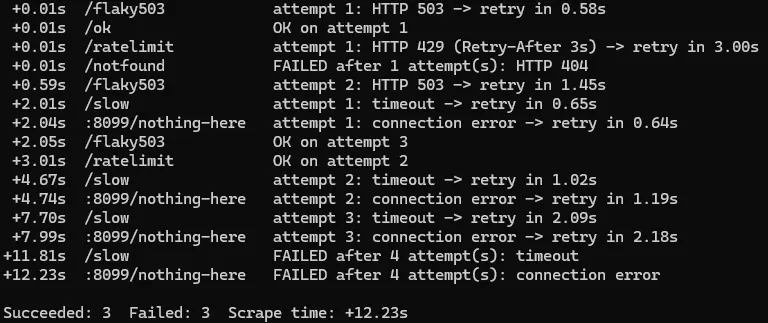
One unhandled exception in a TaskGroup cancels every other task, ending one of our test runs early. So we adjusted the snippet to catch errors per URL, record them for a second pass, and save in finally so recorded results survive errors and a normal Ctrl+C.
import json

async def main() -> None:
    sem = asyncio.Semaphore(CONCURRENCY)
    timeout = aiohttp.ClientTimeout(total=30, connect=5, sock_read=10)
    rows: list[dict] = []
    failures: list[dict] = []

    async def scrape(session: aiohttp.ClientSession, url: str) -> None:
        try:
            async with sem:
                html = await fetch(session, url)
        except Exception as exc: # out of retries, or a 4xx: record it and keep going
            failures.append({"url": url, "error": f"{type(exc).__name__}: {exc}"})
            return
        rows.extend(parse(html))

    try:
        async with aiohttp.ClientSession(timeout=timeout) as session:
            async with asyncio.TaskGroup() as tg:
                for url in URLS:
                    tg.create_task(scrape(session, url))
    finally: # runs on success, on errors and on Ctrl+C
        with open("books.json", "w", encoding="utf-8") as f:
            json.dump(rows, f)
        with open("failures.json", "w", encoding="utf-8") as f:
            json.dump(failures, f, indent=2)
        print(f"Saved {len(rows)} books, {len(failures)} failures for a second pass")

if __name__ == "__main__":
    try:
        asyncio.run(main())
    except KeyboardInterrupt:
        print("Stopped by Ctrl+C; finished rows were saved.")
Add proxies for concurrent requests
Up to this point, every run used our local IP. That’s fine for pilot runs, but it can’t be a production practice since that many concurrent requests from a single IP can hit per-IP rate limits or invite bans.
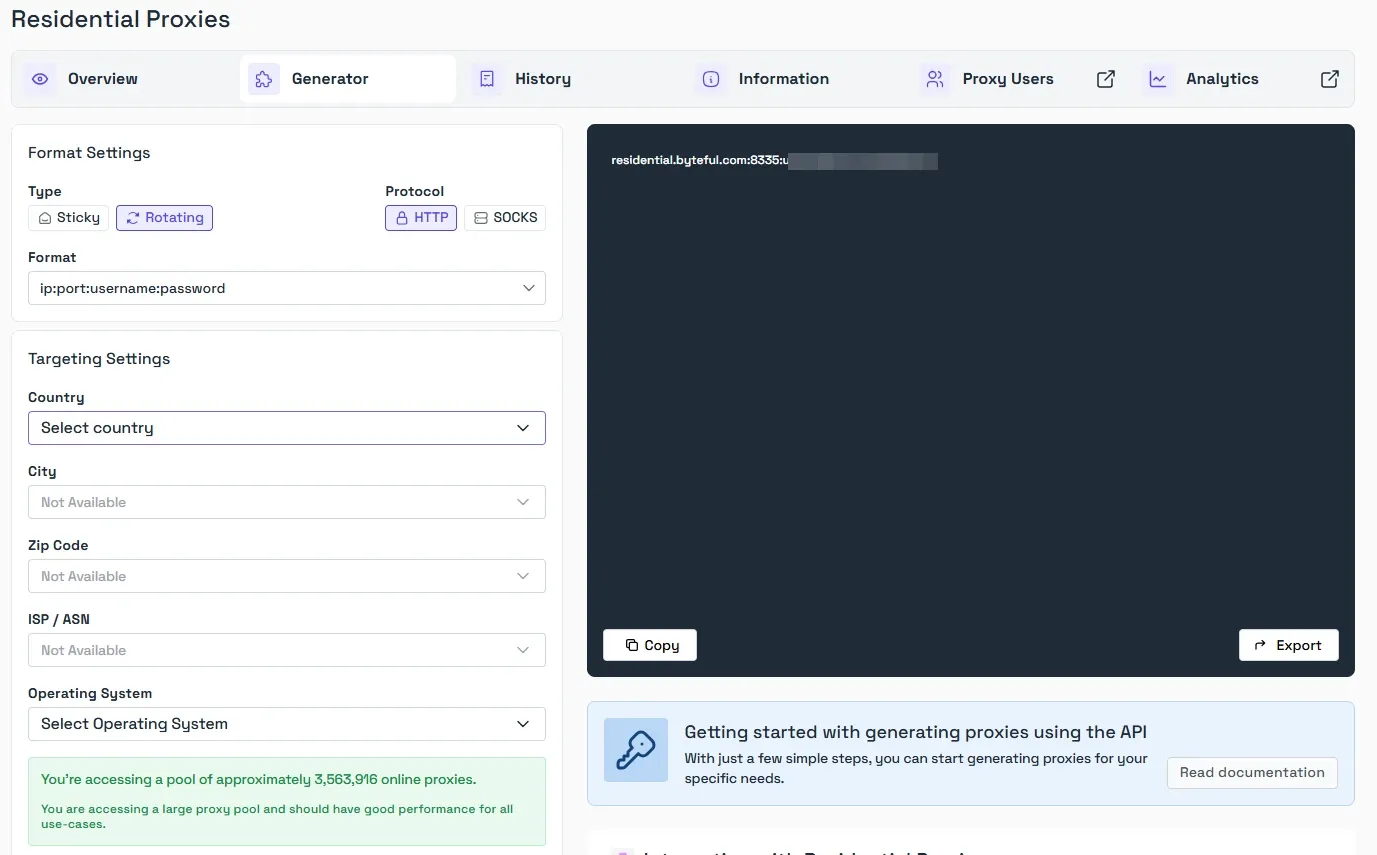
So, proxies are a good countermeasure that any large-scale scraper uses under the hood to spread requests evenly across many IPs. Over here, we use Byteful’s backconnect proxy gateway, which rotates IPs per request.
The following image shows our dashboard, which lets you generate an IP based on session type, protocol, geotarget (country, city, zip code, and ISP), and operating system.
aiohttp: Set the proxy per request
The snippet below routes the scraper through our gateway with username-password authentication. It shows only the proxy-related changes: fetch() takes an optional session_id, and session.get() now passes proxy= and proxy_headers=. You can apply these two changes to the fetch() from the retry section, keeping its @retry decorator and status checks as is.
import secrets
import aiohttp

PROXY_HOST = "residential.byteful.com"
PROXY_PORT = "PORT" # the port your dashboard shows
PROXY_USER = "your-username"
PROXY_PASS = "your-password"
PROXY = f"http://{PROXY_HOST}:{PROXY_PORT}"

def proxy_headers(session_id: str | None = None) -> dict[str, str]:
    """Rotating by default; pass a session ID for a sticky IP."""
    user = f"{PROXY_USER}_s_{session_id}" if session_id else PROXY_USER
    return {"Proxy-Authorization": aiohttp.encode_basic_auth(user, PROXY_PASS)}

# keep the @retry(...) decorator from the previous section on this function
async def fetch(session: aiohttp.ClientSession, url: str, session_id: str | None = None) -> str:
    async with session.get(url, proxy=PROXY, proxy_headers=proxy_headers(session_id)) as resp:
        resp.raise_for_status()
        return await resp.text()
Our proxy URLs are fairly straightforward: plain username rotates, and the ones with s<ID> make the session sticky. For a paginated or logged-in sequence, it’s better to give every worker its own ID with secrets.token_hex(4) and pass it on every fetch().
If not a gateway, you need to pass a different proxy= from your self-maintained IP list with each request. However, a gateway lets you use a pool with a single proxy string, which makes backconnect proxies easy to work with.
You might notice we used a proxy authorization header instead of a proxy URL. This is because aiohttp’s 407 error prints the proxy URL, credentials included, and proxy_auth=aiohttp.BasicAuth(...) has been deprecated since aiohttp 3.1.14. If you’d rather not keep credentials in your scraper code, use IP whitelisting instead.
At Byteful, it works with static proxies only, since rotating IPs reads its settings from the proxy string. (See our guide to proxy endpoint formats). For a full walkthrough of proxy options, see our guide to setting up aiohttp proxies.
httpx: Set the proxy per client
httpx takes the proxy once, when you create the client, and every request on that client goes through it. That moves the rotation decision up a level: you either rotate through the gateway, or you build one sticky client per worker:
from urllib.parse import quote
import httpx

proxy = f"http://{quote(PROXY_USER, safe='')}:{quote(PROXY_PASS, safe='')}@{PROXY_HOST}:{PROXY_PORT}"
async with httpx.AsyncClient(proxy=proxy, limits=limits, timeout=timeout) as client:
    ... # on a per-connection gateway, each new connection gets a new exit IP
So you can either rotate through the gateway or give every worker its own sticky client, like the snippet below (we verified stickiness with aiohttp).
import secrets

def sticky_client(session_id: str) -> httpx.AsyncClient:
    user = quote(f"{PROXY_USER}_s_{session_id}", safe="")
    proxy = f"http://{user}:{quote(PROXY_PASS, safe='')}@{PROXY_HOST}:{PROXY_PORT}"
    return httpx.AsyncClient(proxy=proxy, limits=limits, timeout=timeout)

async def worker(urls: list[str]) -> None:
    async with sticky_client(secrets.token_hex(4)) as client: # one exit IP for this worker
        for url in urls:
            resp = await client.get(url)
            resp.raise_for_status()
            ... # parse and store as in the build section
Check if rotation works
The easiest way to confirm proxy rotation is to fire a batch of requests and count distinct exit IPs:
async def exit_ip(session: aiohttp.ClientSession) -> str:
    return (await fetch(session, "https://api.ipify.org")).strip()

ips = await asyncio.gather(*(exit_ip(session) for _ in range(20)))
print(len(set(ips)), "distinct exit IPs")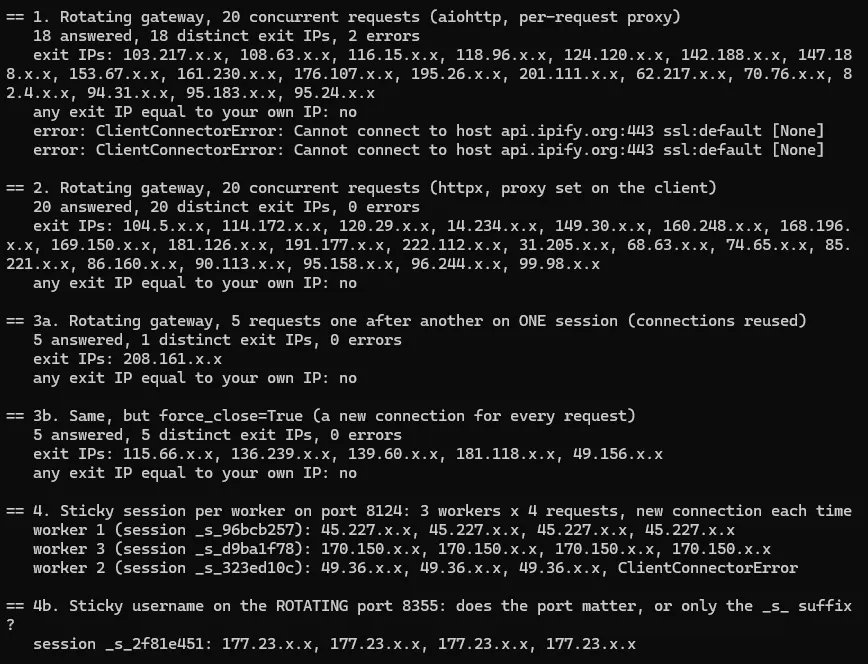
| Test | Requests | Observed result |
|---|---|---|
| Rotating gateway, aiohttp, per-request proxy | 20 | 18 responses, 18 distinct exit IPs, 2 errors |
| Rotating gateway, HTTPX client-level proxy | 20 | 20 responses, 20 distinct exit IPs, no errors |
| Same rotating gateway, reused session | 5 | 5 responses, 1 distinct exit IP |
| Same gateway with forced new connections | 5 | 5 responses, 5 distinct exit IPs |
| Sticky sessions with separate worker identities | 4 per worker | Each worker retained its observed exit IP across requests |
Our test run returned different IPs with 20 concurrent requests, which proves rotation works in this setup. However, it doesn't guarantee unique IPs per request, but that’s something a provider-dependent feature.
Watch limit_per_host with sticky sessions
Sticky sessions also change how aiohttp’s connection limits behave, which we tested with two local test sites behind a local proxy.
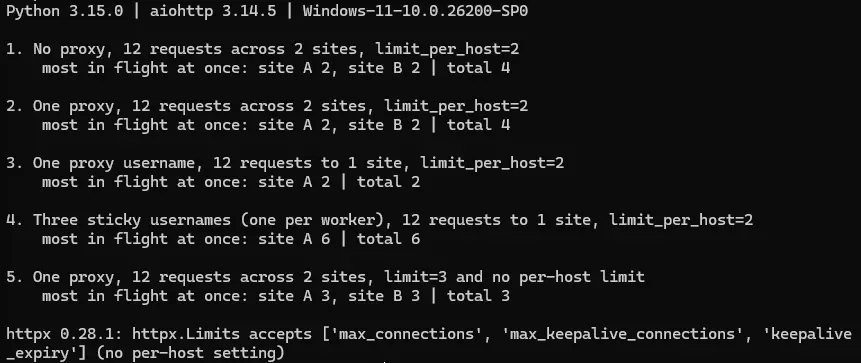
The limit_per_host=2 caps each site at two requests without sticky sessions in place. However, aiohttp counts each site separately for every proxy username, so three sticky usernames sent six requests to one local site at once.
This indicates that, with sticky sessions, you must cap per-site concurrency with a semaphore or aiolimiter and size it to your target’s capacity and proxy concurrency limits.
Which proxy type to use
Not every proxy type fits every scraping workflow, as it depends on the target’s security posture and your scraping requirements. The following list mentions the major proxy types and why you should pick them.
- Datacenter proxies: High concurrency on scraping-tolerant sites, where speed and cost per request matter most.
- Residential proxies: High-risk targets using sophisticated anti-bot measures that frequently block datacenter IP ranges.
- Mobile proxies: Extremely advanced targets that need high IP anonymity, and ones that mostly trust mobile carrier IPs.
- ISP (static residential): Long sessions that need the same IP over time.
Whichever type you pick, start small and track success rate before committing big. Byteful's 1GB of residential data helps test your setup against real targets before you spend anything.
Troubleshooting Async scrapers
Most async scraper failures trace back to a handful of causes. Here are the ones we hit most often, and how to fix each.
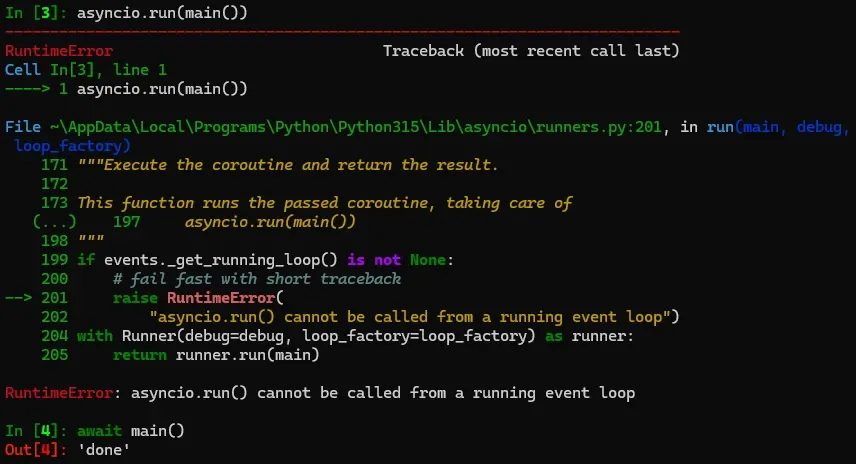
RuntimeError: asyncio.run() cannot be called from a running event loop
Reason: Since Python’s asyncio framework relies on a single event loop per thread, asyncio.run() can’t be called while another event loop is running on the same thread.
Resolution
- In Jupyter / Colab: Delete asyncio.run(main()) and use await main() directly.
- In Web Frameworks (FastAPI/Flask): Define your route or function with async def and call your sub-functions using await instead of nesting loops**.**
Unclosed client session or connector
Reason: Libraries like aiohttp or httpx open persistent TCP connections. So, when a session is still open after the script or event loop ends, the garbage collector cleans it up and aiohttp prints this warning.
Resolution
- Use Async context managers: Wrap your session creation in an async with block so it automatically closes itself when the block finishes, even if an error occurs.
- Reuse one global session: Create a single ClientSession at the top of the loop and pass it down to individual page tasks, rather than opening and closing a new session for every URL.
- Explicitly close on exit: If not a context manager, call await session.close() inside a try...finally block before your function returns.
ValueError: too many file descriptors in select()
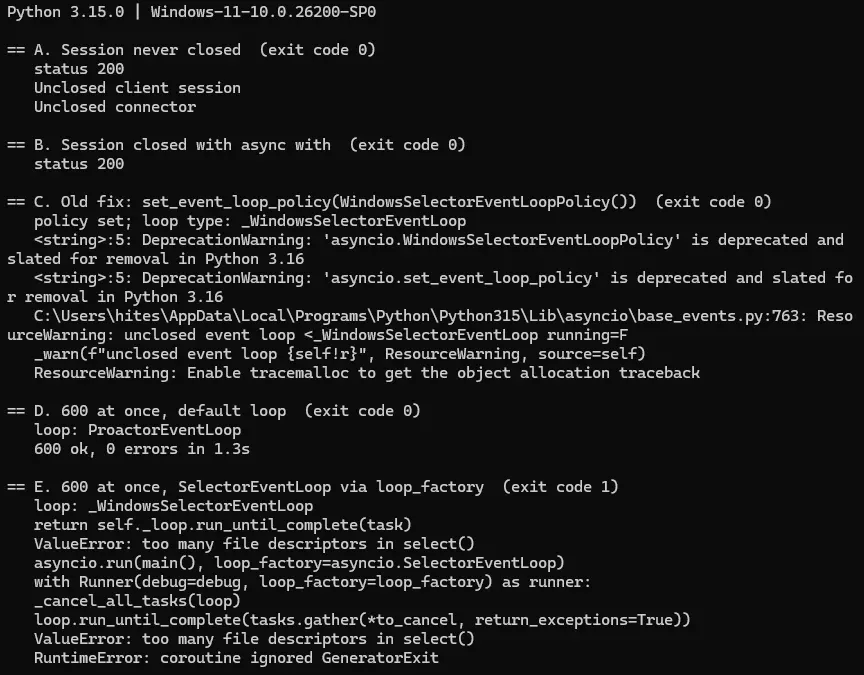
Reason: Older Python configurations or certain frameworks on Windows revert the event loop to the legacy SelectorEventLoop. This may trigger a hardcoded Windows select() system limitation, which is capped at 512 concurrent sockets (file descriptors).
Resolution
- Remove legacy loop policies: Delete any code forcing WindowsSelectorEventLoopPolicy(), as this legacy policy may reintroduce the 512-socket limit.
- Trust the modern defaults: Ensure you are running the latest Python instance on Windows so that the scalable ProactorEventLoop can manage hundreds of concurrent requests by default.
- Add a concurrency semaphore: Use asyncio.Semaphore(50) to pool and throttle active connections.
The scraper is slower when concurrency increases
Reason: Higher concurrency can overload the proxy gateway, trigger target-side thresholds, or get hung up in parsing, decreasing the overall throughput.
Resolution
- Benchmark concurrency levels: Experiment with different concurrency limits and track successful responses, total time, errors, etc., to know the maximum possible request threshold.
- Match network and proxy Constraints: Check if your proxy’s concurrency and your HTTP client’s connector limits (which default to 100 in aiohttp) align with the target’s.
- Profile and offload Blocking Code: Isolate and offload CPU-heavy tasks, like parsing large HTML strings, to an executor (run_in_executor) to prevent synchronous parsing from negating async scraping benefits.
HTTP 429 or 503 responses
Reason: HTTP 429 in web scraping is indicative of the scraper hitting the target’s rate limits, and HTTP 503 signals service unavailability. In a scraping context, both of these can result from the scraper breaching acceptable usage limits.
Resolution
- Honor the Retry-After Header: Parse incoming response headers for Retry-After and force your script to pause execution via await asyncio.sleep() for the exact duration specified by the server (The retry policy above caps this at 60 seconds and records longer waits as failures).
- Retry with exponential backoff and jitter: In case the server doesn’t communicate a Retry-After header, the scraper should retry, applying progressively increasing waiting time added with random delays (jitter).
- Try lower concurrency: Dial down concurrent connections along with exponential backoff and jitter if still stuck.
Note: Check out our error 429 in web scraping for an in-depth discussion, resolution, and the reasons why someone might still face it regardless.
407 Proxy Authentication Required
Reason: The proxy rejects your credentials because they’re missing, wrong, or in the incorrect format. In our test, a wrong password produced a 407 in both aiohttp and httpx but in different ways. With an https:// target, both raised an exception. With an http:// target, they returned an ordinary response with status 407.
Resolution
- Copy the host, port, username, and password from your provider’s dashboard. With Byteful, the plain username rotates, and s<ID> sticks.
- In aiohttp, send credentials as a Proxy-Authorization header built with aiohttp.encode_basic_auth(), as in the proxy section, rather than embedding them in the proxy URL.
- Test with a single request before scaling up.
Note: Check out our detailed guide on fixing 407 Proxy Authentication Required.