
Freebies always come with downsides, and free SOCKS5 proxies are no exception. Still, there are legitimate use cases for them, such as small-scale testing.
So, this guide outlines where to find free SOCKS5 proxies, how to set them up, the associated risks, and better alternatives. Also, you’ll find a few ways to test a free SOCKS proxy list.
Comparing SOCKS5 proxy (and how they are different)?
SOCKS5 is the latest iteration of the SOCKS protocol and has multiple use cases beyond transmitting web traffic. In addition, there are security and implementation distinctions from the widely used HTTP proxies that we have discussed in the following sections.
SOCKS5, SOCKS5h, and HTTP proxies
There are multiple parameters to weigh when evaluating these proxies. Instead of creating a lengthy, jargon-heavy explanation, we have made the following table to help you quickly understand the key differences.
| Feature | HTTP/HTTPS | SOCKS5 | SOCKS5h |
|---|---|---|---|
| Protocol support | TCP and UDP (with HTTP/3) | TCP and UDP | Same as SOCKS5 |
| Traffic inspection/modification | Can inspect, filter, modify, and cache web traffic | Blind relay | Same as SOCKS5 |
| DNS resolution | Proxy-side for HTTP CONNECT | Client-side (local DNS) | Proxy-side |
| DNS leak risk | Based on implementation | High | None |
| Encryption | Native HTTPS encryption | None | None |
| Authentication | Basic auth, Digest auth, and NTLM & Negotiate | Username/password and GSSAPI | Same as SOCKS5 |
| Use cases | Web scraping, content filtering, and caching | Online gaming, streaming, and P2P file sharing | SOCKS5 use cases, along with advanced web scraping and censorship bypass |
Note: If you want to learn more, our developer has created this easy-to-understand SOCKS5 deep-dive document that explains its proxying, authentication, and how it differs from HTTP proxies.
SOCKS5 vs SOCKS4
SOCKS4 is now considered a legacy SOCKS version. It was designed to route TCP with DNS resolution on the client side and to provide IP-based access control. You don’t get any user authentication with SOCKS4.
SOCKS5, on the other hand, supports UDP in addition to TCP and multiple authentication methods, including username/password and GSSAPI (mostly used in corporate settings). Not only this, but SOCKS5 also offers IPv6 compatibility, where its predecessor is limited to IPv4.
Another SOCKS5 advantage is that you can enforce remote DNS resolution with SOCKS5h. On the contrary, SOCKS4 was limited to local, client-side resolution, which means surefire DNS leaks whenever you tried to look up hostnames. However, we should mention SOCKS4A, which allows proxy-side DNS resolution. Although it also lacked UDP support, just like the vanilla SOCKS4.
All in all, we consider SOCKS4 as obsolete, and it’s better to move on to SOCKS5 for optimal security and wider protocol support.
Is SOCKS5 encrypted?
SOCKS5 doesn’t feature encryption on its own, unless you wrap it in an encrypted layer (with applications such as stunnel or by configuring SSH tunnels).
This means that if not configured at your end, you allow a SOCKS5 proxy provider to see your web activity. Besides, RFC 1929 states that SOCKS5 username/password subnegotiation occurs in cleartext and strictly prohibits its use in environments at risk of traffic snooping.
Still, using a SOCKS5 proxy to load an HTTPS object means your connection is encrypted by default due to application-layer TLS. In this case, the proxy provider won’t be able to snoop on your web activity.
The fine print here is that you should not blindly trust the padlock icon in the browser, thinking HTTPS is protecting your “entire” connection. This is because a typical web page is made up of text, images, video/audio, and more, and some of this mixed content (including downloads) can still be served over plain HTTP.
This section is a simple reminder that we should not consider SOCKS5 proxies the same as VPN tunnels. While they provide IP masking, the other aspects, such as data encryption and user authentication, require special configuration.
Where can you get free SOCKS5 proxies?
There are a few places to find free SOCKS5 proxies, including general free proxy lists and developer sources (such as GitHub files). Both are almost identical, considering the server load and performance. An even better option is premium proxy services offering a free tier or trial for consistent performance and security.
Each option is discussed subsequently.
General lists filtered to SOCKS5
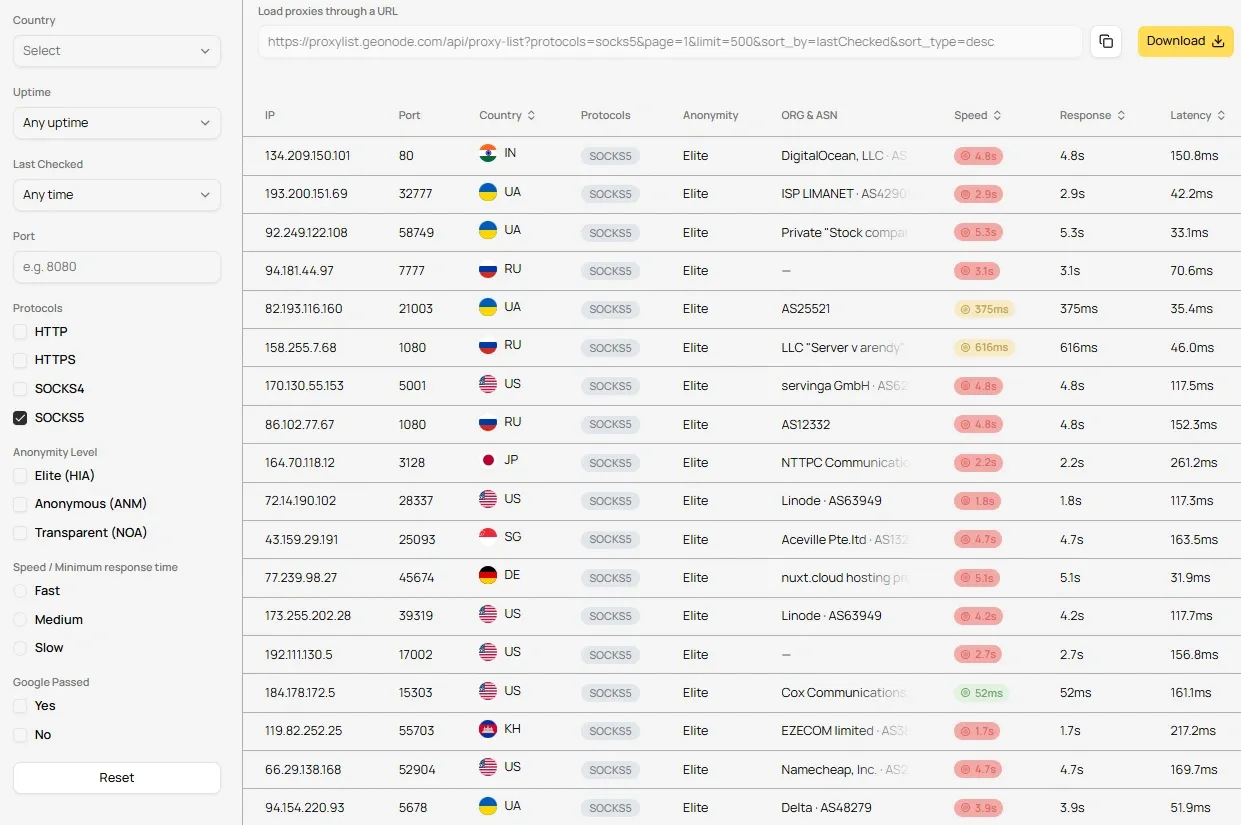
Geonode: This platform hosts a sizeable, daily-updated library of free proxy servers that you can filter by parameters such as protocols, anonymity level, speed, uptime, and location. You can also use the Geonode free proxy list via an API or download it in multiple formats (CSV, TXT, and JSON) for automating scraping workflows.
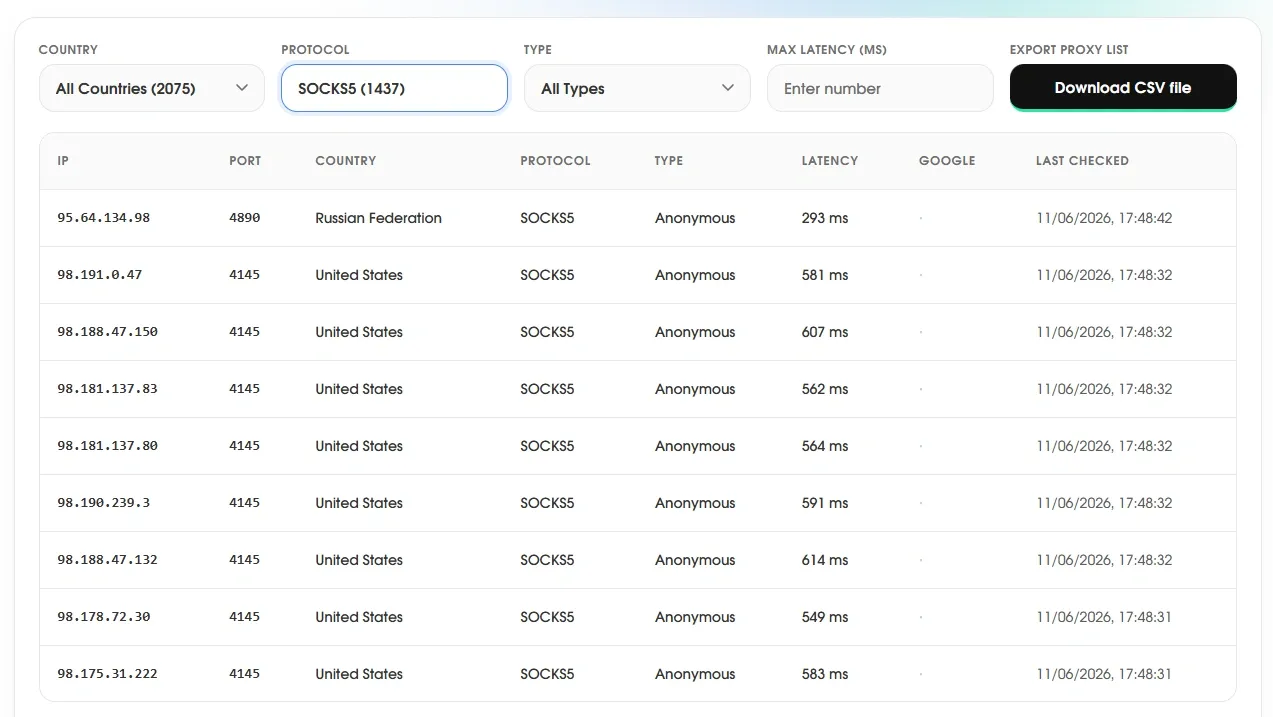
Nodemaven: Nodemaven’s free proxy list is similar to Geonode’s. It enables users to find proxies for specific countries, protocols, and latency. In addition, you can download the entire list as a CSV. What’s missing, however, is a public API endpoint for their free proxy servers.
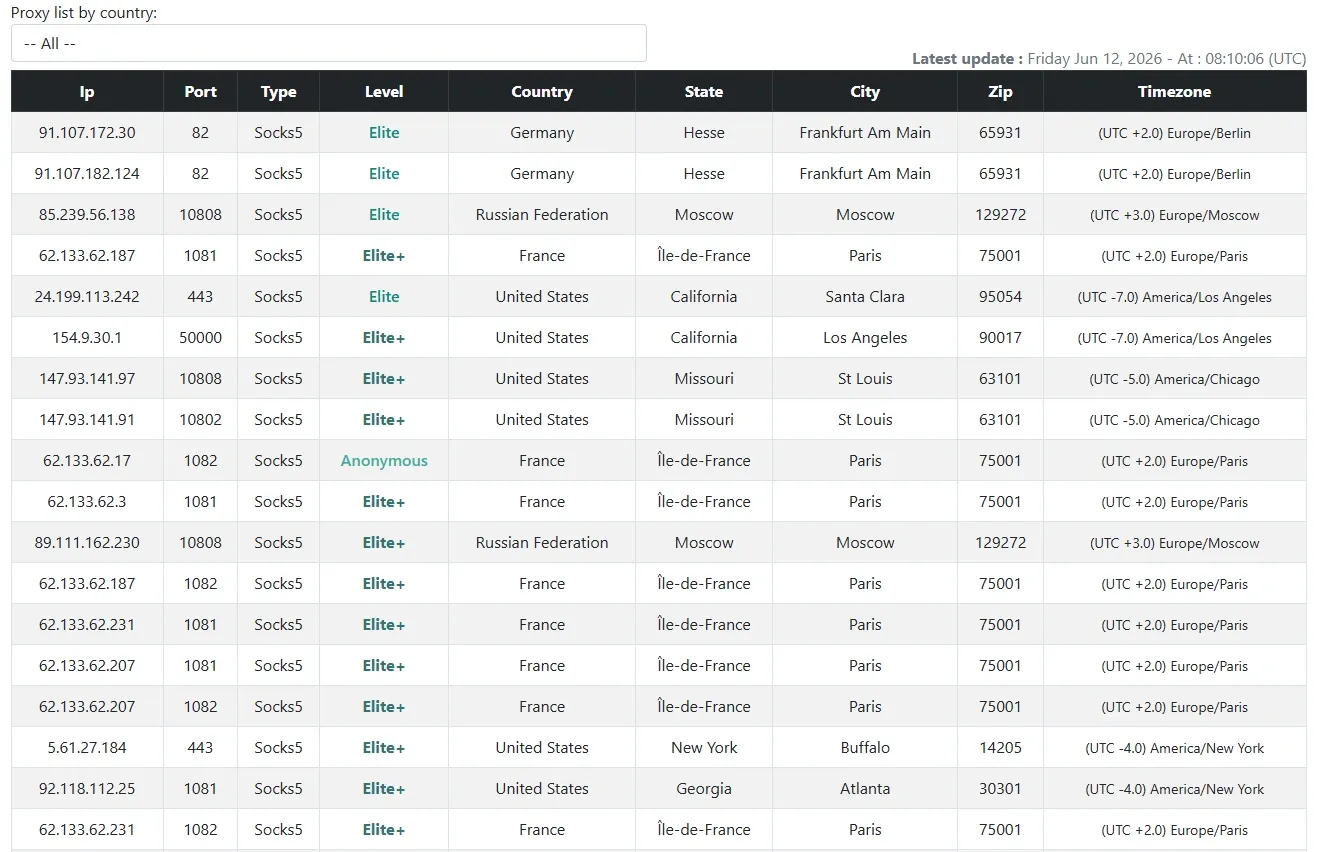
SocksList: This free list is focused exclusively on aggregating SOCKS5 proxy servers. As of this writing, SocksList has IPs from a few select countries, including the US, France, Germany, and Russia, and you can target cities and zip codes for an exact geolocation match.
SocksList also features a public API that lets you download the list in JSON. On the downside, there is no per-IP uptime check; instead, it’s reported for the entire list.
Proxyrack: This is probably one of the most fundamental displays of free proxies. Proxyrack maintains a non-interactive list of intermediary servers, most of which were offline as of this writing. On the bright side, most listed servers were SOCKS5, so we advise using this as a last resort if the platforms above didn’t work for you.
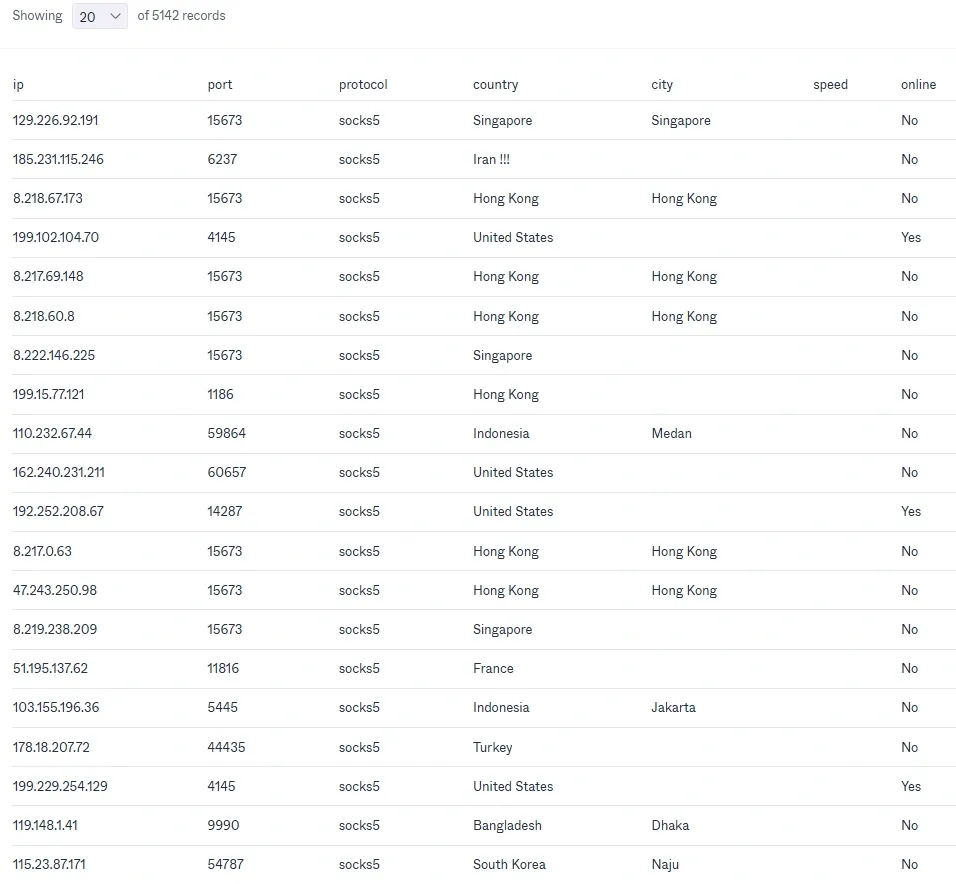
Developer sources: GitHub files and APIs (protocol=socks5)
TheSpeedX: This GitHub handle maintains a PROXY-List repo that provides SOCKS (v5 & v4) and HTTP proxies in a downloadable text file. The same handle also includes a Python tool to check for active SOCKS proxies.
Proxifly: Another one hosted at GitHub, this free proxy list is unique in that it updates every five minutes. You can download proxies by proxy type (SOCKS or HTTP) and by country or fetch them via cURL.
Hookzof: Socks5 list provides an auto-updating list of SOCKS5 proxy servers as raw text for bypassing Telegram-centric restrictions. So, if you’re razor-focused on Telegram and facing blocks in a specific locale, this one is worth a try.
Provider free tiers with SOCKS5 support
The free SOCKS5 proxy options we listed in the sections above are good starting points for testing. However, you should tone down your expectations with them because their hosts bear no responsibility for the list they provide. They simply act as aggregators, with no control over uptime, security, or performance.
That’s why serious use cases turn to reputable proxy providers and look for a free tier for testing the waters. So, here’s a list of such platforms that enable free trials before asking for paid subscriptions.
Byteful: This is a top choice for anyone who wants to test free SOCKS5 proxies. We support multiple types, including residential proxies, static residential proxies, datacenter proxies, and mobile proxies, with a robust network of 35 million IPs across 195+ countries.
But it’s not just the geographical coverage, it’s the sheer performance that helped Byteful secure top spot for the fastest residential response time (0.41s) and mobile response time (0.48s) globally in an independent study titled Proxy Market Research 2026.
Besides this industry-leading performance, it’s the 99.9% connection success rate and sub-second response times that make us a good fit for any high-stakes workflow.
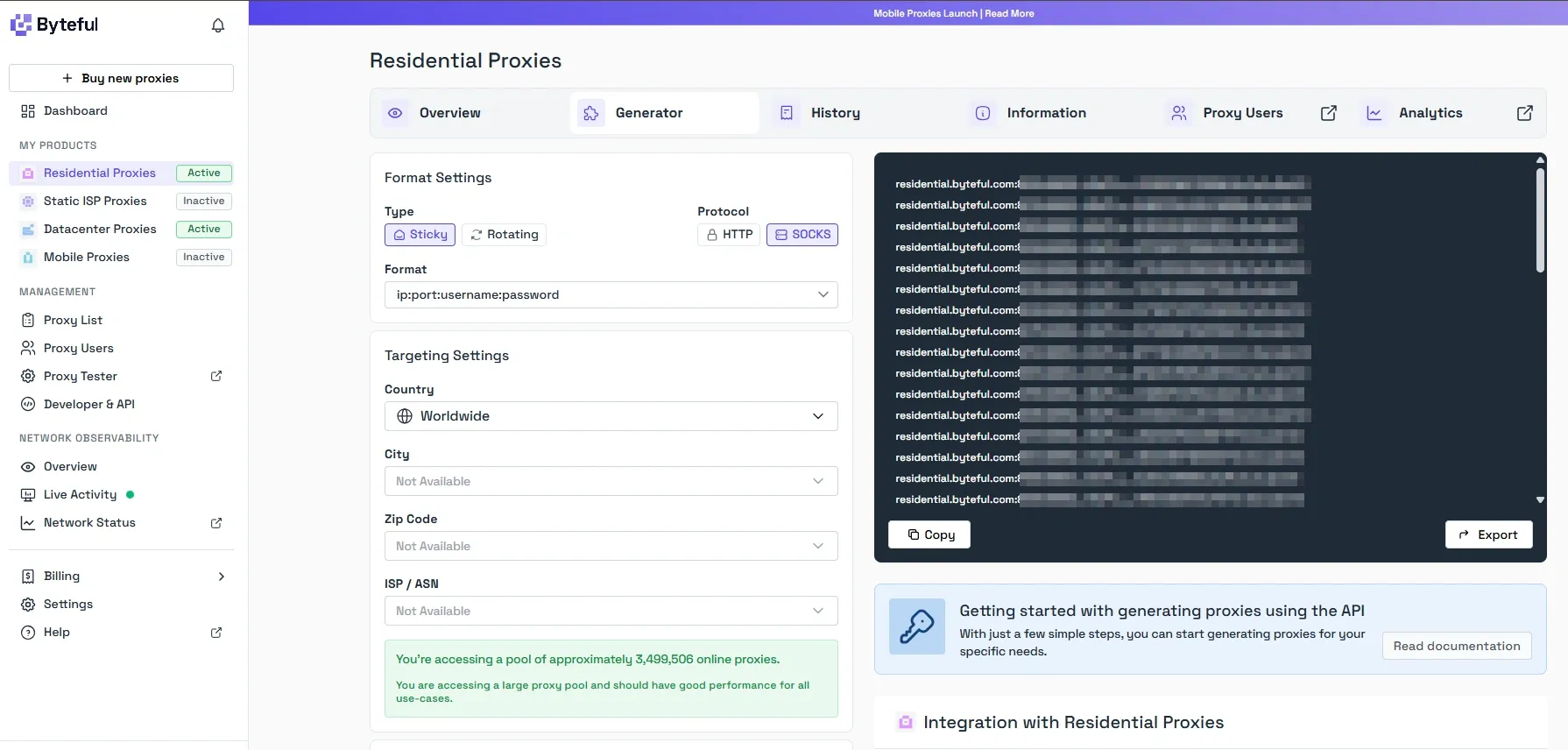
Our users also benefit from Smartpath AI routing, an in-house-developed system that preserves your residential data (by up to 40%) by routing non-essential requests through datacenter IPs at no extra cost.
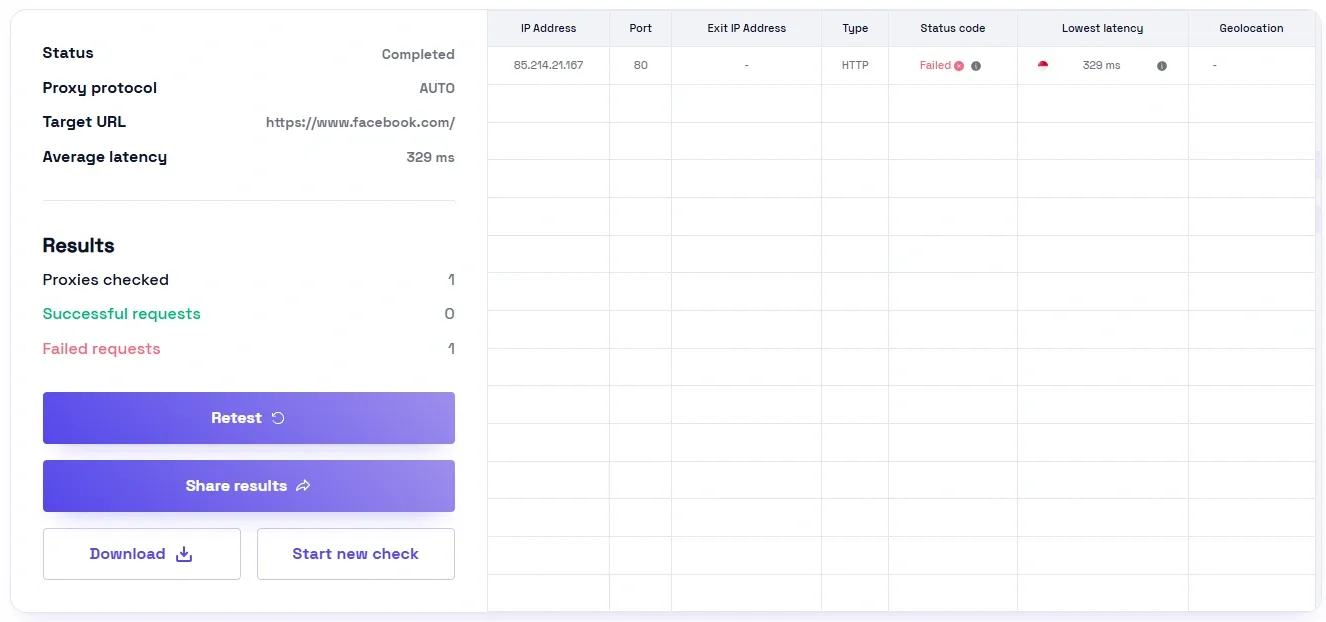
You can also try Byteful’s Proxy Tester to verify if a SOCKS5 proxy or a list will work against a specific target. And since we KYC every user, the chances of sharing infrastructure with a malicious person are practically non-existent.
All of this and more (including an intuitive dashboard, ACL rules, and REST API), you can experience firsthand by signing up for our no-credit-card 1GB residential proxy trial.
Note: After signing up, just select the preferred protocol (HTTP or SOCKS) before generating proxy IPs.
Decodo: This is another premium proxy provider where you can test run with a 3-day trial after registering your payment details. Decodo also has a global coverage, including 195+ locations, and offers HTTP(s) and SOCKS5 proxy servers. This platform’s strength is the size of its proxy pool and its LLM compatibility.
However, you need to be mindful of the 100 MB data limit of the trial and remember that it auto-activates the chosen plan upon trial expiry.
Oxylabs: Oxylabs provides five free IPs in its trial, supporting HTTP and SOCKS5 protocols. These are datacenter proxies from the US, so your testing might be limited in its scope.
You can still use those servers for multiple use cases (such as market research); just don’t try to access sensitive targets, as that is best done with residential IPs.
Also, the free trial, though it offers free proxy IPs, doesn’t allow you to choose the protocol. Which means you might end up with HTTP proxies rather than SOCKS5 IPs during their free trial.
We would have listed more free providers (including Webshare), but the catch is that very few (like Byteful) allow users to choose the proxy protocol during trials. For others, SOCKS5 support might be available with paid subscriptions, but free IPs are generally a random list without any upfront protocol choice.
How to set up a SOCKS5 proxy
There are two simple ways to set up a SOCKS5 proxy. One is to use cURL if you plan to integrate it into a web scraping script, or configure it in the browser itself for simpler use cases. We have explained both of the methods subsequently.
In the command line with cURL
cURL is the easiest way to set up and use a SOCKS5 proxy with the command line. There are two ways: local and remote DNS resolution.
The following script applies when you want cURL to resolve DNS locally.
curl -x socks5://username:password@proxy_IP:port_number https://www.target_website.com/Please remember that while local DNS resolution is okay for testing and latency gains, using it in production may lead to DNS leaks. To avoid this, it’s recommended to let the proxy handle DNS resolution with the following cURL format.
curl -x socks5h://username:password@proxy_IP:port_number https://www.target_website.com/Here, the “h” after SOCKS5 tells cURL to resolve the hostname at the proxy instead of locally, which prevents DNS leaks. Though this hides the lookup from your local resolver, it has nothing to do with traffic encryption that hides web traffic from any middleman (including the proxy server).
Also note that cURL defaults to port 1080 if you omit the :port_number parameter in the script. And you can drop the username:password@ if the proxy is public.
In browser and apps
Proxy settings aren’t universal in all browsers and apps.
For instance, you can’t set up a separate proxy server in Chrome (it uses your computer’s proxy). The same holds true for most of the Chromium-based browsers, including Microsoft Edge, Brave, and Vivaldi. Likewise, Safari doesn’t allow you to set a different proxy for the browser either.
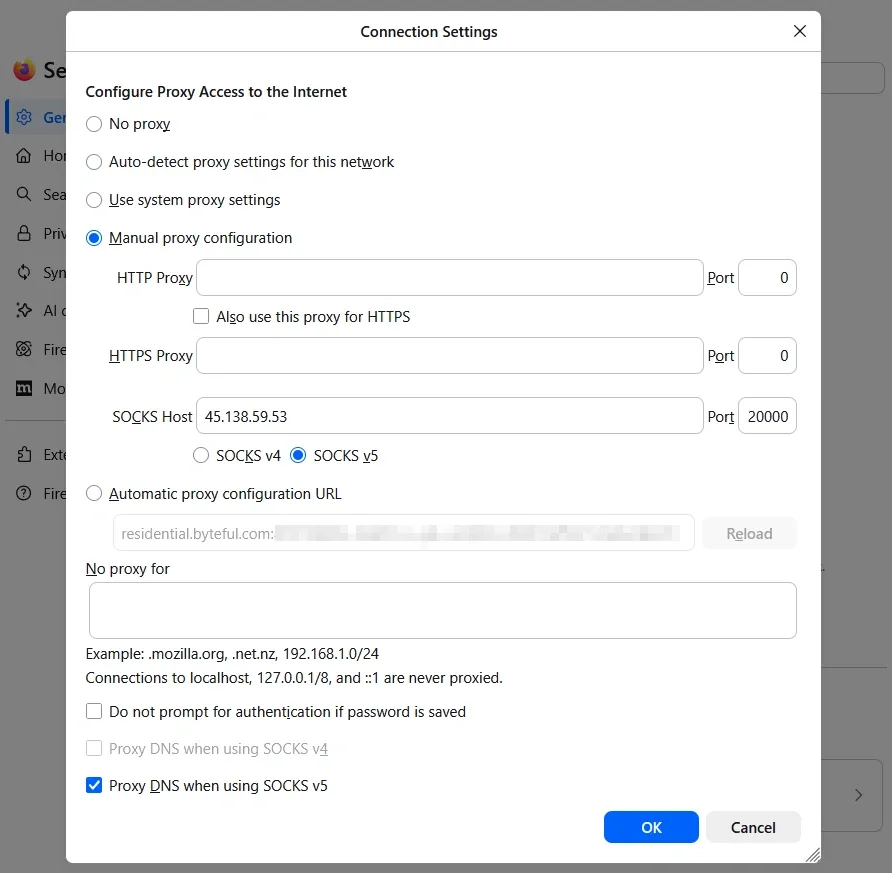
This leaves us with Firefox, one of the few mainstream browsers that offers a dedicated proxy configuration, letting you bypass the operating system’s network path. You can tweak those settings in General > Configure Proxy (under Proxy Settings) > Connection Settings.
Just select Manual proxy configuration, enter SOCKS server details, and select SOCKS5. Also, don’t forget to check “Proxy DNS when using SOCKS v5” at the bottom to avoid leaking DNS outside of the proxy path before clicking OK.
However, there is another way to configure proxies for Firefox and even for Chromium-based browsers. This is by using 3rd-party browser extensions, such as FoxyProxy.
In fact, we have a detailed guide that shows you how to configure FoxyProxy in Firefox and Chrome. You can also try doing the same with ZeroOmega (available for Firefox and Chrome), another extension for in-browser proxy management.
Similar to browsers, many apps (such as Discord and uTorrent) have their own proxy settings. But since it’s up to a specific user interface, a generic illustration can’t cover each one of them.
Finally, we have a detailed guide on proxy whitelist setup if your SOCKS5 proxy provider also offers IP-based authentication in addition to username/password. This enables users to maintain an IP whitelist with their proxy provider and work without using login credentials.
On a side note, if you need platform-specific setup guides, we already have them covered with our Windows proxy setup, Ubuntu proxy setup, and Android proxy setup. And since iOS does not natively support SOCKS5 and users generally report multiple issues with it, we have created this iPhone proxy setup to address that aspect specifically.
How do you test a free SOCKS5 proxy?
Testing a free SOCKS5 proxy is about confirming its type and geolocation. And before everything, it’s about validating that the proxy IP is active at all. The exact procedure for testing a free SOCKS5 proxy is described in the following sections.
Confirm it is SOCKS5, is alive, and its geolocation
We can use the cURL format listed in the proxy setup section to verify if the proxy is alive.
For this demonstration, we are hitting ifconfig.me, and ideally, it should respond back with the proxy IP, as shown in the following image.

Note: If the response from ifconfig.me is your actual IP (check yours at whatismyipaddress), it indicates proxy routing isn’t working as intended. In that case, you should verify whether the authentication details are entered correctly or if the proxy is alive at all.
So, getting a proxy IP in return confirms the proxy server is working. However, this tells you little about whether it will actually work against a target website. And although there are ways to modify the cURL command for this, there is an even easier approach with Byteful’s free Proxy Tester.
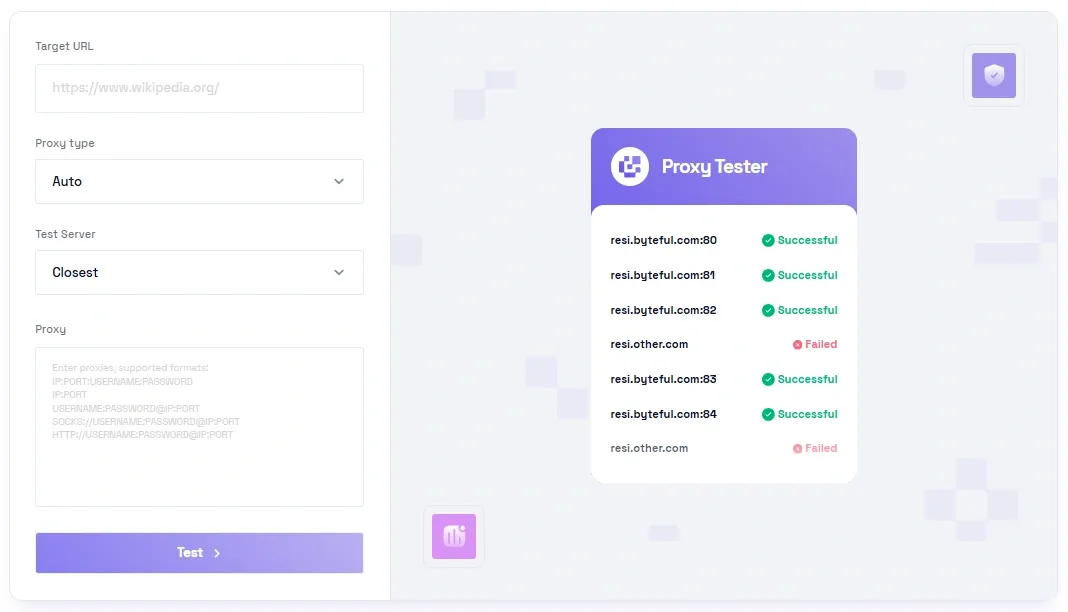
To demonstrate, we plugged proxies from a provider into our proxy tester to check if they work and what type they are. Here are the results.
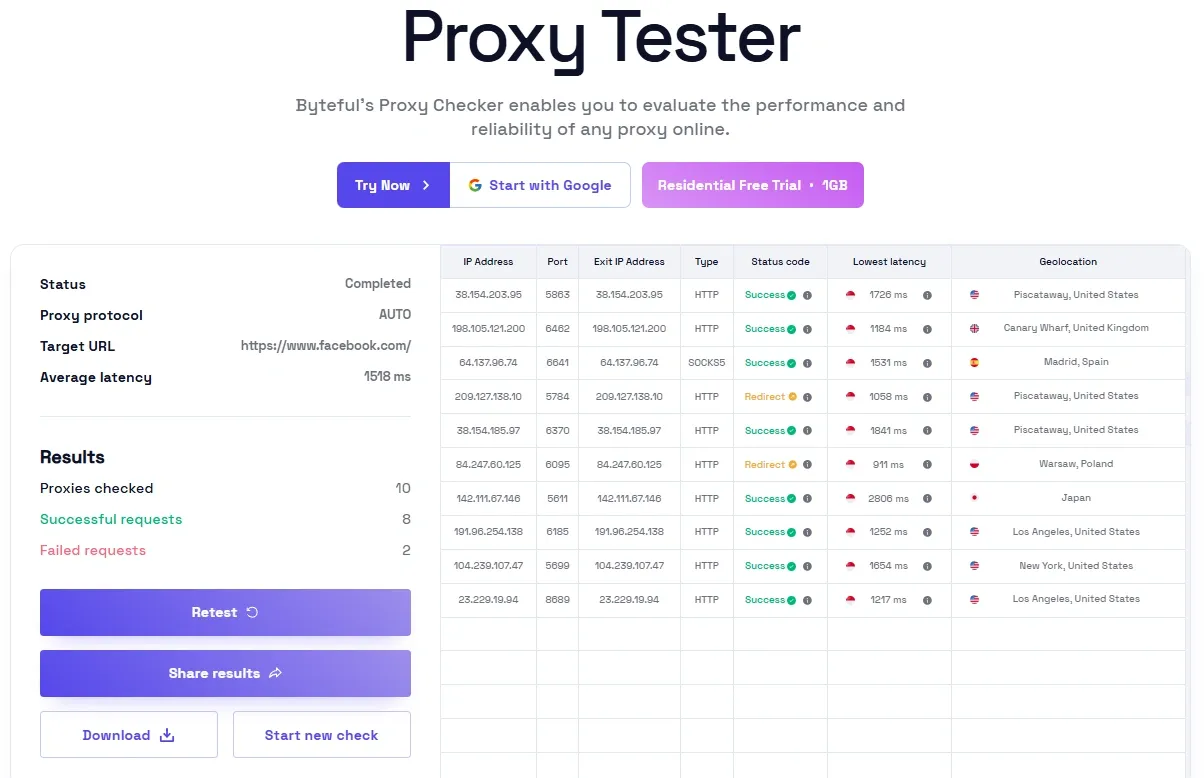
You can see that only one out of ten free proxies provided was SOCKS5. (This is why we have recommended earlier our own free residential trial since it enables users to choose the proxy type upfront.) And two of them were redirecting to another intermediary, or the target wouldn’t let them connect. Either way, you want “Success” in the status code and not redirection.
We would also advise taking note of the exit IP, as it should match the proxy IP unless you have configured a multi-hop network path (which is highly uncommon with free proxy servers).
Additionally, the proxy tester provides information on latency and geolocation. For latency, the general rule of thumb is the lower the better. Geolocation verification is important to determine whether the proxy actually belongs to the advertised location. The status code is another useful parameter for confirming whether the server is working and isn’t redirecting traffic elsewhere.
Is the SOCKS5 IP blacklisted?
Free proxy IPs can have an abusive history, which often puts them in the crosshairs of blacklist providers such as Spamhaus and AbuseIPDB. To check across scores of blacklists at once, there are tools such as APIvoid’s IP Reputation Check and MX ToolBox’s Blacklist Check.
Running a proxy IP through these tools provides aggregated results, like the one we have attached below.
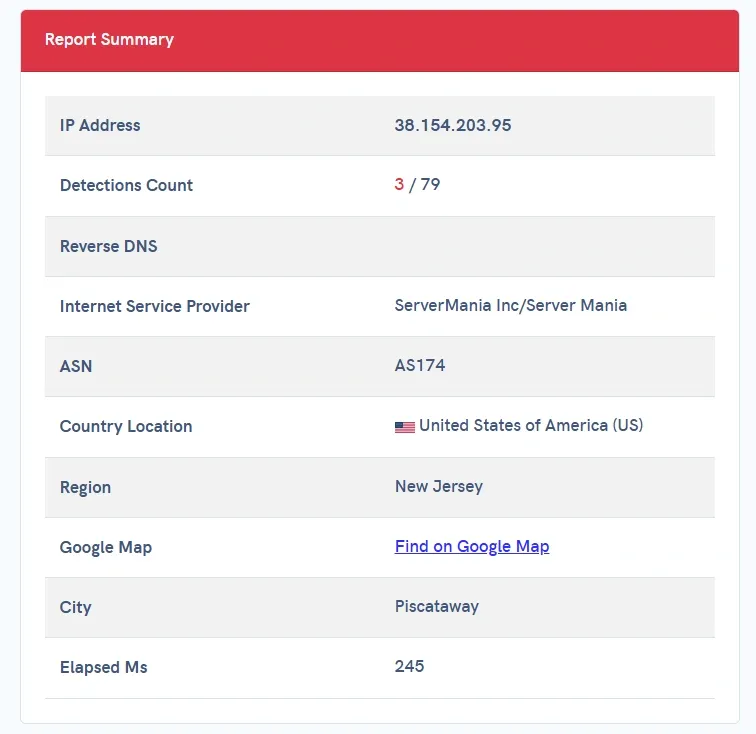
A few blacklist mentions are common with free IPs. However, it all depends on which blacklist provider(s) your target’s security system is using.
Therefore, even a single mention can make an IP useless against a website. On the other hand, an IP can perform just fine even after being tagged by multiple such lists. So, that brings us back to the proxy tester mentioned earlier for verifying an IP or a list of them against a specific target.
When should you switch to paid SOCKS5 proxies?
Here’s a brief checklist that suggests when it’s better to just pay for premium SOCKS5 proxies rather than struggling with the uncertainties of free offerings.
Uptime and performance: Free SOCKS5 proxies can go offline randomly or become overloaded to the point of serving no purpose for any practical application. Connection timeouts are also very common with free SOCKS5 proxies.
Geo-targeting: It’s not unusual for a free proxy to misadvertise its location (based on demand), and it’s normally impossible to get proxies from exact zip codes.
IP reputation: Security systems (such as Cloudflare and Akamai) are known to reject/throttle connections made via free IPs in general because of bad IP reputation. Likewise, you would get way more CAPTCHA or error 429 Too Many Requests compared to paid proxies.
Security concerns: Free proxy hosts can inject ads, redirect to replicas, and modify connection parameters with malicious intent because there is little to no incentive to maintain a free service.
If you’re still on the fence, try our 1GB residential data without paying anything. This will help you decide if a premium proxy's performance matters more for your workflow.